For over a decade, standard objects didn’t support custom row causes. When you needed to share a record from Apex, you had to use the Manual row cause. . Since Salesforce deletes Manual shares when a record’s owner changes, you had to write workarounds.
Two enhancements remove the need for those workarounds. The Keep Manual Shares when Transferring Records setting is available now. Custom row causes, also called Apex sharing reasons, are rolling out for standard objects in the Metadata API and will reach all orgs by the end of October. In this post, we’ll look at Keep Manual Shares on Record Transfer and Custom Row Causes for Standard Objects.
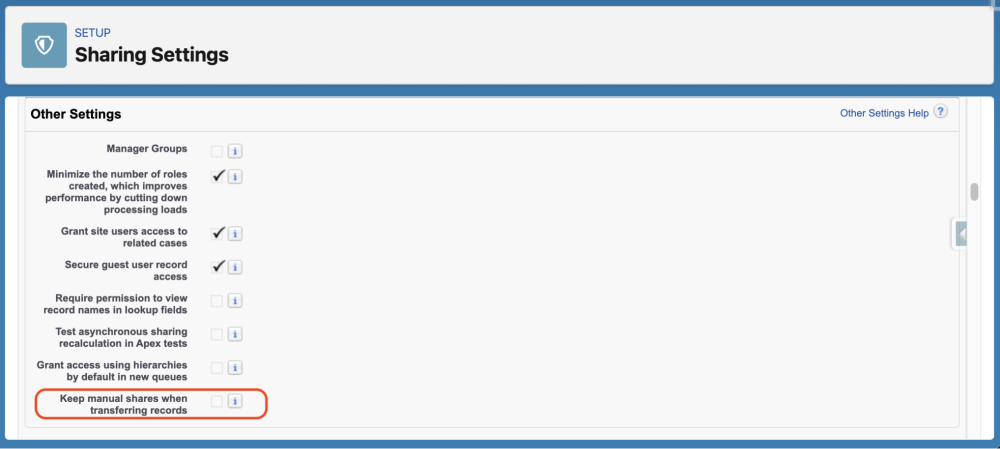
Keep manual shares on record transfer
Availability: Available now.
In Sharing Settings, turn on Keep Manual Shares when Transferring Records. Manual shares then survive ownership changes, and you can remove any workarounds you built for this.
Custom row causes for standard objects
Availability: Rolling out now; all orgs will have it by the end of October.
Apex managed sharing requires an Apex sharing reason. Salesforce stores it in the RowCause field of each share record; we call it a custom row cause in this post. You can now define one on a standard object the same way you do on a custom object. For details, see Sharing a Record Using Apex.
The following example defines an On-Call Expert sharing reason on Case, using the Metadata API:
1<?xml version="1.0" encoding="UTF-8"?>
2<CustomObject xmlns="http://soap.sforce.com/2006/04/metadata">
3    <sharingReasons>
4        <fullName>On_Call_Expert__c</fullName>
5        <label>On-Call Expert</label>
6    </sharingReasons>
7</CustomObject>
Deploy it with a package.xml that lists Case.On_Call_Expert__c as a SharingReason member.
Then you can use it in Apex:
1CaseShare share = new CaseShare();
2share.CaseId = caseId;
3share.UserOrGroupId = userId;
4share.CaseAccessLevel = 'Edit';
5share.RowCause = Schema.CaseShare.RowCause.On_Call_Expert__c;
6insert share;
You can also assign a custom row cause in Flow.
A custom row cause keeps your Apex shares separate from users’ manual shares, and Salesforce doesn’t delete them when the owner changes. In the share table, admins can see why each user has access. Because each reason is separate, you can update or delete the shares for one reason without touching the others. Unlike the Keep Manual Shares setting, a custom row cause doesn’t change how users’ manual shares behave. In November, you’ll be able to manage custom row causes in AIforce and Setup with Agentforce.
Conclusion
Winter ’27 gives you two ways to keep shares when a record’s owner changes.
- If you don’t create shares in code, turn on Keep Manual Shares when Transferring Records. It’s one org-wide setting.
- If code, a Flow, or an integration creates shares on standard objects, switch to a custom row cause. Your shares survive owner changes, stay separate from users’ manual shares, and show why each user has access.
You may need only one of them. Start by reviewing the code that creates CaseShare, AccountShare, or other standard share records.
Resources
- Understanding Apex Managed Sharing
- Protecting Force.com Custom Sharing Code (2013)
- Salesforce Data Security Model — Explained Visually (2017)
- IdeaExchange: Allow Custom RowCause values for Standard Objects
About the author
Larry Tung is the Product Manager for the Sharing team, where he’s working on the next generation of user access features and protecting sensitive data. When Larry isn’t working, he enjoys playing sports and board games with his kids and reading.
Peder Rice is a software engineer on the Sharing team, where he works on record access at scale. He enjoys traveling with his kids in search of hidden corners the guidebooks miss.