Building with agents lets you skip most Setup clicks, but it also costs you the visual context that makes a flow or permission set easy to understand. Two VS Code extensions, Metadata Visualizer and Live Preview, bring that context back. This post covers how the Headless Toolkit speeds up your work, then how visualizers and live preview add the visuals back.
Increase your productivity with the Headless Toolkit
The Headless Toolkit combines three elements that help you work with Salesforce from any agentic surface: agent skills, hosted Model Context Protocol (MCP) servers, and the Headless Experience Layer (HXL). Among those, skills and MCP servers play a central role in modern development workflows. They allow developers to save time by automating code generation and skipping manual interactions in Salesforce Setup menus for most tasks.
Salesforce skills teach agents how to perform development tasks. These include CRUD operations on metadata (Apex classes, Lightning web components, flows, permission sets), running tests, packaging, deployments, and more. Skills combined with Salesforce-hosted MCP servers, the Salesforce CLI and APIs provide the ability to explore and act on both metadata and data.
Let’s look at a practical example of the benefits of the Headless Toolkit with a common task: modifying a permission set.
Before the toolkit, you retrieved the permission set from your org or your project repository. The result was a long XML file. You could run a text search in the file, but most of the time you had to navigate through Setup and complete the following steps:
- Understand which permissions are granted
- Modify the permissions
- Retrieve the updated permission set metadata locally
- Add your changes to version control
The slightest change took minutes and tens of clicks.
Nowadays, thanks to agents and the toolkit, you can query and modify permissions directly from the terminal and get results in seconds.
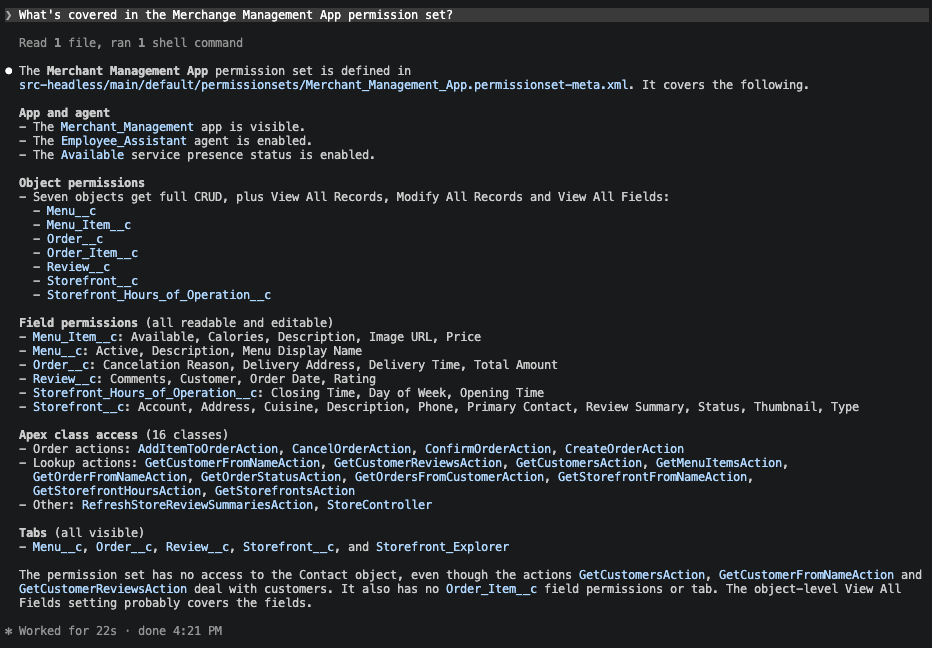
You bypass the Salesforce Setup menus, so you save on clicks. You also modify the metadata locally, so you limit round trips because you no longer need to retrieve the metadata after making changes. Even better, you can do this at scale and run operations in parallel.
Headless tools help you build and deliver value faster when working on the platform. The trend of bypassing the graphical user interface was initiated with the Salesforce CLI, and agents took it to the next level. However, agent interactions are text-driven and structured data can be hard to read due to the lack of depth and formatting. Working with metadata visualizers and live preview tools addresses this limitation.
Add visual context with the Metadata Visualizer and Live Preview extensions
Explore metadata with Metadata Visualizer
The Metadata Visualizer extension for VS Code renders read-only visual representations of Salesforce metadata. This extension is part of the Salesforce Extension Pack for VS Code, so there’s a good chance that you already have it installed.
Returning to the permission-set example, you can jump from an agent’s text answer to a visual view like the one below with a single click.
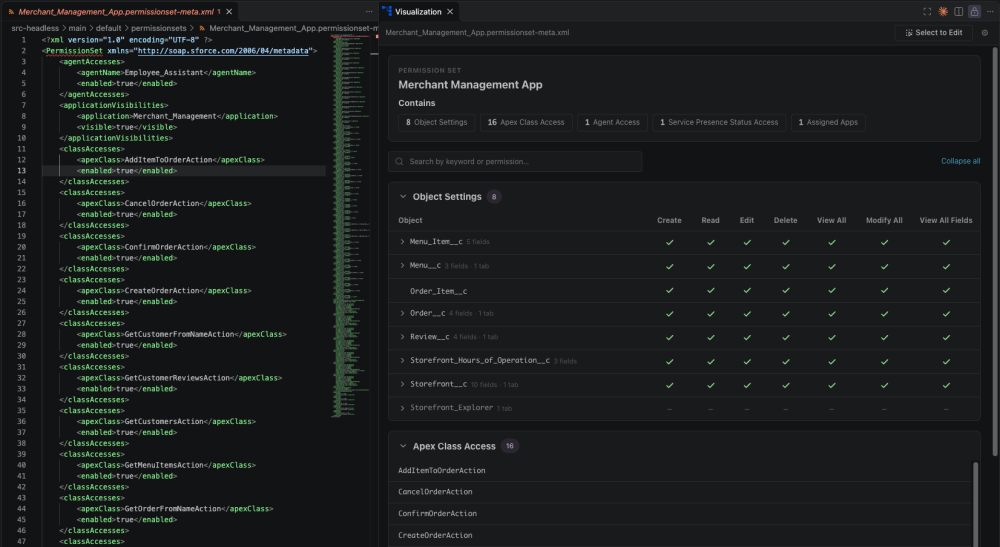
Visualizations are read-only representations of the metadata. You can use them to analyze metadata in VS Code and call an agent (also in VS Code) to apply changes.
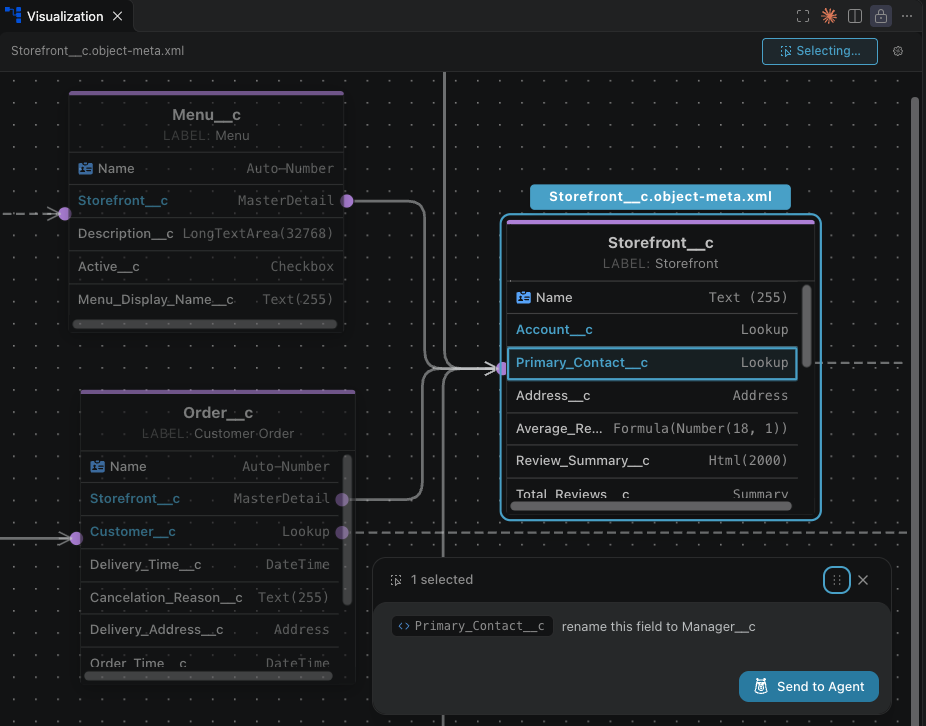
And, if you use Agentforce Vibes, you can have the agent edit the metadata by selecting elements in the visualizer.
With some exceptions, as a developer, you no longer need to open builders to work with metadata. Flows are a good example. Their metadata XML files are hard to read, and text descriptions from agent responses are a poor way to represent multiple branches. Instead of using Flow Builder or reading text descriptions, you can open the flow in a visualizer and use prompts to modify it.
![Screenshot of the visualization for a flow in VS Code.]](https://d259t2jj6zp7qm.cloudfront.net/images/20261118084559/image2_5e0598-e1795020374249.png)
At the time of writing (November 2026), visualizers are available for the following metadata types and more are on the way:
- Agents
- Flows
- Lightning pages (FlexiPage)
- Objects
- Permission sets
To access them, open a supported metadata file and click Visualize at the top right of the editor.
Preview UI changes with Live Preview
Visualizers cover some metadata, and you can use the Live Preview extension for VS Code for UI-related metadata. This extension works with Lightning web components (LWC), Multi-Framework UI bundles, and HXL widgets. When previewed, LWC and Multi-Framework UI bundles use live data from your org and HXL widgets relies on sample data.
Step-by-step instructions are available in the Live Preview guides for Lightning web components and Multi-Framework UI bundles. To open a live preview for an HXL widget, select a widget metadata file, open the command palette (Cmd+Shift+P on Mac, Ctrl+Shift+P on Windows), and run SFDX: Open in Widget Preview. When the view opens, you’re on the Preview tab by default and you can switch to the Data tab to customize the sample data as JSON.
You can open an HXL widget defined as JSON and simulate how it renders in Agentforce, Slackbot, ChatGPT, or Claude.
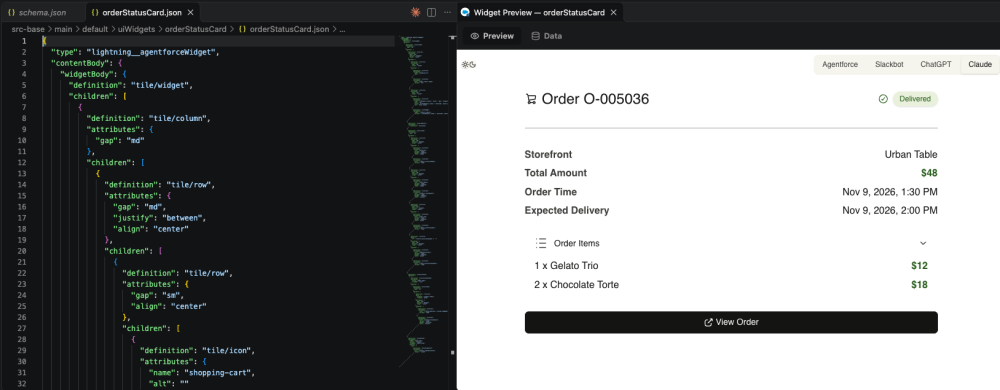
The preview comes with automatically generated sample data. This default data is generic, but you can improve the experience and make it more realistic by using a prompt to generate data based on a real org record.
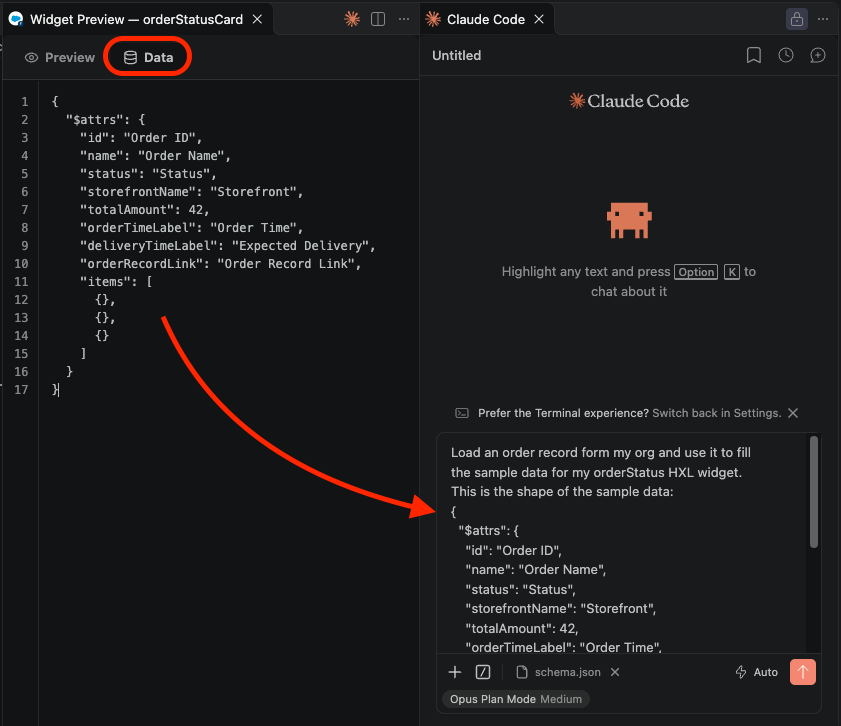
As you modify the widget definition or the sample data, the preview automatically refreshes.
Conclusion
Combining the Headless Toolkit with visualizers and live preview tools provides an effective way to build fast with agents while retaining some visual context.
We’ve come a long way from working with Setup menus, builders, and XML files to automating tasks with agents, and we’ve reduced the need for context-switching. Install the VS Code extensions and give metadata visualizers and live preview a try as you build with agents.
In my view (forward-looking statement), as the Salesforce tools and the MCP Apps standard that supports HXL evolve, the VS Code extensions and builders could be replaced by interactive widgets representing metadata directly in agent responses.
Resources
- Metadata Visualizer extension docs
- Metadata Visualizer extension for VS Code
- Live Preview extension for VS Code
- Salesforce skills repository
- Headless Experience Layer docs
- Hosted MCP servers reference
About the author
Philippe Ozil is a Principal Developer Advocate at Salesforce, where he focuses on the Salesforce Platform. He writes technical content and speaks frequently at conferences. He is a full-stack developer and enjoys working with APIs, DevOps, robotics, and VR projects. Follow him on X, LinkedIn, and Bluesky, and check out his GitHub projects.