The Headless Experience Layer (HXL) beta lets you define a widget once and show it as an interactive card in Agentforce, Slackbot, Claude, and ChatGPT. When a user asks a question, the widget reaches the screen in different ways, depending on which client the user is chatting in.
Runtime behavior follows one of two routes:
- Route 1 runs inside Agentforce.
- Route 2 runs through the Model Context Protocol (MCP), the open standard that MCP clients such as Claude and ChatGPT use to call external tools.
Knowing which component does what in each route helps you design better actions, and tells you where to look when a card doesn’t show up. In this blog post, you’ll:
- Walk through Route 1, from the user’s question to the card in Agentforce.
- Walk through Route 2, first in a simplified view and then in full.
- Learn how to troubleshoot each route when a card doesn’t show up.
- Compare both routes side by side.
Note: An earlier blog post, Building Interactive UI with Headless Experience Layer, introduces the topic and shows the code and metadata you need to create widgets. Make sure to read that post first.
Example widget: Get customer reviews in Pronto
Both routes use the same example from Pronto, a sample app for a fictional food delivery platform. A Pronto employee asks, “Show me the reviews for The Green Fork.” The agent calls the getCustomerReviews action, which runs the GetCustomerReviewsAction Apex class and returns a customerReviews widget: a card with the average rating and the list of reviews. Pronto wires that same widget into both routes, so you can deploy the app and test it yourself.
Route 1: Render HXL widgets as Agentforce action output
In Route 1, the large language model (LLM) points at a stored action result, and the Agentforce Client builds the widget in the browser from JSON. Route 1 is described in the Agentforce action output guide.
Here is the full sequence for it (HXL-specific messages are in orange):
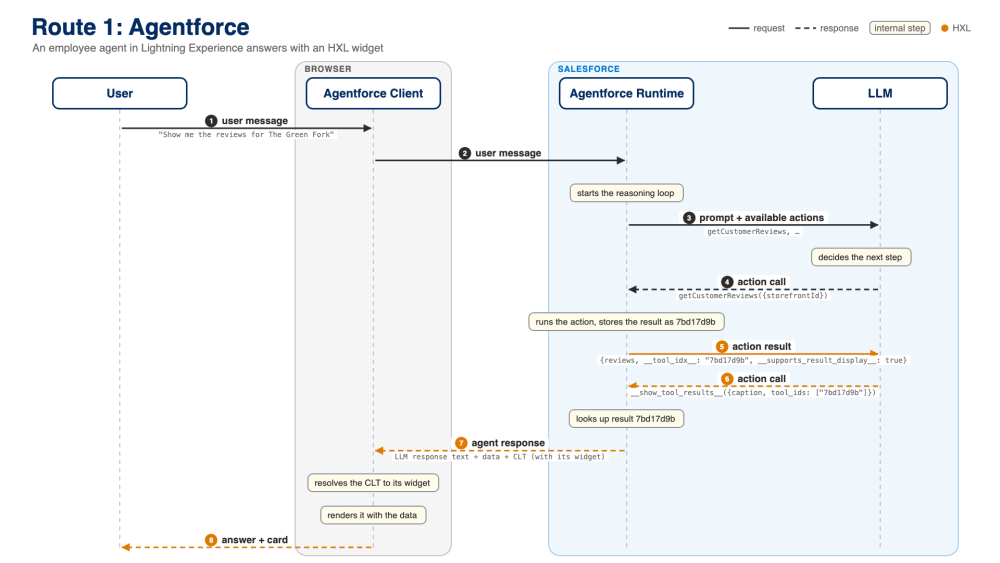
In the diagram, there are four actors:
- The User that sends the prompt.
- The Agentforce Conversation Client, which is the chat panel that runs in Lightning Experience, within the browser.
- The Agentforce Runtime, which is the entity that runs the reasoning loop on Salesforce.
- The LLM that the runtime calls at each step.
Steps 1 to 4: The agent calls the action
- The user message travels from the client (browser) to the Agentforce runtime.
- The runtime starts the reasoning loop.
- The runtime sends the LLM the prompt plus the list of available actions.
- The LLM decides the next step and calls
getCustomerReviewswith the storefront ID. In Pronto, the agent first turns the storefront name into a record ID with the standard Identify Record By Name action. The diagram skips that call to keep the flow short.
So far, this is a regular Agentforce action call. Nothing HXL-specific has happened yet.
Steps 5 and 6: The LLM asks to show the result
This is where HXL comes in.
5. The runtime runs the action and stores its output under a short ID. When it returns the result to the LLM, it adds two extra fields:
1{
2  "reviews": { "reviewCount": 8, "averageRating": 4.125, "items": ["..."] },
3  "__tool_idx__": "4bd08ecf",
4  "__supports_result_display__": true
5}__supports_result_display__tells the LLM that this result can be shown as a card. The runtime only sets it when the surface can render widgets and the action has an output markedis_displayable: Truein your Agent Script.__tool_idx__is the ID of the stored result.
6. If the LLM wants the card, it calls a built-in action named __show_tool_results__, passing in the __tool_idx__ value:
1{
2  "caption": "Here are the reviews for The Green Fork. You can view individual ratings, comments, and customer names. Let me know if you'd like to reply to any review or need more details.",
3  "tool_ids": ["4bd08ecf"]
4}
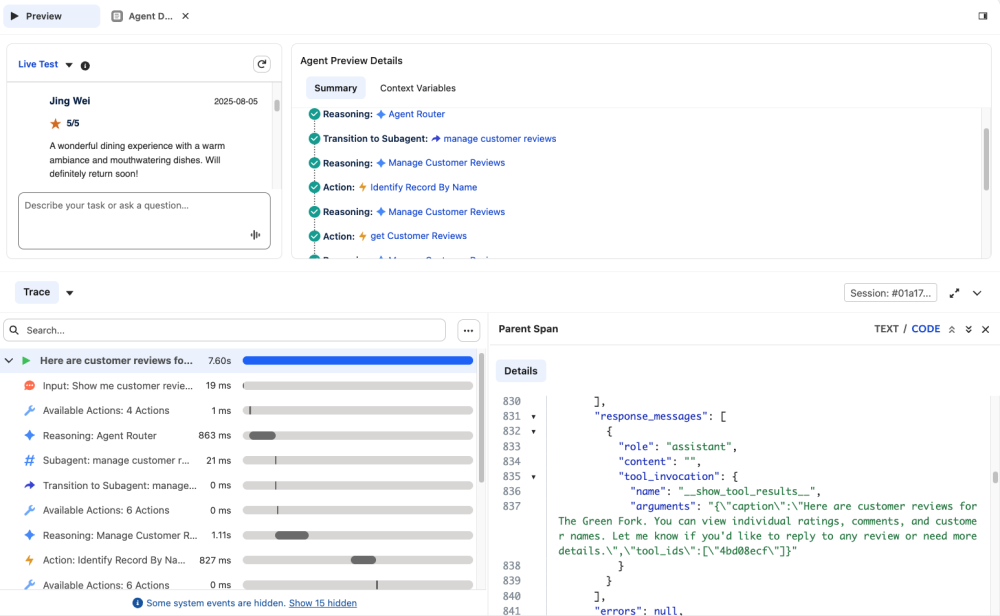
Rendering depends on the model choosing to call __show_tool_results__. The model can skip it, for example when a short text answer seems enough. To make the card more likely, ask for it in the agent’s instructions. Note that this call carries no data and no widget, only a caption and an ID. The LLM points at a result and the runtime does the rest.
Steps 7 and 8: The runtime resolves the results and the client renders the widget
7. The runtime looks up the result by its ID and crafts a response. That response holds three things: the LLM response text (caption), the data returned by the Apex class, and the configured Custom Lightning Type (CLT) with its widget. In Pronto, that CLT is customerReviewsOutput, the type of the reviews output in the agent’s Agent Script.
8. The Agentforce Conversation Client then does the HXL work in the browser. It reads the It reads the CLT’s widget mapping to find the widget. Then it hydrates each {!$attrs...} placeholder with the matching value from the data. Finally, it draws the widget’s component tree as Lightning web components. No HTML travels over the wire in this route, only JSON.
Troubleshooting Route 1 in Agentforce
If you get a wall of text instead of a card, check these steps in order. You can see the action calls in the trace in Agentforce Builder or Agentforce DX while you test, and in production through Agentforce Session Tracing:
- Is the output marked
is_displayable: True? Without that, the runtime doesn’t add__supports_result_display__(step 5). - Does the output use the CLT as its
complex_data_type_name? Without it, the response has no widget (step 7). - Did the LLM call
__show_tool_results__at all? Look for it in the trace (step 6). If it’s missing, ask for the card in the agent’s instructions.
Route 2: Expose HXL widgets to MCP clients with a custom MCP server
In Route 2, the MCP server sends a widget already filled with data, and the MCP host draws it in a sandboxed iframe. Route 2 is described in the HXL MCP channels guide. This route follows the standard MCP Apps protocol. The protocol defines how an MCP tool points to a UI resource, how the MCP host loads it, and how the host passes tool results to it.
Let’s start with a simplified view. In this diagram, everything that happens inside the MCP client is folded into one lifeline, labeled “MCP Client”:
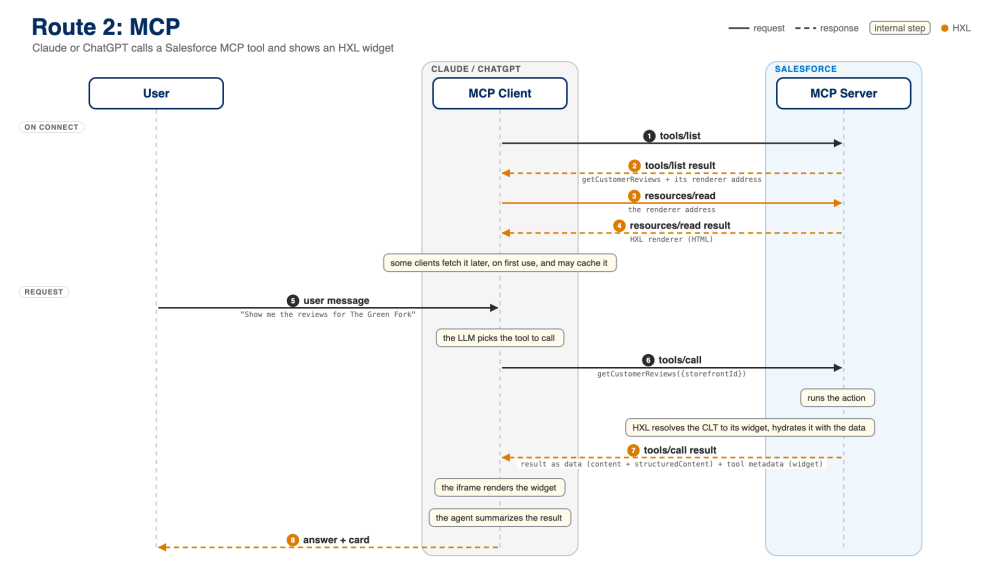
In the diagram, there are three actors:
- The User that sends the prompt.
- The MCP Client, such as ChatGPT, Claude, or Slackbot. The next diagram expands the client into its iframe, host, and the LLM.
- The MCP Server in Salesforce.
On connect: The client discovers the renderer
1. When Claude or ChatGPT connects to your MCP server, it calls tools/list.
2. Each tool that has a widget comes back with a renderer address, a ui:// Uniform Resource Identifier (URI) that MCP Apps defines in _meta.ui.resourceUri:
1{
2  "name": "getCustomerReviews",
3  "_meta": {
4    "ui": { "resourceUri": "ui://widget/lightningType/c__customerReviews" }
5  }
6}
In Pronto, that address comes from the Pronto Employee Server MCP server definition. There, the getCustomerReviews tool points to the customerReviews UI resource (the CLT that maps to the widget).
3. The client then calls resources/read on that address.
4. It gets back the HXL renderer, an HTML page that reads an HXL widget and draws it on screen. The MCP client loads that page in a sandboxed iframe, isolated from the rest of the app. The client can fetch the renderer when it connects or the first time it needs it. Each host decides, and it can cache the renderer for later calls. In Route 1, the renderer is already part of the Agentforce Client. The actual widget, already filled with data, arrives later with each tool result.
Request: The server returns data and a hydrated widget
5. The user asks for the reviews.
6. The LLM picks getCustomerReviews and the client sends tools/call. As in Route 1, the LLM first needs the storefront ID, which it can get from another Pronto tool such as searchStorefronts.
7. The server runs the action. Then HXL resolves the CLT to its widget and hydrates the widget with the data. The tools/call result carries three parts:
1{
2  "content": [{ "type": "text", "text": "the same JSON, as a string" }],
3  "structuredContent": { "...": "the raw action output, serialized as JSON" },
4  "_meta": {
5    "salesforce/uiMetadata": { "...": "the hydrated widget" }
6  }
7}structuredContentis the raw tool response, wrapped in an envelope withactionName,isSuccess, andoutputValues, which holds the action’s output. Because the action returns a list, the envelope sits inside an array.contentcarries the same JSON as text. That’s the part the LLM reads._metaholds the widget, and it’s only for rendering.
8. The client hands the result to the renderer, which draws the card, and the agent summarizes the result in its answer to the user. Per the protocol, the agent doesn’t read _meta. It reads content, which carries the same JSON as structuredContent. Note: Slackbot shows HXL widgets as HTML styled to look like Block Kit.
The full picture: Host, LLM, and iframe
The simplified view hides who does what inside the client. This one splits the MCP Client into its three parts:
- The Widget Iframe is the sandboxed frame where the renderer runs.
- The MCP Host is the app (for example, Claude or ChatGPT) that talks to the server.
- The LLM is the model.
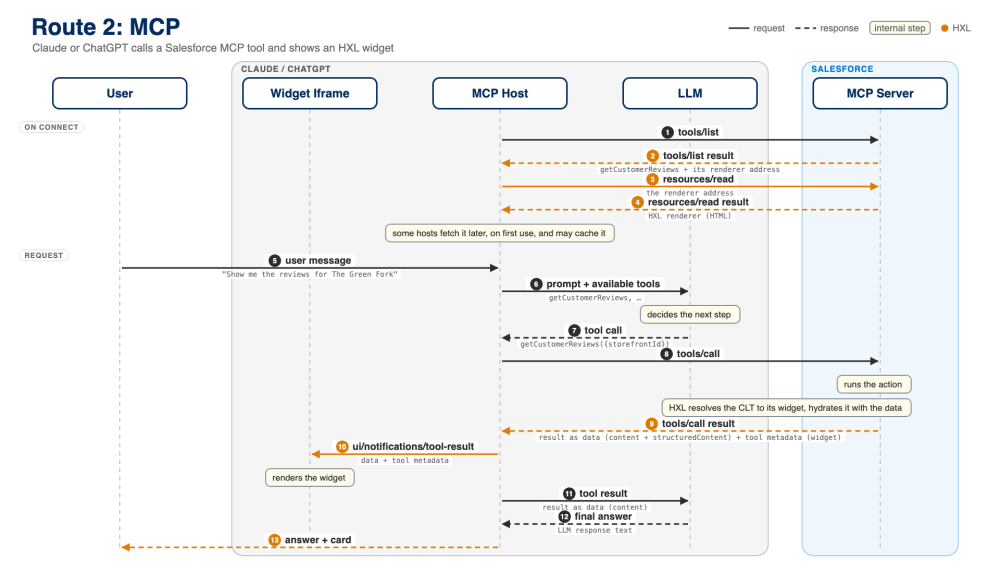
Four steps are worth a closer look (9 to 12 in the diagram):
9. The tools/call result reaches the host.
10. The host pushes the tool result into the iframe. The renderer reads the widget from it and draws the card.
11. The host sends the tool result to the LLM, without the widget.
12. The LLM writes the final answer from the data, and the host shows the answer next to the card.
Troubleshooting Route 2 in MCP clients
If you get text instead of a card, check each step of the sequence in order. You can use the MCP Inspector to see the raw responses the server returns:
- Does the client support MCP Apps? Claude, ChatGPT, and Slackbot do. Claude Code in the terminal doesn’t render widgets, so you’ll see text only.
- Does the
tools/listresult include_meta.ui.resourceUrifor your tool (step 2)? If not, check that the tool points to the UI resource in your MCP server definition. - Does the UI resource load? Call
resources/readon that URI in the MCP Inspector, and make sure it returns the HXL renderer (step 4). - Does the
tools/callresult includesalesforce/uiMetadata(step 7 in the simplified diagram)? If not, checkisErrorfirst. When the action fails, the server returns only an error message, with no data and no widget.
Route 1 vs. Route 2: What’s different
Both routes start from the same Apex action and the same widget. They differ in who decides to show the card, where the widget gets filled with data, and who draws it.
Route 1: Agentforce |
Route 2: MCP (Claude, ChatGPT, Slackbot) |
|
Who decides to show the card |
The LLM, by calling __show_tool_results__ |
The host, whenever the tool has a renderer address. The LLM can’t drop the card. |
What the LLM sees |
The result plus an ID, never the widget |
The result data, never _meta |
What travels to the client |
Response text, data, and the CLT with its widget |
Raw tool response plus the hydrated widget in _meta |
Where data meets the widget |
In the browser, in the Agentforce Client |
On the server, in HXL |
Who draws the card |
The Agentforce Client, as Lightning web components |
The HXL renderer, inside a sandboxed iframe, as HTML |
When the HXL renderer loads |
Already part of the Agentforce Conversation Client |
Through resources/read, on connect or on first use |
Conclusion
You now know what happens between a user’s question and the card on the screen in both routes. In Agentforce, the LLM points at a stored result and the client builds the card in the browser. In MCP clients, the Salesforce MCP server sends a hydrated widget and the host draws it in an iframe.
To see it in action, deploy Pronto to an org and try both routes. To go deeper, watch the recorded codeLive, Build Rich Agentic UI with Headless Experience Layer, and Ask Me Anything (AMA) sessions.
Resources
- Building Interactive UI with Headless Experience Layer
- Pronto sample app
- HXL Get Started
- Render HXL Widgets as Agentforce Action Output
- Expose HXL Widgets through MCP
- HXL Playground
- MCP Apps overview and MCP Apps specification
About the author
Alba Rivas works as a Principal Developer Advocate at Salesforce. You can follow her on GitHub or LinkedIn.