With AIforce, Salesforce comes to wherever your users already work: Agentforce, Slackbot, Claude, ChatGPT, and whatever AI interface comes next. The Headless Toolkit is how developers build their own AIforce experiences, exposing Salesforce data, business logic, and actions to any agent through MCP, APIs, and the CLI.
But data and actions are only half of the story. When an agent replies with a wall of text, users lose the rich, interactive experience they’re used to inside Salesforce. The Headless Experience Layer (HXL) closes that gap. HXL is the part of the Headless Toolkit that brings interactive experiences to any agent: you define a widget once in declarative JSON, and it renders natively in Agentforce and in any Model Context Protocol (MCP) client that supports MCP Apps. No more rebuilding the same experience for every channel.
In this post, you’ll learn the core concepts, how HXL works, and where it fits in AIforce. We’ll then walk through a real widget from the Pronto sample app, following it from the Apex action to the MCP server.
Understanding the Headless Experience Layer
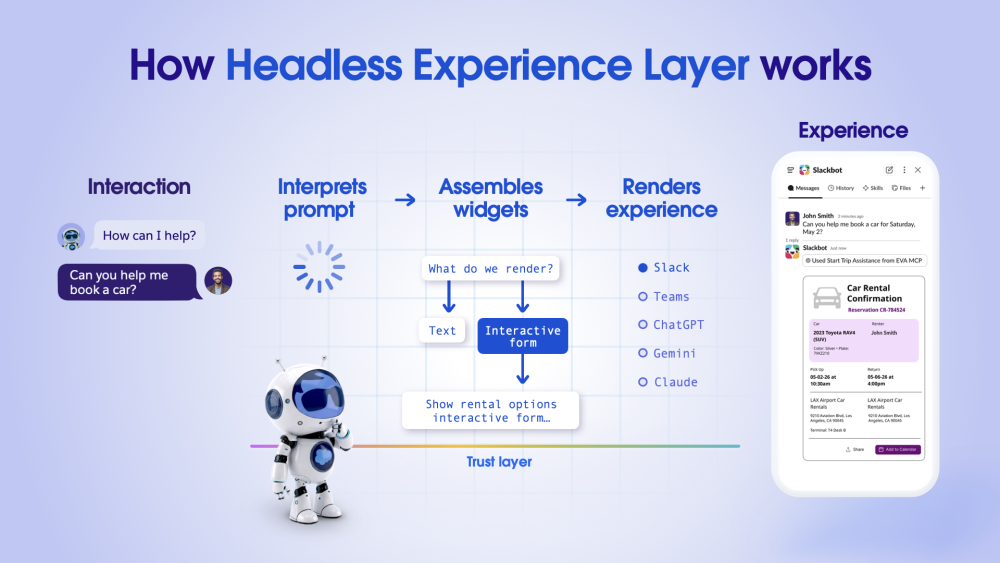
HXL is a centralized engine built on one principle: write once, render anywhere. Today, most agent actions return a plain-text sentence. With HXL, the same action returns a branded, interactive card that looks and behaves consistently, whether your user is in Agentforce, Slack, or Claude.
Because you build the widget once and reuse it on every supported interface, you don’t maintain a separate UI for each one. This saves development time and keeps the experience consistent. A widget isn’t a Lightning Web Component (LWC) or a React app. It’s a declarative tree of components that each surface renders natively.
Core platform benefits
- Your existing security model. A widget only displays what your action returns. When the action enforces sharing and field-level security, every surface shows each user only what they’re allowed to see.
- One source of truth. The same Apex action and the same widget definition serve every channel. There’s no second copy to keep in sync.
- Less integration code. Custom Lightning Types describe your data shape, so you don’t need custom API bridges between your org and each UI surface.
HXL Essentials: Components, Widgets, and Custom Lightning Types
The HXL architecture relies on three core concepts:
- Components: The foundational building blocks of HXL. Components are reusable UI primitives that can be composed to build different experiences. Each component is surface-aware and knows how to render across supported HXL surfaces.
- Widgets: Composed UI experiences built by combining multiple components to address a specific use case. Widgets define the final UI structure and behavior delivered to the user.
- Custom Lightning Types (CLTs): The bridge between data and UI. A CLT describes the shape of your data. Its renderer tells the platform which widget draws that data and how the fields map onto the widget’s attributes.
Where the widget’s data comes from
A widget doesn’t fetch data on its own. The data arrives through the Custom Lightning Type (CLT), which defines the structure your data must follow. Whatever source you use, its output has to match the CLT structure so its properties can bind to the widget attributes. In this post, the data source is an Apex invocable action, following the pattern used in the HXL docs and the Pronto sample app.
How HXL works
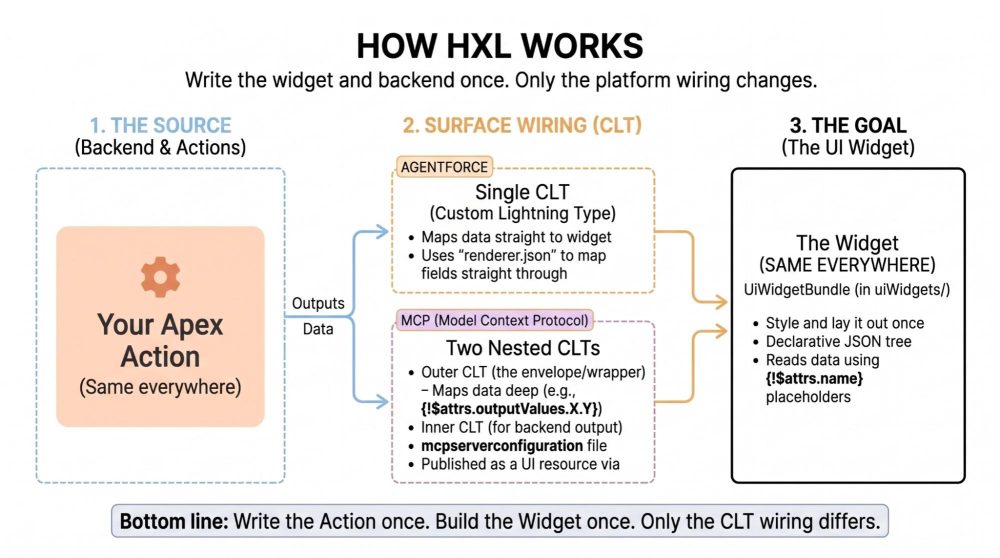
You write the Apex action once and the widget once. Only the wiring between them changes per channel.
| Aspect | Agentforce | MCP clients (Claude, ChatGPT) |
|---|---|---|
| CLTs you add | One, typed to your Apex class | Two nested: the inner one mirrors your Apex output, and the outer one mirrors the MCP envelope (actionName, isSuccess, outputValues) |
| Which CLT has renderer.json | The single CLT | Only the outer CLT |
| Renderer path | {!$attrs.averageRating} |
{!$attrs.outputValues.reviews.averageRating} |
| How the surface finds the widget | Agent Script output with complex_data_type_name and is_displayable: True |
MCP server definition: a |
What you can build in the beta
In the HXL beta, you can:
- Build widgets as JSON in your Salesforce DX project, or vibe code them with an AI agent using the Salesforce Skills library.
- Learn the components and preview layouts in the HXL Playground.
- Render widgets in Agentforce and preview them in Agentforce Builder. See how to render a widget in Agentforce.
- Render widgets in MCP clients that support the MCP Apps standard, such as Claude and ChatGPT.
- Make widgets interactive with two client actions, sendMessage and openLink.
Example: a Pronto customer reviews widget
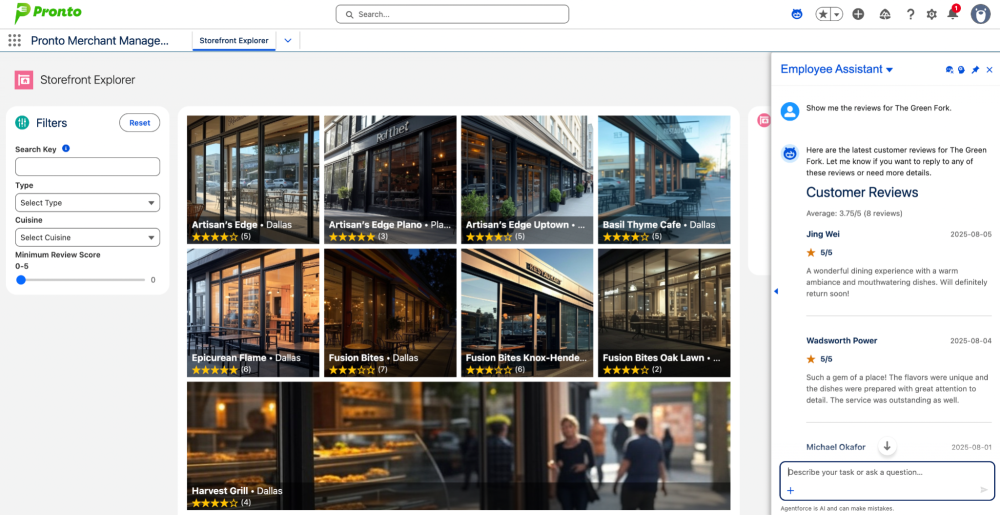
To keep things concrete, we’ll use Pronto, our fictional food-delivery sample app. Pronto ships an Employee_Assistant agent with a Get Customer Reviews action. Ask the agent, “Show me the reviews for The Green Fork,” and it will render a review card instead of a paragraph of text.
The card shows a header with the average rating, followed by one entry per review with the customer’s name, the order date, the star rating, and the comment. It’s built from four pieces:
- An Apex invocable action that returns the review data.
- A widget that defines the card’s layout.
- A Custom Lightning Type that binds the action’s output to the widget.
- An agent action output (or an MCP tool) that tells the surface to render that type.
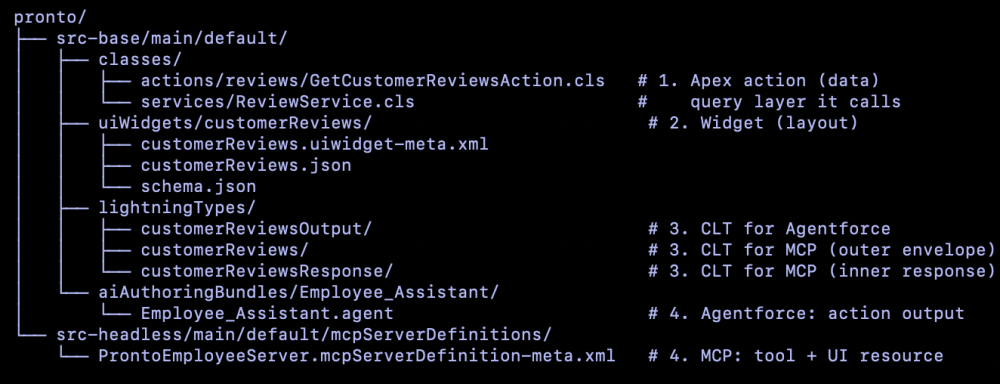
How the HXL files map in a Salesforce DX project
Here’s how the four pieces map to files in the Pronto repo. The rest of this post walks through them in this order.
Start with the Apex action
Everything starts with the data. GetCustomerReviewsAction is a global Apex class with an @InvocableMethod. It returns a success flag, a message, and one structured reviews object. That object’s shape is what the widget and CLT bind to. Here’s the Apex class, trimmed to its contract:
1global with sharing class GetCustomerReviewsAction {
2  @InvocableMethod(label='Get Customer Reviews'
3    description='Retrieves customer reviews for a specific storefront')
4  global static List<Output> getCustomerReviews(List<Input> inputs) { /* ... */ }
5
6  global class Output {
7    @InvocableVariable(label='Success') public Boolean isSuccess;
8    @InvocableVariable(label='Message') public String message;
9    @InvocableVariable(label='Reviews') public ReviewWrapper reviews;
10  }
11
12  global class ReviewWrapper {
13    @InvocableVariable public Integer reviewCount;
14    @InvocableVariable public Decimal averageRating;
15    @InvocableVariable public List<ReviewItemWrapper> items;
16  }
17
18  global class ReviewItemWrapper {
19    @InvocableVariable public String customerName;
20    @InvocableVariable public Decimal rating;
21    @InvocableVariable public Date orderDate;
22    @InvocableVariable public String comments;
23  }
24}
Note: The Apex class computes averageRating and reviewCount itself. The widget can’t do math, so the action hands it display-ready values.
Define the widget: layout, contract, and registration
A widget lives in a UiWidgetBundle under uiWidgets/<widgetName>/. The bundle holds up to three files, each with one job:
customerReviews.uiwidget-meta.xmlregisters the bundle and setswidgetTypetoJSON.customerReviews.jsonis the composition file. It’s the layout, built fromtile/*blocks.schema.jsonis optional. It declares the type of each attribute, so tools can validate your bindings before you deploy.
Every composition starts with a lightning__agentforceWidget root and a tile/widget tree. Values that change per record are {!$attrs.<name>} placeholders. To repeat a component for each item in a list, you add a forEach meta property and name the loop variable with forItem. Here’s the core of Pronto’s reviews widget, trimmed for brevity:
1{
2  "type": "lightning__agentforceWidget",
3  "contentBody": {
4    "widgetBody": {
5      "definition": "tile/widget",
6      "children": [
7        {
8          "definition": "tile/column",
9          "attributes": { "gap": "lg" },
10          "children": [
11            {
12              "definition": "tile/text",
13              "attributes": {
14                "text": "Average: {!$attrs.averageRating}/5 ({!$attrs.reviewCount} reviews)",
15                "variant": "body",
16                "color": "muted"
17              }
18            },
19            {
20              "definition": "tile/column",
21              "attributes": { "gap": "md" },
22              "meta": { "forEach": "{!$attrs.items}", "forItem": "$review" },
23              "children": [
24                {
25                  "definition": "tile/text",
26                  "attributes": { "text": "{!$review.customerName}", "variant": "h4", "weight": "semibold" }
27                },
28                {
29                  "definition": "tile/text",
30                  "attributes": { "text": "{!$review.rating}/5", "variant": "body", "weight": "semibold" }
31                },
32                {
33                  "definition": "tile/text",
34                  "attributes": { "text": "{!$review.comments}", "variant": "body", "color": "muted" }
35                }
36              ]
37            }
38          ]
39        }
40      ]
41    }
42  }
43}
Inside the loop, $review is the current item. You reach each field with {!$review.<field>}. There’s no JavaScript in a widget, so the layout only places and styles values.
The schema is the widget’s contract. It names each attribute and gives it a lightning:type.
Notice that items is a list whose items point at an Apex class you just saw:
1{
2  "title": "Customer Reviews Widget",
3  "type": "object",
4  "properties": {
5    "attributes": {
6      "lightning:type": "lightning__objectType",
7      "properties": {
8        "reviewCount":   { "lightning:type": "lightning__numberType" },
9        "averageRating": { "lightning:type": "lightning__numberType" },
10        "items": {
11          "lightning:type": "lightning__listType",
12          "items": {
13            "lightning:type": "@apexClassType/c__GetCustomerReviewsAction$ReviewItemWrapper"
14          }
15        }
16      }
17    }
18  }
19}
Preview widgets in the HXL Playground
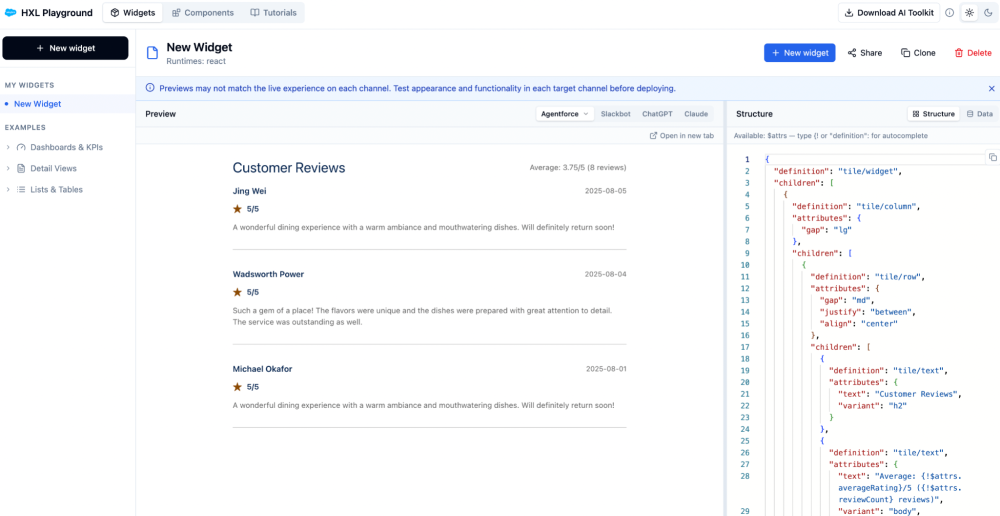
The HXL Playground is a browser-based learning tool for HXL. It isn’t part of the build or deploy flow, so you don’t need it to ship a widget. It’s simply the fastest way to learn the components and try out a layout.
The Playground has three areas. The Components area documents each component and its attributes. The Widgets area lets you compose components and preview the result on several surfaces. Tutorials walk you from a single text block to a full widget.
To try Pronto’s reviews card, create a widget and paste the composition from customerReviews.json into the Structure tab. Then add sample values for averageRating, reviewCount, and items in the Data tab. The preview updates as you type, so you can fix the layout before you copy it back into your project. Previews can differ from the live experience, so always test on each target surface.
Bind data to UI with a Custom Lightning Type
A Custom Lightning Type (CLT) connects your action’s output to a widget. A widget is a shell until data flows in. For Agentforce, the CLT is typed directly to the Apex class that the action returns. Pronto’s customerReviewsOutput type points at the action’s ReviewWrapper inner class:
1{
2  "title": "Customer Reviews Output",
3  "description": "Customer reviews and rating summary returned by GetCustomerReviewsAction, rendered as a widget",
4  "lightning:type": "@apexClassType/c__GetCustomerReviewsAction$ReviewWrapper"
5}
The CLT’s renderer.json points at the widget and binds each widget attribute to an output field:
1{
2  "renderer": {
3    "componentOverrides": {
4      "$": {
5        "definition": "@widget/c/customerReviews",
6        "attributes": {
7          "reviewCount":   "{!$attrs.reviewCount}",
8          "averageRating": "{!$attrs.averageRating}",
9          "items":         "{!$attrs.items}"
10        }
11      }
12    }
13  }
14}
Read each binding from right to left. The output field on the right feeds the widget attribute on the left. Two details matter here. The "$" key means “the whole type,” and the @widget/ prefix tells the platform to resolve a UiWidgetBundle.
Render the widget in Agentforce
The agent needs to know that this output should render. In Pronto’s Agent Script, the action’s reviews output names the CLT and marks itself displayable:
1reviews: object
2    label: "Reviews"
3    complex_data_type_name: "c__customerReviewsOutput"
4    filter_from_agent: False
5    is_displayable: True
With is_displayable: True, the agent can show the output in the conversation. Agentforce then resolves the CLT, follows its renderer to the widget, and draws the card. Keep filter_from_agent: False so the output also stays in the agent’s context.
The model still decides when to show the card. In our testing, it usually renders on the first question in a fresh conversation. Follow-up questions in the same conversation sometimes come back as text. To make rendering more consistent, name the action explicitly in your subagent’s instructions. Pronto’s Employee_Assistant does exactly that, referencing the action by name: Call {!@actions.getCustomerReviews} to retrieve customer reviews for a storefront.
Render the same widget through MCP
To render the same widget through MCP, you add two nested Custom Lightning Types, and only the outer one carries the renderer. This is where “render anywhere” pays off. Pronto exposes Get Customer Reviews as a tool on its ProntoEmployeeServer MCP server. HXL widgets follow the MCP Apps standard, so any MCP client that supports MCP Apps, such as Claude and ChatGPT, can render the same card.
MCP needs a different CLT shape, though. An MCP tool call wraps the action output in an envelope with actionName, isSuccess, and outputValues. So you add two nested types. The inner type, customerReviewsResponse, mirrors the Apex Output class. The outer type, customerReviews, mirrors the envelope. Only the outer type has a renderer, and its paths read two levels deep:
1{
2  "renderer": {
3    "componentOverrides": {
4      "$": {
5        "definition": "@widget/c/customerReviews",
6        "attributes": {
7          "reviewCount":   "{!$attrs.outputValues.reviews.reviewCount}",
8          "averageRating": "{!$attrs.outputValues.reviews.averageRating}",
9          "items":         "{!$attrs.outputValues.reviews.items}"
10        }
11      }
12    }
13  }
14}
The widget and the attribute names on the left are identical. Only the paths on the right change. In the MCP server definition, an entry publishes the outer type as a UI resource. The tool then points at that resource by name:
1<tools>
2    <apiDefinition>
3        <apiIdentifier>aa:apex-GetCustomerReviewsAction</apiIdentifier>
4        <apiSource>API_CATALOG</apiSource>
5        <operation>GetCustomerReviewsAction</operation>
6    </apiDefinition>
7    <uiResource>customerReviews</uiResource>
8    <readOnly>true</readOnly>
9    <toolName>getCustomerReviews</toolName>
10    <toolTitle>Get Customer Reviews</toolTitle>
11</tools>
12<resources>
13    <resourceName>customerReviews</resourceName>
14    <resourceUri>ui://widget/lightningType/c__customerReviews</resourceUri>
15    <resourceTitle>Customer Reviews</resourceTitle>
16</resources>
Every client that calls getCustomerReviews follows the resource back to the same @widget/c/customerReviews definition. After you deploy, activate the server in Setup under API Catalog > MCP Servers. Then connect your MCP client through an External Client App. The HXL MCP channels guide covers the client setup in detail.
How to get started
First, enable the beta. In Setup, search for Headless Experience Layer Settings under Feature Settings. Turn on Headless Experience Layer (Beta) and accept the beta terms. Your project should use API version 67.0 or later.
Next, explore a working example. Clone the Pronto sample app, install it in your org, and ask the Employee_Assistant for a storefront’s reviews. Then open the customerReviews widget and its two CLT shapes to see how the pieces fit.
When you’re ready to build your own widget, let an AI agent do the heavy lifting. The open-source Salesforce Skills library is optimized for Agentforce Vibes and works with other AI coding tools. Its HXL skills can plan the Apex display fields, the widget, and the Lightning Type from a single prompt. They can also update your Agent Script and generate the nested MCP types.
To try the whole flow hands-on, take the Give Agents UI with the Headless Experience Layer workshop. It builds a Pronto storefront profile card and renders it in both Agentforce and an MCP client.
Conclusion
HXL makes one hard thing easy: shipping consistent, interactive UI to every agent surface your users touch. You build a widget once and map your data with a Custom Lightning Type. The same card then renders inside Agentforce and across MCP clients, backed by the security your action already enforces. That means less UI code, no drift between channels, and faster delivery.
The fastest way to see it is to install Pronto and watch its review card render. Have questions or something to show? Bring them to the Trailblazer Community, or share what you build with us on LinkedIn.
Resources
- Headless Experience Layer: Get Started
- Build Rich UI with HXL
- HXL Playground
- Salesforce CLI
- Trailblazer Community
- Use HXL Widgets on MCP | Build Rich UI | Headless Experience Layer Developer Guide (Beta)
- Use Agentforce Vibes to Build Widgets | Headless Experience Layer Developer Guide (Beta)
- GitHub – forcedotcom/sf-skills: Salesforce’s curated collection of agent skills for building applications. Optimized for Agentforce Vibes, compatible with all AI tools.
- https://developer.salesforce.com/workshops/aiforce-workshop/give-agents-ui-with-the-headless-experience-layer-hxl/overview
About the author
Akshata Sawant is a Lead Developer Advocate at Salesforce and co-author of a book titled “MuleSoft for Salesforce Developers,” published by Packt Publication. For a more in-depth look at Akshata’s accomplishments, visit her LinkedIn profile.
Monika Singh is a Senior Product Manager at Salesforce, focused on Headless Experience Layer (HXL). She has a background in AI/ML product management and is passionate about building intelligent, personalized digital experiences. For more details, visit her LinkedIn profile.