Use the App Install History Page
Use the App Install History page to monitor installations in progress, track the assets created for the app, and view logs to troubleshoot any installation issues.
| User Permissions Needed | |
|---|
| To manage installed apps: | Manage Analytics Templates |
For an overview of the App Install History page, see Monitor and Troubleshoot Templated App Installations. The default view on this page is for App Templates. Use the filter  to select Data Templates.
Templates use tokens to assign IDs, names, and labels at runtime, along with replacing variables and constants. The app state is the runtime state of the templated app during creation or upgrade. It stores the context information of the tokens used to create and update the app assets, along with data prep uploads and job runs.
The state for each install task detail record contains context information about the user, org, apps, app, variables, and constants, represented as a tree. For each item, click  to expand the elements of the tree.
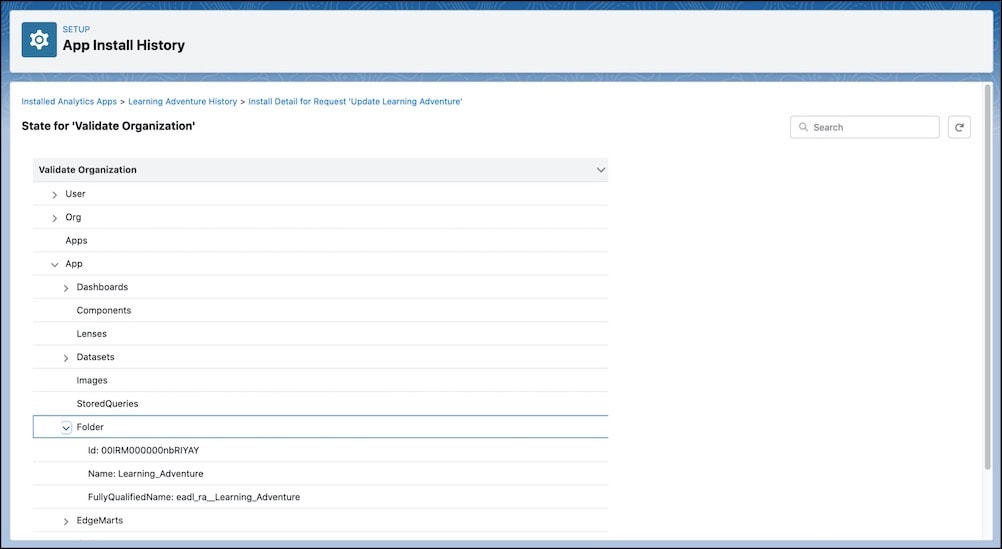
User: The user context information for installing the templated app, which includes user ID, username, first name, and last name.
Org: The org context information for installing the templated app, which includes the org ID, the org name, and the org namespace.
Apps: The dependent app context information. This information includes the template name for dependent apps, the assets in those apps, and the asset source names.
App: The asset context information for the app. The list of assets updates with each installation step, as the runtime determines which assets are created or updated and then processes the assets. Possible assets for a templated app include:
- Dashboards: a list of dashboards with ID, name, and label
- Components: a list of components with ID, name, and label
- Lenses: a list of lenses with ID, name, and label
- Datasets: a list of datasets with ID, version ID, alias, fully qualified name, name, and label
- EdgeMarts: same as the list of datasets (Deprecated)
- Folder: the folder ID, name, and fully qualified name
- Images: a list of images with ID, name, and namespace
- Dataflows: a list of dataflows with ID
- Recipes: a list of recipes with ID, name, and label
- Connections: a list of connections with name
Variables: The runtime variables that are used to generate the templated app. The variables are a list of name and value pairs to display the value of each variable at runtime.
Constants: The runtime constants that are used to generate the templated app. The constants are a list of name and value pairs to display the value of each constant at runtime.


 j
j