Each Analytics Templated App Poller log contains multiple log lines generated from different log events.
Multiple logs are written out during the templated app lifecycle of create, reset, or upgrade, usually 3–4 separate logs containing different details from the processing. Each log is a Analytics Templated App Poller log.
Each log entry has a 2-MB limit controlled by org limits and is truncated when the limit is exceeded.
Note
The Analytics Templated App Poller log includes these details.
Log Level
Apex Log Event
Details
Example Log Line
Info
WAVE_APP_LIFECYCLE
The app action, app lifecycle phase, app id, and app name.
`14:04:00.399 (51399277642)
Error
TEMPLATE_PROCESSING_ERROR
Displays any template processing errors.
`13:06:42.63 (2341994782)
Fine
APP_CONTAINER_INITIATED
The template values and variables.
`14:01:55.50 (15050452403)
Fine
TEMPLATED_ASSET
The app asset status, which is created, updated, or deleted.
`14:03:24.627 (15627342211)
Fine
TRANSFORMATION_SUMMARY
The template asset name and type being transformed to an app asset.
`14:03:25.684 (16692521613)
Fine
RULES_EXECUTION_SUMMARY
The rule name, appliesTo types, actions, and any conditions.
`14:03:15.266 (7081461905)
Fine
ASSET_DIFF_SUMMARY
The summary of differences for an asset on an app reset or upgrade.
`15:09:24.682 (9748463760)
Fine
JSON_DIFF_SUMMARY
The summary of differences for JSON on an app reset or upgrade.
`15:09:21.493 (6865203874)
Finer
RULES_EXECUTION_DETAIL
The rule results for each action of a rule.
`14:03:35.872 (26905199214)
Finest
JSON_DIFF_DETAIL
The detailed difference for JSON on an app upgrade or reset.
`15:09:24.682 (9729246304)
Setting the Wave category log level to Finest includes all the log events in the log file.
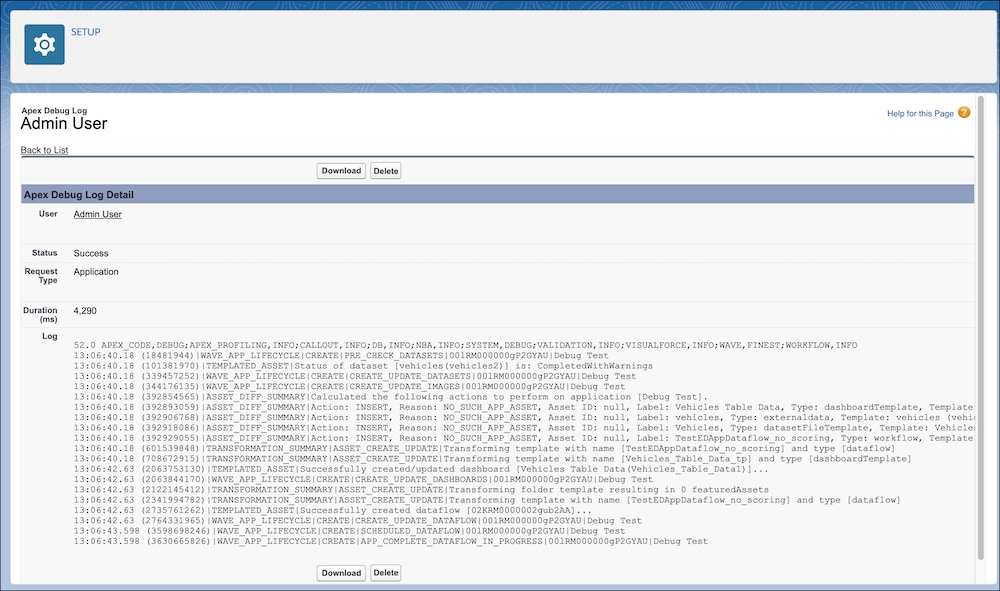
Example
A sample Analytics Templated App Poller log file:
The templated app debug log files are also visible via the Salesforce Dev Console after the debug trace flags are created.


 j
j