


Customizing the Layout and Appearance of Case Feed
Creating a customized Case Feed page with Visualforce lets you control the overall layout and appearance, including which actions and tools are shown and where they’re located on the page. You can also include other standard and custom console components to enhance the functionality of the page.
In addition to the four case-specific Visualforce components detailed in this guide, you can also use the chatter:feed component to customize Case Feed. The table below lists its attributes.
chatter:feed Attributes
| Attribute Name | Attribute Type | Description | Required? | API Version | Access |
|---|---|---|---|---|---|
entityId | id | Entity ID of the record for which to display the feed; for example, Contact.Id | Yes | 25.0 | |
feedItemType | String | The feed item type on which the Entity or UserProfileFeed is filtered. See the Type field on the FeedItem object listing in the API Object Reference Guide for accepted values. | 25.0 | ||
id | String | An identifier that allows the component to be referenced by other components on the page. | 20.0 | global | |
onComplete | String | The Javascript function to call after a post or comment is added to the feed | 25.0 | ||
rendered | Boolean | A Boolean value that specifies whether the additional fields defined in the action layout are displayed. | 20.0 | global | |
reRender | Object | The ID of one or more components that are redrawn when the result of the action method returns to the client. This value can be a single ID, a comma-separated list of IDs, or a merge field expression for a list or collection of IDs. | 25.0 | ||
showPublisher | Boolean | Displays the Chatter publisher. | 25.0 |
Use Case
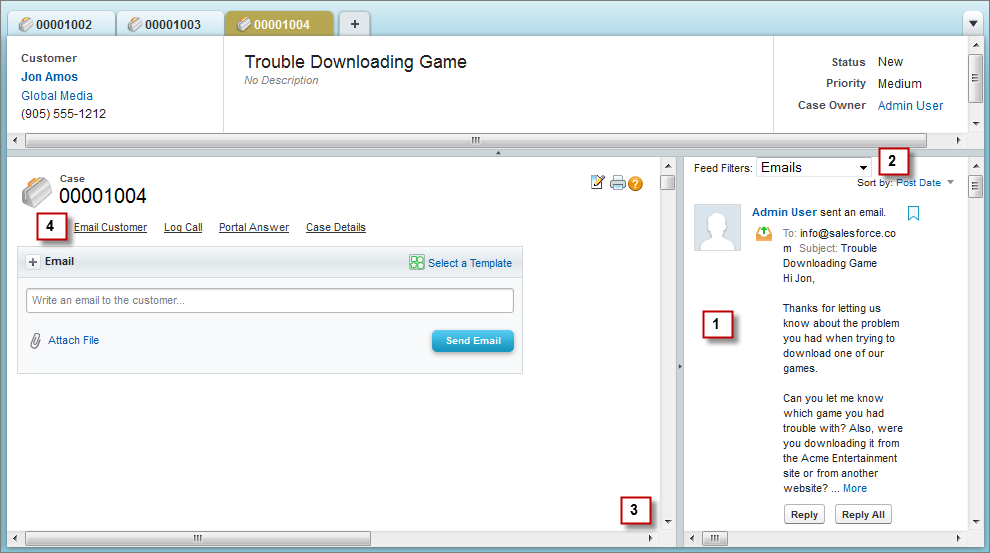
Acme Entertainment creates online games used by more than a million people on multiple platforms. Acme’s 1500 support agents use desktop computers, laptops, and tablets, and the company wanted to customize the Case Feed page to standardize its look and feel across different devices. They also wanted to make it easier for agents to track case activities using filters.
Acme used these steps to create a customized Case Feed page:
-
Using the chatter:feed component, they positioned the feed in the sidebar so the publisher and other Case Feed tools are always in the center of the page.
-
They repositioned the feed filter and auto-selected default filters depending on case origin:
- If the case origin is email,. the default filter is Emails.
- If the case origin is phone, the default filter is Call Logs.
- If the case origin is Web, the default filter is Portal Answers.
-
In
apex:emailPublisher,apex:logCallPublisher, andsupport:portalPublisher, they made the width percentage-based so the publisher expands and contracts as the size of the page changes, making its appearance more consistent across different screen sizes. -
They changed the orientation of the publisher action tabs from their standard left-side vertical arrangement to a horizontal arrangement at the top of the page.
Code Sample
This code sample shows a Visualforce page with custom Email, Portal, Log a Call, and Case Details tabs.
1<apex:page standardController="Case">
2
3    <!-- Repositions publisher tabs to a horizontal arrangement on top of the page -->
4    <ul class="demoNav" style="list-style: none; overflow: hidden">
5        <li style="float:left">
6            <a id="custom_email_tab" class="selected" href="javascript:void(0);"
7                onclick="getDemoSidebarMenu().selectMenuItem('custom_email_tab');">
8                <span class="menuItem">Email Customer</span>
9            </a>
10        </li>
11        <li style="float:left">
12            <a id="custom_log_call_tab" href="javascript:void(0);"
13                onclick="getDemoSidebarMenu().selectMenuItem('custom_log_call_tab');">
14                <span class="menuItem">Log Call</span>
15            </a>
16        </li>
17        <li style="float:left">
18            <a id="custom_portal_tab" href="javascript:void(0);"
19                onclick="getDemoSidebarMenu().selectMenuItem('custom_portal_tab');">
20                <span class="menuItem">Portal Answer</span>
21            </a>
22         </li>
23        <li style="float:left">
24            <a id="custom_detail_tab" href="javascript:void(0);"
25                onclick="getDemoSidebarMenu().selectMenuItem('custom_detail_tab');">
26                <span class="menuItem">Case Details</span>
27            </a>
28        </li>
29    </ul>
30
31    <!-- Email action -->
32    <div id="custom_email_pub_vf">
33        <apex:emailPublisher entityId="{!case.id}"
34             width="80%"
35             emailBodyHeight="10em"
36             showAdditionalFields="false"
37             enableQuickText="true"
38             toAddresses="{!case.contact.email}"
39             toVisibility="readOnly"
40             fromAddresses="support@cirrus.com"
41             onSubmitSuccess="refreshFeed();" />
42    </div>
43
44    <!-- Log call action -->
45    <div id="custom_log_call_vf" style="display:none">
46        <apex:logCallPublisher entityId="{!case.id}"
47            width="80%"
48            logCallBodyHeight="10em"
49            reRender="demoFeed"
50            onSubmitSuccess="refreshFeed();" />
51    </div>
52
53    <!-- Portal action -->
54    <div id="custom_portal_vf" style="display:none">
55        <support:portalPublisher entityId="{!case.id}"
56            width="80%"
57            answerBodyHeight="10em"
58            reRender="demoFeed"
59            answerBody="Dear {!Case.Contact.FirstName},
60                \n\nHere is the solution to your case.\n\nBest regards,\n\nSupport"
61            onSubmitSuccess="refreshFeed();" />
62    </div>
63
64    <!-- Case detail page -->
65    <div id="custom_detail_vf" style="display:none">
66        <apex:detail inlineEdit="true" relatedList="true" rerender="demoFeed" />
67    </div>
68
69    <!-- Include library for using service desk console API -->
70    <apex:includeScript value="/support/console/25.0/integration.js"/>
71
72    <!-- Javascript for switching publishers -->
73    <script type="text/javascript">
74        function DemoSidebarMenu() {
75            var menus = {"custom_email_tab" : "custom_email_pub_vf",
76                         "custom_log_call_tab" : "custom_log_call_vf",
77                         "custom_portal_tab" : "custom_portal_vf",
78                         "custom_detail_tab" : "custom_detail_vf"};
79
80            this.selectMenuItem = function(tabId) {
81                for (var index in menus) {
82                    var tabEl = document.getElementById(index);
83                    var vfEl = document.getElementById(menus[index]);
84
85                    if (index == tabId) {
86                        tabEl.className = "selected";
87                        vfEl.style.display = "block";
88                    } else {
89                        tabEl.className = "";
90                        vfEl.style.display = "none";
91                    }
92                }
93             };
94        }
95        var demoSidebarMenu;
96        var getDemoSidebarMenu = function() {
97            if (!demoSidebarMenu) {
98                demoSidebarMenu = new DemoSidebarMenu();
99            }
100            return demoSidebarMenu;
101        };
102    </script>
103
104    <!-- Javascript for firing event to refresh feed in the sidebar -->
105    <script type="text/javascript">
106        function refreshFeed() {
107            sforce.console.fireEvent
108                ('Cirrus.samplePublisherVFPage.RefreshFeedEvent', null, null);
109        }
110    </script>
111</apex:page>
The following sample shows an Apex class containing a controller extension to be used with the Visualforce page above.
1public class MyCaseExtension {
2    private final Case mycase;
3    private String curFilter;
4
5    public MyCaseExtension(ApexPages.StandardController stdController) {
6        this.mycase = (Case)stdController.getRecord();
7
8        // initialize feed filter based on case origin
9        if (this.mycase.origin.equals('Email')) {
10            curFilter = 'EmailMessageEvent';
11        } else if (this.mycase.origin.equals('Phone')) {
12            curFilter = 'CallLogPost';
13        } else if (this.mycase.origin.equals('Web')) {
14            curFilter = 'CaseCommentPost';
15        }
16    }
17
18    public String getCurFilter() {
19        return curFilter;
20    }
21
22    public void setCurFilter(String c) {
23        if (c.equals('All')) {
24            curFilter = null;
25        } else {
26            curFilter = c;
27        }
28    }
29
30    public PageReference refreshFeed() {
31        return null;
32    }
33}
This sample shows a Visualforce page with custom feed filters and Chatter feed for cases. You can use this page in the sidebar of a Salesforce console.
1<apex:page standardController="Case" extensions="MyCaseExtension">
2
3 <!-- Feed filter -->
4 <div>
5 <span>Feed Filters:</span>
6 <select onchange="changeFilter(this.options[selectedIndex].value);"
7 id="custom_filterSelect">
8 <option value="All" id="custom_all_option">All</option>
9 <option value="EmailMessageEvent"
10 id="custom_email_option">Emails</option>
11 <option value="CaseCommentPost"
12 id="custom_web_option">Portal Answers</option>
13 <option value="CallLogPost"
14 id="custom_phone_option">Call Logs</option>
15 </select>
16 </div>
17
18 <apex:form >
19 <!-- actionFunction for refreshing feed when the feed filter is updated -->
20 <apex:actionFunction action="{!refreshFeed}" name="changeFilter"
21 reRender="custom_demoFeed" immediate="true" >
22 <apex:param name="firstParam" assignTo="{!curFilter}" value="" />
23 </apex:actionFunction>
24
25 <!-- actionFunction for refreshing feed when there is an event fired for
26 updating the feed -->
27 <apex:actionFunction action="{!refreshFeed}" name="updateFeed"
28 reRender="custom_demoFeed" immediate="true" />
29 </apex:form>
30
31 <!-- Chatter feed -->
32 <chatter:feed entityId="{!case.id}" showPublisher="false"
33 feedItemType="{!curFilter}" id="custom_demoFeed" />
34
35 <!-- Include library for using service desk console API -->
36 <apex:includeScript value="/support/console/25.0/integration.js"/>
37
38 <!-- Javascript for adding event listener for refreshing feed -->
39 <script type="text/javascript">
40
41 var listener = function (result) {
42 updateFeed();
43 };
44
45 // add a listener for the 'Cirrus.samplePublisherVFPage.RefreshFeedEvent'
46 event type
47 sforce.console.addEventListener('Cirrus.samplePublisherVFPage.RefreshFeedEvent',
48 listener);
49 </script>
50
51 <!-- Javascript for initializing select option based on case origin -->
52 <script type="text/javascript">
53 window.onload = function() {
54 var caseOrigin = "{!case.origin}";
55 if (!caseOrigin) {
56 caseOrigin = "all";
57 } else {
58 caseOrigin = caseOrigin.toLowerCase();
59 }
60 var selectElem = document.getElementById('custom_' + caseOrigin + '_option');
61 if (selectElem) {
62 selectElem.selected = true;
63 }
64 }
65 </script>
66
67</apex:page> j
j