


Customizing the Portal Action
The Portal action makes it easy for support agents to compose and post messages to customers on portals. With the support:portalPublisher component, you can:
- Customize the dimensions of the Portal action.
- Define a default value for the portal message text.
- Define the visibility and label of the submit button.
- Define onSubmit functionality.
support:portalPublisher Attributes
| Attribute Name | Attribute Type | Description | Required? | API Version | Access |
|---|---|---|---|---|---|
answerBody | String | The default text value of the answer body. | 25.0 | ||
answerBodyHeight | String | The height of the answer body in ems (em). | 25.0 | ||
autoCollapseBody | Boolean | A Boolean value that specifies whether the answer body is collapsed when it is empty. | 25.0 | ||
entityId | id | Entity ID of the record for which to display the Portal action. In the current version, only Case record ids are supported. | Yes | 25.0 | |
id | String | An identifier that allows the component to be referenced by other components on the page. | 25.0 | Global | |
onSubmitFailure | String | The JavaScript invoked if the answer failed to be published to the portal. | 25.0 | ||
onSubmitSuccess | String | The JavaScript invoked if the answer was successfully published to the portal. | 25.0 | ||
rendered | Boolean | A Boolean value that specifies whether the component is rendered on the page. If not specified, this value defaults to true. | 25.0 | Global | |
reRender | Object | The ID of one or more components that are redrawn when the answer is successfully published. This value can be a single ID, a comma-separated list of IDs, or a merge field expression for a list or collection of IDs. | 25.0 | ||
showSendEmailOption | Boolean | A Boolean value that specifies whether the option to send email notification should be displayed. | 25.0 | ||
showSubmitButton | Boolean | A Boolean value that specifies whether the submit button should be displayed. | 25.0 | ||
submitButtonName | String | The name of the submit button in the portal action. | 25.0 | ||
submitFunctionName | String | The name of a function that can be called from JavaScript to publish the answer. | 25.0 | ||
title | String | The title displayed in the portal action header. | 25.0 | ||
width | String | The width of the action in pixels (px) or percentage (%). | 25.0 |
Use Case
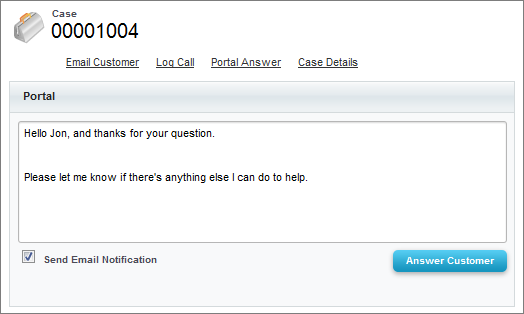
The Wellness Group is a healthcare company with 300 support agents in three tiers of support. Wellness wanted to customize the Portal action to reduce the amount of standard text, such as greetings and closings, agents had to type when replying to customers, which would help increase agents’ efficiency and improve the standardization of portal communications.
Wellness used the support:portalPublisher component to create a Portal action that:
- Pre-populates the message body with a standard opening (“Hello {name}, and thanks for your question.”) and a standard closing (“Please let me know if there’s anything else I can do to help.”).
- Lets agents edit the pre-populated text if needed.
Code Sample
1<apex:page standardController="Case">
2 <support:portalPublisher entityId="{!case.id}" width="800px"
3 answerBody="Hello {!Case.Contact.FirstName}, and thanks for your question.
4 \n\nPlease let me know if there's anything else I can do to help.">
5 </support:portalPublisher>
6</apex:page> j
j