Visualforce Developer Guide
 j
jNewer Version Available
Example Using a Related List
Dynamic Visualforce components are best used when you don’t know the type of object you want to reference, as opposed to dynamic Visualforce bindings, which are best used when you don’t know the fields you want to access.
The following scenario for using dynamic Visualforce constructs a simple, reusable page with a known set of fields you want to access. The page and its custom object are placed into an unmanaged package and distributed throughout the same organization.
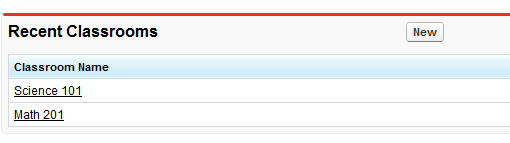
- Click New under Custom Fields & Relationships.
- Select Master-Detail Relationship, then click Next.
- Select Classroom from the drop-down list, then click Next.
- Continue to click Next, leaving all the default values intact.
- A new Student named Johnny Walker, and a new Teacher named Mister Pibb, both assigned to Science 101.
- Another new Student named Boont Amber, and a new Teacher named Doctor Pepper, both assigned to Math 201.
1public class DynamicClassroomList {
2
3    private ApexPages.StandardSetController controller;
4    private PageReference savePage;
5    private Set<String> unSelectedNames;
6    private Set<String> selectedNames;
7
8    public List<String> selected { get; set; }
9    public List<String> unselected { get; set; }
10    public String objId { get; set; }
11    public List<String> displayObjs {
12        get; private set;
13    }
14
15    boolean idIsSet = false;
16
17    public DynamicClassroomList() {
18        init();
19    }
20
21    public DynamicClassroomList(ApexPages.StandardSetController con) {
22        this.controller = con;
23        init();
24    }
25
26    private void init() {
27        savePage = null;
28        unSelectedNames = new Set<String>();
29        selectedNames = new Set<String>();
30
31        if (idIsSet) {
32            ApexPages.CurrentPage().getParameters().put('id', objId);
33            idIsSet = false;
34        }
35    }
36
37    public PageReference show() {
38        savePage = Page.dynVFClassroom;
39        savePage.getParameters().put('id', objId);
40        return savePage;
41    }
42
43    public List<SelectOption> displayObjsList {
44        get {
45            List<SelectOption> options = new List<SelectOption>();
46            List<Classroom__c> classrooms = [SELECT id, name FROM Classroom__c];
47
48            for (Classroom__c c: classrooms) {
49                options.add(new SelectOption(c.id, c.name));
50            }
51
52            return options;
53       }
54    }
55
56    public PageReference customize() {
57        savePage = ApexPages.CurrentPage();
58        savePage.getParameters().put('id', objId);
59
60        return Page.dynamicclassroomlist;
61    }
62
63    // The methods below are for constructing the select list
64
65    public List<SelectOption> selectedOptions {
66        get {
67            List<String> sorted = new List<String>(selectedNames);
68            sorted.sort();
69            List<SelectOption> options = new List<SelectOption>();
70            for (String s: sorted) {
71                options.add(new SelectOption(s, s));
72            }
73            return options;
74        }
75    }
76
77    public List<SelectOption> unSelectedOptions {
78        get {
79            Schema.DescribeSObjectResult R = Classroom__c.SObjectType.getDescribe();
80            List<Schema.ChildRelationship> C = R.getChildRelationships();
81            List<SelectOption> options = new List<SelectOption>();
82
83            for (Schema.ChildRelationship cr: C) {
84                String relName = cr.getRelationshipName();
85                // We're only interested in custom relationships
86                if (relName != null && relName.contains('__r')) {
87                    options.add(new SelectOption(relName, relName));
88                }
89            }
90            return options;
91        }
92    }
93
94
95    public void doSelect() {
96        for (String s: selected) {
97            selectedNames.add(s);
98            unselectedNames.remove(s);
99        }
100    }
101
102    public void doUnSelect() {
103        for (String s: unselected) {
104            unSelectedNames.add(s);
105            selectedNames.remove(s);
106        }
107    }
108
109    public Component.Apex.OutputPanel getClassroomRelatedLists() {
110        Component.Apex.OutputPanel dynOutPanel= new Component.Apex.OutputPanel();
111
112        for(String id: selectedNames) {
113           Component.Apex.RelatedList dynRelList = new Component.Apex.RelatedList();
114           dynRelList.list = id;
115           dynOutPanel.childComponents.add(dynRelList);
116        }
117
118        return dynOutPanel;
119    }
120}1<apex:page standardController="Classroom__c" recordSetVar="classlist"
2 extensions="DynamicClassroomList">
3
4 <apex:dynamicComponent componentValue="{!ClassroomRelatedLists}"/>
5
6 <apex:form>
7
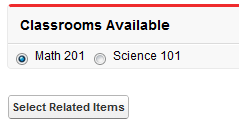
8 <apex:pageBlock title="Classrooms Available" mode="edit">
9 <apex:pageMessages/>
10 <apex:selectRadio value="{!objId}">
11 <apex:selectOptions value="{!displayObjsList}"/>
12 </apex:selectRadio>
13 </apex:pageBlock>
14
15 <apex:commandButton value="Select Related Items" action="{!Customize}"/>
16 </apex:form>
17
18</apex:page>1<apex:page standardController="Classroom__c" recordsetvar="listPageMarker"
2 extensions="DynamicClassroomList">
3 <apex:messages/><br/>
4 <apex:form>
5 <apex:pageBlock title="Select Relationships to Display" id="selectionBlock">
6 <apex:panelGrid columns="3">
7 <apex:selectList id="unselected_list" required="false"
8 value="{!selected}" multiselect="true" size="20"
9 style="width:250px">
10 <apex:selectOptions value="{!unSelectedOptions}"/>
11 </apex:selectList>
12 <apex:panelGroup>
13 <apex:commandButton value=">>" action="{!DoSelect}"
14 reRender="selectionBlock"/>
15 <br/>
16 <apex:commandButton value="<<" action="{!DoUnselect}"
17 reRender="selectionBlock"/>
18 </apex:panelGroup>
19 <apex:selectList id="selected_list" required="false"
20 value="{!unselected}" multiselect="true" size="20"
21 style="width:250px">
22 <apex:selectOptions value="{!selectedOptions}"/>
23 </apex:selectList>
24 </apex:panelGrid>
25 </apex:pageBlock>
26 <br/>
27 <apex:commandButton value="Show Related Lists" action="{!show}"/>
28 </apex:form>
29</apex:page>After assembling the controller extension and these pages, navigate to
/apex/dynVFClassroom in your organization. You’ll see a
sequence similar to the following: