


Salesforce App Developer Guide
 j
jQuick Actions
Create quick actions, and add them to your Salesforce Classic home page, to the Chatter tab, to Chatter groups, and to record detail pages. Choose from standard quick actions, such as create and update actions, or create custom actions based on your company’s needs. In addition, actions have their own action layouts, which let you specify which fields are included in the action, and in which order.
Where Do Actions Appear?
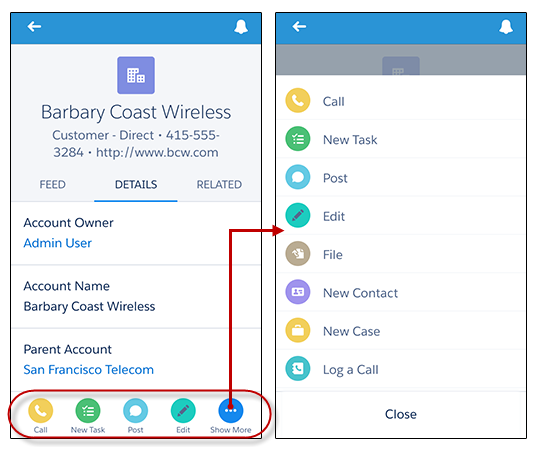
In the Salesforce app, actions appear in the action bar and its action menu.
Actions also appear in an action bar on list items such as task lists and related record lists. This gives your mobile users the ability to work with records directly from lists and update records without having to open them. To access list item actions, navigate to the task list or open a related list from an object’s related information page. Then swipe left on the desired record.
Object-Specific Quick Actions
Object-specific actions let users quickly create or update records, log calls, send emails, and more, in the context of a particular object. For example, you add an object-specific action on the Account object that creates contacts. If a user creates a contact with that action on the detail page for the Acme account, that new contact is associated with Acme. You can only add an object-specific action to page layouts for that object.
Global Quick Actions
You can add global quick actions to almost any page that supports actions. Use global actions to let users log call details, create or update records, or send email, all without leaving the page they’re on. Global create actions enable users to create object records, but the new record has no direct relationship with other records.
Quick Action Types
- Create actions let users create records—like New Contact, New Opportunity, and New Lead. Global create actions enable users to create object records, but the new record has no direct relationship with other records. Object-specific create actions create records that are automatically associated with related records. They’re different from the Quick Create and Create New features on the Salesforce Classic home page, because create actions respect validation rules and field requiredness, and you can choose each action’s fields.
- Update actions let users make changes to a record.
- Log a Call actions let users record the details of phone calls or other customer interactions. These call logs are saved as completed tasks. Object-specific Log a Call actions let users enter notes about calls, meetings, or other interactions that are related to a specific record.
- Custom actions invoke Lightning components, flows, Visualforce pages, or canvas apps with functionality that you define. Use a Visualforce page, Lightning component, or a canvas app to create global custom actions for tasks that don’t require users to use records that have a relationship to a specific object. Object-specific custom actions invoke Lightning components, flows, Visualforce pages, or canvas apps that let users interact with or create records that have a relationship to an object record.
- Object-specific Send Email actions, available only on cases, give users access to a simplified version of the Case Feed Email action in the Salesforce mobile app. You can use the case-specific Send Email action in Salesforce Classic, Lightning Experience, and the Salesforce mobile app.
- Global Send Email actions are supported only in Lightning Experience. You can’t add them to the Cases layout or use them with cases.
- Question actions enable users to ask and search for questions about the records that they’re working with.
For create, log-a-call, and custom actions—which we’ll go over at the end of this chapter—you can create either object-specific quick actions or global quick actions. Update actions must be object-specific.
For a list of supported objects for object-specific and global actions, see "Object-Specific Actions" and "Global Quick Actions" in Salesforce Help.