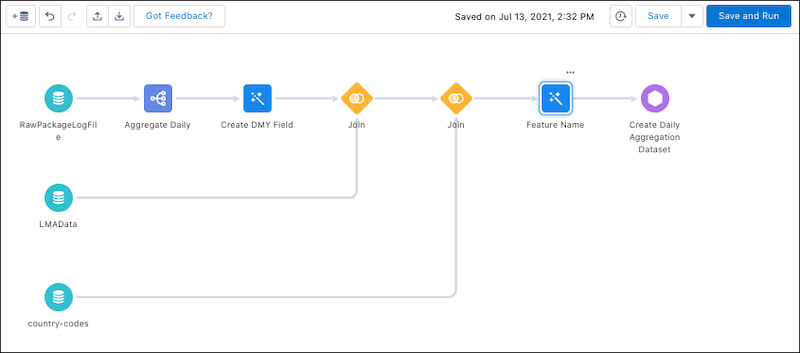
You join your raw package log file data with your License Management App (LMA) data to create the DailyAggregation CRM Analytics recipe. The recipe produces a dataset called DailyAggregation that you use to create App Analytics recipes.
Before You Begin
Required Editions
Available in: both Salesforce Classic and Lightning Experience
Available in: Enterprise, Performance, Unlimited, and Developer Editions
In your org in Analytics Studio in CRM Analytics:
Click Data Manager.
Click Dataflows & Recipes.
On the Recipes tab, click Create Recipe.
Click Add Input Data.
Select RawPackageLogFile.
Select all the columns.
Create an aggregate with these specifications.
Field
Aggregate By
event_count
Sum
login_key
Unique
num_fields
Sum
num_soql_queries
Sum
operation_count
Sum
rows_processed
Sum
session_key
Unique
In the aggregate, in Group Rows, click +, and select timestamp_derived.
Select Year, Month, and Day.
Click Add.
In the aggregate, in Group Rows, create a group for each of these fields.
api_type
api_version
app_name
class_name
cloned_from_organization
custom_entity
custom_entity_type
entry_point
event
event_subscriber
http_method
http_status_code
log_record_type
managed_package_namespace
method_name
operation_type
organization_country_code
Create a transform named Create DMY Field with this formula.to_date(concat(timestamp_derived_DAY,"/",timestamp_derived_MONTH,"/",timestamp_derived_YEAR),"dd/MM/yyyy"))
Join your RawPackageLogFile dataset to your LMAData dataset using this information.
Select Input Data to Join: LMAData
Columns to Select: All fields
Join Type: Lookup
Join Keys: organization_id = Subscriber Org ID and package_id = PackageID15
API Name Prefix for Right Columns: LMAData
Join your country-codes dataset to your LMAData dataset using this information.
Select Input Data to Join: country-codes
Columns to Select: All fields
Join Type: Lookup
Join Keys: user_country_code = ISO3166-1-Alpha-2
API Name Prefix for Right Columns: UserCountry
Create a transform named Feature Name.
Create as many CRM Analytics buckets as you need for your features, such as Inventory, Orders, and a catch-all bucket called Other.
A CRM Analytics bucket represents a category that you use to group your data. For example, say your app contains multiple features, such as an inventory tracking feature and an order processing feature. Create a CRM Analytics bucket for each feature. Each bucket contains the custom objects, pages, Lightning components, and Apex classes that pertain to that feature. You can use these buckets to create Feature Adoption App Analytics recipes
Note
Add your custom entities to the appropriate bucket.
Select Output and use these settings.
Write To: Dataset
Dataset Display Label: DailyAggregation
App Location: PartnerIntelligence
Sharing Source: default
Security Predicate: Apply row-level security to the target dataset by adding a predicate filter condition
Name: Create Daily Aggregation Dataset
Click Apply.
Click Save.
Name your recipe DailyAggregation.
Click Save and Run.
Example
When complete, your DailyAggregation recipe looks like this.


 j
j