Create the LMAJoin CRM Analytics Recipe
Create a CRM Analytics recipe that contains your License Management App (LMA) data.
Before You Begin
| Required Editions |
|---|
| Available in: both Salesforce Classic and Lightning Experience |
| Available in: Enterprise, Performance, Unlimited, and Developer Editions |
In your org in Analytics Studio in CRM Analytics:
-
Click Data Manager.
-
In Dataflows & Recipes on the Recipes tab, click Create Recipe.
-
Click Add Input Data.
-
Select sfLmaLicensec, and select all columns.
-
Create a transform named License with these specifications.
- Custom Formula:
string(Id)
- Output Type: Text
- Length:
255
- Default Value:
blank
- Show Results In: New Column (and Keep Original)
- Column Label:
LicenseRecordId
-
Add a join to Lead with these specifications.
- Select Input Data to Join: Lead
- Columns to Select: Company, First Name, Id, Last Name
- Join Type: Lookup
- Join Keys: License: Record ID = Lead ID
- API Name Prefix for Right Columns:
Lead
-
Add a join to Account with these specifications.
- Select Input Data to Join: Account
- Columns to Select: Name
- Join Type: Lookup
- Join Keys: Account Name = Account Name
- API Name Prefix for Right Columns:
Account
-
Add a join to sfLmaPackagec with these specifications.
- Select Input Data to Join: sfLmaPackagec
- Columns to Select:
All fields
- Join Type: Lookup
- Join Keys: Package = Record ID
- API Name Prefix for Right Columns:
Package
-
Create a transform between the join and sfLma__Package__c with these specifications.
- Custom Formula:
substr(sfLma__Package_ID__c, 1, 15)
- Output Type: Text
- Length:
255
- Default Value: none
- Show Results in: New Column (and Keep Original)
- Column Label:
PackageID15
-
Create another join with these specifications.
- Select Input Data to Join: sfLmaPackage_Verzionc
- Columns to Select:
All fields
- Join Type: Lookup
- Join Keys: Package Version = Record ID
- API Name Prefix for Right Columns:
PackageVersion
-
Create an output with these specifications.
- Write To: Dataset
- Dataset Display Label:
LMAJoin
- App Location: PartnerIntelligence
- Sharing Source: default
- Security Predicate: Apply row-level security to the target dataset by adding a predicate filter condition
-
Click Apply.
-
Click Save.
-
Save your recipe as LMAJoin.
-
Click Save and Run.
-
To monitor the status of your job, click Go to Data Monitor.
Example
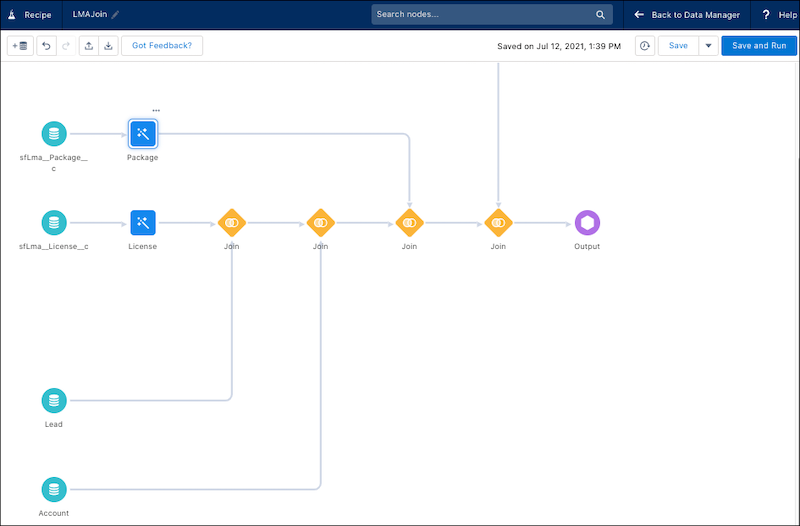
When complete, your LMAJoin CRM Analytics recipe looks like this.
-
Monitor Your LMAJoin CRM Analytics Recipe
CRM Analytics recipes can take a while to complete. Use these steps to monitor the status of your LMAJoin recipe.
-
Run the LMAJoin CRM Analytics Recipe
To create a reusable dataset, schedule your LMAJoin CRM Analytics recipe to run on a regular basis. We recommend daily at midnight.
See Also
Previous topic: Connect to Your License Management App Data
Next topic: Create Your App Analytics Dataset


 j
j