


Connect REST API Developer Guide
 j
jNewer Version Available
Action Link Group Definitions
Create an action link group definition. To
associate an action link with a feed element, first create an action link group definition.
Then post a feed element with an associated actions capability.
All action links must belong to a group. Action links in a group are mutually exclusive and share some properties. Define standalone actions in their own action group.
This image shows a feed element with one action link group containing two action links,
Download and Order.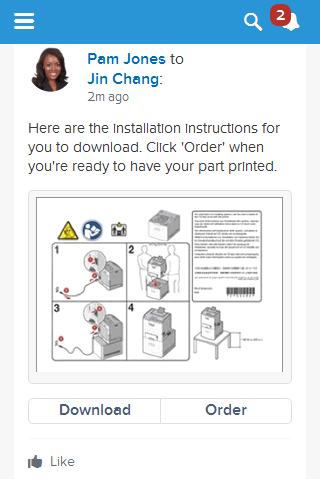
- Resource
-
1/connect/action-link-group-definitions1/connect/communities/communityId/action-link-group-definitions - Available since release
- 33.0
- HTTP methods
- POST
The Action Link Group Definitions resource doesn’t support query parameters for POST. You must use an Action Link Group Definition Input request body.
- Request body for POST
- Action Link Group Definition Input
- Response body for POST
- Action Link Group Definition
- Example for POST
- To associate an action link group with a feed item, first create an action link group definition:
-
1POST /connect/action-link-group-definitions 2 3{ 4 "actionLinks": [ 5 { 6 "actionType" : "Api", 7 "actionUrl" : "https://www.example.com/api/v1/confirm", 8 "groupDefault" : "true", 9 "headers" : [ 10 { 11 "name" : "Authorization", 12 "value" : "OAuth 00DRR0000000N0g!ARoAQMZyQtsP1Gs27EZ8hl7vdpYXH5O5rv1 13 VNprqTeD12xYnvygD3JgPnNR._nmE6thZakAbBVJUsjUInMUaKMlkNKaWXdHO" 14 }, 15 { 16 "name" : "Content-Type", 17 "value" : "application/json" 18 }, 19 { 20 "name" : "Accept", 21 "value" : "application/json" 22 }, 23 { 24 "name" : "X-PrettyPrint", 25 "value" : "1" 26 } 27 ], 28 "labelKey" : "Confirm", 29 "method" : "HttpPost", 30 "requiresConfirmation" : "true" 31 }, 32 { 33 "actionType" : "Api", 34 "actionUrl" : "https://www.example.com/api/v1/deny", 35 "groupDefault" : "false", 36 "headers" : [ 37 { 38 "name" : "Authorization", 39 "value" : "OAuth 00DRR0000000N0g!ARoAQMZyQtsP1Gs27EZ8hl7vdpYXH5O5rv1 40 VNprqTeD12xYnvygD3JgPnNR._nmE6thZakAbBVJUsjUInMUaKMlkNKaWXdHO" 41 }, 42 { 43 "name" : "Content-Type", 44 "value" : "application/json" 45 }, 46 { 47 "name" : "Accept", 48 "value" : "application/json" 49 }, 50 { 51 "name" : "X-PrettyPrint", 52 "value" : "1" 53 } 54 ], 55 "labelKey": "Deny", 56 "method" : "HttpPost", 57 "requiresConfirmation" : "true" 58 }, 59 { 60 "actionType": "Ui", 61 "actionUrl" : "https://www.example.com/reviewPage.html", 62 "groupDefault" : "false", 63 "labelKey" : "Review", 64 "method" : "HttpGet", 65 "requiresConfirmation" : "false" 66 }, 67 "executionsAllowed" : "OncePerUser", 68 "category" : "Primary", 69 "expirationDate" : "2014-05-09T18:45:39.000Z" 70} - Next, associate the action link group with the feed item and post the feed item. Grab the action
link group ID from the /connect/action-link-group-definitions response and pass it in a POST
request to /chatter/feed-elements.
1POST /chatter/feed-elements 2 3{ 4 "body": { 5 "messageSegments": [ 6 { 7 "type": "Text", 8 "text": "Please confirm or deny this item. You can also click Review to provide more feedback." 9 } 10 ] 11 }, 12 "subjectId": "me", 13 "feedElementType": "FeedItem", 14 "capabilities": { 15 "associatedActions": { 16 "actionLinkGroupIds": ["0AgRR0000004CTr0AM"] 17 } 18 } 19} - Different types of action links have different workflows to set their status property, whose value displays in the UI. See /connect/action-links/actionLinkId for more information.