Represents an agent action that can be added to an AI agent.
Parent Type
This type extends the
Metadata metadata type and inherits its
fullName field.
File Suffix and Directory Location
GenAiFunction components have the suffix .genAiFunction and are stored in the genAiFunctions folder.
GenAiFunction components can contain folders for the input and output schemas. Here’s an
example component, showing the schema folders.
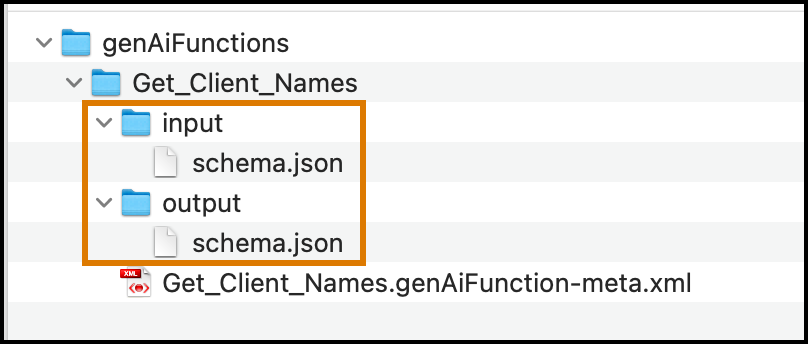
See the Input Folder and Output Folder sections for more
information.
Version
GenAiFunction components are available in API version 60.0 and later.
Special Access Rules
GenAiFunction is available only if Agents is enabled in your org.
Fields
| description |
- Field Type
- string
- Description
- A description explaining the general purpose and domain of the action.
|
| invocationTarget |
- Field Type
- string
- Description
-
Required. Target invocation used by invocation
operations.
|
| invocationTargetType |
- Field Type
- PlannerFunctionInvocableTargetType
(enumeration of type string)
- Description
-
Required. Invocable action type used by invocation operations.
Values are:
- apex
- api
- createCatalogItemRequest
- flow
- generatePromptResponse
- externalService
- quickAction
- slack
- standardInvocableAction
|
| isConfirmationRequired |
- Field Type
- boolean
- Description
- Indicates whether confirmation is required for this action.
|
| isIncludeInProgressIndicator |
- Field Type
- boolean
- Description
- Indicates whether to display the progress indicator for
this action.
|
| mappingAttributes |
- Field Type
-
GenAiPlannerAttr[]
- Description
- List of attributes for the planner.
|
| masterLabel |
- Field Type
- string
- Description
-
Required. The master label for the generative AI
action.
|
| pluginField |
- Field Type
- string
- Description
-
Represents the action’s parent topic.
|
| progressIndicatorMessage |
- Field Type
- string
- Description
-
The progress message.
|
GenAiPlannerAttr
| description |
- Field Type
- string
- Description
- Description of the planner attribute.
|
| label |
- Field Type
- string
- Description
-
Required. Label for the planner attribute.
|
| name |
- Field Type
- string
- Description
- Required. Name of the planner attribute.
|
| parameterName |
- Field Type
- string
- Description
- Required. The parameter name.
|
| parameterType |
- Field Type
- PlannerAttrMappingType (enumeration of type string)
- Description
- Required. The parameter type. Values are:
|
Input Folder
The input folder contains a schema.json file with the action inputs. Here’s a sample input schema
file.
1{
2  "required" : ["OwnerId", "Status"],
3  "properties" : {
4    "OwnerId" : {
5      "title" : "Owner Id",
6      "description" : "ID of the Salesforce record that owns the request.",
7      "lightning:type" : "lightning__textType",
8      "lightning:isPII" : false,
9      "copilotAction:isUserInput" : true
10    },
11    "Status" : {
12      "title" : "Request Status",
13      "description" : "The status of the contact request.",
14      "lightning:type" : "lightning__textType",
15      "lightning:isPII" : false,
16      "copilotAction:isUserInput" : true
17    }
18  },
19  "lightning:type" : "lightning__objectType"
20}
This table describes the properties that you can specify in this JSON file.
| required |
- Field Type
- array of strings
- Description
- A list of all the required properties in the input
list.
|
| properties |
- Field Type
- object
- Description
- The parent object for all the properties associated with
the input.
|
|
{PROPERTY_NAME} (child of properties
field)
|
- Field Type
- object
- Description
- Required. Each property in the
properties object must contain
the API value corresponding to the input parameter.
|
|
title (child of properties.PROPERTY_NAME
field)
|
- Field Type
- string
- Description
- Required. The label for the property.
|
|
description (child of
properties.PROPERTY_NAME field)
|
- Field Type
- string
- Description
- The description for the property.
|
|
lightning:type (child of
properties.PROPERTY_NAME field)
|
- Field Type
- string
- Description
- Required. Describes the type of property.
-
Some of the possible
values include:
-
lightning__booleanType—Boolean
type.
-
lightning__dateType—Date type.
-
lightning__dateTimeType—Date and time
type. When using this value, you must provide a
dateTime
string. This field is specified in the format
yyyy-MM-dd'T'HH:mm:ss.SSSZ. You can also
provide a timeZone string. Use the timezone
attribute to specify a time zone in the IANA time
zone database format.
-
lightning__integerType—Integer type.
When using this value, you can also provide
maximum and
minimum
numbers for this property.
-
lightning__listType—List type.
-
lightning__multilineTextType—Multi-line
text type. When using this value, you can also
provide maxLength and minLength numbers for
this property.
-
lightning__numberType—Number type. When
using this value, you can also provide maximum and minimum numbers for
this property.
-
lightning__objectType—Object type. When
using this value, you must also provide a properties object
that contains the list of subproperties within
it.
-
lightning__recordIdType—Record ID
type.
-
lightning__richTextType—Rich text type.
When using this value, you can also provide
maxLength and
minLength
numbers for this property.
-
lightning__textType—Text type. When
using this value, you can also provide maxLength and minLength numbers for
this property. The maximum text type length is 250
characters.
-
lightning__urlType—URL type. When using
this value, you can also provide an array of
strings in a lightning:allowedUrlSchemes field to
specify the list of allowed URL schemes.
|
|
lightning:isPII (child of
properties.PROPERTY_NAME field)
|
- Field Type
- boolean
- Description
- Indicates whether the property contains personally
identifiable information.
|
|
copilotAction:isUserInput (child of
properties.PROPERTY_NAME field)
|
- Field Type
- boolean
- Description
- Indicates whether the property is presented as user
input.
|
| lightning:type |
- Field Type
- string
- Description
- Required. Describes the type of input. This value should
always be lightning__objectType.
|
Output Folder
The output folder contains a schema.json file with the action output. Here’s a sample output schema
file.
1{
2  "properties" : {
3    "Id" : {
4      "title" : "Contact Request Id",
5      "description" : "ID of the Salesforce contact request record.",
6      "lightning:type" : "lightning__recordIdType",
7      "lightning:isPII" : false,
8      "copilotAction:isDisplayable" : true,
9      "copilotAction:isUsedByPlanner" : true
10    }
11  },
12  "lightning:type" : "lightning__objectType"
13}
This table describes the properties that you can specify in this JSON file.
| properties |
- Field Type
- object
- Description
- The parent object for all the properties associated with
the output.
|
|
{PROPERTY_NAME} (child of properties
field)
|
- Field Type
- object
- Description
- Required. Each property in the
properties object must contain
the API value corresponding to the output
parameter.
|
|
title (child of properties.PROPERTY_NAME
field)
|
- Field Type
- string
- Description
- Required. The label for the property.
|
|
description (child of
properties.PROPERTY_NAME field)
|
- Field Type
- string
- Description
- The description for the property.
|
|
lightning:type (child of properties.PROPERTY_NAME
field)
|
- Field Type
- string
- Description
- Required. Describes the type of output.
- Some of the possible
values include:
-
lightning__booleanType—Boolean
type.
-
lightning__dateType—Date type.
-
lightning__dateTimeType—Date and time
type. When using this value, you must provide a
dateTime
string. This field is specified in the format
yyyy-MM-dd'T'HH:mm:ss.SSSZ. You can also
provide a timeZone string. Use the timezone
attribute to specify a time zone in the IANA time
zone database format.
-
lightning__integerType—Integer type.
When using this value, you can also provide
maximum and
minimum
numbers for this property.
-
lightning__listType—List type.
-
lightning__multilineTextType—Multi-line
text type. When using this value, you can also
provide maxLength and minLength numbers for
this property.
-
lightning__numberType—Number type. When
using this value, you can also provide maximum and minimum numbers for
this property.
-
lightning__objectType—Object type. When
using this value, you must also provide a properties object
that contains the list of subproperties within
it.
-
lightning__recordIdType—Record ID
type.
-
lightning__richTextType—Rich text type.
When using this value, you can also provide
maxLength and
minLength
numbers for this property.
-
lightning__textType—Text type. When
using this value, you can also provide maxLength and minLength numbers for
this property. The maximum text type length is 250
characters.
-
lightning__urlType—URL type. When using
this value, you can also provide an array of
strings in a lightning:allowedUrlSchemes field to
specify the list of allowed URL schemes.
|
|
lightning:isPII (child of properties.PROPERTY_NAME
field)
|
- Field Type
- boolean
- Description
- Indicates whether the property contains personally identifiable information.
|
|
copilotAction:isDisplayable (child of properties.PROPERTY_NAME
field)
|
- Field Type
- boolean
- Description
- Indicates whether the property is displayable as
output.
|
|
copilotAction:isUsedByPlanner (child of
properties.PROPERTY_NAME field)
|
- Field Type
- boolean
- Description
- Indicates whether the property is used by the agent planner. At least one output
property must have this value as true or else the
planner returns random responses.
|
| lightning:type |
- Field Type
- string
- Description
- Required. Describes the type of output. This value
should always be lightning__objectType.
|
Usage
In Winter '26 orgs and later, use GenAiPlannerBundle to retrieve actions
that are created within a particular agent. To retrieve actions in the asset
library, use GenAiFunction.
When deploying topic or action metadata to a
Summer '25 (version 64.0) org, retrieve the metadata using Metadata API version
64.0, even if your source org is Winter '26 or later (version 65.0). For Winter `26
and later, use Metadata API version 65.0 and later.
Declarative Metadata Sample Definition
The following is an example of a GenAiFunction component.
1<?xml version="1.0" encoding="UTF-8"?>
2<GenAiFunction xmlns="http://soap.sforce.com/2006/04/metadata">
3    <description>get tracking information</description>
4    <invocationTarget>TrackShipment</invocationTarget>
5    <invocationTargetType>apex</invocationTargetType>
6    <isConfirmationRequired>false</isConfirmationRequired>
7    <masterLabel>get_tracking_info</masterLabel>
8</GenAiFunction>
The following is an example package.xml that
references the previous definition.
1<?xml version="1.0" encoding="UTF-8"?>
2<Package xmlns="http://soap.sforce.com/2006/04/metadata">
3   <types>
4      <members>*</members>
5      <name>GenAiFunction</name>
6   </types>
7   <version>60.0</version>
8</Package>


 j
j