Newer Version Available

This content describes an older version of this product. View Latest

Create a Custom Object Creates Per Day Recipe

This recipe produces a unique count of how many times per day a custom object was created.

In your org in Analytics Studio in CRM Analytics:

  1. In All items on the Datasets tab, select your DailyAggregation dataset.
  2. Select Charts.
  3. Click Column and leave Bar Length as Count of Rows.
  4. Under Bars, click + and search for timestamp_DMY.
  5. Select Year-Month-Day.
  6. Click Filters.
  7. Click +.
  8. Select custom_entity_type equals CustomObject.
  9. Click Apply.
  10. Click +.
  11. Select operation_type Equals INSERT.
  12. Click Apply.
  13. Click Data.
  14. Under Trellis, click +.
  15. Select custom_entity.
  16. Click Save.
  17. Name your lens Custom Object Creates Per Day.
  18. Select your PartnerIntelligence app.
  19. Click Save.

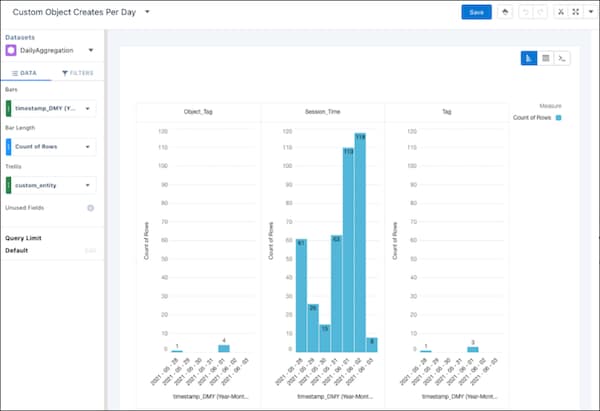
Example

A sample Custom Object Creates Per Day CRM Analytics lens
SAQL:
1q = load "DailyAggregation";
2q = filter q by 'custom_entity_type' == "CustomObject";
3q = filter q by 'operation_type' == "INSERT";
4q = group q by ('timestamp_derived_DAY_formula_Year', 'timestamp_derived_DAY_formula_Month', 'timestamp_derived_DAY_formula_Day', 'custom_entity');
5q = foreach q generate 'timestamp_derived_DAY_formula_Year' + "~~~" + 'timestamp_derived_DAY_formula_Month' + "~~~" + 'timestamp_derived_DAY_formula_Day' as 'timestamp_derived_DAY_formula_Year~~~timestamp_derived_DAY_formula_Month~~~timestamp_derived_DAY_formula_Day', 'custom_entity' as 'custom_entity', count() as 'count';
6q = order q by ('timestamp_derived_DAY_formula_Year~~~timestamp_derived_DAY_formula_Month~~~timestamp_derived_DAY_formula_Day' asc, 'custom_entity' asc);
7q = limit q 2000;