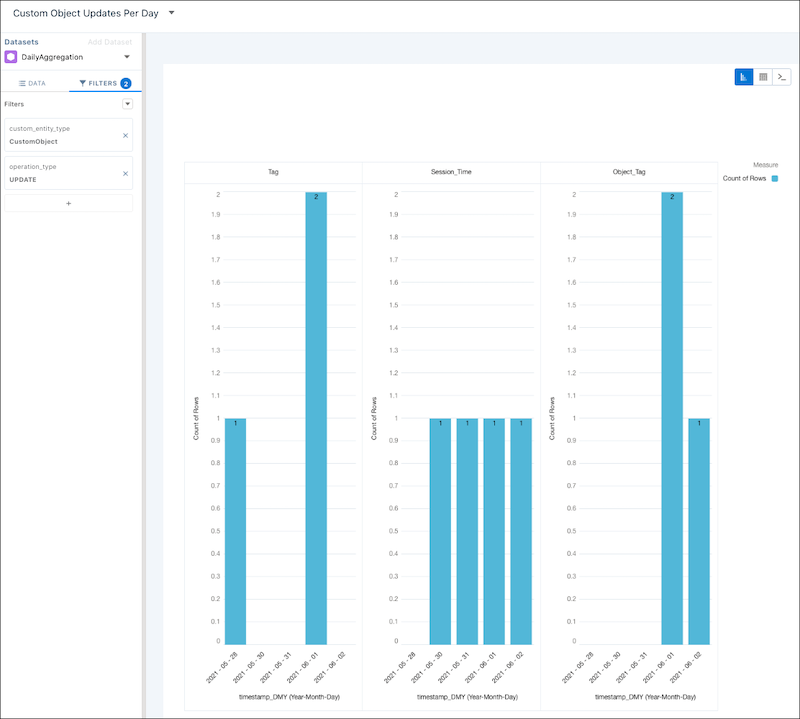
Create a Custom Object Updates Per Day Recipe

This recipe produces a unique count of how many times per day a custom object was created.

In your org in Analytics Studio in CRM Analytics:

  1. In All items on the Datasets tab, select your DailyAggregation dataset.

  2. Select Charts.

  3. Click Column and leave Bar Length as Count of Rows.

  4. Under Bars, click + and select timestamp_DMY.

  5. Select Year-Month-Day.

  6. Click the Filters tab.

  7. Click +.

  8. Select custom_entity_type Equals CustomObject

  9. Click Apply.

  10. Click +.

  11. Select operation_type Equals UPDATE.

  12. Click Apply.

  13. Click the Data tab.

  14. Under Trellis, click +.

  15. Select custom_entity.

  16. Click Save.

  17. Name your lens Custom Object Creates Per Day.

  18. Select your PartnerIntelligence app.

  19. Click Save.

Example 

A sample Custom Object Updates Per Day CRM Analytics lens

SAQL:

1q = load "DailyAggregation";
2q = filter q by 'custom_entity_type' == "CustomObject";
3q = filter q by 'operation_type' == "UPDATE";
4q = group q by ('timestamp_derived_DAY_formula_Year', 'timestamp_derived_DAY_formula_Month', 'timestamp_derived_DAY_formula_Day', 'custom_entity');
5q = foreach q generate 'timestamp_derived_DAY_formula_Year' + "~~~" + 'timestamp_derived_DAY_formula_Month' + "~~~" + 'timestamp_derived_DAY_formula_Day' as 'timestamp_derived_DAY_formula_Year~~~timestamp_derived_DAY_formula_Month~~~timestamp_derived_DAY_formula_Day', 'custom_entity' as 'custom_entity', count() as 'count';
6q = order q by ('timestamp_derived_DAY_formula_Year~~~timestamp_derived_DAY_formula_Month~~~timestamp_derived_DAY_formula_Day' asc, 'custom_entity' asc);
7q = limit q 2000;