


LWR Sites for Experience Cloud
 j
jNewer Version Available
Create a Custom Navigation Menu Component
The Build Your Own (LWR) template includes a Navigation Menu component that you can
customize for the desktop and mobile versions of your site. If you prefer to create your own
component, we recommend that you create a custom Lightning web component with an Apex controller
to get the navigation items.
Step 1: Configure a Navigation Menu
To create a custom navigation menu component in Experience Builder, go to , and click Add Navigation Menu. In the Menu Editor, you can add navigation items targeting specific sites pages.
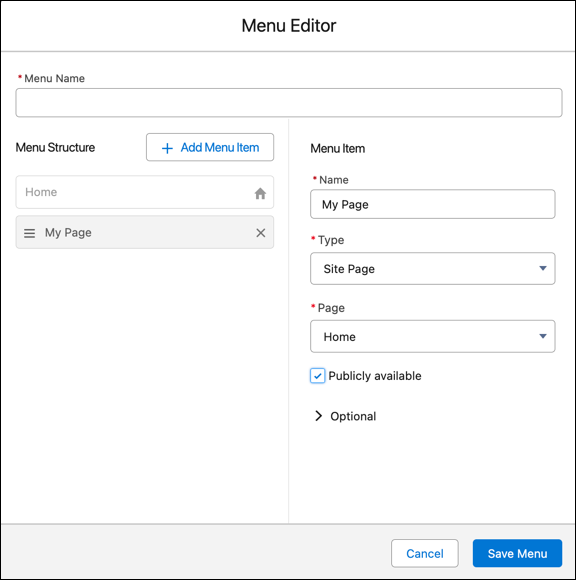
Adding navigation items creates the NavigationLinkSet object and its corresponding NavigationMenuItems.
Step 2: Implement the Apex Controller
To fetch the navigation menu for your component, you can implement an Apex controller that uses the Connect API to get the NavigationMenuItems for the NavigationLinkSet you created in the Menu Editor.
In the example, we pass in:
- navigationLinkSetMasterLabel, or the menu name, to look up the NavigationLinkSet.DeveloperName for the nav menu of the current site
- publishStatus to get the correct NavigationMenuItems for a published site or for a site in draft mode
- addHomeMenuItem to determine whether the Home menu item must be included in the data
- includeImageUrl to determine whether the data must include image URLs
Step 3: Implement the Navigation Menu Component
To implement your Navigation Menu component, use the code samples provided.
Here are some pointers on how the sample component is set up.
- JavaScript: To get data into the Lightning web component, we must import the Apex controller using the wire annotation.
- JavaScript: To get the publishedState for the Apex controller, we can import the CurrentPageReference from lightning/navigation and check whether the menu is published.
- XML: We can expose the Navigation Menu Name through the property in the targetConfig of the js-meta.xml file.
- JavaScript: To navigate between pages, make sure to reference lightning/navigation and the various page types that are supported.