


Headless Identity Implementation Guide
 j
jNote: This release is in preview. Features described here don’t become generally available until the latest general availability date that Salesforce announces for this release. Before then, and where features are noted as beta, pilot, or developer preview, we can’t guarantee general availability within any particular time frame or at all. Make your purchase decisions only on the basis of generally available products and features.
Headless Forgot Password Overview
If your users can log in and register, they must also be able to reset their passwords.
Here’s a high-level overview of how the Headless Forgot Password Flow works with a single-page
app.
| Available in: both Salesforce Classic (not available in all orgs) and Lightning Experience |
| Available in: Enterprise, Unlimited, and Developer Editions |
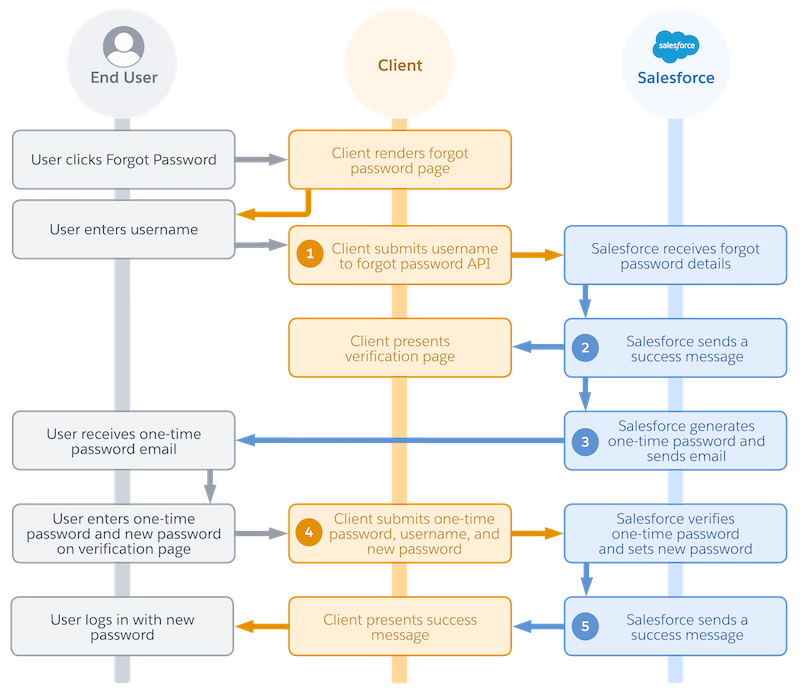
- An end user clicks a password reset link in your app.
- In your app, you natively display a forgot password page.
- The user enters their username.
- Your app initiates the flow with a request to Headless Forgot Password API. The request includes the user’s username (1).
- Salesforce receives the forgot password details.
- Salesforce returns a success message to your app (2).
- Immediately after, Salesforce generates a one-time password (OTP) and sends it to the user’s email address (3).
- In your app, you natively display an OTP verification form.
- The user receives the OTP email.
- The user enters the OTP and their new password in your verification form.
- Your app finishes resetting the password with another request to Headless Forgot Password API. The request includes the username, OTP, and new password (4).
- Salesforce verifies the OTP and sets a new password.
- Salesforce returns a success message to your app (5).
- The user logs in with their new password.
Here are a few key concepts to keep in mind for this flow.
- This flow sends two requests to Headless Forgot Password API.
- The first request initializes the password reset and kicks off the OTP verification process.
- The second request completes the password reset process.