Headless Forgot Password Overview
If your users can log in and register, they must also be able to reset their passwords. Here’s a high-level overview of how the Headless Forgot Password Flow works with a single-page app.
| Required Editions |
|---|
| Available in: both Salesforce Classic (not available in all orgs) and Lightning Experience |
| Available in: Enterprise, Unlimited, and Developer Editions |
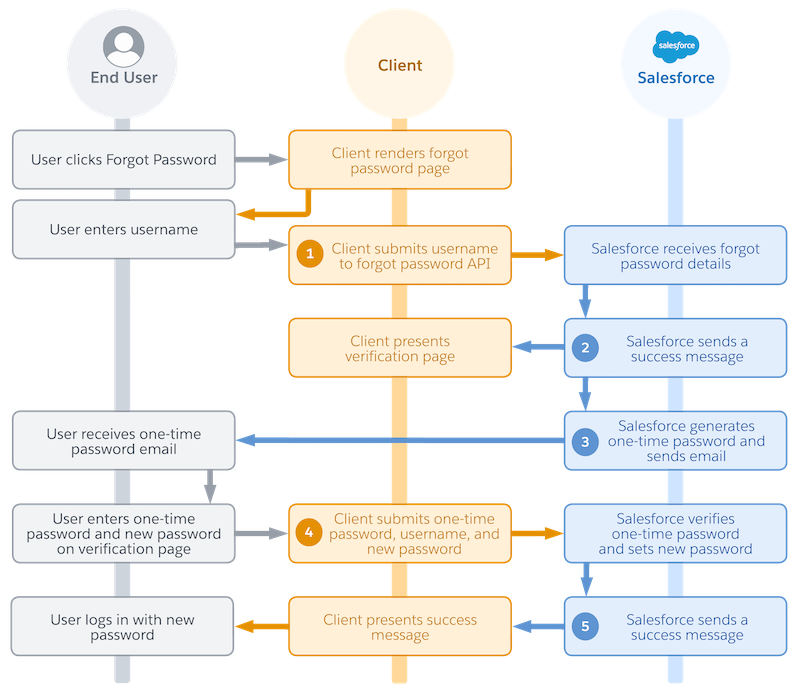
- An end user clicks a password reset link in your app.
- In your app, you natively display a forgot password page.
- The user enters their username.
- Your app initiates the flow with a request to Headless Forgot Password API. The request includes the user’s username (1).
- Salesforce receives the forgot password details.
- Salesforce returns a success message to your app (2).
- Immediately after, Salesforce generates a one-time password (OTP) and sends it to the user’s email address (3).
- In your app, you natively display an OTP verification form.
- The user receives the OTP email.
- The user enters the OTP and their new password in your verification form.
- Your app finishes resetting the password with another request to Headless Forgot Password API. The request includes the username, OTP, and new password (4).
- Salesforce verifies the OTP and sets a new password.
- Salesforce returns a success message to your app (5).
- The user logs in with their new password.
Here are a few key concepts to keep in mind for this flow.
- This flow sends two requests to Headless Forgot Password API.
- The first request initializes the password reset and kicks off the OTP verification process.
- The second request completes the password reset process.


 j
j