Embedded Service Chat SDK for iOS Developer Guide
 j
jShow Pre-Chat Fields to User
To create pre-chat fields, add SCSPrechatObject instances to the prechatFields property on the SCSChatConfiguration object.
-
Create an SCSChatConfiguration object.
In Swift:
1let config = SCSChatConfiguration(liveAgentPod: "TO_DO_POD_NAME",
2                                  // e.g. "d.gla5.gus.salesforce.com"
3                                  orgId: "TO_DO_ORG_ID",
4                                  // e.g. "00DB00000003Rxz"
5                                  deploymentId: "TO_DO_DEPLOYMENT_ID",
6                                  // e.g. "573B00000005KXz"
7                                  buttonId: "TO_DO_BUTTON_ID")
8                                  // e.g. "575C00000004h3m"
In Objective-C:
1SCSChatConfiguration *config =
2  [[SCSChatConfiguration alloc] initWithLiveAgentPod:@"TO_DO_POD_NAME"
3                                              // e.g. "d.gla5.gus.salesforce.com"
4                                               orgId:@"TO_DO_ORG_ID"
5                                              // e.g. "00DB00000003Rxz"
6                                        deploymentId:@"TO_DO_DEPLOYMENT_ID"
7                                              // e.g. "573B00000005KXz"
8                                            buttonId:@"TO_DO_BUTTON_ID"];
9                                              // e.g. "575C00000004h3m"
See Configure a Chat Session on how to configure a chat session.
-
Create SCSPrechatObject objects for the pre-chat fields you
want to specify in your app.
There are several types of pre-chat fields:
- SCSPrechatObject does not require user input and can be used to send custom data directly to the agent.
- SCSPrechatTextInputObject (a subclass of SCSPrechatObject) takes user input from a text field.
- SCSPrechatPickerObject (a subclass of SCSPrechatObject) provides the user with a dropdown list of options.
Each type has different properties you can configure.
-
Create objects that don't require user input using SCSPrechatObject.
In Swift:
1let customData = SCSPrechatObject(label: "CustomEmailField",
2                                    value: "lauren@example.com")
In Objective-C:
1SCSPrechatObject* customData = [[SCSPrechatObject alloc]
2                                    initWithLabel:@"CustomEmailField"
3                                    value:@"lauren@example.com"];
When using SCSPrechatObject to send data without user input, specify both the label and the value. The SCSPrechatObject base class contains the following properties:
- label—name of the pre-chat field shown to agent.
- value—value of the pre-chat field; only use this property if you don't intend for the user to fill in this field.
- displayLabel—optional display name of the pre-chat field shown to the user if different than the label.
- transcriptFields—optional array of field identifiers on the LiveAgentChatTranscript object in Salesforce.
- displayToAgent—indicates whether this pre-chat detail is shown to an agent accepting the chat session; defaults to true.
-
Create text input objects using SCSPrechatTextInputObject.
In Swift:
1// Create a text field
2let myPrechatField = SCSPrechatTextInputObject(label: "Full Name")
In Objective-C:
1// Create a text field
2SCSPrechatTextInputObject* myPrechatField = [[SCSPrechatTextInputObject alloc]
3  initWithLabel:@"Full Name"];
When using a SCSPrechatTextInputObject, you can control several other properties:
- required—indicates whether the field is required.
- keyboardType—provides access to other standard keyboards (such as UIKeyboardTypeEmailAddress).
- autocapitalizationType—controls how text capitalization works.
- autocorrectionType—controls auto-correction behavior.
- maxLength—specifies the maximum length of the field
- displayLabel—optional display name of the pre-chat field shown to the user if different than the label.
- transcriptFields—optional array of field identifiers on the LiveAgentChatTranscript object in Salesforce.
- displayToAgent—indicates whether this pre-chat detail is shown to an agent accepting the chat session; defaults to true.
-
Create dropdown lists using SCSPrechatPickerObject.
In Swift:
1// Create dropdown choices
2let statusOptions = NSMutableArray()
3statusOptions.add(SCSPrechatPickerOption(label:"New Issue", value:"New"))
4statusOptions.add(SCSPrechatPickerOption(label:"Fixed Issue", value:"Fixed"))
5
6// Create a dropdown list with choices
7let statusPickerField = SCSPrechatPickerObject(
8      label: "Issue Type",
9      options: statusOptions as! [SCSPrechatPickerOption])
In Objective-C:
1// Create a dropdown list with two choices
2NSMutableArray *statusOptions = [[NSMutableArray alloc] init];
3[statusOptions addObject: [[SCSPrechatPickerOption alloc]
4                          initWithLabel:@"New Issue" value:@"New"]];
5[statusOptions addObject: [[SCSPrechatPickerOption alloc]
6                          initWithLabel:@"Fixed Issue" value:@"Fixed"]];
7
8// Create a dropdown list with choices
9SCSPrechatPickerObject *picker = [[SCSPrechatPickerObject alloc]
10                                 initWithLabel:@"Issue Type" options:statusOptions];
When using a SCSPrechatPickerObject, you can access these properties:
- required—indicates whether the field is required.
- options—specifies items in the dropdown list. This property is an array of SCSPrechatPickerOption objects.
- displayLabel—optional display name of the pre-chat field shown to the user if different than the label.
- transcriptFields—optional array of field identifiers on the LiveAgentChatTranscript object in Salesforce.
- displayToAgent—indicates whether this pre-chat detail is shown to an agent accepting the chat session; defaults to true.
-
(Optional) Create SCSPrechatEntity objects to associate pre-chat fields
with fields from a record in your org.
Pre-chat fields are always sent to the agent at the start of the session. But if you want to fill in fields of a particular record, instantiate an SCSPrechatEntity for each Salesforce object (for example, Case or Contact) and instantiate an SCSPrechatEntityField for each field association within that Salesforce object (for example, Subject or LastName). To learn more, see Create or Update Salesforce Records from a Chat Session.
-
Update the config object's prechatFields property with an array of your pre-chat
objects.
In Swift:
1// Add the array of pre-chat fields to the config object
2config?.prechatFields = myPrechatFields
In Objective-C:
1// Add the array of pre-chat fields to the config object 2config.prechatFields = myPrechatFields; -
Show the pre-chat form and start a chat session by calling showChat(with:showPrechat:) and specify true for whether to show the pre-chat form.
-
If you want to show the pre-chat form and then send those results to
the agent when starting a session, call showChat(with:showPrechat:).
In Swift:
1// Show the pre-chat form and start a session
2ServiceCloud.shared().chatUI.showChat(with: config, showPrechat: true)
In Objective-C:
1// Show the pre-chat form and start a session 2[[SCServiceCloud sharedInstance].chatUI showChatWithConfiguration:config showPrechat: YES]; -
If you want to programmatically change the pre-chat data before passing
it to the org or agent, call the showPrechat(withFields:modal:completion:)
method first. From within the completion block of this method, update
the config object's prechatFields property and
then call showChat(with:showPrechat:)
and specify false for showPrechat.
For example, the following Swift code asks the user for their first and last name. After the user completes the pre-chat form, the code creates a new field by concatenating the two name fields. When we start the chat session, only this new field is sent to the agent.
1// Create two text fields
2let firstNameField = SCSPrechatTextInputObject(label: "First Name")
3let lastNameField = SCSPrechatTextInputObject(label: "Last Name")
4let prechatInputFields = [firstNameField, lastNameField] as? [SCSPrechatObject]
5
6// Show the pre-chat form...
7ServiceCloud.shared().chatUI.showPrechat(withFields: prechatInputFields, completion: {
8  (prechatResultFields, completed) in
9
10  // If the pre-chat form completed successfully...
11  if (completed && prechatResultFields != nil && prechatResultFields!.count >= 2) {
12
13    // Create the full name from the values of the two pre-chat name fields
14    let fullName = prechatResultFields![0].value + " " + prechatResultFields![1].value
15
16    // Create a full name field
17    let fullNameField = SCSPrechatObject(label: "Full Name", value: fullName)
18
19    // Add this new field to the config object
20    // (We DON'T include the original pre-chat fields because we don't need to send them...)
21    config!.prechatFields = [fullNameField]
22
23    // And now start a chat session (without showing pre-chat)
24    ServiceCloud.shared().chatUI.showChat(with: config!)
25
26  } else {
27    // TO DO: Handle the scenario where the user cancels out of the pre-chat form
28  }
29})
-
If you want to show the pre-chat form and then send those results to
the agent when starting a session, call showChat(with:showPrechat:).
Example
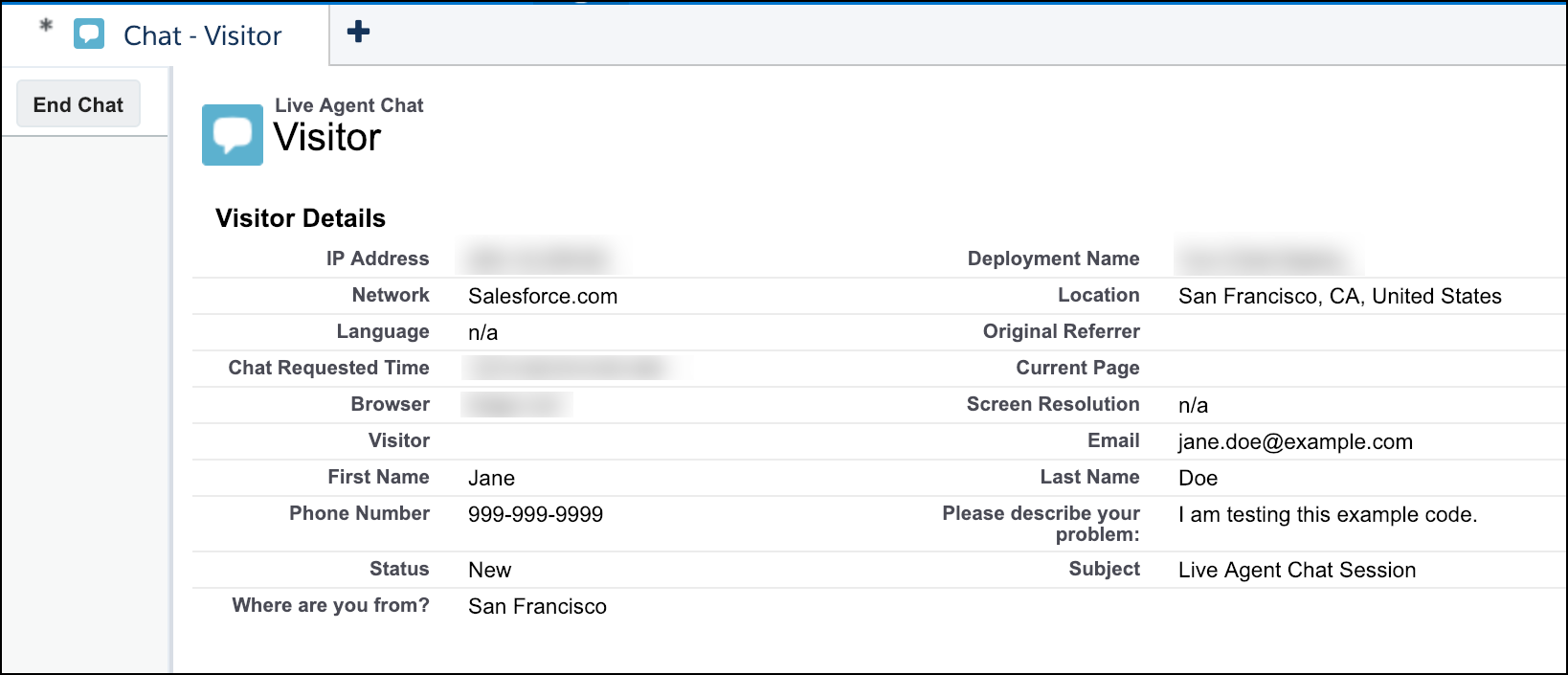
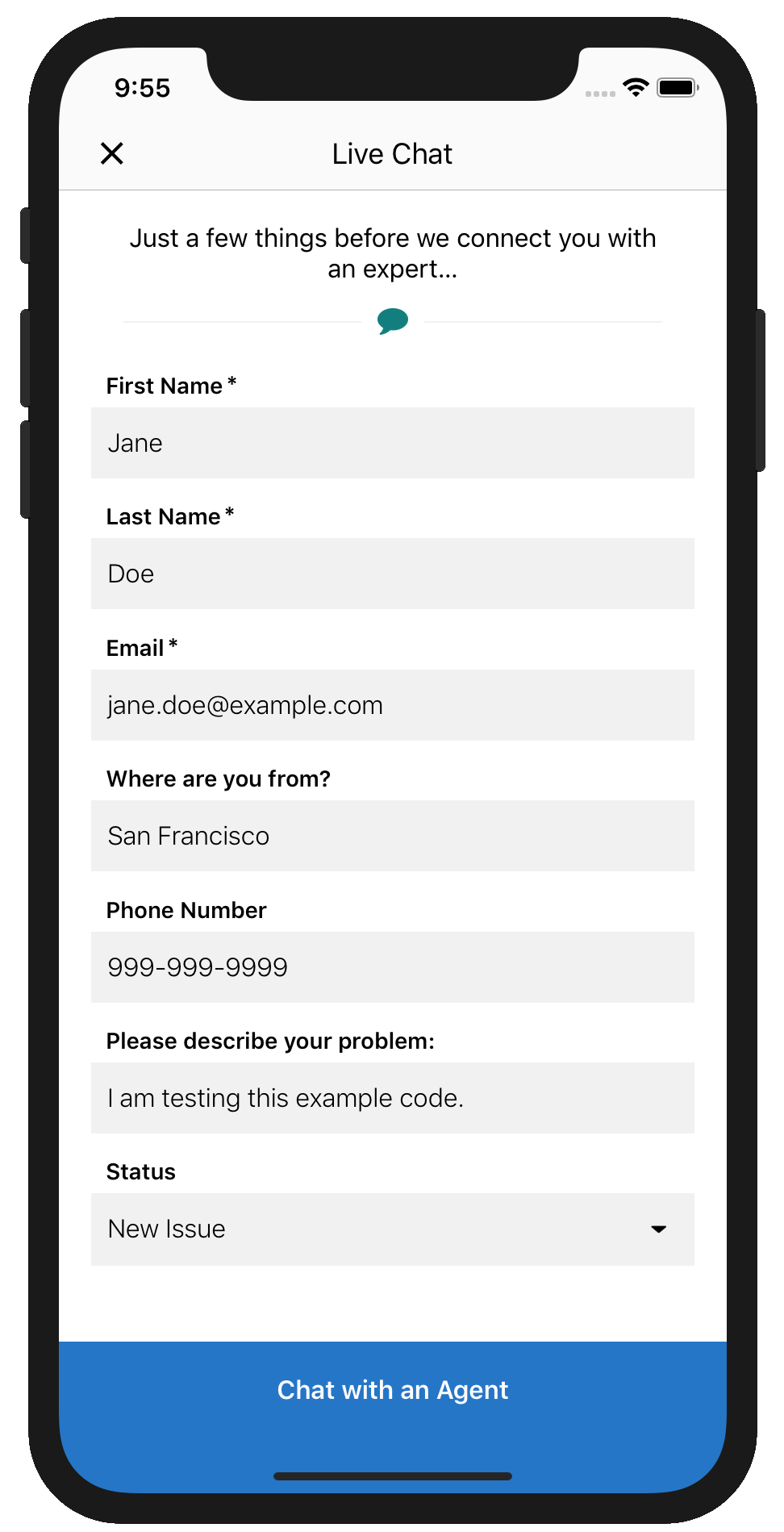
This code sample builds a set of pre-chat fields that are shown to the user.
1let config = SCSChatConfiguration(liveAgentPod: "YOUR-POD-NAME",
2                                  orgId: "YOUR-ORG-ID",
3                                  deploymentId: "YOUR-DEPLOYMENT-ID",
4                                  buttonId: "YOUR-BUTTON-ID")
5
6// Add some required fields
7let firstNameField = SCSPrechatTextInputObject(label: "First Name")
8firstNameField!.isRequired = true
9let lastNameField = SCSPrechatTextInputObject(label: "Last Name")
10lastNameField!.isRequired = true
11let emailField = SCSPrechatTextInputObject(label: "Email")
12emailField!.isRequired = true
13emailField!.keyboardType = .emailAddress
14emailField!.autocorrectionType = .no
15
16// Add some optional fields
17let originField = SCSPrechatTextInputObject(label: "Where are you from?")
18originField!.isRequired = false
19let phoneField = SCSPrechatTextInputObject(label: "Phone Number")
20phoneField!.isRequired = false
21phoneField!.keyboardType = .phonePad
22let descriptionField = SCSPrechatTextInputObject(label: "Please describe your problem:")
23descriptionField!.isRequired = false
24
25// Add a picklist field
26let statusOptions = NSMutableArray()
27statusOptions.add(SCSPrechatPickerOption(label:"New Issue", value:"New"))
28statusOptions.add(SCSPrechatPickerOption(label:"Fixed Issue", value:"Fixed"))
29let statusPickerField = SCSPrechatPickerObject(label: "Status",
30options: statusOptions as NSArray as! [SCSPrechatPickerOption])
31statusPickerField!.isRequired = false
32
33// Add hidden field containing the subject
34let subjectField = SCSPrechatObject(label: "Subject", value: "Chat Session")
35
36// Create an array of all pre-chat fields
37let prechatFields: [SCSPrechatObject] = [firstNameField!, lastNameField!, emailField!,
38                                              originField!, phoneField!, descriptionField!,
39                                              statusPickerField!, subjectField]
40
41// Add the array of pre-chat fields to the config object
42config?.prechatFields = prechatFields
43
44// And NOW show the chat UI
45ServiceCloud.shared().chatUI.showChat(with: config!, showPrechat: true)
With this code, the user sees the following pre-chat UI in their mobile app.
And the agent sees the following UI from the console.