


 j
jAnnouncements
B2C Commerce Developer Tooling
B2C CLI Agent Skills
Agentic MCP Shopper Tools Quick Start (Pilot)
SFRA Quick Start
Composable Storefront Quick Start
B2C Commerce API Quick Start
B2C Commerce Release Notes
Ask the Community
AI agents like Claude, Agentforce, and ChatGPT are powerful, but they often struggle to give truly accurate, brand-based, storefront-specific suggestions. That’s why we built the B2C Commerce Model Context Protocol (MCP) Service, focusing on the most important users: your shoppers.
The B2C Commerce MCP Service is a fully-hosted service for linking an AI agent to real-time B2C Commerce data access. The B2C Commerce MCP Service provides MCP tools for the agentic shopper experience, and supports the latest standards, including Google’s Agent to Agent (A2A), Model Context Protocol (MCP) /tools, HTTP SSE. Because it leverages a secure, standards-based protocol that supports robust authentication and authorization, the B2C Commerce MCP Service ensures data privacy and platform integrity.
This quick start explains how to connect an AI agent to the B2C Commerce MCP Shopper Service. It doesn’t cover Salesforce Agentforce Shopper Agent setup or Shopper Agents API session initialization.
The B2C Commerce MCP Shopper Service and the Salesforce Agentforce Shopper Agent are separate offerings. Use this table to find the applicable path for your goal.
| Your goal | What to use |
|---|---|
| Let external AI assistants (such as ChatGPT or Claude) search your catalog, build a cart, and link to checkout. | The B2C Commerce MCP Shopper Service (this guide). |
| Add a conversational Shopper Agent (chat) to your storefront. | The Shopper Agent setup docs: Set Up Salesforce Agent Guided Shopping. |
| Connect the B2C Commerce MCP Service to Agentforce. | Not currently supported. |
The Shopper Agents API (including its sessionInitKey) is part of Salesforce Agentforce Shopper Agent setup, not the B2C Commerce MCP Service, and is out of scope for this quick start. In this guide, the MCP sessionId from the /sse connection is used only for MCP Service messaging calls. For Shopper Agent setup, see the Help docs linked in the table.
Note
With the B2C Commerce MCP Service, your AI agent always has access to the most up-to-date resources (product lists, details, and images) from Salesforce B2C Commerce. External AI assistants, such as ChatGPT and Perplexity, are enabled with seamless conversational access to a brand’s ecommerce capabilities, so that shoppers can use natural language to discover and buy products via the AI assistants, for example:
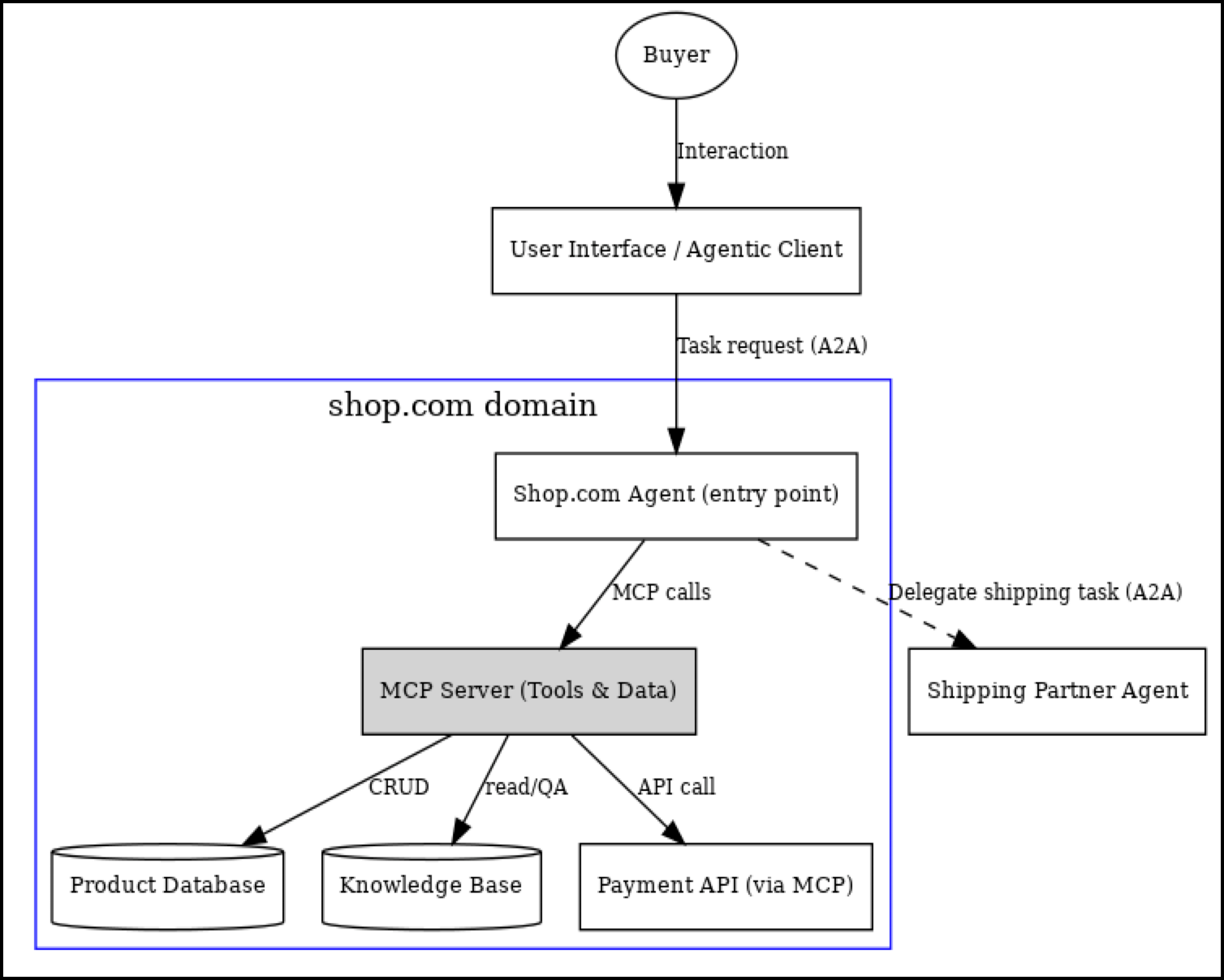
The following image shows how the B2C Commerce MCP Service makes product data, inventory, pricing, order information, and merchant operational functions machine-readable and easily accessible to authorized AI agents.
The B2C Commerce MCP Shopper Service pilot provides the functionality shown in the MCP Server (Tools & Data) box.
Note
 )
)
The B2C Commerce MCP Service offers a range of features, such as shopper, merchant, and intelligence capabilities. The pilot program for the B2C Commerce MCP Shopper Service, however, is centered around the shopper experience.
To participate in the pilot program:
The B2C Commerce MCP Service doesn’t return a sessionInitKey. The sessionId returned when connecting to the MCP Service via /sse is only for making additional MCP Service requests within that session.
Note
To demonstrate the B2C Commerce MCP Shopper Service, we are providing a demo shopper agent that uses the OpenAI GPT API and accepts simple HTTP requests using Agent2Agent (A2A) JSON RPC calls from a chat UI in your storefront.
Your AI agent configuration can vary depending on your environment. Check the documentation for your specific AI agent.
Important
sfcc.shopper-mcpagent scope in the SLAS JWT scopes field.
short-code, org-id, and the mcp family. You can find your organization’s short-code and tenant ID in Business Manager, for example: kv7kzm70 and f_ecom_zzrr_dev, respectively.
https://<short-code>.api.comm…om/mcp/shopper/v1/organizations/<org_id>/ssehttps://<short-code>.api.comm…om/mcp/shopper/v1//organizations/<org_id>/mcp/messages?sessionId=<session_id>, where session_id is received in the first event from the /sse request./messaging protocol.These tables summarize the available B2C Commerce MCP Service shopper tools for AI-powered product search, product detail pages with images, adding one or more products to a cart, and a link to checkout that redirects to the storefront for both guest and registered users:
| Functionality | Description | Parameters |
|---|---|---|
| search_product | Get a list of products based on query value. |
|
| get_product | Get a specific product by ID. |
|
| Functionality | Description | Parameters |
|---|---|---|
| create_basket | Create a basket (cart) with a product for a given site ID and usid. |
|
| add_product_to_basket | Add a product to a cart with a given basket ID, site ID, and usid. |
|
| get_basket | Return the basket (cart) details for the given site ID and basket ID. |
|
| remove_basket | Remove (delete) the given basket (cart) by site ID and basket ID. |
|
| checkout | Start checkout for given cart ID, site, and usid. This returns a link to the configured PWA kit store front. |
|
In compliance with Salesforce Security Guidelines, every API requires a SLAS JWT for authentication, uses TLS over the network, monitoring and logging and auditing, and provides rate limits for all API calls.
j