Technical reference for Commerce Apps APIs, data models, and terminology.
commerce-app.json Schema
Every Commerce App Package must include a commerce-app.json file at the root of the CAP directory. This file defines the app’s identity and must match the corresponding entry in the App Registry manifest.
Field
Type
Required
Description
id
string
Yes
App identifier in kebab-case (for example, avalara-tax)
name
string
Yes
Human-readable display name (for example, Avalara Tax)
description
string
Yes
Short description of the app
domain
string
Yes
Commerce domain in hyphen-case (for example, tax, ratings-and-reviews). Must match the registry manifest.
version
string
Yes
Semantic version (for example, 1.1.0). Must match the registry manifest.
publisher
object
Yes
Publisher information (see below)
dependencies
object
No
Reserved for future dependency management between apps
Important: The version and domain fields in commerce-app.json must match the corresponding entry in the App Registry root manifest (commerce-apps-manifest/manifest.json). A mismatch causes CI validation to fail.
adminComponents.json Schema
app-configuration/adminComponents.json is an optional file that declares Business Manager admin UI components that the merchant sees after installing the app. The file is a JSON object with a configuration array of interactive setting entries. Each entry describes one component rendered in the BM admin UI for the app.
Every entry must be an object with a non-empty componentKey (the stable identifier referenced by locale files) and a non-empty string type. Other fields like header and description are free-form and not validated by registry CI.
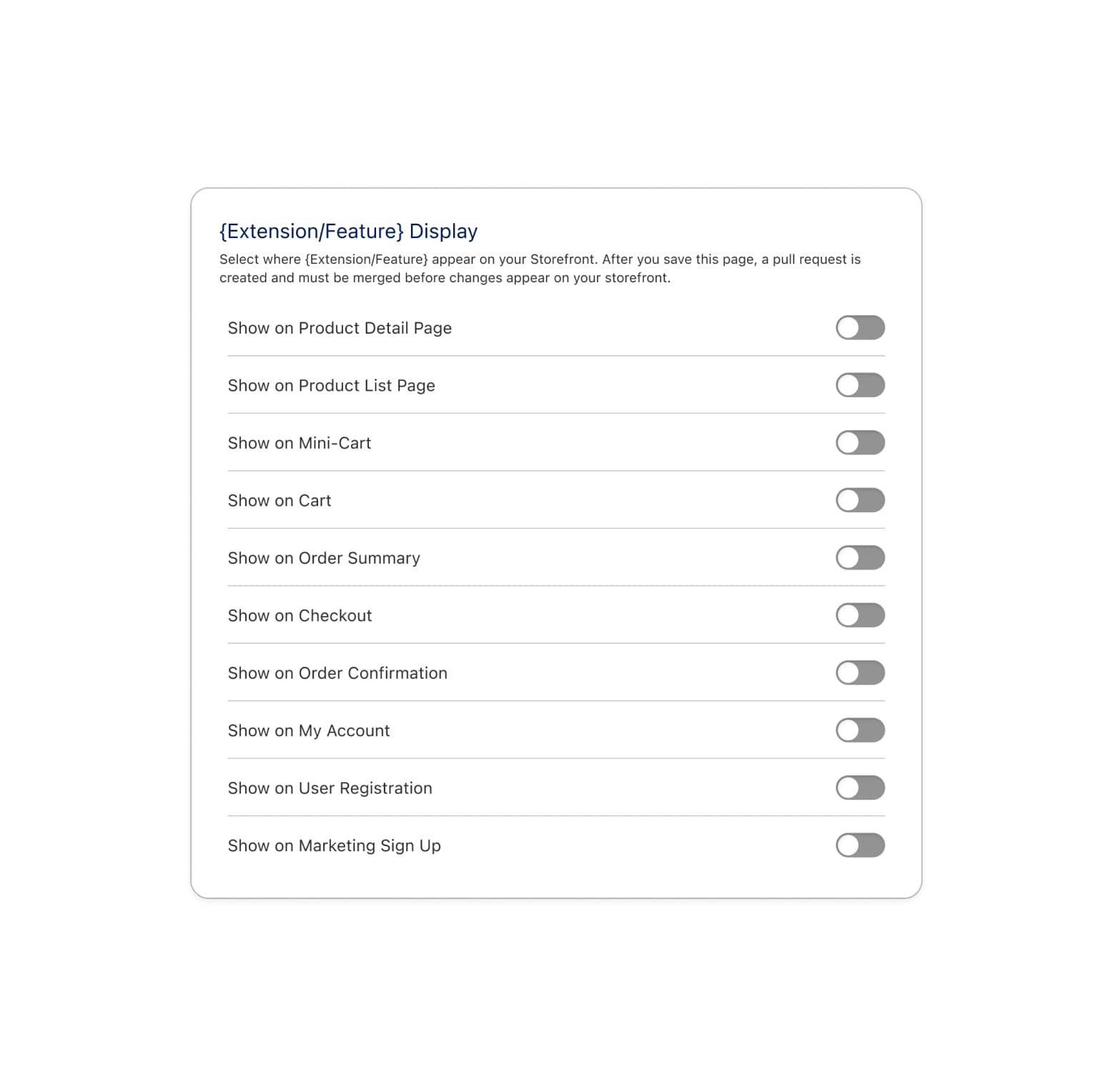
The currently supported component type is storefrontComponentVisibility, which renders one boolean toggle per UI target the app registers — letting the merchant enable or disable each target without touching code. Toggling a target opens a pull request against the merchant’s Storefront Next repository to update target-config.json accordingly.
Component Object Fields
Every entry under configuration:
Field
Type
Required
Description
componentKey
string
Yes
Unique snake*case identifier (matching ^[a-z]a-z0-9*]\*\$) for this configuration entry. Stable across versions; referenced by locale files inapp-configuration/translations/. See App-shipped string localization.
type
string
Yes
Component type identifier. Registry CI only deep-validates known types (currently storefrontComponentVisibility).
storefrontComponentVisibility Attributes
When a configuration entry has type: "storefrontComponentVisibility", it must also declare an attributes[] array. Each entry in attributes[] describes one toggle row.
Field
Type
Required
Description
id
string
Yes
The sfcc.* UI target ID this toggle controls. Must match a target the app registers in storefront-next/src/extensions/{appName}/target-config.json.
Whether the surface area is enabled by default on install.
Note: The BM admin UI shows toggles only for targets that exist in both adminComponents.json and the merchant’s storefront repo target-config.json. Targets declared here but not registered in the storefront appear as unavailable in the UI until the storefront is updated.
Cache TTL: Business Manager caches the toggle values it reads from the merchant’s Storefront Next target-config.json for 30 seconds. After a merchant merges a storefront PR that flips a toggle value, allow up to 30 seconds before the new value is reflected in the storefrontComponentVisibility component.
Production environments: Surface area toggle changes are not allowed on production environments. Merchants must make toggle changes on a non-production instance and promote them by merging the resulting storefront PR and redeploying the storefront to production MRT.
Gating: The storefrontComponentVisibility component is hidden in Business Manager until the merchant completes the “Merge Storefront PR” task in the app’s configuration task list. Until that task is marked complete, the toggle UI does not render.
Example
1{2 "configuration": [3{4 "componentKey": "component_visibility",5 "type": "storefrontComponentVisibility",6 "header": "Component Visibility",7 "description": "Control where the component appears on the storefront.",8 "attributes": [9{10 "id": "sfcc.checkout.shippingAddress.after",11 "label": "Show on Checkout",12 "defaultValue": true13},14{15 "id": "sfcc.orderSummary.adjustments",16 "label": "Show on Order Summary",17 "defaultValue": false18}19]20}21]22}
CI Validation
Registry CI validates adminComponents.json on every PR that changes a CAP. The file must be a valid JSON object. The configuration key, when present, must be an array. Every entry must declare a non-empty string componentKey matching ^[a-z][a-z0-9_]*$, unique within the file, and a non-empty string type. Every entry whose type is "storefrontComponentVisibility" must also declare a non-empty attributes[] array. Each attribute has a non-empty string id, a non-empty string label, and a boolean defaultValue. The file is optional — omit it if the app doesn’t need merchant-toggled component visibility.
App-shipped string localization
Two app-configuration/ artifacts ship strings that Business Manager renders to merchants:
tasksList.json — the post-install “Complete your setup” checklist. Translatable fields: name, description.
adminComponents.json (optional) — admin-rendered components such as storefrontComponentVisibility toggle rows. Translatable fields: attributes[].label on each configuration[] entry.
By default, both files ship literal English. To render strings in additional locales, ship locale files alongside the source artifact under app-configuration/translations/.
Stable keys: taskKey and componentKey
Locale files reference tasks and admin components by stable keys, not array index. Every entry in tasksList.json must declare a unique non-empty taskKey, and every entry in adminComponents.jsonconfiguration[] must declare a unique non-empty componentKey:
Key
Where
Format
Uniqueness
taskKey
each task in tasksList.json
^[a-z][a-z0-9_]*$ (snake_case)
Within the file
componentKey
each entry in configuration[] of adminComponents.json
^[a-z][a-z0-9_]*$ (snake_case)
Within the file
Once shipped, a key is the stable identifier for that task or component across versions. Avoid renaming.
app-configuration/translations/<locale>.json
Ship one file per locale under app-configuration/translations/:
Each locale file uses two reserved top-level namespaces — tasks and adminComponents — keyed by taskKey and componentKey respectively. Include the namespace only if the corresponding artifact is present.
The top-level tasks and adminComponents keys are reserved by the registry. Don’t introduce sibling keys.
tasks.<taskKey>.name and tasks.<taskKey>.description are both required and must be non-empty for every task listed.
adminComponents.<componentKey>.attributes.<id>.label is required and must be non-empty for every (componentKey, attribute id) pair listed.
en-US.json is required when translations/ exists. It defines the canonical key set every other locale file must match exactly — no extra keys, no missing keys, in either namespace.
The English text in en-US.json and the literal English in tasksList.json / adminComponents.json must stay in sync.
Fallback chain
At render time the BM client requests a locale; the registry resolves each translatable string in this order:
translations/<requested-locale>.json
translations/en-US.json
literal English from the source artifact:
tasks → name / description on the task itself in tasksList.json
admin component attribute labels → label on the attribute in adminComponents.json
An app that omits translations/ entirely keeps rendering literal English in every locale (no behavior change). An app that ships only en-US.json renders the same strings in every locale, but is wired up to add more locales later.
Locale rollout
en-US is required at submission when translations/ is present. Additional locales are optional and can be added incrementally as your localization team produces them.
Heads up: translation files are bundled inside the CAP zip and merged into the persisted task list at install time. Adding or updating translations after the fact requires shipping a new app version and having merchants upgrade — there is no out-of-band path for the registry to push translation updates to an already-installed app.
Supported locales
Locale filenames are validated against the set of locales supported by Business Manager:
Locale
Filename
Arabic (Morocco)
ar_MA.json
German
de.json
English (United States)
en-US.json
Spanish
es.json
French
fr.json
Italian
it.json
Japanese
ja.json
Korean
ko.json
Dutch
nl.json
Polish
pl.json
Portuguese
pt.json
Chinese (Simplified)
zh_CN.json
Chinese (Traditional)
zh_TW.json
CI rejects locale files whose filenames are outside this set.
CI validation
Registry CI validates app-shipped strings on every PR that changes a CAP:
Every tasksList.json entry has a non-empty taskKey matching ^[a-z][a-z0-9_]*$, unique within the file.
Every adminComponents.jsonconfiguration[] entry has a non-empty componentKey matching ^[a-z][a-z0-9_]*$, unique within the file.
When app-configuration/translations/ exists:
en-US.json is present.
Every locale filename is in the supported set.
Every locale file has the expected shape under tasks and (when present) adminComponents.
Every taskKey from tasksList.json and every (componentKey, attribute id) pair from adminComponents.json appears in en-US.json.
Every non-default locale file lists exactly the same keys as en-US.json in both namespaces — no extras, no missing.
adminComponents.json Schema
app-configuration/adminComponents.json is an optional file that declares Business Manager admin UI components that the merchant sees after installing the app. The file is a JSON object with a configuration array of interactive setting entries. Each entry describes one component rendered in the BM admin UI for the app.
Every entry must be an object with a non-empty componentKey (the stable identifier referenced by locale files) and a non-empty string type. Other fields like header and description are free-form and not validated by registry CI.
The currently supported component type is storefrontComponentVisibility, which renders one boolean toggle per UI target the app registers — letting the merchant enable or disable each target without touching code. Toggling a target opens a pull request against the merchant’s Storefront Next repository to update target-config.json accordingly.
Component Object Fields
Every entry under configuration:
Field
Type
Required
Description
componentKey
string
Yes
Unique snake_case identifier (matching ^[a-z][a-z0-9_]*$) for this configuration entry. Stable across versions; referenced by locale files in app-configuration/translations/. See App-shipped string localization.
type
string
Yes
Component type identifier. Registry CI only deep-validates known types (currently storefrontComponentVisibility).
storefrontComponentVisibility Attributes
When a configuration entry has type: "storefrontComponentVisibility", it must also declare an attributes[] array. Each entry in attributes[] describes one toggle row.
Field
Type
Required
Description
id
string
Yes
The sfcc.* UI target ID this toggle controls. Must match a target the app registers in storefront-next/src/extensions/{appName}/target-config.json.
Whether the surface area is enabled by default on install.
Note: The BM admin UI shows toggles only for targets that exist in both adminComponents.json and the merchant’s storefront repo target-config.json. Targets declared here but not registered in the storefront appear as unavailable in the UI until the storefront is updated.
Cache TTL: Business Manager caches the toggle values it reads from the merchant’s Storefront Next target-config.json for 30 seconds. After a merchant merges a storefront PR that flips a toggle value, allow up to 30 seconds before the new value is reflected in the storefrontComponentVisibility component.
Production environments: Surface area toggle changes are not allowed on production environments. Merchants must make toggle changes on a non-production instance and promote them by merging the resulting storefront PR and redeploying the storefront to production MRT.
Gating: The storefrontComponentVisibility component is hidden in Business Manager until the merchant completes the “Merge Storefront PR” task in the app’s configuration task list. Until that task is marked complete, the toggle UI does not render.
Example
1{2 "configuration": [3{4 "componentKey": "component_visibility",5 "type": "storefrontComponentVisibility",6 "header": "Component Visibility",7 "description": "Control where the component appears on the storefront.",8 "attributes": [9{10 "id": "sfcc.checkout.shippingAddress.after",11 "label": "Show on Checkout",12 "defaultValue": true13},14{15 "id": "sfcc.orderSummary.adjustments",16 "label": "Show on Order Summary",17 "defaultValue": false18}19]20}21]22}
CI Validation
Registry CI validates adminComponents.json on every PR that changes a CAP. The file must be a valid JSON object. The configuration key, when present, must be an array. Every entry must declare a non-empty string componentKey matching ^[a-z][a-z0-9_]*$, unique within the file, and a non-empty string type. Every entry whose type is "storefrontComponentVisibility" must declare a non-empty attributes[] array where each attribute has a non-empty string id, a non-empty string label, and a boolean defaultValue. The file is optional — omit it if the app does not need merchant-toggled component visibility.
App-shipped string localization
Two app-configuration/ artifacts ship strings that Business Manager renders to merchants:
tasksList.json — the post-install “Complete your setup” checklist. Translatable fields: name, description.
adminComponents.json (optional) — admin-rendered components such as storefrontComponentVisibility toggle rows. Translatable fields: attributes[].label on each configuration[] entry.
By default, both files ship literal English. To render strings in additional locales, ship locale files alongside the source artifact under app-configuration/translations/.
Stable keys: taskKey and componentKey
Locale files reference tasks and admin components by stable keys, not array index. Every entry in tasksList.json must declare a unique non-empty taskKey, and every entry in adminComponents.jsonconfiguration[] must declare a unique non-empty componentKey:
Key
Where
Format
Uniqueness
taskKey
each task in tasksList.json
^[a-z][a-z0-9_]*$ (snake_case)
Within the file
componentKey
each entry in configuration[] of adminComponents.json
^[a-z][a-z0-9_]*$ (snake_case)
Within the file
Once shipped, a key is the stable identifier for that task or component across versions. Avoid renaming.
app-configuration/translations/<locale>.json
Ship one file per locale under app-configuration/translations/:
Each locale file uses two reserved top-level namespaces — tasks and adminComponents — keyed by taskKey and componentKey respectively. Include the namespace only if the corresponding artifact is present.
The top-level tasks and adminComponents keys are reserved by the registry. Don’t introduce sibling keys.
tasks.<taskKey>.name and tasks.<taskKey>.description are both required and must be non-empty for every task listed.
adminComponents.<componentKey>.attributes.<id>.label is required and must be non-empty for every (componentKey, attribute id) pair listed.
en-US.json is required when translations/ exists. It defines the canonical key set every other locale file must match exactly — no extra keys, no missing keys, in either namespace.
The English text in en-US.json and the literal English in tasksList.json / adminComponents.json must stay in sync.
Fallback chain
At render time the BM client requests a locale; the registry resolves each translatable string in this order:
translations/<requested-locale>.json
translations/en-US.json
literal English from the source artifact:
tasks → name / description on the task itself in tasksList.json
admin component attribute labels → label on the attribute in adminComponents.json
An app that omits translations/ entirely keeps rendering literal English in every locale (no behavior change). An app that ships only en-US.json renders the same strings in every locale, but is wired up to add more locales later.
Locale rollout
en-US is required at submission when translations/ is present. Additional locales are optional and can be added incrementally as your localization team produces them.
Heads up: translation files are bundled inside the CAP zip and merged into the persisted task list at install time. Adding or updating translations after the fact requires shipping a new app version and having merchants upgrade — there is no out-of-band path for the registry to push translation updates to an already-installed app.
Supported locales
Locale filenames are validated against the set of locales supported by Business Manager:
Locale
Filename
Arabic (Morocco)
ar_MA.json
German
de.json
English (United States)
en-US.json
Spanish
es.json
French
fr.json
Italian
it.json
Japanese
ja.json
Korean
ko.json
Dutch
nl.json
Polish
pl.json
Portuguese
pt.json
Chinese (Simplified)
zh_CN.json
Chinese (Traditional)
zh_TW.json
CI rejects locale files whose filenames are outside this set.
CI validation
Registry CI validates app-shipped strings on every PR that changes a CAP:
Every tasksList.json entry has a non-empty taskKey matching ^[a-z][a-z0-9_]*$, unique within the file.
Every adminComponents.jsonconfiguration[] entry has a non-empty componentKey matching ^[a-z][a-z0-9_]*$, unique within the file.
When app-configuration/translations/ exists:
en-US.json is present.
Every locale filename is in the supported set.
Every locale file has the expected shape under tasks and (when present) adminComponents.
Every taskKey from tasksList.json and every (componentKey, attribute id) pair from adminComponents.json appears in en-US.json.
Every non-default locale file lists exactly the same keys as en-US.json in both namespaces — no extras, no missing.
APIs
The following APIs support Commerce App lifecycle management:
Install/Uninstall Jobs (OCAPI Data API)
Commerce App installation and uninstallation are driven by system jobs executed via the OCAPI Data API.
Base URL:/s/-/dw/data/v{version}/jobs/{job_id}/executions
Install Job ID:sfcc-install-commerce-app
Uninstall Job ID:sfcc-uninstall-commerce-app
Jobs are triggered via POST to the executions endpoint with parameters in the request body. The B2C CLI handles this automatically, but the underlying API can also be called directly.
Required OCAPI Permissions
Your API client must have the following OCAPI Data API resources configured in Business Manager (Administration > Site Development > Open Commerce API Settings):
Note: When using the B2C CLI (b2c cap install), the CLI handles packaging, WebDAV upload, and job execution automatically. You don’t need to call this API directly.
Uninstall Job Parameters
Parameter
Type
Description
app_name
string
The app ID to uninstall, such as avalara-tax
app_domain
string
The commerce domain, such as tax, shipping, or fraud
site_id
string
The target site ID, prefixed with Sites- (for example, Sites-RefArch)
Both install and uninstall jobs return a standard OCAPI job execution object. The CLI polls the execution status until the job completes or fails. Key response fields:
Field
Type
Description
id
string
Execution ID for polling status
execution_status
string
running, finished, aborted
exit_status.code
string
Exit code on completion, such as ok or error
duration
number
Execution duration in milliseconds
log_file_name
string
Path to the job log file (retrievable via WebDAV)
CommerceFeatureState Data Model
The CommerceFeatureState system object tracks installation and configuration status for each Commerce App per site.
Field
Type
Description
StateId
varchar
Unique identifier for this installation record
SiteId
varchar
The site this feature state applies to
FeatureType
varchar
ISV_APP, NATIVE_APP, NATIVE_FEATURE, or CUSTOM_FEATURE
Timestamp of configuration being cleared (if applicable)
FeatureType Values
The FeatureType field is derived from the type and provider fields in the App Registry manifest:
Manifest type
Manifest provider
FeatureType
Description
app
thirdParty
ISV_APP
Third-party ISV Commerce App
app
salesforce
NATIVE_APP
Salesforce-built Commerce App
feature
salesforce
NATIVE_FEATURE
Native platform feature (for example, Flat Tax)
feature
custom
CUSTOM_FEATURE
Customer-customizable feature
custom
custom
CUSTOM_FEATURE
Custom provider placeholder (for example, Custom Tax)
Multi-Site Behavior
The CommerceFeatureState record is per-site. A single app can be installed on multiple sites within the same realm. Key multi-site behaviors:
Cartridge copying: The install job copies cartridges to the active code version on the first site install. Subsequent site installs skip the copy if the cartridges already exist in the active code version.
Cartridge path: Each site gets its own cartridge path entry, managed independently.
IMPEX processing: Install IMPEX runs for every site install. Uninstall IMPEX only runs when the last site uninstalls the app, because services, jobs, and custom object definitions are instance-scoped resources shared across all sites.
Cartridge file deletion: Cartridge files are only deleted from the active code version when the last site uninstalls the app.
Feature toggles: Toggle disablement is also deferred until the last site uninstalls.
Feature Toggles
The platform automatically manages feature toggles during Commerce App installation and uninstallation. You don’t need to configure these manually — the install job enables them and the uninstall job disables them.
Tax Domain Toggles
When a tax Commerce App is installed, the platform automatically enables the following toggles:
Toggle Name
Purpose
TaxAppHooksEnabled
Required for Commerce App tax extension points (sfcc.app.tax.*) to execute. When disabled, the platform falls back to dw.order.calculateTax.
ScapiHookExecutionEnabled
Required for SCAPI hooks to execute during headless checkout flows.
MultilevelTax
Enables multi-level tax line items on basket line items (for example, state + county + city).
On uninstall, only TaxAppHooksEnabled is disabled (and only when the last tax app is removed from all sites). ScapiHookExecutionEnabled and MultilevelTax are left enabled because other platform features can rely on them.
Note: These toggles serve as kill switches. If a Commerce App tax hook is misbehaving in production, internal support can disable TaxAppHooksEnabled without a code deployment to fall back to standard tax behavior.
Install and Uninstall Flow Details
Install Flow
The install job (sfcc-install-commerce-app) executes these steps in order:
Feature toggle check: Verifies CommerceAppsEnabled is enabled on the instance.
Manifest validation: Checks that the app name and domain exist in the App Registry manifest.
Idempotency check: If the app is already installed on this site, the job skips installation and returns success. If cartridges are missing from the active code version (for example, after a code version switch), the job re-copies them without re-running IMPEX.
Resolve site, library, and code version: Validates the target site exists, resolves the site’s content library ID (for LIBRARYID placeholder), and locates the active code version.
Write INSTALLING state.
Fetch and unzip CAP: Downloads the .zip from WebDAV or the App Registry and extracts it to a temporary directory.
Read tasksList.json: Parses post-install configuration tasks from the CAP.
Copy cartridges: Copies site_cartridges/ and bm_cartridges/ to the active code version directory. Skips copying if the app is already installed on another site and the cartridges are already present.
Update cartridge paths: Prepends site cartridges to the site’s cartridge path and adds BM cartridges to the Business Manager cartridge path.
Process install IMPEX: Replaces SITEID and LIBRARYID placeholders, zips the processed files, and executes a Site Import in merge mode.
Serialize uninstall IMPEX: Persists the contents of impex/uninstall/ into the CommerceFeatureState record so they’re available at uninstall time (the CAP isn’t needed for uninstall).
Enable feature toggles: For tax apps, enables TaxAppHooksEnabled, ScapiHookExecutionEnabled, and MultilevelTax.
Create storefront PR (optional): If storefront-next/ is present and should_create_pr is true, creates a GitHub PR against the merchant’s Storefront Next repository. A “Merge Storefront PR” task is automatically prepended to the configuration task list.
Write INSTALLED state.
On failure at any step, the job writes INSTALL_FAILED, removes cartridges from paths, and cleans up copied cartridge files.
Uninstall Flow
The uninstall job (sfcc-uninstall-commerce-app) executes these steps:
Feature toggle check: Verifies CommerceAppsEnabled is enabled.
Idempotency check: Verifies the app is currently installed on the target site and no uninstall is already in progress.
Read persisted state: Reads installed cartridge names and serialized uninstall IMPEX data from the CommerceFeatureState record before writing the UNINSTALLING state (which overwrites some metadata fields).
Write UNINSTALLING state.
Remove cartridges from paths: Removes site cartridges from the site’s path and BM cartridges from the BM path. On partial failure, attempts to restore the site cartridge path.
Delete cartridge files (last site only): If this is the last site using the app, deletes the cartridge directories from the active code version.
Disable feature toggles (last site only): For tax apps, disables TaxAppHooksEnabled.
Process uninstall IMPEX (last site only): Reconstructs the uninstall IMPEX files from persisted state, replaces placeholders, and executes a Site Import in merge mode. This step is intentionally ordered last because it’s irreversible.
Write UNINSTALLED state.
Important: The uninstall job does not require access to the original CAP archive. All data needed for uninstall is read from the CommerceFeatureState record that was persisted during installation.
App Registry Manifest
The App Registry uses a root manifest (commerce-apps-manifest/manifest.json) to define all available apps. The manifest organizes apps by domain, with each domain containing an array of app entries.
Manifest Entry Fields
Field
Type
Required
Description
id
string
Yes
App identifier in kebab-case
name
string
Yes
Display name
description
string
Yes
App description
iconName
string
Yes
Icon filename (for example, avalara.png)
domain
string
Yes
Commerce domain
type
string
Yes
app, feature, or custom
provider
string
Yes
thirdParty, salesforce, or custom
version
string
Apps only
Semantic version of the current release
zip
string
Apps only
ZIP filename (for example, avalara-tax-v1.1.0.zip)
sha256
string
Apps only
SHA256 hash of the ZIP file for integrity verification
configurationUrl
string
Features only
Business Manager deep link for native feature configuration
Entry Types
The manifest supports three entry types:
app (ISV or Salesforce apps): Installable Commerce App Packages with version, zip, and sha256 fields. These go through the full CAP install flow.
feature (native platform features): Built-in features like Flat Tax or Basic Shipping that are configured directly in Business Manager via a configurationUrl. No CAP install is needed.
custom (custom provider placeholders): Placeholders that let merchants configure their own custom integrations. No CAP install is needed.
Hub Display
Provider domains (tax, payment, shipping) appear under “Providers” in the Cart & Checkout Hub. All other domains appear under “Additional Setup”. Multiple entries within the same domain appear as provider options under a single hub tile.
Manifest and Catalog Cache TTL
Business Manager caches the App Registry manifest.json and per-app catalog.json responses for 15 minutes. After a registry PR merges that adds a new app or publishes a new version, allow up to 15 minutes before it appears in the Cart & Checkout Hub of an existing Business Manager session. Starting a new BM session does not bypass the cache — the TTL is per-instance, not per-session.
Manifest and Catalog Cache TTL
Business Manager caches the App Registry manifest.json and per-app catalog.json responses for 15 minutes. After a registry PR merges that adds a new app or publishes a new version, allow up to 15 minutes before it appears in the Cart & Checkout Hub of an existing Business Manager session. Starting a new BM session does not bypass the cache — the TTL is per-instance, not per-session.
Known Limitations
The following limitations apply to Commerce Apps:
Storefront compatibility
Commerce Apps are designed exclusively for Storefront Next. SiteGenesis and SFRA storefronts aren’t supported.
SiteGenesis cartridges (sitegenesis_storefront_controllers, sitegenesis_storefront_core) and SFRA cartridges (app_storefront_base) override the dw.order.calculate hook, which bypasses Commerce App tax hook selection entirely. These cartridges must be removed from the site’s cartridge path before installing a tax Commerce App.
Hybrid setups (Storefront Next with SiteGenesis/SFRA cartridges still on the path) produce unpredictable behavior for Commerce App extension points.
Extension points
Only Tax extension points (sfcc.app.tax.calculate, sfcc.app.tax.commit, sfcc.app.tax.cancel) are live in the initial release. Shipping, Fraud, and other adapter interface extension points arrive in the second half of 2026.
Only one Commerce App can be the active provider for a given domain per site. Installing a second tax app on the same site overwrites the first.
Legacy hooks (dw.order.calculateTax) and Commerce App extension points are mutually exclusive per site. When TaxAppHooksEnabled is active, the platform calls the registered Commerce App hook instead of the legacy hook.
Installation and upgrades
No in-place upgrades. To update to a new version, merchants must uninstall the old version and install the new one. Automated version upgrades are planned for Wave 3.
No rollback mechanism. After uninstalling, there is no one-click way to restore the previous version. Merchants must re-install the desired version.
Multi-site
Cartridge files are shared across sites at the code version level. You can’t run different versions of the same Commerce App on different sites within the same realm.
Instance-scoped resources (service definitions, custom object type definitions) are shared across all sites. Uninstall IMPEX only runs when the last site uninstalls the app.
Storefront Next extensions
Extensions are incorporated via a GitHub Pull Request at install time. The merchant must manually merge the PR and rebuild their storefront.
There is no automated mechanism to remove storefront extension code on uninstall. Merchants must manually remove the extension files from their Storefront Next repository.
Connection Health Check
The connection health check is an optional extension point that a Commerce App uses to report whether its external dependency is reachable. Business Manager calls the hook when a merchant views the app details page or manually refreshes the connection status, and shows the result as a health badge on the app’s Cart & Checkout Hub tile.
Extension Point
Extension point name
Exported function
Return type
sfcc.app.<domain>.checkConnectionHealth
checkConnectionHealth
dw.system.Status or null
The hook is registered per app domain — for example, sfcc.app.tax.checkConnectionHealth for a tax app, sfcc.app.shipping.checkConnectionHealth for a shipping app.
Status Interpretation
Returned Status
Health state
Status.OK (any code)
Healthy
Status.ERROR with code DEGRADED
Degraded
Status.ERROR with any other code (including UNHEALTHY)
Unhealthy
null return, exception thrown, or CPU timeout
Unknown
Status Detail Keys
These detail keys are recognized by the Business Manager health indicator UI when attached via status.addDetail(key, value):
Key
Type
Description
message
string
Brief human-readable description of the current connection state. Surfaced verbatim in Business Manager.
remediation
string
Actionable steps the merchant can take to resolve a degraded or unhealthy state. Surfaced verbatim in Business Manager.
These keys are defined as constants on the dw.commerceapps.ConnectionHealthStatusCodes Script API class:
ConnectionHealthStatusCodes.DETAIL_MESSAGE
ConnectionHealthStatusCodes.DETAIL_REMEDIATION
Localization
The hook executes in the Business Manager session locale context. To provide translated message and remediation strings, use dw.web.Resource.msg() or dw.web.Resource.msgf() with resource bundles under cartridge/templates/resources/ in your cartridge. If you hard-code English strings, they flow through to the UI unchanged regardless of the admin’s locale.
Timeout Behavior
The platform applies a CPU timeout to the hook execution. If the hook exceeds this timeout, the platform treats the result as null and shows an “Unknown” health badge. Keep implementations lightweight — prefer a simple health or ping endpoint over complex validation logic.
Availability
Applies to: All Commerce App types (UI-only, Backend-only, Fullstack)
Required: No. Apps that don’t depend on an external connection can omit the hook entirely. The Cart & Checkout Hub tile doesn’t show a health badge.
Script API reference:dw.commerceapps.hooks.ConnectionHealthCheckHooks, dw.commerceapps.ConnectionHealthStatusCodes


 j
j