Handle Asynchronous Processing
Checkout APIs invoke calculators that run asynchronously. A successful API response doesn’t mean processing is complete or data is ready.
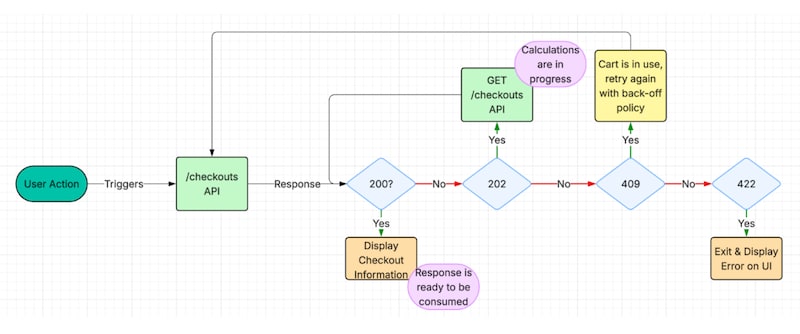
Response codes:
- 200 OK – Processing complete, data ready for consumption, and proceed to next step.
- 202 Accepted – Background calculators still running, cart locked for updates, and poll GET endpoint until you receive 200.
- 409 Conflict – Request made while previous operation still in progress, wait for completion before retrying.
Concurrent Update Example
Scenario: Custom Apex updates a custom field on WebCart when the user clicks Place Order.
- Payment API loads the cart (version = x).
- Simultaneously, custom Apex updates the cart (version = x + 1).
- Payment API tries to save with old version (x).
- The system detects the mismatch and rejects with “Looks like your cart is currently in use. Please try again later.”
Result: Payment processes successfully but isn’t saved to the cart, preventing order creation.
Asynchronous Operation Example
Scenario: The user adds a product and clicks Checkout, invoking PUT /checkouts.
- API returns 202 Accepted (checkout session creation in progress).
- User immediately invokes PATCH /checkouts to update delivery info without waiting.
- System returns 409 Conflict with error code CHECKOUT_CONFLICT.
Result: Update fails because previous operation hasn’t completed.
Avoid Conflicts
Don’t:
- Make concurrent API calls that modify the cart.
- Run custom code that updates cart while Checkout APIs are processing.
- Invoke next Checkout API before receiving 200 OK.
Do:
- Wait for 200 OK before making next API call.
- Poll GET /checkouts after 202 responses.
- Coordinate custom code to avoid simultaneous cart updates.


 j
j