


DMOs: Map External Subscriber Data
Business Goal: Continuously integrate all new and existing customer engagement systems into Data 360 to maintain a complete, unified Customer 360 profile. By relying on identity resolution to unify this data, businesses enable comprehensive analysis and effective segmentation.
Use Case: A newly onboarded project requires ingesting subscriber profile data from an AWS S3 CSV file and mapping it to the Data Model Objects (DMOs) that make up the standard unified individual data model. These DMOs include key objects, such as Individual, Contact Point Phone, Contact Point Email, and Contact Point Address. A data engineer uses Connect API to streamline initial onboarding and subsequent change management processes.
The DMO Connect API prepares data for a unified customer view, transforming raw Data Lake Object (DLO) data into structured DMOs. This programmatic approach provides granular administrative control, streamlining implementation and ensuring seamless check-in to external change management.
For limit information, see Data 360 Limits and Guidelines.
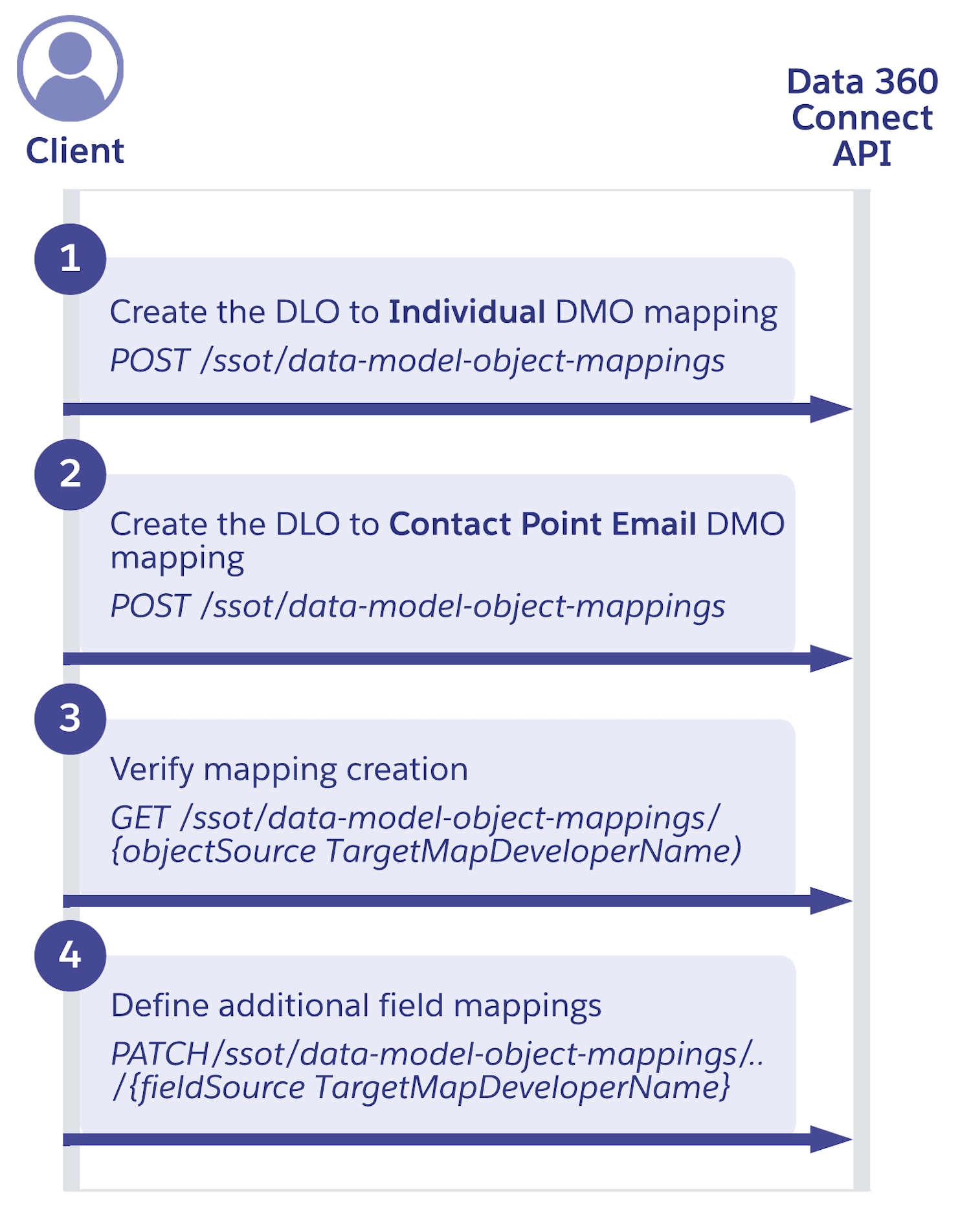
Step 1: Create the new DLO to Individual DMO mapping
Use the create data model object mapping endpoint to initiate the creation of the object mapping in Data 360.
Request
Map the ingested subscribers data from the DLO to the existing Individual DMO, which is the gateway for identity resolution processing. Include field mappings, such as ID, last name, and first name in the request.
1POST https://{dne_cdpInstanceUrl}/services/data/v65.0/ssot/data-model-object-mappings1{
2 "description": "Mapping for Subscriber S3 data to the Individual DMO",
3 "label": "S3_Subscribers_Individual",
4 "name": "S3 Subscribers to Individual Mapping",
5 "fieldMapping": [
6 {
7 "description": "Mapping Subscriber ID to SourceSystemId",
8 "label": "Subscriber_ID_to_SourceSystemId",
9 "name": "Subscriber ID to SourceSystemId",
10 "sourceFieldDeveloperName": "Subscriber_ID__c",
11 "targetFieldDeveloperName": "ssot__SourceSystemId__c"
12 },
13 {
14 "description": "Mapping LastName to LastName",
15 "label": "LastName_to_LastName",
16 "name": "LastName to LastName",
17 "sourceFieldDeveloperName": "LastName__c",
18 "targetFieldDeveloperName": "ssot__LastName__c"
19 },
20 {
21 "description": "Mapping FirstName to FirstName",
22 "label": "FirstName_to_FirstName",
23 "name": "FirstName to FirstName",
24 "sourceFieldDeveloperName": "FirstName__c",
25 "targetFieldDeveloperName": "ssot__FirstName__c"
26 }
27 ],
28 "sourceEntityDeveloperName": "S3_Subscribers__dll",
29 "targetEntityDeveloperName": "ssot__Individual__dlm"
30}Response
The API call confirms the creation of the mapping, with the status set to CREATING, indicating that the job is being processed.
1{
2  "developerName": "S3_Subscribers_Individual",
3  "fieldMappings": [
4    {
5      "developerName": "Subscriber_ID__c_fieldmap_ssot__SourceSystemId_c",
6      "sourceFieldDeveloperName": "Subscriber_ID__c",
7      "targetFieldDeveloperName": "ssot__SourceSystemId__c"
8    },
9    {
10      "developerName": "LastName__c_fieldmap_ssot__LastName__c",
11      "sourceFieldDeveloperName": "LastName__c",
12      "targetFieldDeveloperName": "ssot__LastName__c"
13    },
14    {
15      "developerName": "FirstName__c_fieldmap_ssot__FirstName_c",
16      "sourceFieldDeveloperName": "FirstName__c",
17      "targetFieldDeveloperName": "ssot__FirstName__c"
18    }
19  ],
20  "sourceEntityDeveloperName": "S3_Subscribers__dll",
21  "status": "CREATING",
22  "targetEntityDeveloperName": "ssot__Individual__dlm"
23}
Step 2: Create the new DLO to Contact Point Email DMO mapping
Use the same create data model object mapping endpoint from the previous step to create another object mapping.
Request
Map the ingested subscribers data to the Contact Point Email DMO to establish the primary email address for identity resolution and engagement. Include the ID and email address fields in the request.
1POST https://{dne_cdpInstanceUrl}/services/data/v65.0/ssot/data-model-object-mappings1{
2 "description": "Mapping for Subscriber S3 data to the Contact Point Email DMO",
3 "label": "S3_Subscribers_ContactPointEmail",
4 "name": "S3 Subscribers to Contact Point Email",
5 "fieldMapping": [
6 {
7 "description": "Mapping Subscriber ID to SourceSystemId",
8 "label": "Subscriber_ID_to_SourceSystemId",
9 "name": "Subscriber ID to SourceSystemId",
10 "sourceFieldDeveloperName": "Subscriber_ID__c",
11 "targetFieldDeveloperName": "ssot__SourceSystemId__c"
12 },
13 {
14 "description": "Mapping Email to EmailAddress",
15 "label": "Email_to_EmailAddress",
16 "name": "Email to EmailAddress",
17 "sourceFieldDeveloperName": "Email__c",
18 "targetFieldDeveloperName": "ssot__EmailAddress__c"
19 }
20 ],
21 "sourceEntityDeveloperName": "S3_Subscribers__dll",
22 "targetEntityDeveloperName": "ssot__ContactPointEmail__dlm"
23}Response
The API call confirms the creation of the mapping, with the status again set to CREATING, indicating that the job is being processed.
1{
2  "developerName": "S3_Subscribers_ContactPointEmail",
3  "fieldMappings": [
4    {
5      "developerName": "Subscriber_ID__c_fieldmap_ssot__SourceSystemId__c",
6      "sourceFieldDeveloperName": "Subscriber_ID__c",
7      "targetFieldDeveloperName": "ssot__SourceSystemId__c"
8    },
9    {
10      "developerName": "Email__c_fieldmap_ssot__EmailAddress__c",
11      "sourceFieldDeveloperName": "Email__c",
12      "targetFieldDeveloperName": "ssot__EmailAddress__c"
13    }
14  ],
15  "sourceEntityDeveloperName": "S3_Subscribers__dll",
16  "status": "CREATING",
17  "targetEntityDeveloperName": "ssot__ContactPointEmail__dlm"
18}
Step 3: Verify the DLO to DMO mapping
Verify the status of a specific object mapping by using the get data model object mapping endpoint.
Request
Confirm the status and creation of the mapping (completed in Step 1) from the source S3 Subscriber data to the target Individual DMO.
1GET https://{dne_cdpInstanceUrl}/services/data/v65.0/ssot/data-model-object-mappings/S3_Subscribers_IndividualResponse
The mapping process for the Individual DMO is completed and all defined field mappings are confirmed and active. Use the same endpoint to verify the completion status of the Contact Point Email DMO mapping.
1{
2  "developerName": "S3_Subscribers_Individual",
3  "fieldMappings": [
4    {
5      "developerName": "Subscriber_ID__c_fieldmap_ssot__SourceSystemId__c",
6      "sourceFieldDeveloperName": "Subscriber_ID__c",
7      "targetFieldDeveloperName": "ssot__SourceSystemId__c"
8    },
9    {
10      "developerName": "LastName__c_fieldmap_ssot__LastName__c",
11      "sourceFieldDeveloperName": "LastName__c",
12      "targetFieldDeveloperName": "ssot__LastName__c"
13    },
14    {
15      "developerName": "FirstName__c_fieldmap_ssot__FirstName__c",
16      "sourceFieldDeveloperName": "FirstName__c",
17      "targetFieldDeveloperName": "ssot__FirstName__c"
18    }
19  ],
20  "sourceEntityDeveloperName": "S3_Subscribers__dll",
21  "status": "ACTIVE",
22  "targetEntityDeveloperName": "ssot__Individual__dlm"
23}
Step 4: Define additional field mappings
If you need to add another field mapping after creation of the initial mapping, use the update data model field mappings endpoint to add fields or to update existing mappings.
Request
Add a new mapping from the DateOfBirth__c DLO field to the BirthDate DMO field.
1PATCH https://{dne_cdpInstanceUrl}/services/data/v65.0/ssot/data-model-object-mappings/S3_Subscribers_Individual/field-mappings1{
2 "description": "Additional mapping for Subscriber S3 data to the Individual DMO",
3 "label": "S3_Subscribers_Individual",
4 "name": "S3 Subscribers to Individual Mapping",
5 "fieldMapping": [
6 {
7 "description": "Mapping DateOfBirth to BirthDate",
8 "label": "DateOfBirth_to_BirthDate",
9 "name": "DateOfBirth to BirthDate",
10 "sourceFieldDeveloperName": "DateOfBirth__c",
11 "targetFieldDeveloperName": "ssot__BirthDate__c"
12 }
13 ],
14 "sourceEntityDeveloperName": "S3_Subscribers__dll",
15 "targetEntityDeveloperName": "ssot__Individual__dlm"
16}Response
The API call confirms the update by returning the full object-mapping payload, including the newly added field mapping. The status is set to UPDATING to indicate the mapping is in the process of being updated.
Make sure that all relevant data columns from the source DLO are correctly standardized against the DMO structure. Review the API response, which confirms the new field mapping aligns the source data format (for example, data type or length) with the expected DMO field structure.
1{
2  "developerName": "S3_Subscribers_Individual",
3  "fieldMappings": [
4    {
5      "developerName": "Subscriber_ID__c_fieldmap_ssot__SourceSystemId__c",
6      "sourceFieldDeveloperName": "Subscriber_ID__c",
7      "targetFieldDeveloperName": "ssot__SourceSystemId__c"
8    },
9    {
10      "developerName": "LastName__c_fieldmap_ssot__LastName__c",
11      "sourceFieldDeveloperName": "LastName__c",
12      "targetFieldDeveloperName": "ssot__LastName__c"
13    },
14    {
15      "developerName": "FirstName__c_fieldmap_ssot__FirstName__c",
16      "sourceFieldDeveloperName": "FirstName__c",
17      "targetFieldDeveloperName": "ssot__FirstName__c"
18    },
19    {
20      "developerName": "DateOfBirth__c_fieldmap_ssot__BirthDate__c",
21      "sourceFieldDeveloperName": "DateOfBirth__c",
22      "targetFieldDeveloperName": "ssot__BirthDate__c"
23    }
24  ],
25  "sourceEntityDeveloperName": "S3_Subscribers__dll",
26  "status": "UPDATING",
27  "targetEntityDeveloperName": "ssot__Individual__dlm"
28}
Step 5: Delete field mapping (optional)
For governance or cleanup, you can delete a specific field mapping without affecting the overall DLO-to-DMO relationship. Use the delete data model field mapping endpoint to remove an individual field relationship.
 j
j