


 j
jIndustriesSettings
Industries Object Access by Community License
Access Industries Features Deployed Using Managed Packages
Previous Versions
Use the Interest Tagging Business APIs to give users a seamless API experience for Interest Tags.
| Required Editions |
|---|
| Available in: Lightning Experience |
| Available in: Interest Tagging is available with Enterprise, Unlimited, and Performance Editions with the Financial Services Cloud. |
Interest Tag API is only for use with Interest Tags, not with Topics Tags or Communities Tags.
Note
Here are some examples on how the Salesforce UI interacts with the Interest Tags resources:
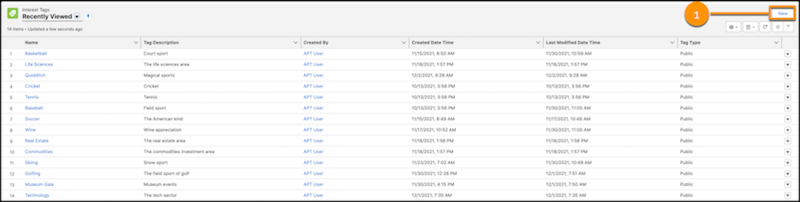
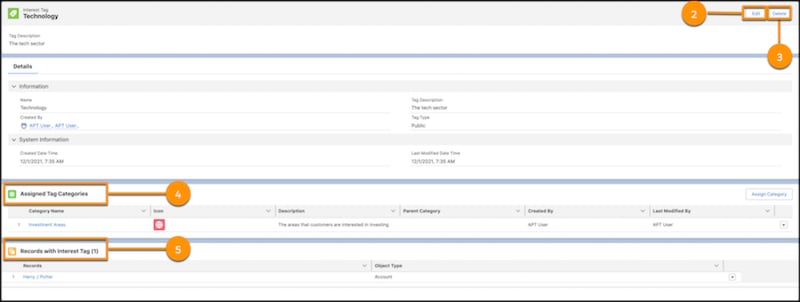
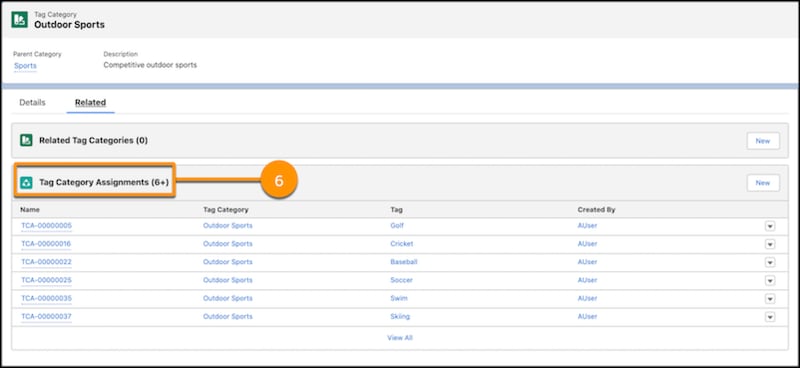
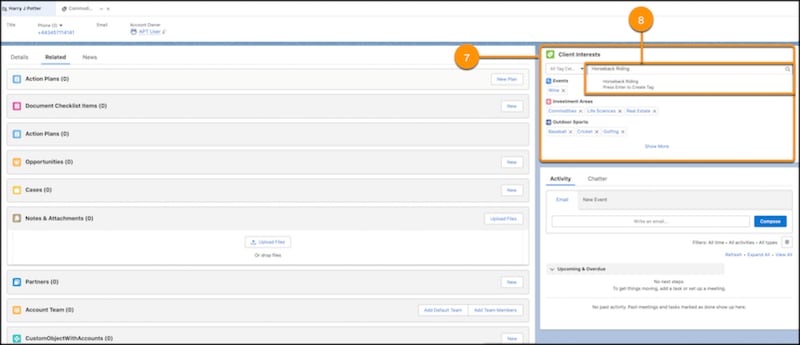
Following are the available Interest Tags resources as numbered in the Salesforce UI:
| Label Number in the UI | Resource | Description |
|---|---|---|
| 1 | /connect/interest-tags/tags | Create an Interest Tag. |
| 2 | /connect/interest-tags/tags/${tagId} | Update an Interest Tag. |
| 3 | /connect/interest-tags/tags?tagId=tagId1 | Delete Interest Tags by tag IDs. |
| 4 | /connect/interest-tags/categories | Retrieve a list of categories assigned to an Interest Tag. |
| 5 | /connect/interest-tags/assignments/tag/${tagId} | Retrieve a list of assignments by an Interest Tag ID. |
| 6 | /connect/interest-tags/tags?categoryId={categoryId} | Retrieve a list of Interest Tags by a tag category ID. |
| 7 | /connect/interest-tags/assignments/entity/${recordId} | Retrieve a list of interest tags grouped by tag categories that are assigned to a Salesforce object record. |
| 8 | /connect/interest-tags/assignments | Create assignments for Interest Tags and the Salesforce object record. |
You can access Interest Tags APIs using REST endpoints. These REST APIs follow similar conventions as Connect REST APIs.
j