


 j
Get Started with Insurance Developer Resources
Endorse Policy
Issue Policy
Renew Policy
Create Out of Sequence Policy Endorsement
Issue Multi-Root Policy
Endorse Multi-Root Policy
Renew Multi-Root Policy
Cancel Policy
Previous PDF Versions
Issue a new insurance policy when quoting is managed outside Salesforce, by a third-party system. This process results in the creation of a policy record in Salesforce, formally establishing coverage for the customer.
Use the Rating API to generate a price-adjusted context. This price-adjusted context contains the calculated premium and other relevant details that are required to issue a policy. This process bypasses the need for a formal Salesforce Quote record for pricing.
This diagram outlines the sequence of issuing a policy without using Salesforce quote, rather by using the Rating API to generate a price-adjusted context that’s used to issue a policy.
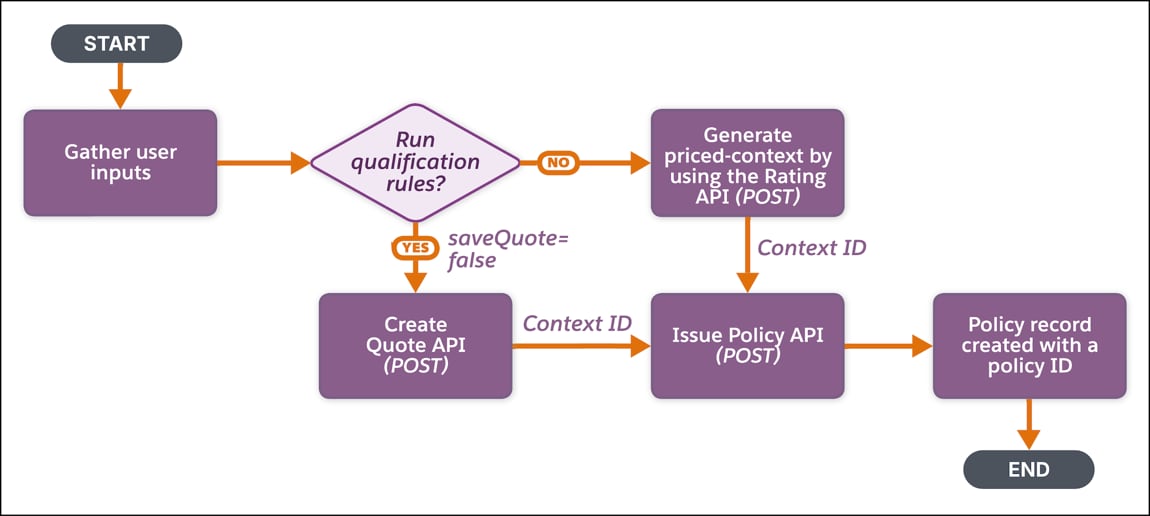
(Optional)Run Qualification Rules—If customers want to determine the policyholder’s eligibility for a product, run the qualification rules either by:
Set the saveQuote parameter to false. It doesn’t save the quote and returns an updated context with the eligibility details.
Generate Price-adjusted Context—Make a POST request on the Insurance Product Ratings Connect API.
You must include additionalFields in the request payload with either a QuoteAccount or an Opportunity ID that’s linked to an account to generate the context.
Issue Policy—Use the price-adjusted context record to issue a policy either by:
You can override the context data, such as policy name, policy number, effective-from date, effective-to date, and any other additional fields to provide the values for the custom fields during the API call. You can also specify a name for the transaction record that’s created as part of the policy issuance process. This transaction record is used to track an audit or as a financial marker.
This request creates a new policy record.
Expected Results:
j