


 j
Get Started with Insurance Developer Resources
Endorse Policy
Issue Policy
Renew Policy
Create Out of Sequence Policy Endorsement
Issue Multi-Root Policy
Endorse Multi-Root Policy
Renew Multi-Root Policy
Cancel Policy
Previous PDF Versions
Policy endorsement, also known as a Mid-Term Adjustment (MTA), is a process where you change an active insurance policy. The endorsement process changes the policy version and the premiums. This user journey shows you how to endorse a policy when Salesforce’s quoting capabilities aren’t used.
Make sure you have these details.
This diagram outlines the sequence of endorsing a policy, where any changes are initially processed through the Rating API to generate a price-adjusted context. The context contains the calculated premium and other relevant details that are required to endorse the policy. This process bypasses the need for a formal Salesforce Quote record for pricing.
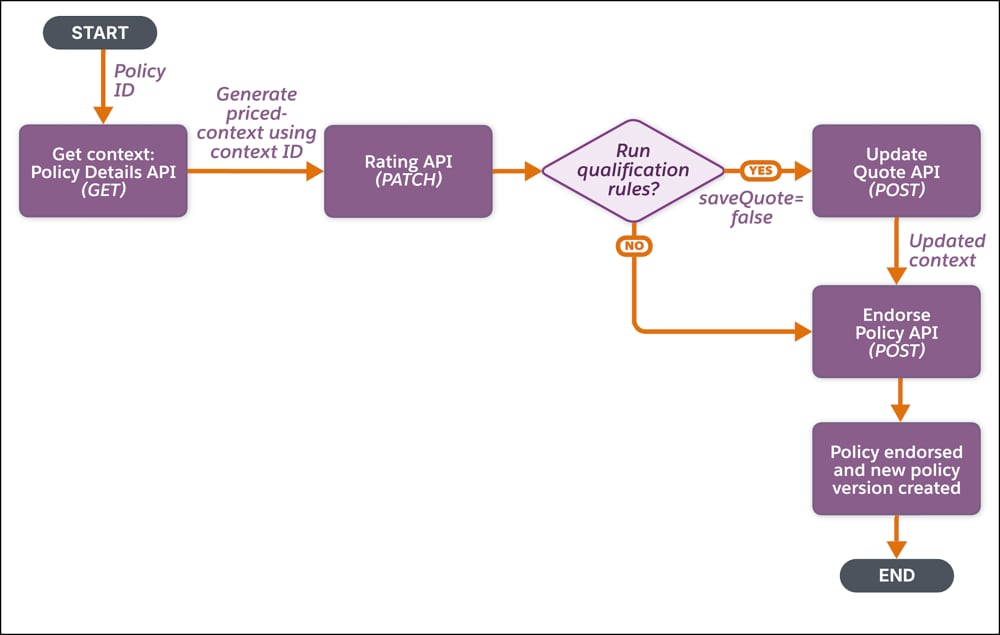
Get Policy Context—Use the policy ID to get the policy context either by:
Generate Price-adjusted Context—Use the context ID and make a PATCH request on the Insurance Product Ratings Connect API.
The price-adjusted context record contains the premium impact of the proposed modifications.
(Optional)Run Qualification Rules—If customers want to determine the policyholder’s eligibility for a product, run the qualification rules either by:
Set the saveQuote parameter to false. It doesn’t save the quote and returns an updated context with the eligibility details.
Endorse Policy—Use the retrieved context to endorse a policy either by:
You can change the context fields, such as the policy name or policy number, directly during the API call. You can also provide a name for the transaction record that’s created along with the endorsement. This transaction record captures the financial details or the audit information related to the MTA.
A new endorsed policy version is created.
Expected Results:
j