


 j
jEvent Tracking
Ionic and Capacitor Support
Push Messages in the Marketing Cloud Engagement REST API Reference
Transactional Push Messages in the Marketing Cloud Engagement REST API Reference
Use the Cordova Plugin to integrate the MobilePush SDK into Ionic and Capacitor applications. For detailed installation and setup instructions, see Marketing Cloud Cordova Plugin.
To integrate Capacitor or Ionic apps with the MobilePush SDK, configure the Cordova plugin by modifying your application’s configuration file.
For Ionic apps, modify the capacitor.config.ts file and add preferences under cordova, as shown in this example.
1const config: CapacitorConfig = {
2  appId: "io.ionic.starter", //Your app id
3  appName: "ionicapp", //Your app name
4  webDir: "build",
5  bundledWebRuntime: false,
6  cordova: {
7    preferences: {
8      //Salesforce Marketing Cloud Engagement Config
9      "com.salesforce.marketingcloud.app_id": "{Engagement application id}",
10      "com.salesforce.marketingcloud.access_token": "{Engagement access token}",
11      "com.salesforce.marketingcloud.tenant_specific_endpoint":
12        "{URL retrieved from Engagement administration page}",
13      "com.salesforce.marketingcloud.analytics": "{true|false}",
14      "salesforce.marketingcloud.delay_registration_until_contact_key_is_set": "{true|false}",
15      "com.salesforce.marketingcloud.notification_small_icon": "ic_launcher_foreground",
16    },
17  },
18};For Capacitor apps, modify the capacitor.config.json file and add preferences under cordova, as shown in this example.
1{
2  "appId": "com.example.app", //Your app id
3  "appName": "testSFMC", //Your app name
4  "bundledWebRuntime": false,
5  "webDir": "dist",
6  "plugins": {
7    "SplashScreen": {
8      "launchShowDuration": 0
9    }
10  },
11  "cordova": {
12    "preferences": {
13      //Salesforce Marketing Cloud Engagement Config
14      "com.salesforce.marketingcloud.app_id": "{App ID}",
15      "com.salesforce.marketingcloud.access_token": "{Access token}",
16      "com.salesforce.marketingcloud.tenant_specific_endpoint": "{Tenant-specific endpoint URL}",
17      "com.salesforce.marketingcloud.analytics": "{true|false}",
18      "salesforce.marketingcloud.delay_registration_until_contact_key_is_set": "{true|false}",
19      "com.salesforce.marketingcloud.notification_small_icon": "ic_launcher_foreground"
20    }
21  }
22}
Complete these steps each time you add the platform to your Capacitor app.
Important
Copy the google-services.json file into the YOUR_APP/android/app/ directory.
Enable push notifications in your target’s Capabilities settings in Xcode by clicking + Capability and then selecting Push Notifications.
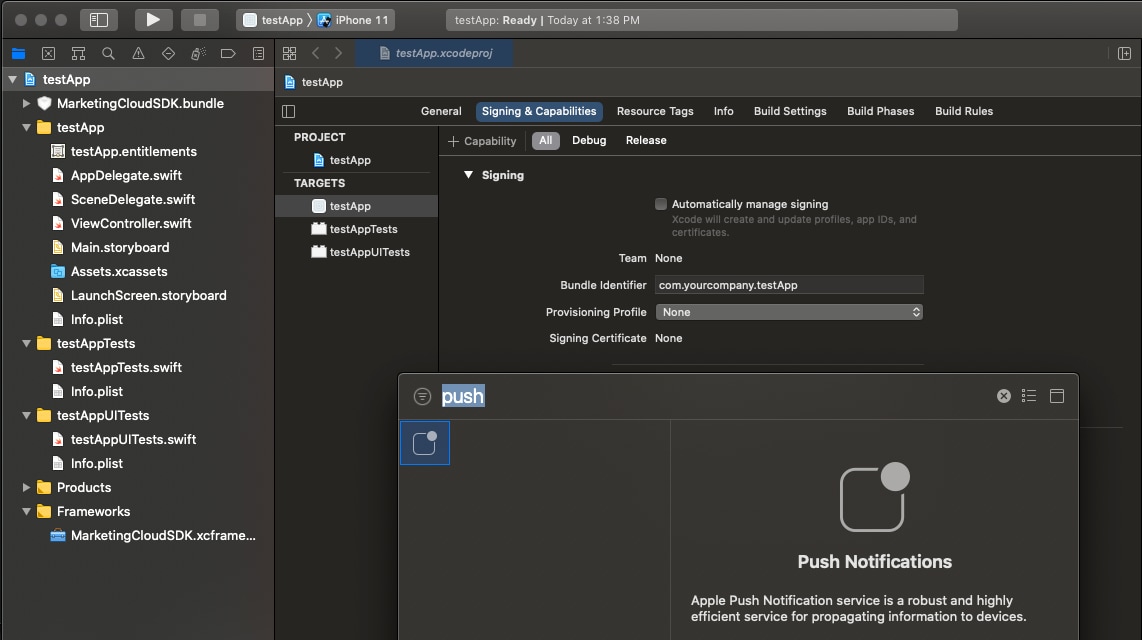
Enable iOS push notifications by adding this code to AppDelegate.
1//Add following imports
2//Other imports...
3import SFMCSDK
4import MarketingCloudSDK
Additionally, add this code to the end of the AppDelegate.swift file.
1//SFMCSDK PushNotification
2extension AppDelegate {
3    // MobilePush SDK: REQUIRED IMPLEMENTATION
4    func application(_ application: UIApplication, didRegisterForRemoteNotificationsWithDeviceToken deviceToken: Data) {
5        SFMCSdk.mp.setDeviceToken(deviceToken)
6    }
7
8    // MobilePush SDK: REQUIRED IMPLEMENTATION
9    func application(_ application: UIApplication, didFailToRegisterForRemoteNotificationsWithError error: Error) {
10        print(error)
11    }
12
13    // MobilePush SDK: REQUIRED IMPLEMENTATION
14    /** This delegate method offers an opportunity for applications with the "remote-notification" background mode to fetch appropriate new data in response to an incoming remote notification. You should call the fetchCompletionHandler as soon as you’re finished performing that operation, so the system can accurately estimate its power and data cost.
15    This method will be invoked even if the application was launched or resumed because of the remote notification. The respective delegate methods will be invoked first. Note that this behavior is in contrast to application:didReceiveRemoteNotification:, which is not called in those cases, and which will not be invoked if this method is implemented. **/
16    func application(_ application: UIApplication, didReceiveRemoteNotification userInfo: [AnyHashable : Any], fetchCompletionHandler completionHandler: @escaping (UIBackgroundFetchResult) -> Void) {
17        SFMCSdk.mp.setNotificationUserInfo(userInfo)
18        completionHandler(.newData)
19    }
20}If you use TypeScript with your app, declare the plugin before you call the APIs, as shown in this example.
1//Declare the plugin (for typescript)
2declare let MCCordovaPlugin: any;
3declare let SFMCEvent: any;
4
5//Call plugin APIs
6MCCordovaPlugin.enableLogging();
7MCCordovaPlugin.enablePush();
8//Other APIs...