


Customize Push Notification Functionality for iOS Apps
Use these customization options in your app to extend push notification capabilities beyond the default settings.
Specify a Custom Notification Sound
This feature uses a sound included in your mobile app as a custom audio signal when a push message arrives on the mobile device.
- Add a file named
custom.cafto your project. The cloud push payload looks for a file namedcustom.caf.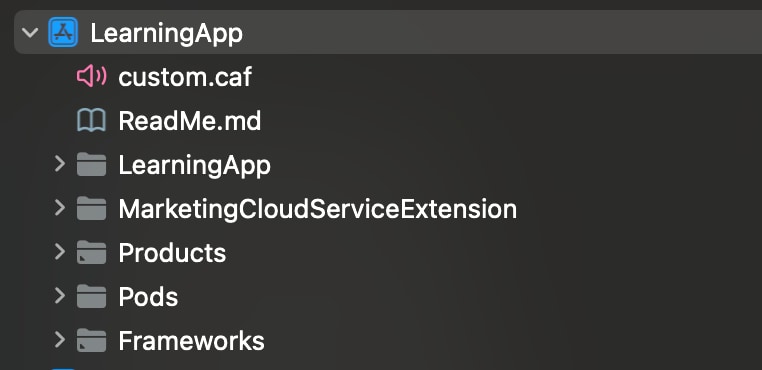
- Add the
custom.cafaudio file to the Copy Bundle Resources folder in Xcode for your app.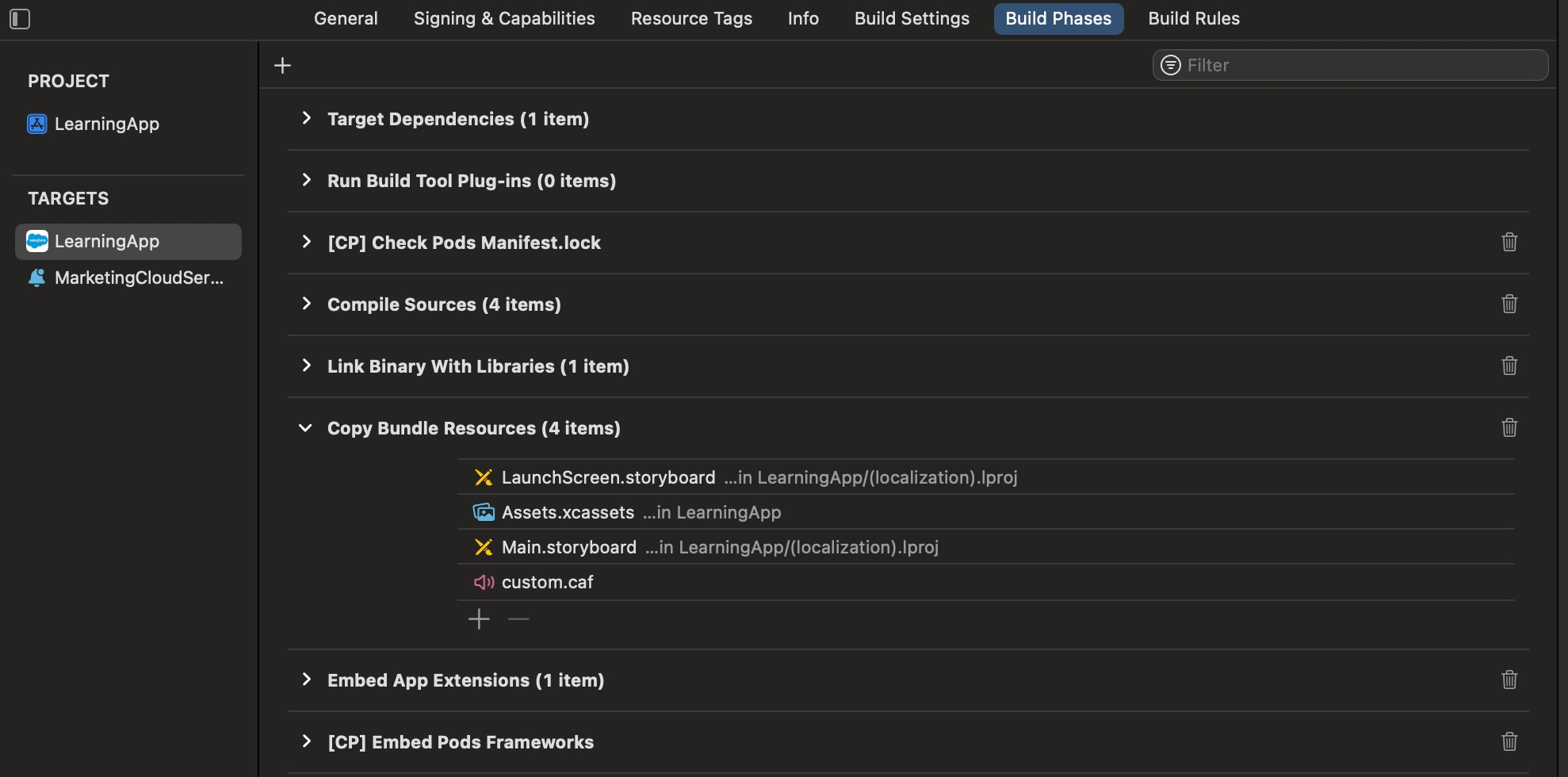
- To prevent Xcode from using cached files, perform a clean build of the folder in Xcode. In the Product menu, hold the Option key and select Clean Build Folder.
Display Interactive Notifications
Use interactive notifications to add buttons to push notifications from your mobile app.
This code example shows how to configure the SDK to display interactive notifications.
1func configureSdk() -> Bool {
2
3  // Enable logging for debugging early on. Debug level is not recommended for
4  // production apps because a large amount of data is logged to the console.
5
6  #if DEBUG
7    SFMCSdk.setLogger(logLevel: .debug)
8  #endif
9
10  // Use the `PushFeatureConfigBuilder` to configure the Push Feature SDK. This
11  // gives you the maximum flexibility in SDK configuration. The builder lets you
12  //configure the module parameters at runtime.
13
14  let pushFeatureConfiguration = PushFeatureConfigBuilder()
15    .setApplicationControlsBadging(true)
16    .build()
17
18  // Set the completion handler to take action when all modules initialization
19  // is completed. Setting the completion handler is optional.
20
21  let completionHandler: ((_ status: [ModuleInitStatus]) -> Void) = { [weak self] status in
22    DispatchQueue.main.async {
23      self?.handleSDKInitializationCompletion(status: status)
24    }
25  }
26
27  SFMCSdk.initializeSdk(
28    ConfigBuilder().setPushFeature(config: pushFeatureConfiguration).build(),
29    completion: completionHandler)
30
31  return true
32}
33
34// MARK: - SDK Initialization Completion Handler
35
36private func handleSDKInitializationCompletion(status: [ModuleInitStatus]) {
37  var allSuccessful = true
38
39  for moduleStatus in status {
40    print(
41      "Module: \(moduleStatus.moduleName.rawValue), Status: \(moduleStatus.initStatus.rawValue)")
42
43    if moduleStatus.initStatus == .success {
44      // Handle successful initialization for each module
45      switch moduleStatus.moduleName {
46      case .pushFeature:
47        setupPushFeature()
48      default:
49        break
50      }
51    } else if moduleStatus.initStatus == .error {
52      allSuccessful = false
53      // module failed to initialize, check logs for more details
54    } else if moduleStatus.initStatus == .cancelled {
55      allSuccessful = false
56      // module initialization was cancelled
57      // (for example if re-configuration was triggered before init completed)
58    } else if moduleStatus.initStatus == .timeout {
59      allSuccessful = false
60      // module failed to initialize due to timeout, check logs for more details
61    }
62  }
63  if allSuccessful {
64    print("SDK initialization completed successfully")
65  } else {
66    print("SDK initialization completed with errors - check logs above")
67  }
68}
69
70func setupPushFeature() {
71  // Set the URLHandlingDelegate to handle URLs from CloudPage, OpenDirect,
72  // Location, and Inbox messages. In this example, the AppDelegate class adheres
73  // to the URLHandlingDelegate protocol (see below).
74  PushFeature.requestSdk { pushFeature in
75    DispatchQueue.main.async {
76      pushFeature?.setURLHandlingDelegate(self)
77    }
78  }
79
80  // Make sure to dispatch this to the main thread, as UNUserNotificationCenter
81  // will present UI.
82  DispatchQueue.main.async {
83    // Set the UNUserNotificationCenterDelegate to a class adhering to this protocol.
84    // In this example, the AppDelegate class adheres to the protocol (see below)
85    // and handles Notification Center delegate methods from iOS.
86    UNUserNotificationCenter.current().delegate = self
87
88    // Request authorization from the user for push notification alerts.
89    UNUserNotificationCenter.current().requestAuthorization(
90      options: [.alert, .sound, .badge],
91      completionHandler: { (_ granted: Bool, _ error: Error?) -> Void in
92        if error == nil {
93          if granted == true {
94            DispatchQueue.main.async {
95              UIApplication.shared.registerForRemoteNotifications()
96            }
97            // Support notification categories
98            let exampleAction = UNNotificationAction(
99              identifier: "App", title: "Example", options: [])
100            let appCategory = UNNotificationCategory(
101              identifier: "Example", actions: [exampleAction],
102              intentIdentifiers: [] as? [String] ?? [String](), options: [])
103            let categories = Set<AnyHashable>([appCategory])
104            UNUserNotificationCenter.current().setNotificationCategories(
105              categories as? Set<UNNotificationCategory> ?? Set<UNNotificationCategory>())
106          }
107        }
108      }
109    )
110  }
111}
112
113func application(
114  _ application: UIApplication,
115  didFinishLaunchingWithOptions launchOptions: [UIApplication.LaunchOptionsKey: Any]?
116) -> Bool {
117  self.configureSFMCSdk()
118  return true
119}
Handle Actions
In your push handler, examine the push notification’s payload to see if your action is triggered and if your application performed the action, as shown in this code example.
1// The method is called on the delegate when the user responds to the notification
2// by opening the application, dismissing the notification, or choosing a
3// UNNotificationAction. The delegate must be set before the application returns
4//from applicationDidFinishLaunching:.
5func userNotificationCenter(
6  _ center: UNUserNotificationCenter, didReceive response: UNNotificationResponse,
7  withCompletionHandler completionHandler: @escaping () -> Void
8) {
9  // tell the SDK about the notification
10  PushFeature.requestSdk { pushFeature in
11    pushFeature?.setNotificationResponse(response)
12  }
13  // Check your notification custom actions
14  if response.actionIdentifier == "App" {
15    // Handle your notification’s custom action here
16  }
17}
Send Rich Notifications
Rich notifications include images, videos, titles, and subtitles from Marketing Cloud Next and mutable content. Mutable content can include personalization in the title, subtitle, or body of your message.
Prerequisites
- Make sure that your app is built for iOS version 10 or later.
- Include a service extension for your app that can handle mutable content. See Apple Developer Documentation: Modifying and Presenting Notifications.
- Make sure that your app is registered to send push notifications in Marketing Cloud Next.
Create a Notification Service Extension
Skip these steps if you’ve already integrated Notification Service Extension when you integrated the Mobile App Messaging SDK with your app.
- Click File > New > Target.
- Select Notification Service Extension.
- Name and save the new extension.
- In your project target’s General settings, confirm that the new extension is listed in the Frameworks, Libraries, and Embedded Content section. If not, add it.
The Notification Target must be signed with the same Xcode Managed Profile as the main project.
Important
This service extension checks for a _mediaUrl element in request.content.userInfo. If found, the extension attempts to download the media from the URL, creates a thumbnail-size version, and then adds the attachment. The service extension also checks for a _mediaAlt element in request.content.userInfo. If found, the service extension uses the element for the body text if there are any problems downloading or creating the media attachment.
A service extension can timeout if it’s unable to download. In this code sample, the service extension delivers the original content with the body text changed to the value in _mediaAlt. This code example assumes your app is using the Mobile App Messaging SDK without the Extension SDK integration.
1import UserNotifications
2import CoreGraphics
3
4class MyNotificationService: UNNotificationServiceExtension {
5
6    var contentHandler: ((UNNotificationContent) -> Void)?
7    var bestAttemptContent: UNMutableNotificationContent?
8
9    override func didReceive(_ request: UNNotificationRequest, withContentHandler contentHandler: @escaping (UNNotificationContent) -> Void) {
10        self.contentHandler = contentHandler
11        self.bestAttemptContent = (request.content.mutableCopy() as? UNMutableNotificationContent)
12
13        self.addMedia(request) {
14            self.contentHandler!(self.bestAttemptContent!)
15        }
16    }
17
18    override func serviceExtensionTimeWillExpire() {
19        // Called just before the extension is terminated by the system.
20        // Use this as an opportunity to deliver your "best attempt" at modified content. Otherwise, the original push payload will be used.
21        // We took too long to download the media URL. Use the alternate text if provided.
22        self.useAltText()
23
24        // Tell the OS that the process is complete and the content is ready to be presented.
25        self.contentHandler!(self.bestAttemptContent!)
26    }
27
28    private func useAltText() {
29        if let mediaAltText = self.bestAttemptContent?.userInfo["_mediaAlt"] as? String {
30            // alternative text to display if there are any issues loading the media URL
31            if mediaAltText.isEmpty == false {
32                self.bestAttemptContent?.body = mediaAltText
33            }
34        }
35    }
36
37    private func addMedia(_ request: UNNotificationRequest, completion: @escaping () -> Void) {
38        guard let mediaUrlString = request.content.userInfo["_mediaUrl"] as? String,
39                !mediaUrlString.isEmpty  else {
40            useAltText()
41            completion()
42            return
43        }
44
45        guard let mediaUrl = URL(string: mediaUrlString) else {
46            useAltText()
47            completion()
48            return
49        }
50
51        let session = URLSession(configuration: URLSessionConfiguration.default)
52        let downloadTask = session.downloadTask(with: mediaUrl) { [weak self]
53            location, response, error in
54            if let _ = error {
55                self?.useAltText()
56                completion()
57                return
58            }
59
60            guard let theLocation = location else {
61                self?.useAltText()
62                completion()
63                return
64            }
65
66            guard let theResponse = response as? HTTPURLResponse else {
67                self?.useAltText()
68                completion()
69                return
70            }
71
72            let statusCode = theResponse.statusCode
73            guard (statusCode >= 200 && statusCode <= 299) else {
74                self?.useAltText()
75                completion()
76                return
77            }
78
79            let localMediaUrl = URL.init(fileURLWithPath: theLocation.path + mediaUrl.lastPathComponent)
80
81            // Remove any existing file with the same name
82            try? FileManager.default.removeItem(at: localMediaUrl)
83
84            do {
85                try FileManager.default.moveItem(at: theLocation, to: localMediaUrl)
86            } catch {
87                self?.useAltText()
88                completion()
89                return
90            }
91
92            guard let mediaAttachment = try? UNNotificationAttachment(identifier: "SomeAttachmentId",
93                                                                      url: localMediaUrl) else {
94                self?.useAltText()
95                completion()
96                return;
97            }
98
99            guard let theContent = self?.bestAttemptContent else {
100                self?.useAltText()
101                completion()
102                return
103            }
104
105            theContent.attachments = [mediaAttachment]
106            completion()
107        }
108
109        downloadTask.resume()
110    }
111}
If your app uses the Mobile App Messaging SDK with the Extension SDK integration, use this code example instead.
1//  NotificationService.swift
2//  MyServiceExtension
3
4import UserNotifications
5import MCExtensionSDK
6
7class NotificationService: SFMCNotificationService {
8
9    // Use this method to enable logging, change logging levels, etc. , if required.
10    override func sfmcProvideConfig() -> SFNotificationServiceConfig {
11        var logLevel: LogLevel = .none
12#if DEBUG
13        logLevel = .debug
14#endif
15        return SFNotificationServiceConfig(logLevel: logLevel)
16    }
17
18    // Use this method only if you need to perform any custom processing for
19    // images, video downloads, inserting custom keys in notification userInfo, etc.
20    // Don’t modify mutableContent.request.content.userInfo directly. To add any
21    // custom key in notification userInfo, return a dictionary in the
22    // completion handler.
23
24
25    // Like the `UNNotificationServiceExtension` method - func didReceive(_ request: UNNotificationRequest, withContentHandler contentHandler: @escaping (UNNotificationContent) → Void), you'll only have limited time from the system for processing.
26    override func sfmcDidReceive(_ request: UNNotificationRequest, mutableContent: UNMutableNotificationContent, withContentHandler contentHandler: @escaping ([AnyHashable : Any]?) -> Void) {
27        // Your custom code here
28        //...
29        self.addMedia(mutableContent) {
30            // To add any custom key:value pair(s) in notifications userInfo object, then
31            var customUserInfo: [AnyHashable : Any] = [:]
32            customUserInfo["MyCustomKey"] = "MyCustomValue"
33
34            // Finally, call the content handler to signal the end of your processing operation.
35            //
36            contentHandler(customUserInfo)
37        }
38    }
39
40    private func addMedia(_ mutableContent: UNMutableNotificationContent, completion: @escaping () -> Void) {
41        guard let mediaUrlString = mutableContent.userInfo["_mediaUrl"] as? String,
42                !mediaUrlString.isEmpty  else {
43            completion()
44            return
45        }
46
47        guard let mediaUrl = URL(string: mediaUrlString) else {
48            completion()
49            return
50        }
51
52        let session = URLSession(configuration: URLSessionConfiguration.default)
53        let downloadTask = session.downloadTask(with: mediaUrl) { [weak self]
54            location, response, error in
55            if let _ = error {
56                completion()
57                return
58            }
59
60            guard let theLocation = location else {
61                completion()
62                return
63            }
64
65            guard let theResponse = response as? HTTPURLResponse else {
66                completion()
67                return
68            }
69
70            let statusCode = theResponse.statusCode
71            guard (statusCode >= 200 && statusCode <= 299) else {
72                completion()
73                return
74            }
75
76            let localMediaUrl = URL.init(fileURLWithPath: theLocation.path + mediaUrl.lastPathComponent)
77
78            // Remove any existing file with the same name
79            try? FileManager.default.removeItem(at: localMediaUrl)
80
81            do {
82                try FileManager.default.moveItem(at: theLocation, to: localMediaUrl)
83            } catch {
84                completion()
85                return
86            }
87
88            guard let mediaAttachment = try? UNNotificationAttachment(identifier: "SomeAttachmentId",
89                                                                      url: localMediaUrl) else {
90                completion()
91                return;
92            }
93
94            mutableContent.attachments = [mediaAttachment]
95            completion()
96        }
97
98        downloadTask.resume()
99    }
100}
Messages with an OpenDirect URL
OpenDirect customized push messages contain a URL in the payload. The Mobile App Messaging SDK can pass this URL to your application to handle. For information about handling URLs from push notifications that use OpenDirect, see Handle URLs.
Handle URLs
The SDK doesn’t automatically present URLs from these sources:
- CloudPages URLs from push notifications
- OpenDirect URLs from push notifications
- CloudPages URLs from inbox messages using the built-in
UITableViewdelegate
To handle URLs from these sources, follow these steps.
- Implement the
URLHandlingDelegateprotocol in your app. - Use
setURLHandlingDelegatemethod to set a delegate for the protocol. - Next, you’re prompted to implement the protocol method
sfmc_handleURL:type:
When an OpenDirect or CloudPages push notification is received, the SDK passes a NSURL value to sfmc_handleURL:type:. This value contains the push notification or inbox message, and includes the URL. A type value also reflects the source of the URL, which is either SFMCURLTypeCloudPages or SFMCURLTypeOpenDirect.
If the development language is Swift, the class that implements the URLHandlingDelegate must be compatible with Objective-C. Prefix the class with @objc and extend NSObject, as shown in this example.
Important
1// Framework import
2import SFMCSDK
3import PushFeatureSDK
4
5// Make sure your class adopts the protocol
6@objc class MyClass: NSObject, URLHandlingDelegate
7
8...
9// Set the delegate somewhere in your application code (after configuring the SDK)
10 PushFeature.requestSdk { pushFeature in
11 pushFeature?.setURLHandlingDelegate(self)
12 }
13...
14
15// EXAMPLE IMPLEMENTATIONS
16// Implement the protocol method and have iOS handle the URL itself
17func sfmc_handleURL(_ url: URL, type: String) {
18 if UIApplication.shared.canOpenURL(url) == true {
19 if #available(iOS 10.0, *) {
20 UIApplication.shared.open(url, options: [:], completionHandler: { success in
21 if success {
22 print("url \(url) opened successfully")
23 } else {
24 print("url \(url) could not be opened")
25 }
26 })
27 } else {
28 if UIApplication.shared.openURL(url) == true {
29 print("URL \(url) opened successfully")
30 } else {
31 print("Couldn't open URL \(url)")
32 }
33 }
34 }
35}
36
37// Implement the protocol method and use SFSafariViewController to present the URL within your application
38func sfmc_handleURL(_ url: URL, type: String) {
39 let safariViewController = SFSafariViewController(url: url)
40 window?.topViewController()?.present(safariViewController, animated: true) {}
41}
42
43// Implement the protocol method and take application-specific actions based on the URL itself
44func sfmc_handleURL(_ url: URL, type: String) {
45 let queryItems = URLComponents(string: url.absoluteString)?.queryItems
46 for item: URLQueryItem? in queryItems ?? [] {
47 // do something in your application based on the parameters in the URL
48 }
49} j
j