


 j
jRelease Notes
Example: Generate a Lifecycle-Managed Asset
Example: Change a Lifecycle-Managed Asset
Example: Cancel a Lifecycle-Managed Asset
Recommendations
Salesforce Files
Retired Resources
PDF Archive
Review examples of using Connect REST API to create an asset and start tracking its quantity, amount, and monthly recurring revenue over its lifecycle.
Your sales rep sold a collection of mobile device management subscriptions to a local school district. The order product for the sale has the following values.
ID: 1234
Date of Sale: 09/05/19 4:00:00pm PST
Start Date: 01/01/20 9:00:00am PST
End Date: 12/31/20 8:59:59am PST
Amount: $1,200
Quantity: 10
Build an integration that calls the Generate Asset API to generate an asset, asset action source, asset action, and asset state period.
/services/data/v50.0/asset-management/assets/actions/generate
1{
2  "accountId": "001B000001KDI7BIAX",
3  "assetName": "MDM Subscription",
4  "productId": "01tB0000000q2FFIAY",
5  "currencyIsoCode": "USD",
6
7  "assetStatePeriods": [
8    {
9      "startDate": "2020-01-01T09:00:00-08:00",
10      "endDate": "2020-12-31T08:59:59-08:00",
11      "quantity": 10.0,
12      "mrr": 100.0,
13      "amount": 1200.0
14    }
15  ],
16
17  "assetAction": {
18    "category": "Initial Sale",
19    "actionDate": "2019-09-05T16:00:00-08:00",
20    "quantityChange": 10.0,
21    "mrrChange": 100.0,
22    "amount": 1200.0
23  },
24
25  "assetActionSources": [
26    {
27      "transactionDate": "2019-09-05T16:00:00-08:00",
28      "startDate": "2020-01-01T09:00:00-08:00",
29      "endDate": "2020-12-31T08:59:59-08:00",
30      "quantity": 10.0,
31      "productAmount": 1200.0,
32      "referenceEntityItem": "1WLB00000003geJOAQ"
33    }
34  ]
35}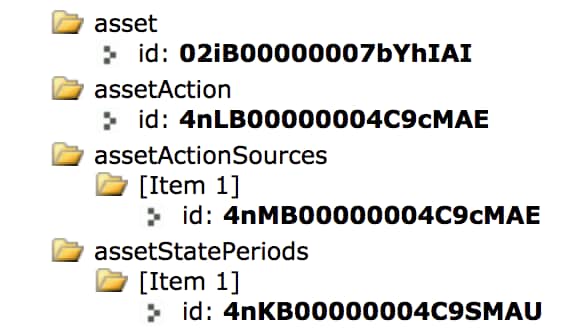
Your sales rep sold a ramped deal for mobile device management subscriptions. The customer has 10 licenses for 01/01 through 06/30 and 20 licenses for 07/01 through 12/31. You want to recognize all the transactions as one asset.
ID: 1234
Date of Sale: 09/05/19 4:00:00pm PST
Start Date: 01/01/20 9:00:00am PST
End Date: 06/30/20 8:59:59am PST
Amount: $600
Quantity: 10
ID: 1235
Date of Sale: 09/05/19 4:00:00pm PST
Start Date: 07/01/20 9:00:00am PST
End Date: 12/31/20 8:59:59am PST
Amount: $1,200
Quantity: 20
In this case, you make one Generate Asset API call that passes in data for two asset state periods. The first asset state period represents the period from 01/01 through 06/30, with a quantity of 10. The second asset state period represents the period from 07/01 through 12/31, with a quantity of 20.
/services/data/v50.0/asset-management/assets/actions/generate
1{
2  "accountId": "001B000001KDI7BIAX",
3  "assetName": "MDM Subscription",
4  "productId": "01tB0000000q2FFIAY",
5  "currencyIsoCode": "USD",
6
7  "assetStatePeriods": [
8    {
9      "startDate": "2020-01-01T09:00:00+08:00",
10      "endDate": "2020-06-30T08:59:59+08:00",
11      "quantity": 10.0,
12      "mrr": 100.0,
13      "amount": 600.0
14    },
15    {
16      "startDate": "2020-07-01T09:00:00+08:00",
17      "endDate": "2020-12-31T08:59:59+08:00",
18      "quantity": 20.0,
19      "mrr": 200.0,
20      "amount": 1200.0
21    }
22  ],
23
24  "assetAction": {
25    "category": "Initial Sale",
26    "actionDate": "2019-09-05T16:00:00+08:00",
27    "quantityChange": 20.0,
28    "mrrChange": 200.0,
29    "amount": 1800.0
30  },
31
32  "assetActionSources": [
33    {
34      "transactionDate": "2019-09-05T16:00:00+08:00",
35      "startDate": "2020-01-01T09:00:00+08:00",
36      "endDate": "2020-06-30T08:59:59+08:00",
37      "quantity": 10.0,
38      "productAmount": 600.0,
39      "referenceEntityItem": "1WLB00000003geJOAQ"
40    },
41    {
42      "transactionDate": "2019-09-05T16:00:00+08:00",
43      "startDate": "2020-07-01T09:00:00+08:00",
44      "endDate": "2020-12-31T08:59:59+08:00",
45      "quantity": 20.0,
46      "productAmount": 1200.0,
47      "referenceEntityItem": "02iB00000007bYhIAI"
48    }
49  ]
50}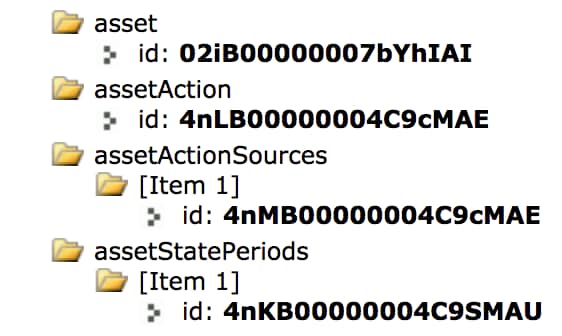
j