


 j
jFlows
Processes
Lightning Components
Pub/Sub API
CometD
List Custom Channels and Channel Members
Identify and Match Event Messages with the EventUuid Field
Encrypting Platform Event Messages at Rest in the Event Bus
Previous Versions
With a custom channel, you can receive a stream of event messages corresponding to one or more custom platform events, or Real-Time Event Monitoring events. For example, if you’ve defined platform events corresponding to orders for different regions, one client can subscribe to all those events and process them. Custom channels are supported in Pub/Sub API clients, CometD clients, and event relays only. You can also add filters to custom channels. By using only one client to subscribe to all events and using filters, your subscriptions are optimized.
Custom channels are available for high-volume custom platform events that you define and for Real-Time Event Monitoring events. They aren’t supported for standard platform events or legacy standard-volume custom platform events.
Create a custom channel, and specify the platform events it contains in Tooling API and Metadata API.
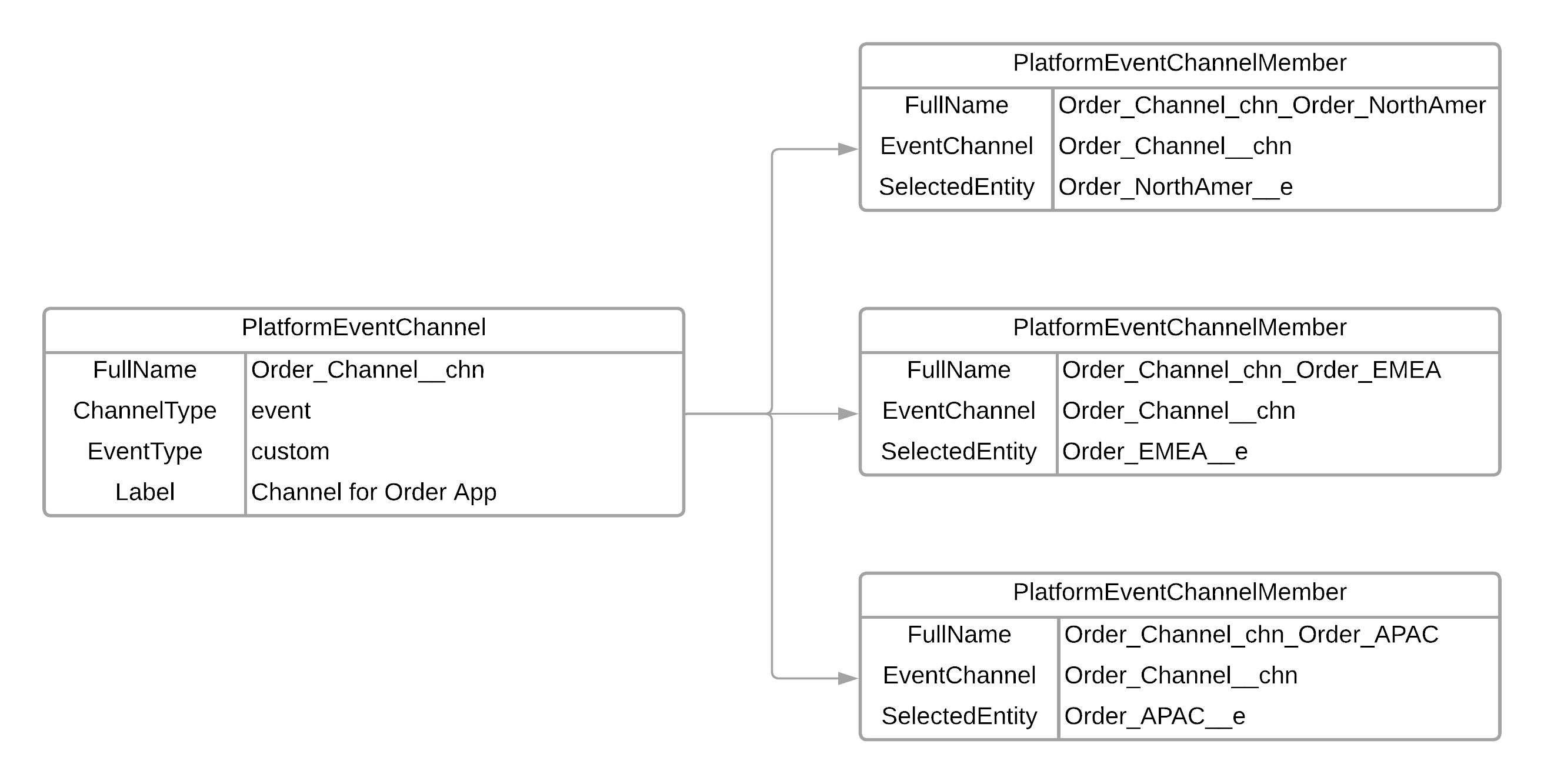
PlatformEventChannel represents a custom channel. The ChannelType field indicates which members the custom channel can contain. A ChannelType value of event means that the channel can contain platform events via its channel members. To specify the specific type of events a channel can hold, such as Real-Time Event Monitoring events, use the optional EventType field in combination with ChannelType.
A custom channel can contain events for only one event product. You can’t mix events from different event products in one channel. For example, you can’t add platform events and change data capture events to the same channel.
PlatformEventChannelMember represents a member of a channel. It contains a platform event in the SelectedEntity field and is associated with the channel via the EventChannel field.
ChannelType or EventType field values.Note
This diagram shows the object relationships and definitions of the custom channel Order_Channel__chn and its members. The channel is set up to receive order events for North America, EMEA, and the APAC regions. A custom event is defined for each region: Order_NorthAmer__e, Order_EMEA__e, Order_APAC__e. Each of these platform events is added to the channel via PlatformEventChannelMember objects. An order management app can subscribe to the custom channel, Order_Channel__chn, and receive messages of the three platform events.
When you subscribe to a custom channel, provide the channel name in the format /event/ChannelName__chn, such as /event/Order_Channel__chn. Your subscriber receives event messages of all events that are part of the channel. If you subscribe to the custom channel with Pub/Sub API, get the API name of the event received through the event schema. To retrieve the event schema, call the GetSchema RPC method using the schema ID contained in the received event. The schema name is in the schema_json field in the response and identifies the event API name. See GetSchema RPC Method in the Pub/Sub API Developer Guide.
This example shows a received event with Pub/Sub API with the event name taken from the event schema.
1{
2  "CreatedDate": 1711497484289,
3  "CreatedById": "0055f000005mc66AAA",
4  "Order_Number__c": "2",
5  "City__c": "London",
6  "Amount__c": 20.0
7}
8with schema name: Order_EMEA__eWhen you subscribe to a custom channel, provide the channel name in the format /event/ChannelName__chn, such as /event/Order_Channel__chn. Your subscriber receives event messages of all events that are part of the channel. In a CometD client, each event message contains the EventApiName field, which contains the type of the event. For example, this event message has an EventApiName of Order_EMEA__e, which means that it’s an Order_EMEA__e event.
1{
2  "schema": "e8jMOnID4xDThlaPBMx5gg",
3  "payload": {
4    "City__c": "London",
5    "CreatedById": "005RM000002Qu16YAC",
6    "Amount__c": 20,
7    "CreatedDate": "2022-03-29T13:45:19.230Z",
8    "Order_Number__c": "2"
9  },
10  "event": {
11    "EventApiName": "Order_EMEA__e",
12    "EventUuid": "218544ad-0472-4315-970f-8825a2802de6",
13    "replayId": 10306
14  }
15}
The EventApiName field is available in event messages received in CometD clients that use a Streaming API endpoint with API version 55.0 and later. It isn’t available in event messages received in other subscribers, such as Apex triggers, flows, and Pub/Sub API. It isn’t included in change data capture events and events that don’t support custom channels. Also, the EventApiName field isn’t part of the event schema that the REST eventSchema resource or the describe call returns.
The maximum number of custom channels and channel members that you can add differ based on the type of events the channel holds. There are separate allocations for custom channels and channel members. See Common Platform Event Allocations.
Create a Custom Channel for Custom Platform Events Using the API
Let’s walk through the steps to create a channel and add two platform events via channel members. Then, you can subscribe to the channel to validate receiving event messages for platform events.
Create a Custom Channel for Real-Time Event Monitoring Events Using the API
Let’s walk through the steps to create a channel and add two Real-Time Event Monitoring events via channel members.
List Custom Channels and Channel Members
You can find which channels and channel members are set up in your Salesforce org by performing SOQL queries through Tooling API.
j