Here are the new and changed features in recent updates of Code Analyzer and the Code Analyzer Visual Studio Code (VS Code) extension. For historical reasons, these release notes also include information about previous v4 releases, but note that as of August 2025, v4 is no longer supported.
We publish new Code Analyzer releases at the end of each month.
To display the version of the Code Analyzer CLI plugin installed on your computer, run sf plugins. The Code Analyzer plugin is called code-analyzer.
To update the Code Analyzer CLI plugin to the latest generally available version, run sf plugins install code-analyzer.
July 2026 Release
Code Analyzer v5.15.0
NEW: We upgraded the libraries behind each of our engines to their latest versions. For example, we upgraded PMD to version 7.26.0, and more.
June 2026 Release
Code Analyzer v5.14.0
NEW: Scan code, configure settings, and create custom rules by using text commands. Salesforce Code Analyzer is integrated with AI tools, including Agentforce Vibes, Claude Code, and Cursor. For Claude Code, Cursor, or Windsurf, install and manage portable skills via the core Salesforce Skills Library (@forcedotcom/sf-skills).
dx-code-analyzer-run: Turn your chat commands into code scans. The agent reads report files, explains bugs in plain language, suggests code fixes, and manages your pull requests (PRs).
dx-code-analyzer-configure: Set up your project files and software tools automatically. Describe what you want, and the agent turns descriptions into official rule IDs, creates templates for GitHub Actions, and fixes setup errors.
dx-code-analyzer-create-custom-rules: Automate custom rule creation from complex natural language instructions. The agent evaluates the requirement, details an implementation plan, and generates engine configurations and matching XPath patterns. It also defines the correct engine tags, configures custom parameter properties, and sets up file exclusions.
NEW: Write exact XPath expressions for custom PMD rules by viewing your code’s Abstract Syntax Tree (AST). Use the new ast-dump command to view this structure directly from your command line. Generating the source file’s AST structure in XML or JSON format, this command supports files written in Apex, Visualforce, HTML, XML, and JavaScript.
NEW: We upgraded the libraries behind each of our engines to their latest versions. For example, we upgraded PMD to version 7.25.0, and more.
May 2026 Release
Code Analyzer v5.13.0
NEW: Simplify and streamline code analysis workflows using natural language prompts. The AI-powered Code Analyzer Skills is integrated with Agentforce Vibes. The Running Code Analyzer skill turns your developer agent into an automated code-review assistant. Instead of typing long, complicated terminal commands to scan your code, you can just ask your agent in plain English to check your code, find bugs. For example, specify a prompt to run code analyzer to capture high-severity security issues. See Use Salesforce Agent Skills to Analyze Code in Natural Language.
NEW: We upgraded the libraries behind each of our engines to their latest versions. For example, we upgraded PMD to version 7.25.0, and more.
April 2026 Release
Code Analyzer v5.12.0
NEW: Use the --include-fixes and --include-suggestions CLI flags to view fixes and suggestions for ESLint violations. Code Analyzer suggests fixes and suggestions for violations wherever a fix is available. Code Analyzer includes this guidance in the output file with details, such as the file path, line number, and column number.
To get Code Analyzer guidance in the scan results, go to the VS Code Settings tab. Enable Include code fixes for applicable violations and Include code suggestions for applicable violations. Then, open a code file in the VS Code editor. In the VS Code Command Palette, select SFDX: Scan Current File with Code Analyzer. A window shows the available fixes and suggestions, which you can individually accept or reject.
To use the suggested improvements, manually copy the provided code. The engine provides recommended improvements, but unlike code fixes, these suggestions are not applied automatically. See View Fixes and Suggestions for ESLint Violations
NEW: Suppress violations at the file or folder level using the suppressions object in the code-analyzer.yml file. Define the violations to suppress directly in the configuration file.Use comma-separated rule selectors to suppress multiple rules at one time. Specify the target file or folder path, the maximum number of violations to suppress, and the reason for the suppression.
For example, use this code in the code-analyzer.yml file to suppress violations caused by unused variable and cyclomatic complexity.
NEW: You can now execute a rule by name with the run_code_analyzer command, making it easy to run custom rules created through MCP clients like Agentforce Vibes.
For example, if you create a custom PMD rule called ThreeLevelNestedIfViolation to flag deeply nested if statements, the agent can invoke it directly using the selector field.
NEW: The run_code_analyzer MCP tool detects and applies the configuration settings defined in either the code-analyzer.yml or code-analyzer.yaml files in your project workspace. The custom rule settings, severity levels, suppressions, and ignore patterns defined in the configuration file are fully respected during analysis. You can use the configPath field in the run_code_analyzer command to specify a custom configuration file.
NEW: We upgraded the libraries behind each of our engines to their latest versions. For example, we upgraded PMD to version 7.24.0, and more.
March 2026 Release
Code Analyzer v5.11.0
NEW: The Salesforce Graph Engine (SFGE) has improved analysis speed and stability for large Apex codebases, with reducing scan times and eliminating hanging issues that previously occurred in projects with complex code bases.
The performance improvements include:
Reduced per-entry-point timeout: The default analysis timeout has been reduced from 15 minutes to 30 seconds per entry point. This change prevents complex code paths from blocking overall analysis progress.
Increased parallelism: The default thread count has been increased from 4 to 8 threads, resulting in approximately 1.8 times faster throughput for typical codebases.
Configurable runtime settings: You can now configure entry-point timeout and thread count and tune these parameters to match your infrastructure capacity and codebase complexity.
Due to the reduced timeout, some violations in complex code paths can be missed. If deeper analysis is required, you can increase the timeout using environment variables.
NEW: Use suppression markers within a code block to isolate violations and not affect other code. Divide the code into sections and then analyze each sections independently so that violations in other lines do not affect the analysis.
1// Code-analyzer-suppress(all)2 export function formatPrice(price, currency = 'USD') {3 return new Intl.NumberFormat('en-US', {4 style: 'currency',5 currency: currency6 }).format(price);7 }8 // Code-analyzer-unsuppress(all)9 /**10 * Calculate mortgage payment11 * @param {number} principal - Loan amount12 * @param {number} annualRate - Annual interest rate (e.g., 0.05 for 5%)13 * @param {number} years - Loan term in years14 * @returns {number} Monthly payment15 */1617 export function calculateMortgage(principal, annualRate, years) {18 const monthlyRate = annualRate / 12;19 const numPayments = years * 12;2021 if (monthlyRate === 0) {22 return principal / numPayments;23 }2425 const payment = principal *26 (monthlyRate * Math.pow(1 + monthlyRate, numPayments)) /27 (Math.pow(1 + monthlyRate, numPayments) - 1);2829 return Math.round(payment * 100) / 100;30 }
NEW: (Developer Preview) Use the MCP tools get_ast_nodes_to_generate_xpath and create_custom_rule to generate custom PMD rules for Apex and Visualforce code in MCP clients such as Agentforce Vibes. Define organization-specific coding standards and detect custom patterns by entering a prompt that describes what to flag, such as deeply nested if statements or System.debug usage in Apex. Code Analyzer uses get_ast_nodes_to_generate_xpath to extract AST nodes and generate XPath with AI and then uses create_custom_rule to create the rule and add it to code-analyzer.yml file. See Create a Custom PMD Rule Using MCP Tools for more information.
NEW: Use the NoMixedIndentation regex rule to detect when tabs and spaces are mixed together. Apex supports multi-line strings with triple quotes '''text''', which follow an indentation-based formatting algorithm. Mixing tabs and spaces can cause unexpected formatting issues, especially in the Developer Console.
NEW: We upgraded the libraries behind each of our engines to their latest versions. For example, we upgraded PMD to version 7.23.0, and more.
February 2026 Releases
Code Analyzer v5.10.0
NEW: Analyze React components by using the ESLint engine to identify issues in JSX accessibility standards, optimized component lifecycle management, and strict linting configurations for hooks and syntax best practices.
React static analysis rules are now integrated into the base configuration of the ESLint engine.
ESLint Plugin React: Governs JSX syntax, automatically validates component display names, and prevents unstable nested components to streamline UI logic
ESLint Plugin React Hooks: Maintains the integrity of functional components by enforcing Rules of Hooks and verifying reactive values in dependency arrays
Accessibility Rules (jsx-a11y): Identifies accessibility gaps during development, such as missing alt text for images, incorrect form label links, and non-interactive elements used as buttons without ARIA roles
NEW: To reduce noise in scan results, ignore known or low-priority violations. Spend more time fixing critical issues and less time reviewing expected or acceptable patterns.
Use the ignores object in your code-analyzer.yml file to exclude files from Code Analyzer violations by specifying glob patterns for the paths that you want to ignore.
For example:
1ignores:2 files:3 - "**/utils.js"
Use the disabled property in the rules object to ignore violations of a specific type in all the files of your workspace. For example, use this code in code-analyzer.yml to ignore the trailing whitespace violations.
NEW: We upgraded the libraries behind each of our engines to their latest versions. For example, we upgraded PMD to version 7.21.0, and more.
January 2026 Releases
Code Analyzer v5.9.0
NEW: The Code Analyzer toolset in the Salesforce DX MCP Server is now generally available. We added two new tools to the toolset:
query_code_analyzer_results: Using the output file from a previous run_code_analyzer scan, this tool allows AI tools to paginate through large result sets and filter violations by specific criteria, such as file name or severity level.
list_code_analyzer_rules: Lists all available Code Analyzer rules, enabling the LLM to discover which checks are possible and request specific rule executions.
NEW: We upgraded the libraries behind each of our engines to their latest versions. For example, we upgraded PMD to version 7.20.0, and more.
December 2025 Releases
Code Analyzer v5.8.0
NEW: We updated the run-code-analyzer GitHub Action (v2) to enforce quality gates on changed files. Specifically, we introduced granular output variables that allow you to create quality gates specifically for files modified in a pull request. This feature allows you to enforce strict zero-tolerance policies (such as “No Severity 1 issues”) on new code, while ignoring pre-existing technical debt in the rest of your codebase.
NEW: We upgraded the libraries behind each of our engines to their latest versions. For example, we upgraded PMD to version 7.19.0, and more.
Code Analyzer VS Code Extension v1.14.0
NEW: You can now map Salesforce Code Analyzer violation severities (1-5) to VS Code diagnostic levels (Error, Warning, or Info) to better suit your team’s workflow. For example, you can configure critical Severity 1 and 2 violations to display as Errors (red squiggles) for immediate attention, while setting lower priority violations to Info (blue indicators). Manage this feature using the new settings in your workspace or user configuration named codeAnalyzer.severity1, codeAnalyzer.severity2, and so on. By default, all violations remain as warnings. See Customize Violation Severity Levels.
November 2025 Releases
Code Analyzer v5.7.0
NEW: We added 13 new Flow Scanner rules. For the full detailed list, run this command:
NEW: We upgraded the libraries behind each of our engines to their latest versions. For example, we upgraded PMD to version 7.18, ESLint to version 9.39.1, and more.
Code Analyzer VS Code Extension v1.13.0
NEW: Specify additional file extensions in the Code Analyzer: Analyze on Open and Code Analyzer on Save VS Code settings so that more files in your DX project are scanned on open or save. The new text box associated with each setting is pre-populated with the comma-separated list of default extensions for Salesforce files (.cls,.js,.apex,.trigger,.ts,.xml); add new ones if you want Code Analyzer to scan more types of files, such as .txt,.html.
October 2025 Releases
Code Analyzer v5.6.1
NEW: More easily select the rules you want to run or view with the enhanced syntax of the --rule-selector flag of the three CLI commands (code-analyzer rules|run|config). Specifically, you can now use parentheses to specify a group of comma-separated criteria. The commas act as logical ORs. Combined with colons that act as logical ANDs, you can now specify sophisticated rule selection criteria in just a single --rule-selector flag.
If you use parentheses with the --rule-selector flag, you must wrap the entire value in double quotes.
Tip
This example lists the rules associated with only the pmd engine that have the Security or Performance tags and a high severity (2).
You can use parentheses multiple times, such as in this example which runs rules associated with both the pmd and retire-js engines that have the Security or Performance tags and a high (2) or moderate (3) severity.
1sf code-analyzer run --rule-selector "(pmd,retire-js):(Performance,Security):(2,3)"
NEW: Where possible, we upgraded the libraries behind our engines to their latest versions. For example, we upgraded ESLint to version 9.38.0.
Code Analyzer VS Code Extension v1.12.0
FIX: We fixed some under-the-hood bugs.
September 2025 Releases
Code Analyzer v5.5.0
NEW: We added more Salesforce Lightning Design System 2 (Beta) (or SLDS 2) rules to the ESLint engine. These new rules scan CSS and SCSS files. To read about the new rules, scroll down to the CSS Rules section of this npmjs page. These new rules have the SLDS tag, so you can also run this command to get more details about them:
The Code Analyzer MCP tools feature is in developer preview and is subject to the Beta Services Terms at Agreements - Salesforce.com or a written Unified Pilot Agreement, if executed by Customer. This developer preview may be used in conjunction with other services (GA and non-GA) that consume paid credits or entitlements, and its use is at the Customer’s sole discretion.
Note
NEW: We made many accessibility enhancements to the HTML-formatted Code Analyzer Report that results from running sf code-analyzer run --output-format results.html. We hope these enhancements significantly improve the experience for customers that use assistive technologies.
NEW: We upgraded the libraries behind each of our engines to their latest versions. For example, we upgraded PMD to version 7.17, ESLint to version 9.33.0, and more.
Code Analyzer VS Code Extension v1.10.0
NEW: The ApexGuru integration with Code Analyzer is now generally available. Use this feature to detect critical anti-patterns and performance hotspots in your Apex code. See Scan Your Apex Code for Performance Issues Using ApexGuru.
August 2025 Releases
Code Analyzer v5.4.0
NEW: Output the list of available rules to a comma-separated values (CSV) file by passing the --output-file flag of code-analyzer rules a file with the .csv extension. For example:
NEW: We added a new set of rules to the ESLint engine that are designed specifically for the Salesforce Lightning Design System 2 (Beta), also referred to as SLDS 2. For more information about the rules, scroll down to the “Supported Rules” section of this npmjs page. These rules have the SLDS tag, so you can also run this command to get more details about them:
NEW: We upgraded the libraries behind each of our engines to their latest versions. For example, we upgraded PMD to version 7.16, ESLint to version 9.32.0, and more.
Code Analyzer VS Code Extension v1.10.0
NEW: We added support for some additional rules to the Agentforce Vibes integration in these two categories: ErrorProne and Performance. Here’s the exact list of rule names.
CHANGE: Because Code Analyzer v4 has been retired, we removed all support for it in the VS Code extension; the extension now supports only Code Analyzer v5. See Changes in the Code Analyzer VS Code Extension for information about the difference in the extension between supporting v4 and v5.
Code Analyzer v4.12.0 (Retired)
Code Analyzer v4 is retired and no longer supported as of August 2025. Use Code Analyzer v5 instead. These release notes will no longer include a section for Code Analyzer v4 starting in September 2025.
July 2025 Releases
Code Analyzer v5.3.0
NEW: We upgraded the PMD engine to version 7.15. See the PMD Release Notes for details.
Code Analyzer VS Code Extension v1.9.0
NEW: We added new rules to the Agentforce Vibes integration. Examples of PMD violations that you can fix with these new rules include some of those in the Best Practices, Code Style, and Design PMD Apex rules categories. Here’s the exact list of rule names.
Code Analyzer v4.12.0 (End of Life)
WARNING: Code Analyzer v4 is scheduled for retirement as of August 2025. Use Code Analyzer v5 instead.
June 2025 Releases
Code Analyzer v5.2.0
NEW: Code Analyzer’s ESLint engine now supports both ESLint v9 and v8.
In general, when Code Analyzer detects legacy v8 ESLint configuration files, it uses ESLint v8 to run the eslint rules. If it finds the new v9 flat configuration files, it uses ESLint v9 instead. If no ESLint configuration files are found, Code Analyzer defaults to using ESLint v9. For more details on edge cases, see How Code Analyzer Supports Both ESLint v8 and v9.
NEW: We updated the run-code-analyzerGitHub Action (v2) with these two improvements when the action runs agains a GitHub pull request:
A new review is created that shows the total number of violations that the GitHub action found, and the number of violations in the files that are part of the pull request. The review then provides a link to the action summary.
The action summary now splits the violations into two tables: the violations in the files changed by the pull request, and the violations in unchanged files.
You get these improvements for your PR only if you supply your GitHub token with the new github-tokeninput argument. We updated the example with the new improvements to make it easier for you to incorporate these changes into your environment.
NEW: We upgraded the PMD engine to version 7.14. See the PMD Release Notes for details.
Code Analyzer VS Code Extension v1.8.0
FIX: We fixed some under-the-hood bugs.
Code Analyzer v4.12.0 (End of Life)
WARNING: Code Analyzer v4 is scheduled for retirement as of August 2025. Use Code Analyzer v5 instead.
May 2025 Releases
Code Analyzer v5.1.0
Big thanks to our community for your feedback after we released the GA of Code Analyzer v5 in April 2025. We’ve been using your insights to focus on fixing issues this month, and as a result, our already excellent product is now even better. Keep the feedback coming!
NEW and CHANGED: When running the code-analyzer config command, the new default behavior is to output the settings for only the rules that you’ve explicitly overriden in your code-analyzer.yml file (that apply to the --rule-selector flag, of course.) Previously, all applicable rules were outputted, even unmodified ones. This new default behavior prevents the results of the config command from being unnecessarily large.
Use the new --include-unmodified-rules flag to apply the old behavior. This example outputs rule settings for all the recommended rules, both unmodified and overriden:
NEW: We added new LWC ESLint rules. Specifically, the base set of LWC ESLint rules in Code Analzyer now adds rules from the eslint-plugin-jest and eslint-plugin-import plugins so that base LWC configuration more closely reflects the rules from the @salesforce/eslint-config-lwc/recommended and plugin:@lwc/lwc-platform/recommended ESLint configurations.
Run this command to see the current list of available LWC rules:
1sf code-analyzer rules --rule-selector LWC
NEW: We upgraded the PMD engine to version 7.13. See the PMD Release Notes for details.
Code Analyzer VS Code Extension v1.7.0
FIX: We fixed some under-the-hood bugs.
Code Analyzer v4.12.0 (End of Life)
WARNING: Code Analyzer v4 is scheduled for retirement as of August 2025. Use Code Analyzer v5 instead.
April 2025 Releases
Code Analyzer v5.0.0 (Generally Available)
NEW: We’re thrilled to announce that Code Analyzer v5 is now generally available! This new version has been completely redesigned to be more flexible, expandable, and powerful. New users can quickly get started with Code Analyzer, while more experienced users now have greater customization capabilities. For more information, see:
NEW: The three code-analyzer CLI commands have a new flag: --target. Use this flag to target a subset of files within your workspace when viewing rules, running rules, or displaying the current state of your configuration. Some engines often need your entire code base to perform an analysis, even if you want to target only a subset of the files within your workspace. This example shows how to provide your entire workspace to the Flow Scanner engine so that it can discover subflows, if available, while still targeting only a specific flow to be analyzed:
1sf code-analyzer run --rule-selector flow --workspace ./my_project --target ./my_project/force-app/main/flows/My_Parent_Flow_That_Calls_Subflows.flow-meta.xml
NEW: We added more PMD AppExchange rules. For the full detailed list, run this command:
NEW: Configure the level of messages in the log file with the new log_level top-level field of the code-analyzer.yml configuration file. See Top-Level Configuration Reference for details.
NEW: We upgraded the PMD engine to version 7.12. See the PMD Release Notes for details.
CHANGE: We renamed the “Flowtest” engine “Flow Scanner”. The short name used to select the Flow Scanner rules has changed from flowtest to flow. For example, to display all the Flow Scanner rules, run this command:
1sf code-analyzer rules --rule-selector flow
Code Analyzer VS Code Extension v1.6.0
NEW: The integration between the Code Analyzer and Agentforce Vibes extensions is now generally available! Agentforce Vibes is a VS Code extension designed to assist with code generation, code completion, and other coding tasks. Code Analyzer now seamlessly integrates with Agentforce Vibes by offering suggested code fixes for a set of PMD violations. You can then choose to accept or reject the code fixes.
Examples of some of the PMD violations that you can fix with Agentforce Vibes include those in the ErrorProne, Security, and Documentation PMD Apex rules categories.
NEW: After you run a scan and then modify code associated with a diagnostics, we now highlight the diagnostic with blue instead of yellow. This is a visual cue for you to rerun the scan because, from the perspective of Code Analyzer, the diagnostic associated with the violation is now stale and may no longer apply to your new code.
WARNING: Code Analyzer v4 is scheduled for retirement as of August 2025. Use Code Analyzer v5 instead.
March 2025 Releases
Code Analyzer v4.11.0
WARNING: We plan to stop supporting v4.x of Code Analyzer in the coming months. We highly recommend that you start using v5.x, which is currently in Beta. For information on v5.x, see the Salesforce Code Analyzer v5 documentation.
NEW: We upgraded the PMD engine to version 7.11. See the PMD Release Notes for details.
Code Analyzer VS Code Extension v1.5.1
We released a new version of the VS Code extension on April 4, 2025, to address an issue with the “Analyze on Open” setting. If you had this setting enabled, and also had certain extensions installed, a scan would run on all of the files in your workspace on load. This update resolves that problem.
Code Analyzer VS Code Extension v1.5.0
NEW: (Beta) Easily fix some code violations found by Code Analyzer with Agentforce Vibes Extension, which is a VS Code extension designed to assist with code generation, code completion, and other coding tasks. Code Analyzer now seamlessly integrates with Agentforce Vibes by offering suggested code fixes for a set of PMD violations. You can then choose to accept or reject the code fixes.
To view the list of PMD rules that can currently be fixed with Agentforce Vibes, run this command:
Code Analyzer v5 is a pilot or beta service that is subject to the Beta Services Terms at Agreements - Salesforce.com or a written Unified Pilot Agreement if executed by Customer, and applicable terms in the Product Terms Directory. Use of this pilot or beta service is at the Customer’s sole discretion.
Note
NEW: (Developer Preview) Perform complex data-flow analysis on your Apex code and identify security vulnerabilities and code issues with the new v5 support for Salesforce Graph Engine. Use the value sfge to specify the Graph Engine in CLI commands. This example shows how to list all the Salesforce Graph Engine rules:
NEW: Write the output of the code-analyzer rules command to a file with the new --output-file flag. The file format depends on its extension; currently, only .json is supported for JSON-formatted output. If you specify a folder as part of the filename, the folder must already exist. If the file already exists, it’s overwritten without prompting. Example:
1sf code-analyzer rules --rule-selector all --output-file ./out/rules.json --view detail
NEW: We added more PMD AppExchange rules. For the full detailed list, run this command:
NEW: We upgraded the PMD engine to version 7.11. See the PMD Release Notes for details.
CHANGE: The default value of the --rule-selector flag of code-analyzer config is now all; previously it was Recommended.
The code-analyzer rules and code-analyzer run commands haven’t changed, the default value of --rule-selector is still Recommended.
February 2025 Releases
Code Analyzer v4.10.0
NEW: We upgraded the PMD engine to version 7.10. See the PMD Release Notes for details.
Code Analyzer VS Code Extension v1.4.0
NEW: The VS Code extension now supports Code Analyzer v5 (Beta)!
We will update the Code Analyzer v5 (Beta) documentation soon with more details, but for now here are some tips to get you started:
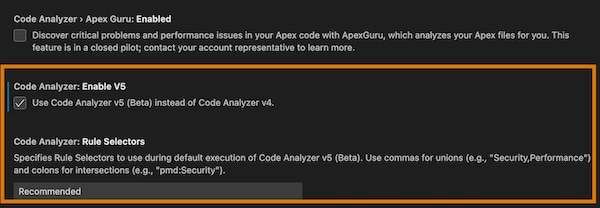
The extension uses Code Analyzer v4 by default, so you must explicitly enable v5 by clicking the new Code Analyzer: Enable V5 setting.
As shown in the preceding image, we added another new v5 setting: Code Analyzer: Rule Selectors. Use this setting to select the rules you want to run based on engine name, severity level, rule name, or tags. The default value is Recommended which selects the recommended rules for all available engines. Here are some other sample values:
Security,Performance : Selects security and performance rules for all engines.
pmd:Security : Selects only the security rules for the PMD engine.
eslint:Recommended:ErrorProne:2 : Selects the recommended ESLint rules that also have the tag ErrorProne and a high severity level (2).
This setting is the VS Code equivalent of the --rule-selector CLI command flag; for more information and examples, see Analyze Your Code with v5 Commands.
While the default Code Analyzer v5 (Beta) configuration is designed to meet the needs of most users, you can customize it by creating a YAML configuration file and putting it in your project root. See Customize the v5 Configuration for details.
Settings that apply to only Code Analyzer v4 are labeled (v4 only).
Actually scanning your code with v5 is the same as with v4: run the various flavors of SFDX: Scan with Code Analyzer commands from either the Command Palette or by right-clicking a file or folder; the exact command name is context-sensitive and depends on where you run it. Clearing violations from your code is also the same; use the SFDX: Clear Code Analyzer Violations command.
After you perform a scan, the Output panel displays which version of Code Analyzer you used:
(v4): 2025-02-22 15:10:26.805 [info] Scanning with @salesforce/sfdx-scanner@^4 via CLI
(v5): 2025-02-22 15:11:02.797 [info] Scanning with @salesforce/plugin-code-analyzer@^5 via CLI
Code Analyzer v5 (Beta) doesn’t yet support the Salesforce Graph Engine, so you don’t see the SFDX: Scan Selected Method with Graph Engine Path-Based Analysis command when using v5.
To use the PMD or Flowtest engines, you must install Java or Python, respectively. See Prerequisites for details.
Enjoy!
Code Analyzer v5.0.0-beta.2 (Beta)
Code Analyzer v5 is a pilot or beta service that is subject to the Beta Services Terms at Agreements - Salesforce.com or a written Unified Pilot Agreement if executed by Customer, and applicable terms in the Product Terms Directory. Use of this pilot or beta service is at the Customer’s sole discretion.
Note
NEW: We upgraded the PMD engine to version 7.10. See the PMD Release Notes for details.
January 2025 Releases
Code Analyzer v4.9.0
NEW: We upgraded the PMD engine to version 7.9. See the PMD Release Notes for details.
Code Analyzer VS Code Extension
We aren’t releasing a new version of the VS Code Extension this month.
Code Analyzer v5.0.0-beta.1 (Beta)
Code Analyzer v5 is a pilot or beta service that is subject to the Beta Services Terms at Agreements - Salesforce.com or a written Unified Pilot Agreement if executed by Customer, and applicable terms in the Product Terms Directory. Use of this pilot or beta service is at the Customer’s sole discretion.
Note
NEW: Use the run-code-analyzer GitHub Action (GHA) in your own GitHub actions to scan your code for violations using Code Analyzer v5, upload the results as an artifact, and display the results as a job summary.
NEW: We added a number of new LWC rules for the eslint engine. Run sf code-analyzer rules --rule-selector eslint to see the full list; the names of the LWC rules begin with either @lwc or @salesforce/lightning.
NEW: We upgraded the PMD engine to version 7.9. See the PMD Release Notes for details.
FIX: We improved the Flowtest engine and it’s now fully functional.
December 2024 Releases
Due to the holidays, we’re pushing out the December releases to mid-January, which is a bit later than usual.
Code Analyzer v4.8.0
NEW: We upgraded the PMD engine to version 7.8. See the PMD Release Notes for details.
Code Analyzer VS Code Extension
We aren’t releasing a new version of the VS Code Extension this month.
Code Analyzer v5.0.0-beta.0 (Beta)
Code Analyzer v5 is a pilot or beta service that is subject to the Beta Services Terms at Agreements - Salesforce.com or a written Unified Pilot Agreement if executed by Customer, and applicable terms in the Product Terms Directory. Use of this pilot or beta service is at the Customer’s sole discretion.
Note
NEW: Code Analyzer v5 is now Beta. To start using the new Beta features, update Salesforce CLI by running this command:
1sf plugins install code-analyzer
NEW: Identify blocks of duplication across files written in variable languages with the new Copy/Paste Detector (CPD) engine. Use the value cpd to specify the CPD engine in the CLI commands. This example shows how to list all the rules for the CPD engine:
NEW: Audit Salesforce Flows and report detailed information about security issues with the new Flowtest engine. Use the value flowtest to specify the Flowtest engine in the CLI commands. This example shows how to list all the rules for the Flowtest engine:
NEW: Use Code Analyzer v5 to prepare your managed packages for the AppExchange security review with the new set of PMD AppExchange rules that we added to the PMD Engine. See PMD AppExchange Rules Reference for details.
NEW: We added a PMDfile_extensions configuration field that supports associating file extensions to rules associated with “apex”, “html”, “javascript”, “typescript”, “visualforce”, and “xml” languages.
NEW: We upgraded the PMD engine to version 7.8. See the PMD Release Notes for details.
CHANGE: We replaced the ESLintjavascript_file_extensions and typescript_file_extensions configuration options with the new file_extensions field. This new field allows you to specify file extensions for “javascript”, “typescript”, and “other”.
November 2024 Releases
We aren’t releasing any updates this month.
October 2024 Releases
Code Analyzer v4.7.0
NEW: We made some updates to the RetireJS vulnerability database. (We don’t plan to mention these updates in the release notes anymore, as they occur regularly.)
NEW: We upgraded the PMD engine to version 7.6. See the PMD Release Notes for details.
NEW: We made some updates to the AppExchange-specific PMD rule engine, pmd-appexchange.
Code Analyzer VS Code Extension v1.3.0
NEW: Scan your entire project with Salesforce Graph Engine with the new SFDX: Scan Project with Graph Engine Path-Based Analysis command. Previously you could run the Graph Engine analysis on only a method.
NEW: After you scan your project with Salesforce Graph Engine, and then address some violations in a few files, you can now chose to run partial scans of just the changed code. Graph Engine scans can take a while, so running partial runs of just the code you’re currently working on saves time. See the VS Code documentation for details.
Code Analyzer v5.0.0-alpha.3 (Developer Preview)
This feature is available as a developer preview. The feature isn’t generally available unless or until Salesforce announces its general availability in documentation or in press releases or public statements. All commands, parameters, and other features are subject to change or deprecation at any time, with or without notice. Don’t implement functionality developed with these commands or tools.
Note
NEW: You can now supply your own custom PMD rules and rulesets in the Code Analyzer configuration file (code-analyzer.yml).
NEW: We added two Regex rules:
AvoidGetHeapSizeInLoop: Detects usage of Limits.getHeapSize() in loops.
MinVersionForAbstractVirtualClassesWithPrivateMethod: Detects private methods within abstract or virtual classes when the corresponding API version of the class is less than v61.0.
Run this command to view details about all the Regex rules:
NEW: We upgraded the PMD engine to version 7.6. See the PMD Release Notes for details.
September 2024 Releases
Code Analyzer v4.6.0
NEW: We made some updates to the RetireJS vulnerability database.
NEW: We upgraded the PMD engine to version 7.5. See the PMD Release Notes for details.
Code Analyzer VS Code Extension v1.2.0
CHANGE: If you use the ApexGuru integration with VS Code and accept one of its suggestions, the suggested Apex code is added as a comment block to your code.
The ApexGuru integration with the Code Analyzer VS Code extension is a pilot service that is subject to the Beta Services Terms at Agreements - Salesforce.com or a written Unified Pilot Agreement if executed by Customer, and applicable terms in the Product Terms
Directory. Use of this pilot service is at the Customer’s sole discretion.
The feature is available to customers that have Scale Center enabled in their production environments. If you want to nominate yourself to participate in this pilot, follow this link.
Note
Code Analyzer v5.0.0-alpha.2 (Developer Preview)
This feature is available as a developer preview. The feature isn’t generally available unless or until Salesforce announces its general availability in documentation or in press releases or public statements. All commands, parameters, and other features are subject to change or deprecation at any time, with or without notice. Don’t implement functionality developed with these commands or tools.
Note
To update Code Analyzer v5 and start using these new features, rerun the installation command:
1sf plugins install code-analyzer@latest-alpha
CHANGE: Because Code Analyzer v5 now supports PMD, you must install Java Platform, Standard Edition Development Kit (JDK), version 11 or later, on your computer.
NEW: Display the current state of your Code Analyzer configuration with the new code-analyzer config CLI command. The command has similar flags to the rules and run commands, such as --rule-selector, --workspace, and --config-file, which you can use to display specific aspects of your configuration. You can also use the --output-file to write the configuration to a YAML-formatted file and then modify as needed.
This example shows how to display, and then write to a file, the configuration state associated with recommended rules that are applicable to your workspace folder, ./src:
NEW: Use Code Analyzer v5 to detect common flaws in your Apex and Visualforce code, such as empty catch blocks or unused variables, with the new support of the PMD engine (version 7.5). Use the value pmd to specify the PMD engine in the CLI commands. This example shows how to list all the rules for the PMD engine:
1sf code-analyzer rules --rule-selector pmd
We support only the built-in PMD rules in this release, you can’t customize them. We also don’t support the pmd-appexchange custom PMD variant.
August 2024 Releases
Code Analyzer v4.5.0
NEW: We made some updates to the RetireJS vulnerability database.
NEW: We upgraded the PMD engine to version 7.4. See the PMD Release Notes for details.
NEW: We made some updates to the AppExchange-specific PMD rule engine, pmd-appexchange.
Code Analyzer VS Code Extension v1.1.0
NEW: Detect critical anti-patterns and performance hotspots in your Apex code by analyzing your Apex files with ApexGuru, which is now integrated into the Code Analyzer VS Code extension. See ApexGuru Insights.
The ApexGuru integration with the Code Analyzer VS Code extension is a pilot service that is subject to the Beta Services Terms at Agreements - Salesforce.com or a written Unified Pilot Agreement if executed by Customer, and applicable terms in the Product Terms Directory. Use of this pilot service is at the Customer’s sole discretion.
The feature is available to customers that have Scale Center enabled in their production environments. If you want to nominate yourself to participate in this pilot, follow this link.
Note
Code Analyzer v5.0.0-alpha.1 (Developer Preview)
This feature is available as a developer preview. The feature isn’t generally available unless or until Salesforce announces its general availability in documentation or in press releases or public statements. All commands, parameters, and other features are subject to change or deprecation at any time, with or without notice. Don’t implement functionality developed with these commands or tools.
Note
We’re excited to announce the Developer Preview release of Code Analyzer v5! This new version has been completely redesigned to be more flexible, expandable, and powerful. New users can quickly get started with Code Analyzer, while more experienced users now have greater customization capabilities. With Code Analyzer v5, you can now easily organize your rulesets with custom tags, set custom severity levels, and much more, thanks to our new YAML-based configuration file.
We’ve also significantly improved how outputs are generated, including enhanced HTML formatting. In the coming months, Code Analyzer v5 will be deeply integrated into our Developer Experiences, from the VS Code IDE to DevOps Center. It will work closely with Einstein for Developers and ApexGuru to provide advanced AI capabilities for identifying and fixing issues in your code.
We look forward to your feedback as you try it out!
July 2024 Releases
Code Analyzer v4.4.0
NEW: We made some updates to the RetireJS vulnerability database.
NEW: We upgraded the PMD engine to version 7.3. See the PMD Release Notes for details.
NEW: We made some updates to the AppExchange-specific PMD rule engine, pmd-appexchange.
FIX: The scanner run and scanner run dfa commands no longer return an error if the --target doesn’t contain any files and you don’t specify the --projectdir flag.
Code Analyzer VS Code Extension v1.0.0 (Generally Available)
We’re happy to announce that Code Analyzer VS Code Extension v1.0.0 is generally available! It stays true to our vision of providing a unified and Salesforce-centric code scanner, allowing you to run PMD, ESlint, RetireJS, and Salesforce Graph Engine from a single extension. You can configure the extension to automatically scan your code on save or when opening a file, so you catch any code quality problems early and often. Enjoy!
IMPORTANT: This is the last release for v3. From now on, use v4, which is generally available as of June 2024. Starting in July 2024, we’ll no longer publish release notes for v3.
To upgrade to the latest release of v4, run this command, which now installs v4 rather than v3.
1sf plugins install @salesforce/sfdx-scanner
We don’t recommend it, but if you must go back to v3, run this command.
NEW: We made some updates to the RetireJS vulnerability database.
Code Analyzer v4.3.0 (Generally Available)
We’re happy to announce that Code Analyzer v4 is now generally available! It includes significant upgrades to all of our engines, such as PMD v7, ESlint v7 and RetireJS v4. These changes make it much easier for you to scan Apex and LWC code that contain the very latest features.
If you haven’t already, we strongly recommend that you upgrade to Code Analyzer v4. It’s easy; simply run this command, which now installs v4 by default:
1sf plugins install @salesforce/sfdx-scanner
We’re working on many more exciting updates this year, so stay tuned! Check out our publicly available roadmap here.
If you just started using v4, note these breaking changes:
Code Analyzer v4 requires version 11 or later of the Java Platform, Standard Edition Java Development Kit (JDK).
If you’re using custom PMD rules, you might need to migrate your rules to work with PMD 7. See Migration Guide for PMD 7 for more information.
Check out the release notes for the previous v4 beta versions:
NEW: We made some updates to the RetireJS vulnerability database.
NEW: We upgraded the PMD engine to version 7.2. See our PMD documentation.
Code Analyzer VS Code Extension v0.7.0 (Beta)
This feature is a Beta Service. Customer may opt to try such Beta Service in its sole discretion. Any use of the Beta Service is subject to the applicable Beta Services Terms provided at Agreements and Terms.
Note
NEW: Clear violations from selected files, or all files in a folder, with the new SFDX: Clear Code Analyzer violations from selected files or folders command.
NEW: In addition to suppressing PMD violations in a single line of code, you can now use a Quick Fix option to suppress violations in the entire class.
NEW: When you use the Quick Fix option to suppress the PMD violation on a line of code, Code Analyzer now removes that violation. Previously you had to rescan the file for the violation to disappear. When you suppress violation at the class level, Code Analyzer removes the violations for the whole file.
NEW: We added three new settings:
Code Analyzer > Normalize Severity: Enabled : Output normalized severity (high, moderate, low) and engine-specific severity across all engines.
Code Analyzer > Rules: Category : The categories of rules to run.
Code Analyzer > Scanner: Engines : The engines to run.
CHANGE: To be consistent with other Salesforce VS Code commands, Code Analyzer commands in the Command Palette now start with SFDX:.
May 2024 Releases
Code Analyzer v3.25.0
IMPORTANT: Next month’s June release (3.26.0) is the last one we’ll publish for v3.x.
NEW: We made some updates to the RetireJS vulnerability database.
Code Analyzer v4.2.0 (Beta)
This feature is a Beta Service. Customer may opt to try such Beta Service in its sole discretion. Any use of the Beta Service is subject to the applicable Beta Services Terms provided at Agreements and Terms.
Note
NEW: We made some updates to the RetireJS vulnerability database.
NEW: We upgraded the PMD engine to version 7.1. See our PMD documentation.
Code Analyzer VS Code Extension v0.6.0 (Beta)
This feature is a Beta Service. Customer may opt to try such Beta Service in its sole discretion. Any use of the Beta Service is subject to the applicable Beta Services Terms provided at Agreements and Terms.
Note
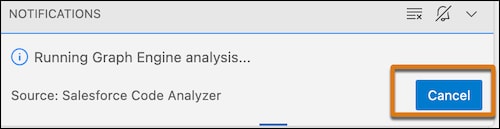
NEW: Cancel a running Salesforce Graph Engine analysis without having to wait for the analysis to complete. If you started the analysis by right-clicking an Apex method and selecting SF: Scan selected method with Graph Engine path-based analysis, the status bar shows the message Running Graph Engine analysis. Click the message, and a notification with a Cancel button pops up.
April 2024 Releases
Code Analyzer v3.24.0
NEW: We made some updates to the RetireJS vulnerability database.
Code Analyzer v4.1.0 (Beta)
This feature is a Beta Service. Customer may opt to try such Beta Service in its sole discretion. Any use of the Beta Service is subject to the applicable Beta Services Terms provided at Agreements and Terms.
Note
NEW: We made some updates to the RetireJS vulnerability database.
CHANGE: We made improvements to Graph Engine’s memory usage, dramatically reducing the likelihood of encountering LimitReached errors and OutOfMemory errors.
Code Analyzer VS Code Extension
This feature is a Beta Service. Customer may opt to try such Beta Service in its sole discretion. Any use of the Beta Service is subject to the applicable Beta Services Terms provided at Agreements and Terms.
Note
We aren’t releasing a new version of the VS Code Extension this month.
March 2024 Releases
Code Analyzer v3.23.0
NEW: We made some updates to the RetireJS vulnerability database.
NEW: In order to support scans of Apex code that uses API version 60 or later, we launched Code Analyzer version 4.x (beta). Specifically, version 4.x (beta) includes PMD 7.x and an upgraded Salesforce Graph Engine so it works with your latest Apex code. You can continue using Code Analyzer version 3.x for a few more months until version 3.x is deprecated. To use the most up-to-date Code Analyzer features, upgrade to v4.x (beta) by running sf plugins install @salesforce/sfdx-scanner@latest-beta.
Code Analyzer v4.0.0 (Beta)
This feature is a Beta Service. Customer may opt to try such Beta Service in its sole discretion. Any use of the Beta Service is subject to the applicable Beta Services Terms provided at Agreements and Terms.
Note
NEW: We updated the Typescript-ESLint engine from version 5.x to version 7.x. See our ESLint documentation.
NEW: We updated the RetireJS engine from version 3.x to version 4.x. See our RetireJS documentation.
NEW: We upgraded PMD to version 7.x. See our PMD documentation.
NEW: When running Code Analyzer version 4.x, Java 11 or later is required.
NEW: We updated Salesforce Graph Engine’s Apex Jorje library to support Apex version 60.0.
Code Analyzer VS Code Extension v0.5.0 (Beta)
This feature is a Beta Service. Customer may opt to try such Beta Service in its sole discretion. Any use of the Beta Service is subject to the applicable Beta Services Terms provided at Agreements and Terms.
Note
NEW: To automatically scan your code when saving or opening a file in VS Code, we added two new config flags: analyzeOnOpen and analyzeOnSave.. Both flags are hidden by default. See our Salesforce Code Analyzer VS Code Extension documentation.
NEW (CodeAnalyzer): We made some updates to the RetireJS vulnerability database.
NEW (CodeAnalyzer): We added a new —-preview-pmd7 flag to the scanner run, scanner rule list, scanner rule describe commands. The current standard Code Analyzer default is PMD 6.55.0. Use the —-preview-pmd7 flag to bypass the default and scan your code with PMD 7.0.0-rc4 and its CPD version. For more info, read the PMD 7.0.0-rc4 and its CPD documentation.
NEW (CodeAnalyzer): To encourage users on Java v8 to upgrade to v11 or later, we added a warning message. In a future release, support for Java v8 will be removed entirely.
NEW (CodeAnalyzer): To accelerate your continuous integration/continuous development (CI/CD) development, use our run-code-analyzer GitHub Action in your pipeline. For more info, read our Accelerate Your CI/CD Integration documentation and access run-code-analyzer directly from the GitHub Actions Marketplace. If you’re using DevOps Center, use our GitHub Action to run Salesforce Code Analyzer as you promote changes.
NEW (CodeAnalyzer): We made some updates to the RetireJS vulnerability database.
CHANGE (CodeAnalyzer and GraphEngine): We made some updates to two sf scanner run and scanner run dfa flags:
--projectdir now attempts to calculate a default when no value is provided
--target now has a default of .
Closed Issues:
32 new PMD rules for AppExchange Security Review #1295
NEW (CodeAnalyzer): We made some updates to the RetireJS vulnerability database.
NEW (CodeAnalyzer): Our documentation now displays Salesforce CLI sf-style instead of sfdx-style commands. We recommend that you update your scripts and CI/CD processes to use sf-style commands. For more information, read Salesforce CLI Command Reference.
NEW (CodeAnalyzer): To prepare your solution for AppExchange security review, we created an AppExchange-specific PMD rule engine, pmd-appexchange. This new, optional engine contains rules that help you identify common security review failure points, and fix them before you submit your solution. For more info on PMD and the pmd-appexchange engine, read our PMD documentation. For more information on using Salesforce Code Analyzer in the AppExchange security review process, read Scan Your Solution with Salesforce Code Analyzer in the ISVforce Guide.
Closed Issues:
New rule [Graph Engine]: Use With Sharing On Database Operation #1301
New rule [Graph Engine]: Avoid Database Operation In Loop #1300
New rule [Graph Engine]: Perform Null Check On SOQL Variables #1299
NEW (CodeAnalyzer): We made some updates to the RetireJS vulnerability database.
NEW (GraphEngine): To improve your code performance, we added one new pilot path-based Salesforce Graph Engine rule: PerformNullCheckOnSoqlVariables. This rule determines when a variable is noticed in the WHERE clause of a SOQL query and is missing a null check.
NEW (GraphEngine): Two recently released Graph Engine pilot rules are now generally available.
NEW (GraphEngine): One recently released Graph Engine pilot rule is now generally available and has been renamed: AvoidMultipleMassSchemaLookups (formerly MultipleMassSchemaLookupRule).
NEW (GraphEngine): We renamed the UnusedMethodRule (pilot) to RemoveUnusedMethod.
NEW (CodeAnalyzer): To provide you with more guidance on building your own custom rules, we added a sample Java-based PMD rules repo. Use the sample repo along with the recommendations in Authoring Custom PMD Rules to build your custom rules.
NEW (CodeAnalyzer): We made some updates to the RetireJS vulnerability database.
NEW (CodeAnalyzer): The upcoming release of PMD 7.x contains some changes that require you to rewrite your PMD 6.x rules. Code Analyzer hasn’t upgraded to PMD 7.x yet. To alert you in advance about what you must change in your code to comply with PMD 7.x, we added a warning message. Fix your code, and if you need help, create an issue on our repo.
NEW (CodeAnalyzer): We made some updates to the RetireJS vulnerability database.
NEW (GraphEngine): To improve your code performance, we added a new Salesforce Graph Engine path-based rule, MultipleMassSchemaLookupRule. This new rule detects scenarios where expensive schema lookups are made more than one time in a path and can cause performance degradation.
NEW (GraphEngine): DML transactions with the “as user” keyword are now treated as secure by ApexFlsViolationRule.
FIX (GraphEngine): We added support for the built-in string method, substringAfterLast().
FIX (CodeAnalyzer): We resolved an issue that caused Just-In-Time installations to fail on the first attempt.
FIX (CodeAnalyzer): We updated the --json flag to treat position information universally as numbers.
[BUG] Path evaluation timed out after 900000 ms #1042
[BUG] Graph Engine reached the path expansion upper limit (6688).. The analysis preemptively stopped running on this path to prevent an OutOfMemory error. Rerun Graph Engine targeting this entry method with a larger heap space. #1041
[BUG] ApexSoqlInjection reported when there should be none #1031
[BUG] sfdx plugins:update does not automatically update to the latest v3.12.0. #1070
Merged pull requests
FIX (GraphEngine): @W-13363157@: Handles loop exclusions more effectively #1085
CHANGE (CodeAnalyzer): @W-13519850@: Bump vm2 from 3.9.17 to 3.9.19 #1076
CHANGE (GraphEngine): @W-13363157@: Handles multiple levels of method call from loop definition #1084
FIX (GraphEngine): @W-13363157@: Exclude method calls from ForEach loop definition in MMSLookupRule #1082
FIX (CodeAnalyzer): @W-13473580@: Pmd output now treats position info as numbers. #1081
CHANGE (GraphEngine): @W-12446560@: Updates apex-jorje-lsp jar with minor test changes #1079
NEW (GraphEngine): @W-12408352@: Classifies “as user” DML operations as safe. #1080
CHANGE (GraphEngine): @W-11989381@: Adds loop boundaries while walking the path #1078
FIX (GraphEngine): @W-12672062@: Add support for built-in String method substringAfterLast. #1074
FIX (CodeAnalyzer): @W-13151459@: IOC initializes in scanner command instead of OCLIF. #1073
NEW (GraphEngine): @W-13080871@: Triggers are now compiled and added to the graph. #1072
CHANGE (GraphEngine): @W-13136274@: Sources are now specified at the rule level. #1068
NEW (GraphEngine): @W-11989381@: New MultipleMassSchemaLookupRule to detect performance degrading schema lookups. #1054
CHANGE (GraphEngine): @W-13123571@: Handle method invocations made directly on iterated array item #1062
NEW (CodeAnalyzer): We made some updates to the RetireJS vulnerability database.
CHANGE: (GraphEngine): UnusedMethodRule is now a path-based rule that’s invoked from scanner:run:dfa and covers many more cases than before. For more info on UnusedMethodRule, see Graph Engine Rules documentation.
NEW: (GraphEngine): Graph Engine now recognizes for-each-loop executed on class instances.
Closed issues:
[BUG] can’t use “sfdx project delete source” #1055
[BUG] @salesforce/sfdx-scanner > ts-node@10.9.1” has unmet peer dependency “@types/node@* #1000
INTERNAL ERROR: Unexpected error occurred while cataloging rules #1033
Merged pull requests
CHANGE (CodeAnalyzer): @W-13114136@: Updates package.json and retire-js vulnerabilities #1064
CHANGE (CodeAnalyzer): @W-13114136@: Bump vm2 from 3.9.14 to 3.9.17 #1056
CHANGE (GraphEngine): @W-12278342@: Expands paths on ForEach loop value method invocation. #1060
CHANGE (GraphEngine): @W-12696440@: UnusedMethodRule is now pilot. #1052
NEW (CodeAnalyzer): We updated the PMD engine to version 6.55.0.
NEW (CodeAnalyzer): We made some updates to the RetireJS vulnerability database.
NEW (GraphEngine): We added a new rule, ApexNullPointerExceptionRule, to Graph Engine. Use this rule to identify Apex operations in your code that throw NullPointerExceptions. Read ApexNullPointerExceptionRule documentation documentation for more info.
FIX (GraphEngine): We updated Graph Engine’s UnusedMethodRule to detect all static, unused methods.
FIX (GraphEngine): We updated Graph Engine’s UnusedMethodRule to detect all unused constructors.
NEW (CodeAnalyzer): We updated the PMD engine to version 6.54.0.
NEW (CodeAnalyzer): We made some updates to the RetireJS vulnerability database.
FIX (CodeAnalyzer): We updated the reference to the eslint-recommended config to point to the updated ESLint dependency. This resolves the error received on new direct or CI/CD installs of Code Analyzer: ERROR Cannot find module '/home/runner/.local/share/sfdx/node_modules/eslint/conf/eslint-recommended.js
FIX (GraphEngine): We added a new parameter, --pathexplimit, on scanner:run:dfa to customize Graph Engine’s scans of complex codebases. SFGE_PATH_EXPANSION_LIMIT is an alternative environment variable to provide the same customization. These options reduce the number of OutOfMemory errors produced. For more information, check out our documentation.
NEW (GraphEngine): We added a new graph-based rule, UnimplementedTypeRule. This rule identifies abstract classes and interfaces that are non-global and are missing implementations or extensions. See UnimplementedTypeRule for more information.
NEW (CodeAnalyzer): We updated the PMD engine to version 6.53.0.
NEW (CodeAnalyzer): We made some updates to the RetireJS vulnerability database.
NEW (GraphEngine): We added sample code to support the unused methods and unused classes and interfaces rules to sfge-working-app.
CHANGE (GraphEngine): We updated the scanner:rule:describe and scanner:rule:list –enginesfge commands to provide info on which Graph Engine rules run with scanner:run:dfa and which rules run with scanner:run.
FIX (GraphEngine): We optimized heap usage of Graph Engine which decreases the frequency of OutOfMemory error.
FIX (GraphEngine): In Winter ‘23, Apex added a WITH USER_MODE keyword to SOQL queries. Graph Engine recognizes this keyword as secure.
FIX (CodeAnalyzer): We updated our internal dependencies on @salesforce/core and @salesforce/command, resulting in minor cosmetic changes to command output.
Closed issues:
[BUG] Not able to run code scan in Staging environment. Error message is in attached screenshot. #933
NEW (Code Analyzer): scanner:run command executes graph-based rules from Graph Engine. Invoke the new rule by executing scanner:run command with --engine sfge and providing the --projectdir parameter. This behavior is different from path-based rules that are executed with scanner:run:dfa.
NEW (Graph Engine): We added a new graph-based rule, UnusedMethodRule. This rule detects methods contained in your code that aren’t invoked. See RemoveUnusedMethodRule for more information.
FIX (Graph Engine): ApexCrudFlsRule now understands multiple levels of method invocations on Schema Standard Library objects within for-loops.
FIX (Graph Engine): ApexCrudFlsRule now understands for-each iterations on Set data types and acknowledges Schema-based checks within the loops.
Closed issues:
[BUG] False positive FLS when using custom access utility class #862
NEW (GraphEngine): @W-11999008@: Add UnusedMethodRule to GraphEngine in disabled state. #915
NEW (GraphEngine): @W-11999008@: Light refactor of UnusedMethodRule. #916
CHANGE (GraphEngine): @W-11999008@: Refactoring appropriate methods into PathEntryPointUtil. #917
CHANGE (CodeAnalyzer): @W-11999008@: Refactor DFA-based GraphEngine in preparation for enabling new rule. #918
NEW (CodeAnalyzer): @W-11999008@: scanner:run now accepts –engine sfge and includes UnusedMethodRule. #919
NEW (GraphEngine): @W-11533657@: New ‘missingOptionsBehavior’ config property allows control over what happens if GraphEngine lacks proper config. #921
FIX (GraphEngine): @W-12138734@: Method invocation on Schema library objects within a forloop are now translated correctly. #922
FIX (GraphEngine): @W-12138734@: Handles forEach loops executed on Set data type. #923
CHANGE (CodeAnalyzer): @W-11999008@: Messages now meet doc team standards. #924
CHANGE (CodeAnalyzer): @W-11533657@: Messages now meet doc team standards. #925
NEW: We opened the Discussions feature on our GitHub repo. Use Discussions to ask and answer questions, share info, and participate in Code Analyzer and Graph Engine development.
NEW: To integrate Code Analyzer into your continuous integration/continuous development (CI/CD) process, read our CI/CD Integration documentation.
NEW: We made some updates to the RetireJS vulnerability database.
NEW: We updated the PMD engine to version 6.51.0
FIX: SObjectType.My_Obj__c is now recognized as a valid DescribeSObjectResult.
FIX: My_Obj__c.My_Field__c is now recognized as a valid SObjectField- .
Closed issues:
[BUG] Winter 22 Assert classes are not considered when scanning for PMD.ApexUnitTestClassShouldHaveAsserts rule #836
List command - INTERNAL ERROR: Unexpected error occurred while cataloging rules: null #882
[Question] Can the DFA detect CRUD/FLS using all forms of schema checking? #883
[BUG] SObjectType.My_Obj__c is not recognized as a DescribeSObjectResult type #890
Merged pull requests
@W-11831625@: Ported testing jobs from CircleCI to Github Actions. #843
CHANGE(GraphEngine): @W-12024733@ We upgraded spotless plugin version to 6.11.0. #874
CHANGE (CodeAnalyzer): @W-11326833@: We more robustly enforce PR naming conventions. #876
CHANGE (GraphEngine): @W-12028485@: User-facing message no longer mentions SFGE. #879
CHANGE (CodeAnalyzer): @W-11326833@: PR scope of ‘other’ is now allowed in PR titles. #880
CHANGE (CodeAnalyzer): @W-11831625@: Our CI will now output more informative information. #884
CHANGE (PMD): @W-12107365@: Upgrade to PMD 6.51.0 #892
FIX (GraphEngine): @W-11992240@: Handle more SObjectField and DescribeSObjectResult formats #893
FIX (GraphEngine): @W-12130636@: Update Apache Log4j to 2.17.1 #894
FIX (CodeAnalyzer): @W-12130427@: Enclose telemetry callouts in try-catch blocks. #896
NEW [SFGE]: We now display progress information of Salesforce Graph Engine’s analysis while executing scanner:run:dfa command.
NEW: If a JavaScript target file is analyzed by both eslint and eslint-lwc, we throw a warning about duplicate violations to alert you that you should modify your configuration.
NEW: We updated the RetireJS Vulnerability Repository.
NEW: We upgraded PMD to 6.48.0.
CHANGE: We replaced eslint’s parser with @babel/eslint-parser.
FIX: We removed the survey request banner’s stylization.
FIX [SFGE]: When Salesforce Graph Engine (SFGE) is unable to resolve a method call or a variable passed to a database operation, it no longer throws an internal error. Instead, SFGE creates a violation to let you know that you need to verify the CRUD/FLS access of the operation manually.
Closed issues:
[BUG] UnexpectedException on v3 DFA on large ISV codebase #739
[BUG] stdout not in proper JSON format when –format json is used #771


 j
j