Survey Invitations

Learn how to create survey invitations through API requests that are invoked from an Apex class.

Survey invitations are created using these steps.

  1. The SurveyApi Apex class (SurveyApi.cls file) is available within a package. The POST method from the SurveyApi Apex class calls the API endpoint having the required payload to create the survey invitation.

    Resource

    1/services/data/vXX.X/connect/surveys/surveyId/survey-response

    Request body for POST

    1{
    2  "languageCode": "",
    3  "invitationSettings": {
    4    "allowGuestUserResponse": false,
    5    "allowParticipantsAccessTheirResponse": false,
    6    "collectAnonymousResponse": false,
    7    "invitationExpirationDate": "2022-07-31T21:32:54",
    8    "communityId": "",
    9    "invitationOwner": ""
    10  }
    11}

    See Survey Responses Using Invitation Configurations for details of the request properties.

  2. The response to the previous POST request fetches the survey and its questions.

    Response

    1{
    2  "languageCode": "en",
    3  "invitationId": "0Kixx0000004MWaCAM",
    4  "flowInterviewState": "state1",
    5  "status": "Success",
    6  "surveyDetail": {
    7    "label": "Survey01",
    8    "name": "Survey01",
    9    "surveyPage": {
    10      "label": "Page 1",
    11      "name": "p_d84afb73_3a30_4a3f_aae7_b0478b3bb4ed",
    12      "surveyQuestions": [
    13        {
    14          "name": "q_856a997e_be2c_4ea3_b70d_7f6fb9cfbf4f",
    15          "label": "Good so Far!",
    16          "questionType": "ShortText",
    17          "responseDataType": "STRING",
    18          "validationFormula": <Formula if any custom validation is added>,
    19          "isResponseRequired": false
    20        }
    21      ]
    22    "versionLabel":"<Survey name>",
    23    "versionNumber": <Survey version>
    24    }
    25  },
    26  "errors": [],
    27  "warnings": []
    28}
  3. The SurveyApi Apex class also has the code to parse the API response, which returns the survey details and questions to the Lightning Web Component (LWC).

    See Survey Description Output for details of the response properties.

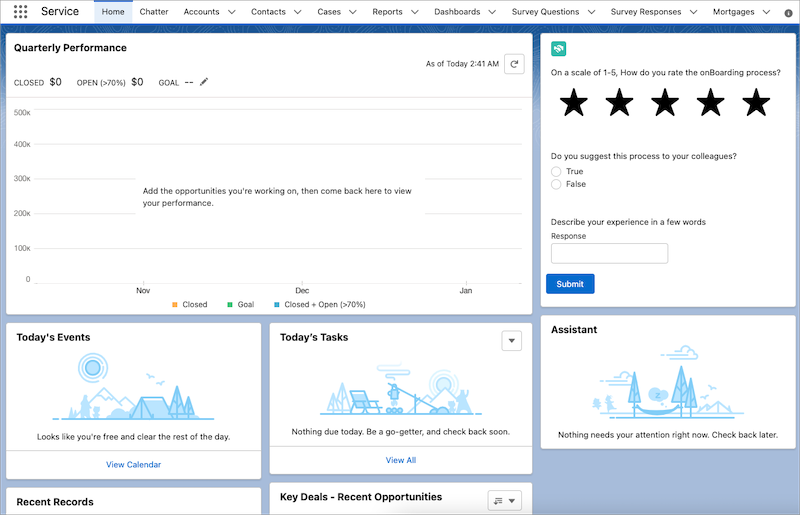
    Here’s how the survey appears on the Salesforce home page.

    A representation of the created survey on the Salesforce home page.