


Customize Colors with the Service Chat SDK
You can customize the look and feel of the interface by specifying the colors used throughout the UI.
The legacy chat product is scheduled for retirement on February 14, 2026, and is in maintenance mode until then. During this phase, you can continue to use chat, but we no longer recommend that you implement new chat channels. To avoid service interruptions to your customers, migrate to Messaging for In-App and Web before that date. Messaging offers many of the chat features that you love plus asynchronous conversations that can be picked back up at any time. Learn about chat retirement in Help.
Important
To customize the colors, create color resource values in your project’s colors.xml file that correspond to the same resource names specified in this documentation.
For example, the following resource file values customize some of the branding tokens:
1<resources>
2  <color name="salesforce_brand_primary">#50e3c2</color>
3  <color name="salesforce_brand_secondary">#4a90e2</color>
4  <color name="salesforce_contrast_inverted">#ffffff</color>
5  <color name="salesforce_contrast_primary">#333333</color>
6  <color name="salesforce_contrast_secondary">#767676</color>
7  <color name="salesforce_feedback_primary">#e74c3c</color>
8</resources>
These screenshots illustrate how the branding tokens affect the UI.
Chat UI Branding:
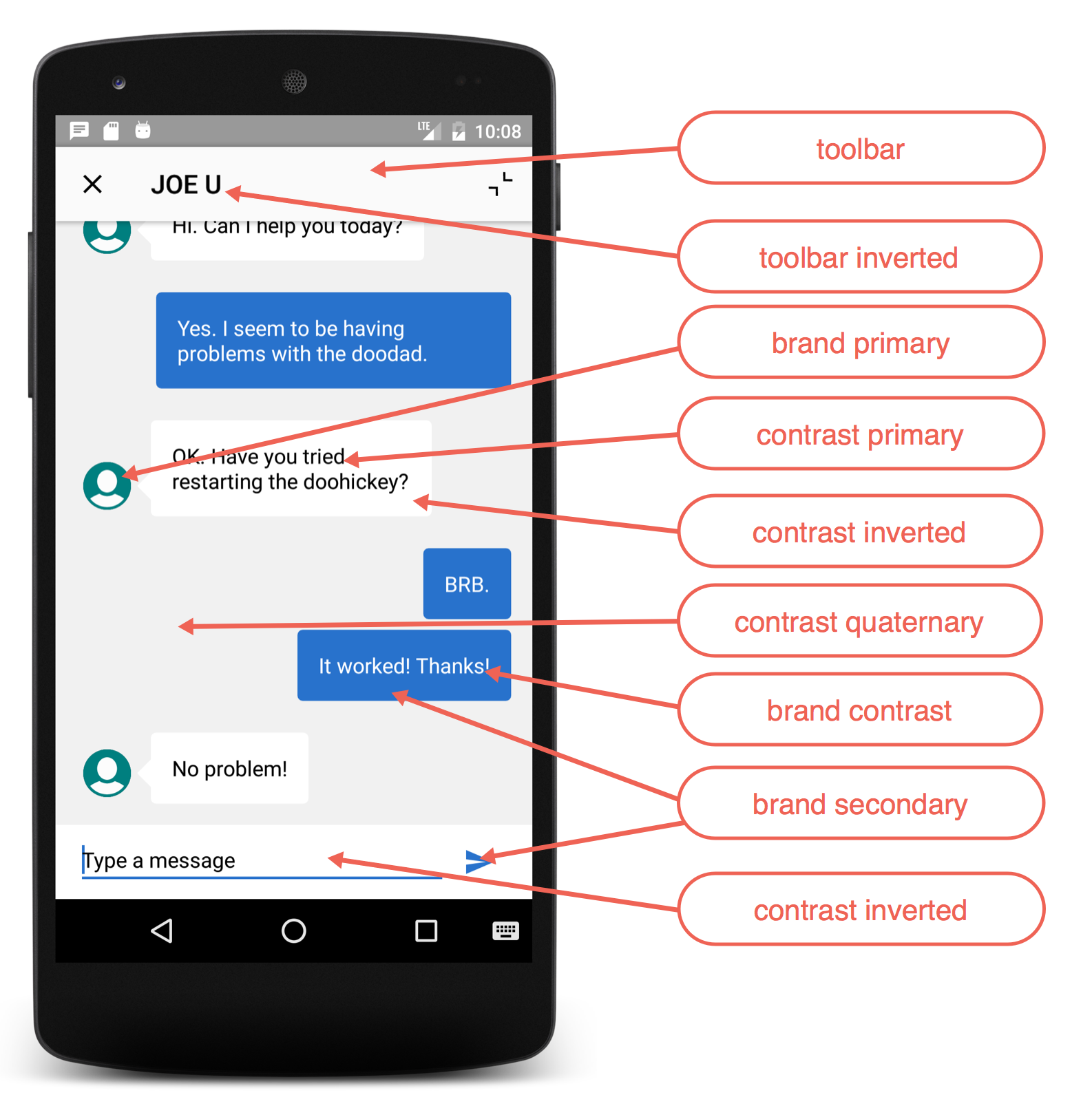
The following branding tokens are available for customization.
| Token Name | Default Value | Description / Sample Uses |
|---|---|---|
Toolbarsalesforce_toolbar | #FAFAFA  | The toolbar background color. |
Toolbar Invertedsalesforce_toolbar_inverted | #010101  | Toolbar text and icon color. |
Brand Primarysalesforce_brand_primary | #007F7F  | The banner background color. Chat: Line under the message you’re typing. |
Brand Secondarysalesforce_brand_secondary | #2872CC  | Chat: User text bubbles. |
Brand Contrastsalesforce_brand_contrast | #FCFCFC  | Title text color. |
Contrast Primarysalesforce_contrast_primary | #000000  | Primary body text color. |
Contrast Secondarysalesforce_contrast_secondary | #6D6D6D  | |
Contrast Tertiarysalesforce_contrast_tertiary | #BABABA  | |
Contrast Quaternarysalesforce_contrast_quaternary | #F1F1F1  | Chat: Background color for the chat feed screen. |
Contrast Invertedsalesforce_contrast_inverted | #FFFFFF  | Page background, navigation bar, table cell background. Chat: Color of the close button on the minimized view. Client message text. Background color at the bottom of the input bar on the chat feed UI. |
Feedback Primarysalesforce_feedback_primary | #E74C3C  | Text color for error messages. |
Feedback Secondarysalesforce_feedback_secondary | #2ECC71  | |
Feedback Tertiarysalesforce_feedback_tertiary | #F5A623  | |
Title Colorsalesforce_title_color | #FBFBFB  | Text as it appears in titles throughout the UI. Text on areas where a brand color is used for the background. Chat: Agent text bubbles. |
Overlaysalesforce_overlay | #000000(40% alpha) |
 j
j