Salesforce Connect brings external data into Salesforce without copying it. Live API calls replace ETL and sync jobs, and the data stays where it is. For sources reachable through a built-in adapter, such as OData services, Snowflake, or Athena, a standard adapter can handle the connection. But when your data lives behind a REST API that none of the built-in adapters speak, developers have had to write the integration by hand, often requiring hundreds of lines of Apex and deep framework knowledge to build a working custom Salesforce Connect Apex adapter.
AI agents can write this code on behalf of the developer, but without deep Salesforce Connect context, AI agents hallucinate. They write Apex that looks correct but misses required columns, uses wrong field types, or returns a malformed TableResult. What promised speed becomes hours of debugging validate and sync failures.
That changes with the platform-salesforce-connect-adapter-generate skill.
Developers can now use a coding agent to carry out the entire end-to-end integration workflow and build a complete, working adapter, including Apex classes.
This blog post covers what the skill does, how it structures the generated code, and how it uses the Salesforce Headless 360 MCP Server to register your adapter, reducing the manual work required in Salesforce Setup to a single click
What is a custom Apex adapter in Salesforce Connect?
The Salesforce Connect custom Apex adapter type lets you build your external data source by connecting with any REST API as a first-class external object. External objects look and behave like native Salesforce records where they show up in related lists; work in SOQL, flows, reports; and support platform features like sharing and field-level security. The data is never stored in Salesforce. Every query fires a live callout.
To build one, you implement two Apex classes from the DataSource namespace:
DataSource.Provider: This class declares what your adapter supports: which objects it exposes, which query capabilities it has, and which authentication method it uses.DataSource.Connection: This class handles the actual API calls. It receives aQueryContext, calls your external system, maps the response to Salesforce field types, and returns aTableResult.
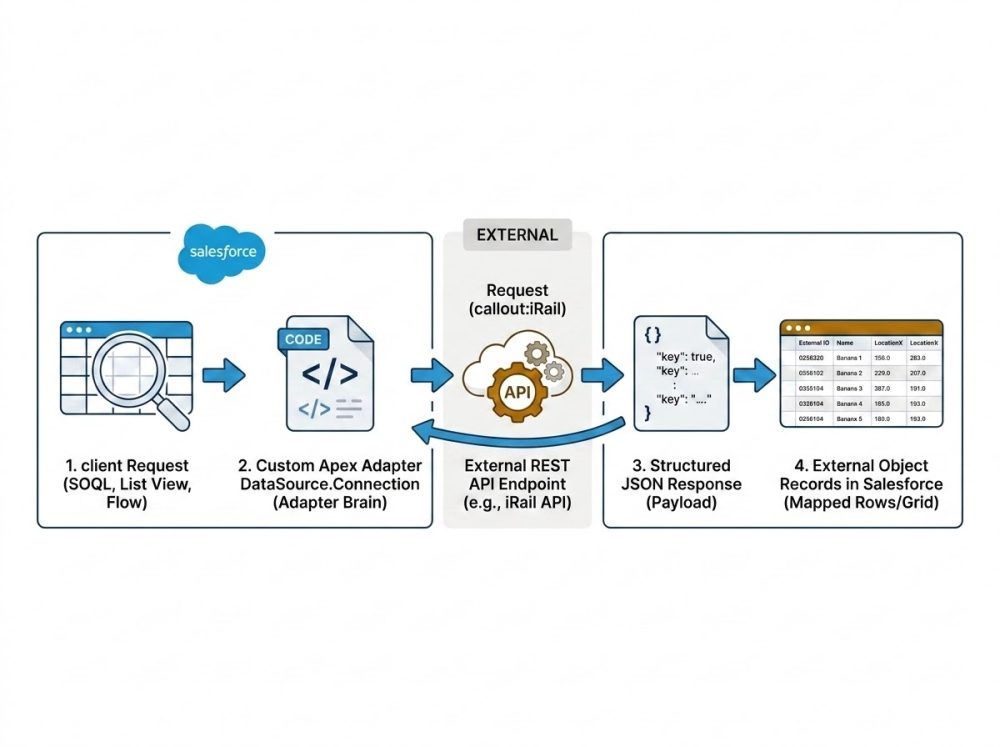
The interface is well-defined and public. But writing it correctly requires knowing the right method signatures, valid field types, pagination contracts, and error handling patterns. All of that is knowledge that takes time to build.
Introducing platform-salesforce-connect-adapter-generate
Salesforce skills are specialized AI capabilities that ground Agentforce Vibes and other dev agents with deep, domain-specific knowledge. They’re open-source, available as sf-skills, preloaded in Agentforce Vibes, and installable in any third-party AI tool. You describe your API in plain language. The agent does the rest.
When the platform-salesforce-connect-adapter-generate skill is loaded, your dev agent knows:
- The exact method signatures for
DataSource.ProviderandDataSource.Connection - Correct
DataSource.DataTypemappings for your API’s field types. The skill knows which enum value to use for text, numbers, URLs, and more - That
ExternalIdandDisplayUrlcolumns are required on every table definition - That every table needs a column designated as its “name” column or the validate and sync operation fails
- How to structure
TableResult,QueryUtils, andSearchUtils - Named credential patterns so no credentials end up hardcoded
Without this skill, any dev agent produces plausible Apex that fails on first sync. With it, the agent gets the contract right on the first try.
Real-world use case: iRail Belgian Rail API
A developer at a travel company needs live data from 714 Belgian train stations in Salesforce for their customer service agents. The iRail API has this data: a public REST endpoint, free to use, returning clean JSON. No built-in adapter covers this endpoint and a custom Apex adapter is the only path.
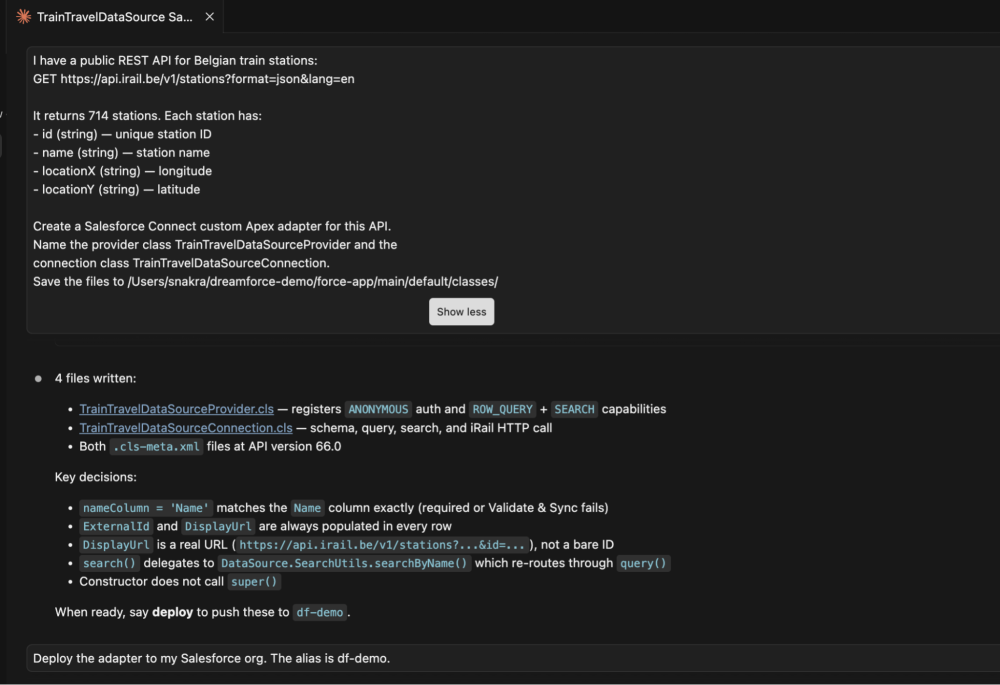
With the platform-salesforce-connect-adapter-generate skill loaded, the developer describes the API in plain language:
“I have a public REST API for Belgian train stations at GET https://api.irail.be/v1/stations. It returns 714 stations with id, name, locationX, and locationY fields. Create a custom Salesforce Connect Apex adapter.”
The agent generates both Apex classes DataSource.Provider and DataSource.Connection with correct field types, required columns, and named credential auth wired in:
1public class TrainTravelDataSourceConnection extends DataSource.Connection {
2    public override DataSource.TableResult query(DataSource.QueryContext context) {
3        HttpRequest req = new HttpRequest();
4        // context unused here — iRail returns all stations; use QueryUtils.filter/sort for filtered queries
5
6req.setEndpoint('callout:iRail_Named_Credential/v1/stations?format=json&lang=en');
7        req.setMethod('GET');
8        HttpResponse res = new Http().send(req);
9        Map<String, Object> body = (Map<String, Object>) JSON.deserializeUntyped(res.getBody());
10        List<Object> stations = (List<Object>) body.get('station');
11        List<Map<String, Object>> rows = new List<Map<String, Object>>();
12        for (Object s : stations) {
13            Map<String, Object> station = (Map<String, Object>) s;
14            Map<String, Object> row = new Map<String, Object>();
15            row.put('ExternalId', (String) station.get('@id'));
16 row.put('DisplayUrl', 'https://api.irail.be/v1/stations?format=json&lang=en&id=' + (String) station.get('@id'));
17            row.put('Name', (String) station.get('name'));
18            row.put('LocationX', Double.valueOf((String) station.get('locationX')));
19            row.put('LocationY', Double.valueOf((String) station.get('locationY')));
20            rows.add(row);
21        }
22        return DataSource.TableResult.get(context, rows);
23    }
24}
The code above shows the Connection class, which handles query logic. The full adapter also includes a DataSource.Provider class that declares adapter capabilities and returns the connection instance. See the complete code at https://github.com/shra1904/dreamforce-demo.
Here’s an example of how to run such a prompt with Claude Code:
This skill gives your agent the edge
Some of the key things the skill gets right automatically:
- Every custom adapter must declare a DataSource.Column named ExternalId, and the skill enforces this
- Field types are deterministic and mapped accurately to avoid field type mismatches, which are the most common failure mode
- The callout uses named credentials via the
callout:prefix so no hardcoded URLs, no secrets in code - The return type is
DataSource.TableResult, which is the exact contract Salesforce expects
When both classes are deployed to the org via sf project deploy start, the adapter code is live. The next step is registering it in Salesforce as an external data source, traditionally a multistep Setup wizard. With the Salesforce Headless 360 MCP Server connected to your coding agent, that step becomes an API call too.
Registering without going to Setup in Salesforce
The agent invokes the external-data-source-setup platform metadata operation directly thanks to an MCP tool:
1# Coding agent generates and deploys the adapter, then calls:
2# Headless 360 MCP → external-data-source-setup
3# → External Data Source created without opening Setup
The MCP server exposes Salesforce configuration operations as structured tools an AI agent can call so the same operations you’d perform through the UI are accessible programmatically.
This is the direction the platform is heading. Every Setup operation becomes an API call that an agent can invoke. Salesforce Connect is one of the first areas where we’re making this real.
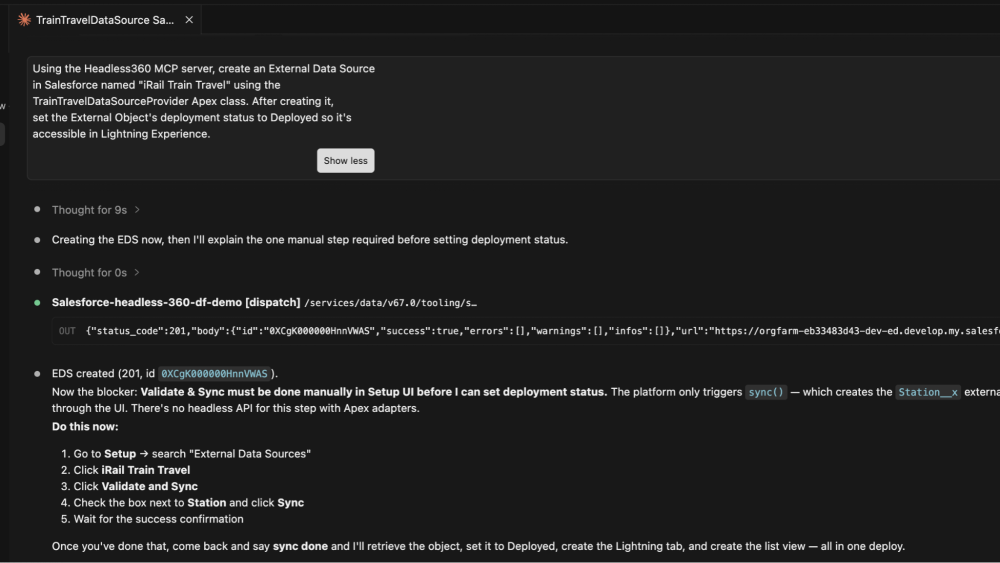
The final step is validate and sync, which creates the external object by querying the adapter for its schema. That is one click in Salesforce Setup. The result: live station data in Salesforce, queryable in SOQL and available across all platform features like flows, reports, and so on.
Getting started
The skill is available now in sf-skills as platform-salesforce-connect-adapter-generate. You’ll need a Salesforce Connect license, Salesforce CLI v2+, and a coding agent like Agentforce Vibes, Claude Code, or Cursor. If you use Agentforce Vibes, the skills are already loaded, but if you are working with a third-party agent, you’ll need to install the skill by running npx skills add forcedotcom/sf-skills in your project directory. Once the skills are available, describe your API to your agent in natural language.
The skill handles any REST API that returns a structured JSON response, whether the API is authenticated or public, and whether the response is paginated or returned as a single response. Tell the agent what fields you need, what types they are, and how authentication works. The generated code is a working first pass. Add error handling and a test class before deploying to production. Apex requires test coverage to deploy to a production org.
Conclusion
Custom Apex adapters have always been capable. The barrier was the knowledge required to write them correctly. The platform-salesforce-connect-adapter-generate skill removes that barrier because your coding agent now knows the full DataSource framework and can generate a working adapter from a plain-language description.
Combined with the Salesforce Headless 360 MCP server, virtually the entire workflow, including code generation, deployment, and org registration, can be completed without leaving your terminal. That’s the foundation we’re building toward: agentic Salesforce configuration, end to end.
In Winter ’27, we’re extending this further with full headless external data source lifecycle management and Salesforce Connect extensibility for standard adapters. (This represents current product direction and is subject to change. Please base purchasing decisions on currently available features.)
Have a data source you’d like to connect to Salesforce? Share your ideas and vote for related requests on IdeaExchange.
Resources
- Salesforce Connect Custom Apex Adapter documentation
- platform-salesforce-connect-adapter-generate skill on sf-skills
- DataSource Namespace reference
- Headless360 MCP documentation
- iRail API (demo target used in this post)
About the author
Shraddha Nakra is a Senior Product Manager at Salesforce on the Platform Connectivity Solutions team, where she owns Salesforce Connect and Private Connect. She focuses on making external data integration secure, faster, and developer-friendly from zero-copy connectivity to agentic configuration. Find her on LinkedIn.