Data 360 provides batch data transforms for governed data preparation. When a customer needs a complex transformation implemented with custom code, Code Extension provides a Python and PySpark authoring option that can be managed in source control, validated locally, and run through Data 360 without exporting governed data to a separate processing platform.
You can package Python code as a script, deploy it into Data 360, and invoke it through a batch data transform. The transform remains the operational control point, while the script contains the customer’s processing logic.
The Northstar Outfitters customer scenario
Northstar Outfitters receives product data from several commerce systems. Brand names, currencies, units, required attributes, and product categories are represented differently across those systems. These inconsistencies affect product search and produce uneven analytics across channels.
Northstar needed one trusted product catalog in Data 360. The transformation had to:
- Standardize product names, brands, currencies, and units.
- Enrich products by mapping them to the approved category reference.
- Validate required attributes and identify invalid records.
- Calculate a product-completeness score using custom business rules.
Native batch data transforms support common operations through visual nodes and formulas. The complexity of Northstar’s transformation logic made a code-based approach more practical, so the team implemented it as modular, unit-tested, and source-controlled Python and PySpark with Code Extension.
A batch data transform remained the operational control point, providing execution, scheduling, status, and run history for the deployed script.
How Data 360 Code Extension fits the solution architecture
Northstar selected Code Extension so its production transformation could run on Salesforce-managed infrastructure within Data 360 using Spark for distributed processing. Developers used their local IDE only to validate the logic against sampled data. Full-scale processing began when the batch data transform invoked the deployed script.
This model provided:
- In-platform processing. Custom Python logic executes within Salesforce-managed infrastructure instead of a separate customer-managed processing pipeline.
- Distributed execution. Spark distributes PySpark DataFrame operations across Salesforce-managed compute resources.
- Isolated, temporary runtime. Tenant isolation, runtime sandboxing, network controls, and ephemeral compute help protect the platform and other workloads.
- Managed operations. Data 360 manages deployment, invocation, scheduling, execution status, logs, and run history.
The batch data transform starts the deployed Code Extension. The script uses the Data Custom Code SDK to read permitted DLOs as Spark DataFrames and write to the permitted target DLO. This scenario illustrates a DLO-to-DLO transform. Code Extension scripts also support DMO-to-DMO transforms, but a script must read from and write to the same object type—it can’t mix DLOs and DMOs.
For more about the architecture and security model, see How to Power Data 360 with Code Extension and Securely Running Python with Data Cloud’s Bring Your Own Code Architecture.
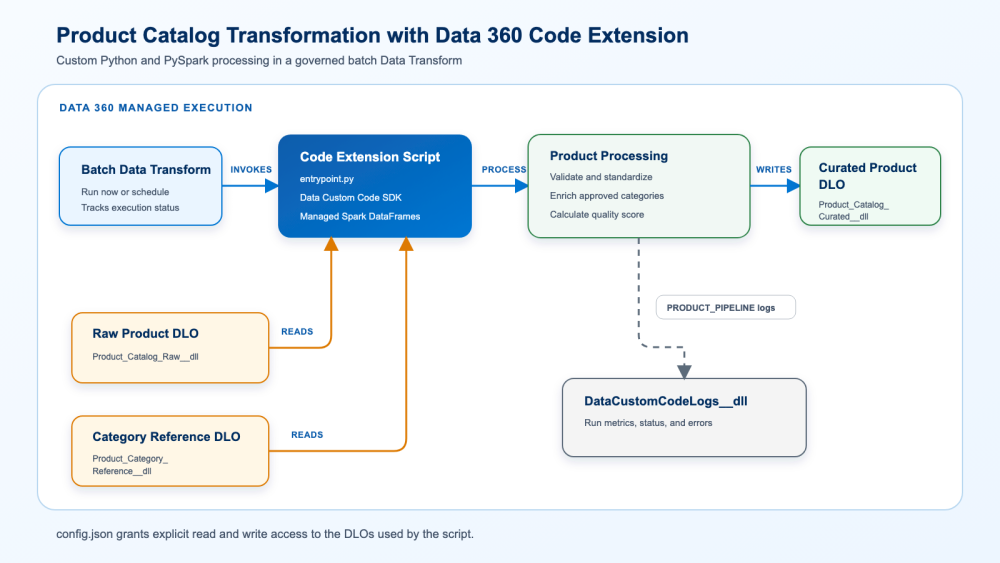
Northstar’s object map was:
| Role | DLO API name |
| Raw product feed | Product_Catalog_Raw__dll |
| Approved category reference | Product_Category_Reference__dll |
| Execution logs | DataCustomCodeLogs__dll |
| Curated product target | Product_Catalog_Curated__dll |
The DLO names in the package constants matched this access model.
How to structure a Data 360 Code Extension package
The Code Extension script used the following structure:
1my_package/
2├── payload/
3│   ├── config.json
4│   └── entrypoint.py
5├── requirements.txt
6└── tests/
7    ├── test_deploy_config.py
8    └── test_entrypoint.py
Because my_package/ contains payload/, the team used it as the deployment root and passed --package-dir ./payload to the packaging and deployment commands.
The package access model
In config.json, Northstar identified the SDK version, entry point, data space, and DLOs that the package could read or write.
1{
2  "sdkVersion": "6.1.0",
3  "entryPoint": "entrypoint.py",
4  "dataspace": "default",
5  "permissions": {
6    "read": {
7      "dlo": [
8        "Product_Catalog_Raw__dll",
9        "Product_Category_Reference__dll"
10      ]
11    },
12    "write": {
13      "dlo": [
14        "Product_Catalog_Curated__dll"
15      ]
16    }
17  }
18}
The curated target remained write-only, keeping read and write responsibilities separate. The explicit permission list also gave reviewers a clear view of the package’s intended data access.
Before deployment, the team confirmed that each DLO existed in the configured data space and that the schemas contained every column used by the program. This caught naming and environment differences before transform creation.
What the Python and PySpark entrypoint script does
The entry point followed a simple read, transform, and write flow:
1products_df = client.read_dlo(PRODUCT_SOURCE_DLO)
2categories_df = client.read_dlo(CATEGORY_REFERENCE_DLO)
3
4changes = transform_products(products_df, categories_df)
5
6client.write_to_dlo(
7    FINAL_DLO,
8    changes,
9    write_mode=WriteMode.MERGE)
Managed execution supplied the authenticated SDK context and enforced the permissions declared in config.json; the script did not hardcode credentials. The transformation function validated and standardized product data, matched approved categories, and calculated the required output. Spark distributed this processing across the managed execution environment.
The script logged failures with their processing context and rethrew exceptions so the data transform could report the run as failed.
How to validate a Code Extension script locally
Before deployment, Northstar ran the script locally against a Data 360 sandbox. Local execution read a sample of up to 1,000 records and sent output to the console without modifying Data 360 objects.
The team used this for functional validation. They measured performance and scale after deploying the script to the managed Data 360 runtime.
Local setup
The local toolchain included Salesforce CLI, Python 3.11, the SDK version declared in config.json, and the Salesforce CLI Code Extension plugin.
1sf update
2sf plugins install @salesforce/plugin-data-code-extension
3python3.11 -m pip install salesforce-data-customcode==6.1.0
4
5sf org login web \
6  --alias myorg \
7  --instance-url https://test.salesforce.com
8
9sf org display --target-org myorg
With the sandbox authenticated as myorg, the team ran the entry point from the repository root:
1sf data-code-extension script run \
2  --entrypoint ./my_package/payload/entrypoint.py \
3  --config-file ./my_package/payload/config.json \
4  --target-org myorg
They ran the unit tests separately:
1cd my_package
2python3.11 -m pytest tests -q
Northstar’s test suite covered schema handling, normalization, category enrichment, quality-score calculation, invalid and empty inputs, write behavior, structured logging, and disjoint read/write permissions.
The team used the Code Extension quick start as its reference for prerequisites and sandbox setup.
How to deploy a Code Extension with Setup or Salesforce CLI
Deploying through Setup
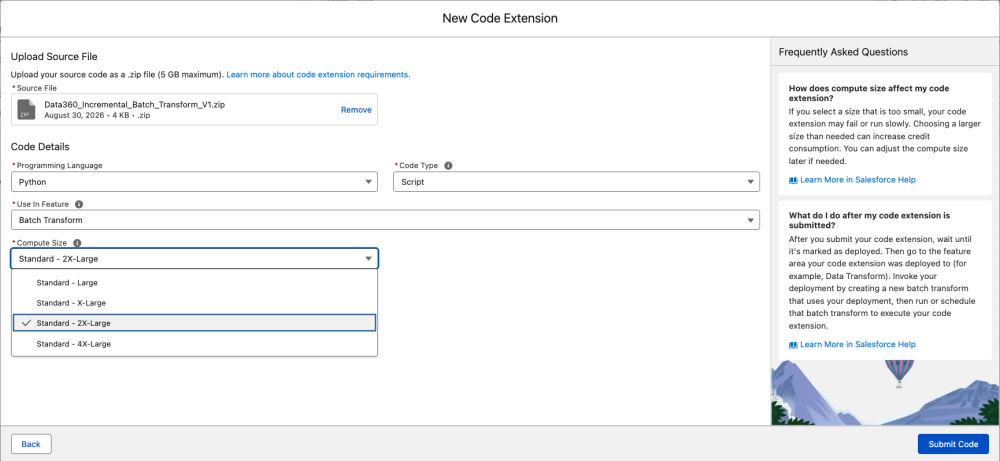
In Setup, Northstar entered Code Extension in Quick Find and opened Code Extension. The page displayed existing deployments, including their code type, owner, deployment time, and current status.

After selecting New, the team uploaded the ZIP package and selected Python, Script, Batch Transform, and the required compute size before submitting the Code Extension.
Deploying with Salesforce CLI
For its repeatable developer workflow, Northstar used the Code Extension plugin to package and deploy the script:
1cd my_package
2
3sf data-code-extension script zip \
4  --package-dir ./payload
5
6sf data-code-extension script deploy \
7  --name Northstar_Product_Catalog_V1 \
8  --package-version 1.0.0 \
9  --description "Product catalog standardization and enrichment" \
10  --package-dir ./payload \
11  --target-org myorg \
12  --cpu-size CPU_2XL
The available CPU flags were CPU_L, CPU_XL, CPU_2XL, and CPU_4XL. Northstar began with CPU_2XL, measured the managed run, and used its timing logs to decide whether a different size was justified.
The deployment name was metadata supplied by the command, not a value that had to appear in entrypoint.py. Northstar later used that same name to select the Code Extension for its transform and filter execution logs.
The team also accounted for the documented CLI limitation for DMO-to-DMO transforms, where the UI deployment path is required. The current behavior is described in Deploy a Custom Script to Data 360 Sandbox by Using CLI.
After upload, the package passed through platform security validation before execution. Managed runs used isolated, temporary compute resources, and Northstar planned to migrate the validated Code Extension and dependencies through a DevOps data kit for its production release.
How to connect a Code Extension to a batch data transform
Deployment made Northstar’s script available, but did not execute it. The team connected the deployed Code Extension to a batch data transform, which became the invocation and scheduling layer.
Creating the transform in the UI
In Data 360, Northstar opened Data Transforms, selected Create from Code Extension, entered a unique label and API name, and selected the deployed Code Extension. It saved the transform and used Run Now for the first managed validation.
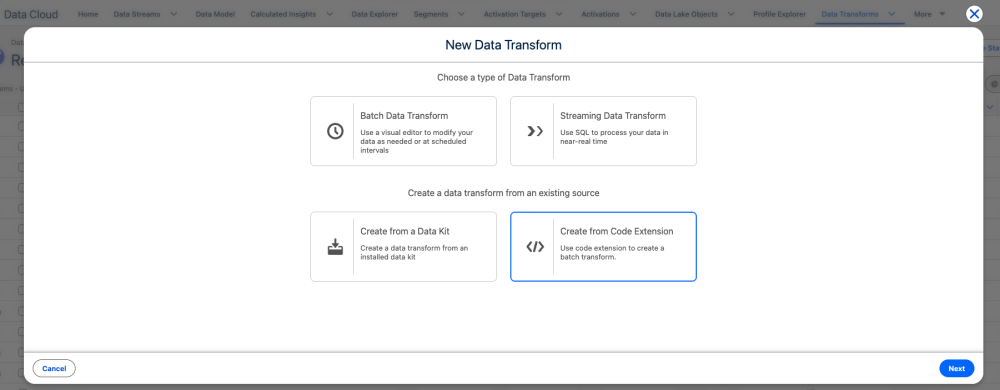
The team kept the API name within the documented character, length, and uniqueness rules described in Invoke Code Extension by Creating a Batch Data Transform.
Automating transform creation with the Connect API
To automate transform creation, Northstar captured the Connect API request as transform-request.json. The following abridged excerpt highlights the relationship between the target DLO, input DLOs, data space, and deployed Code Extension:
1{
2  "definition": {
3    "type": "DCSQL",
4    "manifest": {
5      "nodes": {
6        "node1": {
7          "relation_name": "Product_Catalog_Curated__dll",
8          "config": { "materialized": "table" },
9          "compiled_code": ""
10        }
11      },
12      "sources": {
13        "source1": {
14          "relation_name": "Product_Catalog_Raw__dll"
15        },
16        "source2": {
17          "relation_name": "Product_Category_Reference__dll"
18        }
19      },
20      "macros": {
21        "macro.byoc": {
22          "arguments": [
23            {
24              "name": "Northstar_Product_Catalog_V1",
25              "type": "BYOC_SCRIPT"
26            }
27          ]
28        }
29      }
30    },
31    "version": "56.0"
32  },
33  "label": "Northstar Product Catalog Transform V1",
34  "name": "Northstar_Product_Transform_V1",
35  "description": "Invokes the Northstar custom Code Extension",
36  "type": "BATCH",
37  "dataSpaceName": "default"
38}
The team submitted the payload with Salesforce CLI’s REST client:
1sf api request rest \
2  /services/data/v67.0/ssot/data-transforms \
3  --method POST \
4  --header "Content-Type: application/json" \
5  --body @transform-request.json \
6  --target-org myorg
Because the excerpt is intentionally abbreviated, Northstar used the complete manifest required by the current Data 360 Connect REST API reference in transform-request.json.
During testing, transform creation sometimes outlived the UI or CLI wait window. Instead of immediately resubmitting, the team queried MktDataTransform and checked the Data Transforms UI to determine whether backend creation was still progressing.
How to run and monitor a batch data transform
For its on-demand validation, Northstar invoked the transform through the API:
1sf api request rest \
2  /services/data/v67.0/ssot/data-transforms/Northstar_Product_Transform_V1/actions/run \
3  --method POST \
4  --body '{}' \
5  --target-org myorg
The operations team retrieved transform details and run history with the companion endpoints:
1sf api request rest \
2  /services/data/v67.0/ssot/data-transforms/Northstar_Product_Transform_V1 \
3  --method GET \
4  --target-org myorg
5
6sf api request rest \
7  /services/data/v67.0/ssot/data-transforms/Northstar_Product_Transform_V1/run-history \
8  --method GET \
9  --target-org myorg
Northstar waited to schedule recurring production runs until it had measured duration, verified input and output counts, and understood billing for the selected compute size.
How to troubleshoot a failed Code Extension run
Northstar checked three separate signals: Code Extension deployment in DataCustomCode, data transform status in MktDataTransform, and Python execution messages in DataCustomCodeLogs__dll.
Verifying the Code Extension record
1sf data query \
2  --target-org myorg \
3  --query "SELECT Id, Name, CodeType, DeploymentStatus, Status, DeploymentFailureCode, DeploymentFailureReason, CreatedDate, LastModifiedDate FROM DataCustomCode WHERE Name = 'Northstar_Product_Catalog_V1' ORDER BY CreatedDate DESC"
The team treated Status = Active and DeploymentStatus = Deployed as separate signals. DeploymentStatus showed whether package deployment had completed successfully.
Verifying the data transform record
This query confirms the transform exists and shows its current status and most recent execution details.
1sf data query \
2  --target-org myorg \
3  --query "SELECT Id, Name, DataTransformStatus, LastRunStatus, LastRunTime, CreationSource, Type, CreatedDate, LastModifiedDate FROM MktDataTransform WHERE Name = 'Northstar_Product_Transform_V1' ORDER BY CreatedDate DESC"
Inspecting execution logs
Application logs are stored in the DataCustomCodeLogs__dll DLO, so Northstar queried them in Data Explorer using Data 360 SQL. Because log ingestion is asynchronous, messages may appear shortly after an execution completes.
The latest execution messages
Run this query to review the latest execution messages and correlate them with a specific Code Extension run.
1SELECT
2    "Timestamp__c",
3    "Message__c",
4    "CorrelationId__c",
5    "ExecutionId__c",
6    "ProcessDefinitionName__c",
7    "DataCustomCodeName__c"
8FROM "DataCustomCodeLogs__dll"
9WHERE "DataCustomCodeName__c" =
10      'Northstar_Product_Catalog_V1'
11ORDER BY "Timestamp__c" DESC
12LIMIT 200;
How the script produced application logs
Northstar used Python’s standard logging module inside entrypoint.py:
1import logging
2
3log = logging.getLogger(__name__)
4log.info(
5    "PRODUCT_PIPELINE | phase=PROCESS | status=SUCCESS | records_written=%s",
6    records_written,
7)
During managed execution, Data 360 captured this application message and ingested it into DataCustomCodeLogs__dll. The script did not call a separate API or write directly to the log DLO.
Conclusion
Data 360 Code Extension brings the flexibility of Bring Your Own Code to complex data transformations. Teams can use Python and PySpark for modular and testable logic, multiple data inputs, custom validation, specialized libraries, and distributed processing within a governed Data 360 environment. Combined with batch data transforms for execution, scheduling, monitoring, and run history, it provides a scalable way to operationalize sophisticated data processing without managing a separate external processing platform.
Resources
-
- YouTube series: Extend Data 360 with Code Extension
- How to Power Data 360 with Code Extension
- Securely Running Python with Data Cloud’s Bring Your Own Code Architecture
- Code Extension in Data 360
- Code Extension quick start
- Deploy a custom script using Salesforce CLI
- Create a batch Data Transform from Code Extension
- Data 360 Connect REST API reference
- Salesforce Data Custom Code SDK on PyPI
- Salesforce CLI Code Extension plugin
About the authors
Ravindra Varshney is a Senior Director, Software Engineering at Salesforce. You can find him on LinkedIn.
Gaurav Tewari is a Senior Product Manager at Salesforce. You can find him on LinkedIn.
Chandan Agarwal is a Principal Member of Technical Staff at Salesforce. You can find him on LinkedIn.