
Appearance
Give Agents UI with the Headless Experience Layer (HXL)
Overview
In this module, you'll use the Headless Experience Layer (HXL) to replace a plain-text agent answer with a rich storefront profile card. An HXL widget is declarative JSON, not a compiled component, so the same widget definition renders inside the Employee_Assistant agent's conversation in Lightning Experience and through an MCP server for external clients, without touching the definition twice.
You won't hand-write the widget JSON, Lightning Types, or renderer files. Instead, you'll describe the outcome to Agentforce Vibes, and the HXL skills from the sf-skills library plan, generate, validate, and wire the metadata for you. Your job is to frame the outcome, review the plan, and verify the result.
This module stands on its own
You only need an org with the Pronto sample app, as described in the Workshop Overview. Exercise 1 sets up everything else this module uses, and lets you skip any step you've already done in another module.
How HXL Works
| Piece | What it does |
|---|---|
Widget (UiWidgetBundle, under uiWidgets/) | A declarative tile/* JSON tree with {!$attrs.<name>} placeholders. You build it once and it never changes per surface. |
Lightning Type (under lightningTypes/) | Describes the shape of an action's output. Its renderer.json points at the widget with @widget/c/<widgetName> and maps fields to attributes. |
MCP server definition (under mcpServerDefinitions/) | Exposes the action as an MCP tool and points the tool's uiResource at a Lightning Type, so external MCP clients render the same widget. |
Agentforce and MCP wrap an action's output differently, so one widget needs two Lightning Type shapes:
- Agentforce: one Lightning Type, typed directly to the action's Apex output class.
- MCP: two nested Lightning Types. One mirrors the MCP envelope (
actionName,isSuccess,outputValues), and one mirrors the action's response insideoutputValues. Only the envelope carries arenderer.json.
The Skills That Do the Work
You don't need to name skills in your prompts. Agentforce Vibes picks them based on what you ask for. Wording still matters: the coordinator skills trigger on explicit terms like Lightning Type and MCP tool, which is why the prompts in this module use them.
| Skill | What it does in this module |
|---|---|
platform-lightning-type-widget-coordinate | Orchestrates the Apex change, the Agentforce Lightning Type, the widget, and the renderer wiring (Exercise 2). |
platform-widget-generate | Authors and validates the widget bundle: the tile tree, schema.json, and .uiwidget-meta.xml (Exercise 2). |
platform-custom-lightning-type-generate | Authors the Lightning Type schemas (Exercises 2 and 4). |
platform-apex-generate | Adds the display-ready fields the widget needs to the Apex action (Exercise 2). |
agentforce-generate | Updates the agent's Agent Script so the action output renders as the widget (Exercise 3). |
platform-mcp-tool-widget-coordinate | Orchestrates the two nested MCP Lightning Types and the envelope renderer that reuses your widget (Exercise 4). |
What You'll Build
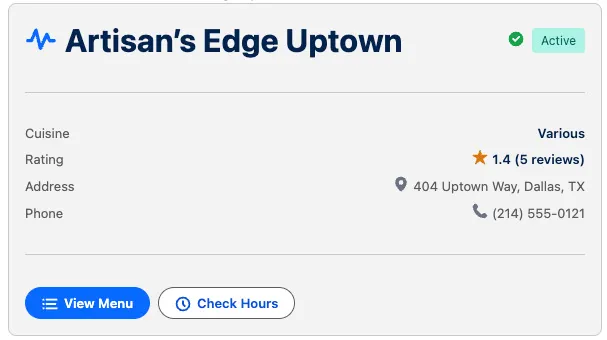
You'll build the storefrontProfileCard widget around the getStorefrontFromName action, which is already wired into the Employee_Assistant agent. The card shows:
- A status badge with a distinct color per storefront status (Active, Pending Activation, Suspended, Inactive, Closed)
- The storefront's cuisine, average rating, and review count
- Its address and phone number
- View Menu and Check Hours buttons that send a follow-up question into the conversation
Want to compare with a reference implementation?
The trailheadapps/pronto repository ships a working HXL example that follows the same pattern: the customerReviews widget, the customerReviewsOutput Lightning Type for Agentforce, and the customerReviews / customerReviewsResponse Lightning Types for MCP. To see it live, open Employee_Assistant in Agentforce Builder and ask "Show me the reviews for The Green Fork".