With the Headless Toolkit, end users can experience the full power of Salesforce wherever they work, in Claude, Slack, Agentforce Coworker, and beyond. For developers, admins, architects, and all builders, this creates new opportunities to bring the custom solutions you build on Salesforce to these interfaces using Salesforce MCP servers, plugins, and skills.
To help you explore how to build agentic, headless experiences with Salesforce and see the Headless Toolkit in action, we’re excited to introduce Pronto, a new open-source sample app powered by the Headless Toolkit.
Built around a fictional AI-powered food delivery platform, Pronto showcases real-world patterns for connecting Salesforce data, workflows, and agents to the tools and interfaces where work already happens.
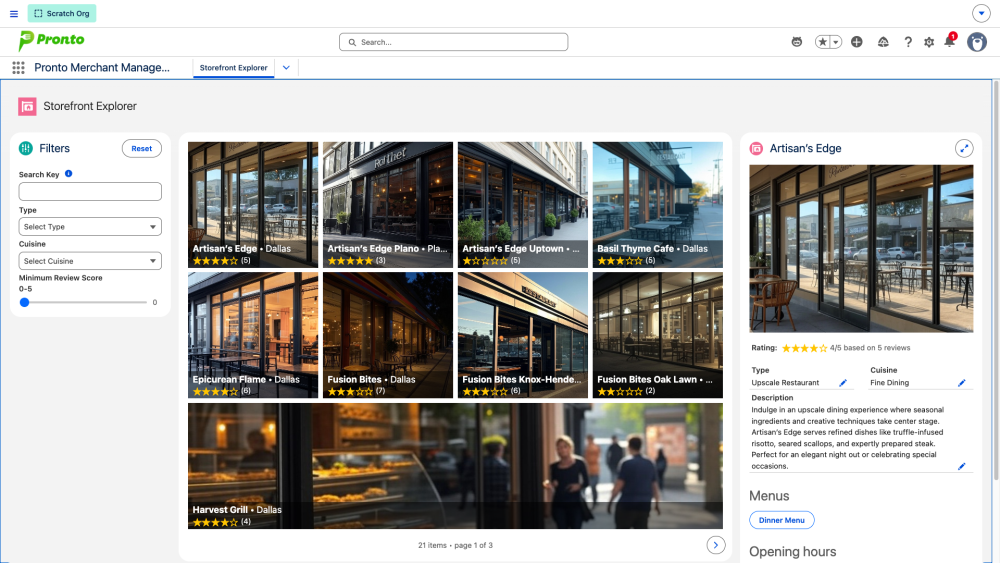
This post explores many of the key features of the Pronto sample app that let you build agentic experiences, enable headless experiences, and ship to multiple surfaces.
Build agentic experiences with Agentforce
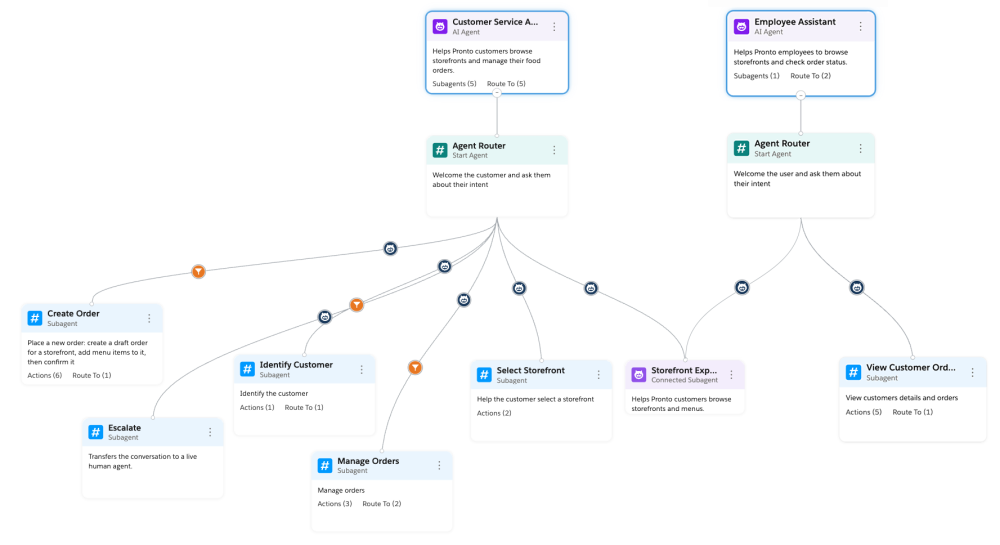
The Pronto sample app ships two main Agentforce agents and 16+ actions. The two main agents are:
- An employee assistant that lets Pronto employees view storefronts, customers, and orders.
- A customer service assistant that lets Pronto customers view storefronts, as well as manage and place orders.
The Pronto agents apply the best practices and patterns from our Agentforce Script Recipes app in a business context. The app also showcases the latest Agentforce innovations.
For example, multi-agent orchestrations make it possible for orchestrator agents to transfer conversations to specialized connected agents without losing context. This feature also enables the reuse of connected subagents.
This is exactly what Pronto does. The storefront explorer assistant agent specializes in displaying restaurant information such as operating hours and menus. The employee assistant and customer service assistant agents are orchestrator agents that share access to the storefront explorer assistant agent and use it as a connected subagent.
Experience headless interactions with Hosted MCP Servers
The Headless Toolkit lets you expose business logic to external clients through Salesforce Hosted MCP Servers. The Pronto employee custom MCP server is a good example of this. It lets employees use any third-party agent of their choice, such as Claude Code, Claude Desktop, or Slack, to interact with Pronto’s orders, storefronts, and more.
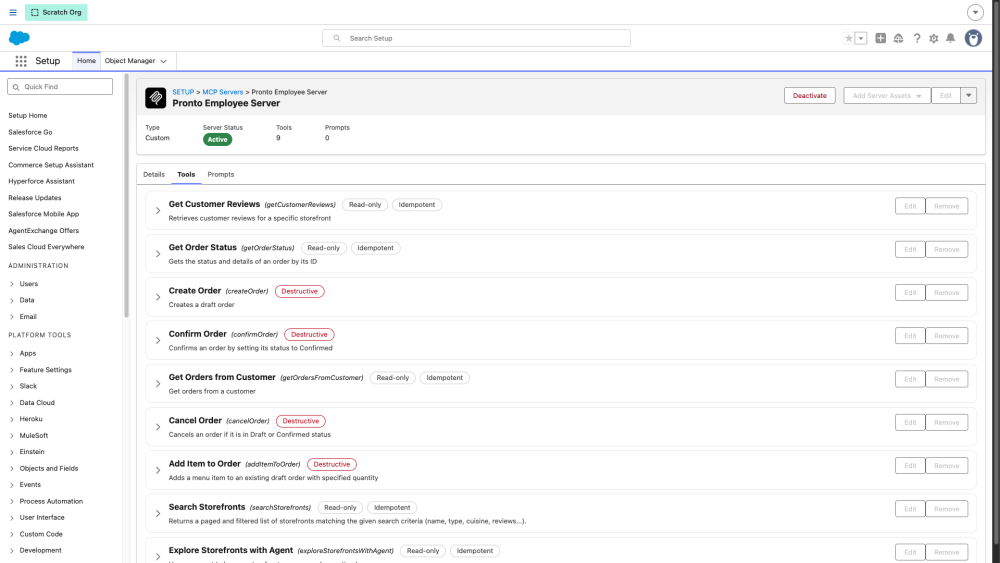
The custom MCP server demonstrates a variety of tool types.
The range of exposed custom tools includes Apex tools built from invocable actions that can also be used as agent actions and called from flows. In the Pronto app, the same actions (create order, get order status, and more) are exposed both as agent actions and MCP tools.
In addition to Apex custom tools, the server also exposes an Apex REST tool. Pronto exposes a custom REST endpoint for searching storefronts. The REST endpoint is registered in the API Catalog and imported as a custom MCP tool.
Lastly, the server exposes the storefront explorer assistant as a custom agent MCP tool. This tool type allows you to expose agent-driven, non-deterministic behavior through MCP. Bear in mind that while this is a powerful capability, it adds extra latency when processing actions, as multiple LLM calls are made by Agentforce after the initial LLM call to the MCP server.
Build once, ship to multiple surfaces
LWR Experience Cloud site integration
Agents can be exposed to any surface. One of the surfaces that Pronto supports is the customer website, an LWR site built with Experience Cloud that lets customers interact with the customer service assistant.
![Screenshot of the Pronto customer site with the customer service assistant]](https://d259t2jj6zp7qm.cloudfront.net/images/20261026123314/Screenshot-of-the-Pronto-customer-site-with-the-customer-service-assistant-e1793043210775.png)
Headless Experience Layer (HXL)
As discussed earlier, Pronto can also be accessed through external MCP clients. You can connect Pronto with third-party agents such as Slack, Claude, or ChatGPT with MCP. And, thanks to the Headless Experience Layer (HXL) Beta, users are no longer limited to text interfaces on these surfaces.
As part of the Pronto employee MCP server, the app can render a rich UI thanks to HXL widgets. For example, it can render this order status card shown in Claude:
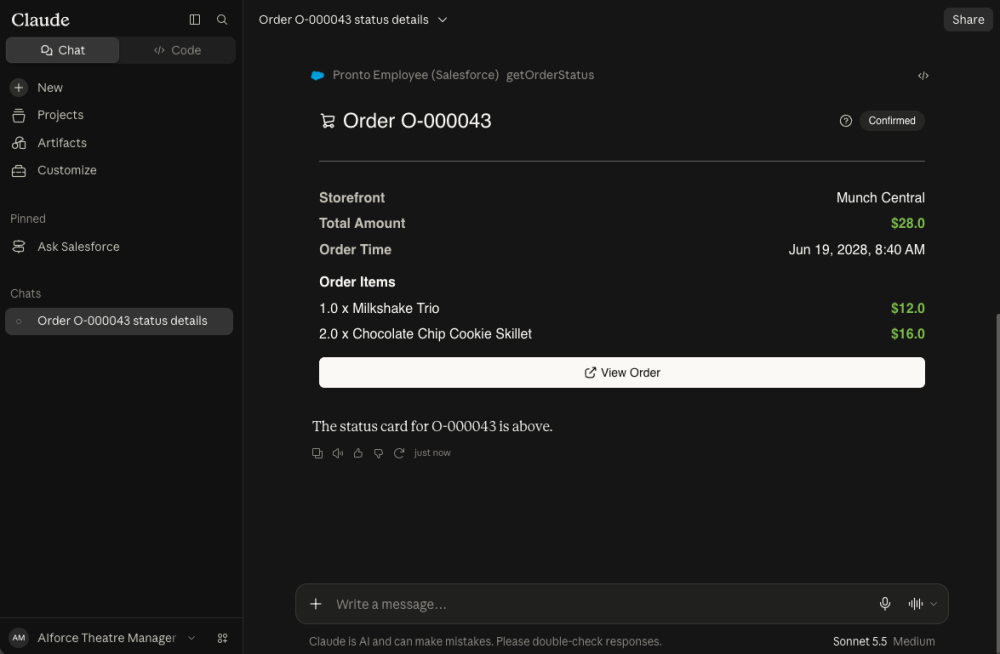
Not only does the output look better than raw text or rich text at best, but it is also deterministic and has a consistent appearance across surfaces.
To try it out, just follow the documentation to create an External Client App (ECA) and connect the Pronto employee MCP server to the third-party agent of your choice. Once this is done, simply ask about the status of an order or the customer reviews for a restaurant. The generated HXL widget will look the same regardless of the surface.
Conclusion
The Pronto sample app shows how the Headless Toolkit lets you build agentic experiences with the latest Agentforce features, expose headless experiences through custom MCP servers, and ship to multiple surfaces from a single codebase. Explore the source code in the Pronto GitHub repository, deploy the app to the org of your choice, and experiment with it to learn more.
Resources
- Pronto repository
- Agentforce Developer Guide
- Salesforce Hosted MCP Servers
- Connect Claude with Salesforce Hosted MCP Servers
- Headless Experience Layer Developer Guide (Beta)
- HXL Playground
About the author
Philippe Ozil is a Principal Developer Advocate at Salesforce, where he focuses on the Salesforce Platform. He writes technical content and speaks frequently at conferences. He is a full-stack developer and enjoys working with APIs, DevOps, robotics, and VR projects. Follow him on X, LinkedIn, and Bluesky, and check out his GitHub projects.