Edit ui.json

The ui.json file determines how your template displays the configuration wizard questions defined in variables.json.

This file isn’t used in an embedded app. Templates with a templateType of embeddedapp aren’t visible in CRM Analytics Studio for install.

Note

The UI file determines wizard page layout, defining the order in which variables described in variables.json appear on a page.

1{

2"ui" :{

3  "pages": [
4    {
5      "title":"Customization Questions",
6      "variables":[

7        { "name": "customizeUserObjectInfo" }

8      ]
9    }
,
10    {

11      "title":"User Object Information",
12      // Only show this page if the user checked the "customizeUserObjectInfo" checkbox.

13      "condition":"{{Variables.customizeUserObjectInfo == 'Yes'}}",

14      "variables":[

15        { "name": "userObjectUsernameField" },

16        { "name": "userObjectName" },
17        { "name": "pageConditionVariable" },

18        { "name": "showBoolean" }
19      ],
20      "helpUrl":"https://salesforce.com/wave/salesapp/page1/help.html"

21    },

22    {

23      "title":"Job Information",

24      "variables":[

25        { "name": "maxAllowedOffset" },
26        { "name": "booleanExample", "visibility": "{{Variables.showBoolean ? 'Visible' : 'Hidden'}}" },
27      ],
28      "helpUrl":"https://salesforce.com/wave/salesapp/page2/help.html"

29    }

30  ],
31  "displayMessages": [
32    {
33      "text":"When we're done creating the app, we'll send you an email.",
34      "location": "AppLandingPage"
35    }
36  ]

37}

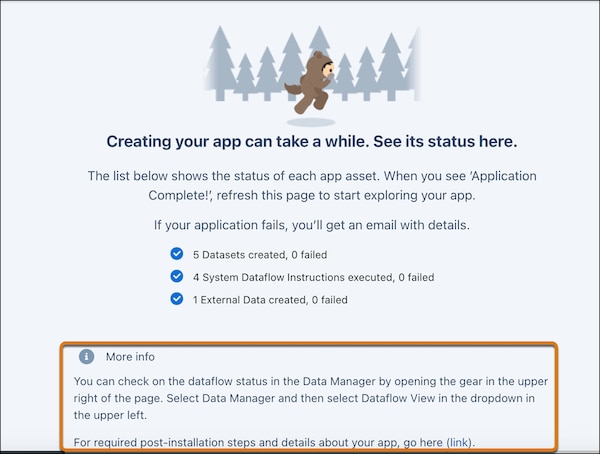
The displayMessages text is visible to the user on the page that displays the app creation progress.

The app landing page showing the app creation progress and the custom displayMessages text.

  • Page Condition Syntax for ui.json

    You can make a page’s appearance conditional on the value of a variable. For example, if the user answers “No” when asked if there is a Products dimension, you can use a conditional to ensure that no Products-related page displays in the wizard. Adding page conditions enables wizard page flow. If the condition is met, then the page with the condition will display; if the condition is not met, the page will not display. Use the following syntax to instruct which conditionals control the display of pages.

  • Variables Array in ui.json

    Use a variables array to display a question to users conditionally. You can optionally display a question as disabled in the case where an answer has been found or computed using Apex Class. To accommodate variable condition and other fields, the variables array must be an array of objects instead of an array of variable names.

  • Use VisualForce To Customize the Wizard UI

    To customize wizard appearance beyond the default interface, use VisualForce and a JavaScript library.

See Also