


Lightning Components Developer's Guide
 j
jNewer Version Available
Summary
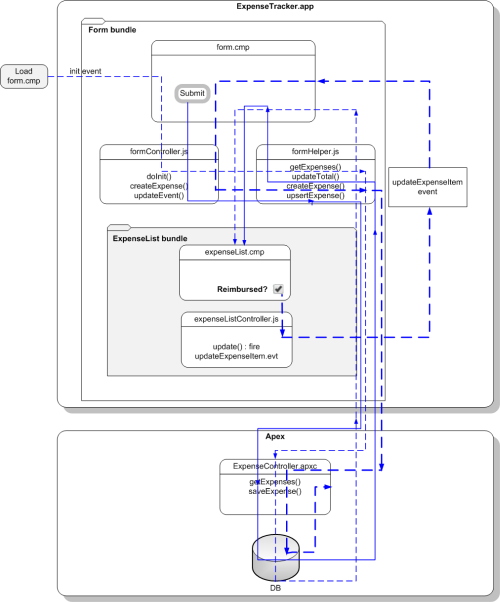
When form.cmp is initialized, the init handler triggers the doInit client-side controller, which calls the getExpenses helper function. getExpenses calls the getExpenses server-side controller to load the expenses. The callback sets the expenses data on the v.expenses attribute and calls updateTotal to update the counters.
Clicking the Submit button triggers the createExpense client-side controller. After field validation, the createExpense helper function is run, in which the upsertExpense helper function calls the saveExpense server-side controller to save the record. The callback pushes the new expense to the list of expenses and updates the attribute v.expenses in form.cmp, which in turn updates the expenses in expenseList.cmp. Finally, the helper calls updateTotal to update the counters represented by the v.total and v.exp attributes.
expenseList.cmp displays the list of expenses. When the Reimbursed? checkbox is selected or deselected, the click event triggers the update client-side controller. The updateExpenseItem event is fired with the relevant expense passed in as a parameter. form.cmp handles the event, triggering the updateEvent client-side controller. This controller action then calls the upsertExpense helper function, which calls the saveExpense server-side controller to save the relevant record.