


ISVforce Guide
 j
jNewer Version Available
Customer Engagement in AppExchange Marketplace Analytics
See how customers interact with your listing and its resources over time. For example,
compare how many times customers viewed white papers versus customization guides.
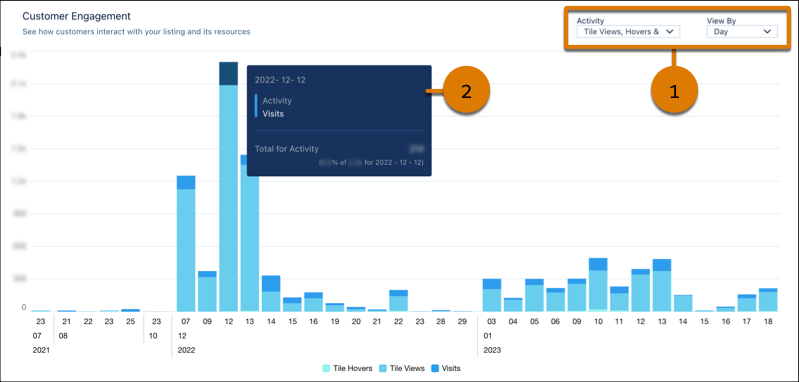
To change activities or the time scale, adjust the local filters (1). The y-axis resizes based on the activities that you select. To resize the x-axis, change the View By filter. To see exact values, hover over a chart segment (2).
Definitions
Here’s how we define the metrics that appear in this visualization.
| Metric | Description |
|---|---|
| Case Studies | Views of your listing’s case studies. |
| Customization Guides | Views of your listing’s customization guides. |
| Data Sheets | Views of your listing’s data sheets. |
| Demos | Clicks on your listing’s Watch Demo button. |
| Get It Nows | Clicks on your listing’s Get It Now button. Customers who click the button start the Get It Now installation flow but potentially don’t complete it. |
| Tile Hovers | Hovers over your listing tile. To qualify as a hover, the customer must pause long enough over the tile to display the listing detail popover. Includes repeat hovers by the customer. |
| Installs | Installs of your solution initiated on AppExchange, your website, or from a code repository. For AppExchange installs, we count the number of successful completions of the Get It Now installation flow. Includes installs in production and sandbox orgs. |
| Lead Events | Lead events on your listing. Events include: demos, test drives, chat interactions, Learn More clicks, and Get It Now clicks or installs. A customer who clicks Get It Now and then installs your solution is counted as a single lead event. |
| Saves | Clicks on your listing’s Save button. |
| Screenshot n | Views of screenshot number n. This number corresponds to the number shown in the image carousel on your listing. |
| Test Drives | Clicks on your listing’s Test Drive button. |
| Testimonials | Views of your listing’s testimonials. |
| Tile Views | Views of your listing tile. To qualify as a view, the entire tile must be visible in the customer’s browser. Includes repeat views by the customer. |
| Webinars | Views of your listing’s webinars. |
| White Papers | Views of your listing’s white papers. |
| Visits | Visits to your listing. Includes repeat visits by the customer. |