


Apex Reference Guide
 j
jRecommendations Class
Namespace
Recommendations Methods
All methods in this class require Chatter and are subject to the per user, per namespace, per hour rate limit.
createRecommendationAudience(communityId, recommendationAudience)
API Version
35.0
Requires Chatter
Yes
Signature
public static ConnectApi.RecommendationAudience createRecommendationAudience(String communityId, ConnectApi.RecommendationAudienceInput recommendationAudience)
Parameters
- communityId
- Type: String
- ID for an Experience Cloud site, internal, or null.
- recommendationAudience
- Type: ConnectApi.RecommendationAudienceInput
- A ConnectApi.RecommendationAudienceInput object.
Return Value
Usage
Community managers can access, create, and delete audiences, definitions, and schedules for custom recommendations. (Community managers are users with the Create and Set Up Experiences or Manage Experiences permission.) Users with the Modify All Data permission can also access, create, and delete custom recommendation audiences, custom recommendation definitions, and scheduled custom recommendations.
createRecommendationAudience(communityId, name)
API Version
35.0
Requires Chatter
Yes
Signature
public static ConnectApi.RecommendationAudience createRecommendationAudience(String communityId, String name)
Parameters
- communityId
- Type: String
- ID for an Experience Cloud site, internal, or null.
- name
- Type: String
- Name of the audience.
Return Value
Usage
Community managers can access, create, and delete audiences, definitions, and schedules for custom recommendations. (Community managers are users with the Create and Set Up Experiences or Manage Experiences permission.) Users with the Modify All Data permission can also access, create, and delete custom recommendation audiences, custom recommendation definitions, and scheduled custom recommendations.
createRecommendationDefinition(communityId, recommendationDefinition)
API Version
35.0
Requires Chatter
Yes
Signature
public static ConnectApi.RecommendationDefinition createRecommendationDefinition(String communityId, ConnectApi.RecommendationDefinitionInput recommendationDefinition)
Parameters
- communityId
- Type: String
- ID for an Experience Cloud site, internal, or null.
- recommendationDefinition
- Type: ConnectApi.RecommendationDefinitionInput
- A ConnectApi.RecommendationDefinitionInput object.
Return Value
Usage
Recommendation definitions allow you to create custom recommendations that appear in Experience Cloud sites, encouraging users to watch videos, take training and more.
Community managers can access, create, and delete audiences, definitions, and schedules for custom recommendations. (Community managers are users with the Create and Set Up Experiences or Manage Experiences permission.) Users with the Modify All Data permission can also access, create, and delete custom recommendation audiences, custom recommendation definitions, and scheduled custom recommendations.
These recommendations appear by default on the Customer Service template. They appear on the home and question detail pages and in the feed in Salesforce mobile web. They also appear anywhere community managers add recommendations using Experience Builder in the Customer Service template.
So that users don’t see the same recommendations all the time, Salesforce periodically removes and brings back custom recommendations that haven’t been accepted or dismissed.
createRecommendationDefinition(communityId, name, title, actionUrl, actionUrlName, explanation)
API Version
35.0
Requires Chatter
Yes
Signature
public static ConnectApi.RecommendationDefinition createRecommendationDefinition(String communityId, String name, String title, String actionUrl, String actionUrlName, String explanation)
Parameters
- communityId
- Type: String
- ID for an Experience Cloud site, internal, or null.
- name
- Type: String
- Name of the custom recommendation definition. The name is displayed in Setup.
- title
- Type: String
- Title of the custom recommendation definition.
- actionUrl
- Type: String
- URL for acting on the custom recommendation, for example, the URL to join a group.
- actionUrlName
- Type: String
- Text label for the action URL in the user interface, for example, “Launch.”
- explanation
- Type: String
- Explanation, or body, of the custom recommendation.
Return Value
Usage
Recommendation definitions allow you to create custom recommendations that appear in Experience Cloud sites, encouraging users to watch videos, take training and more.
Community managers can access, create, and delete audiences, definitions, and schedules for custom recommendations. (Community managers are users with the Create and Set Up Experiences or Manage Experiences permission.) Users with the Modify All Data permission can also access, create, and delete custom recommendation audiences, custom recommendation definitions, and scheduled custom recommendations.
These recommendations appear by default on the Customer Service template. They appear on the home and question detail pages and in the feed in Salesforce mobile web. They also appear anywhere community managers add recommendations using Experience Builder in the Customer Service template.
So that users don’t see the same recommendations all the time, Salesforce periodically removes and brings back custom recommendations that haven’t been accepted or dismissed.
createScheduledRecommendation(communityId, scheduledRecommendation)
API Version
35.0
Requires Chatter
Yes
Signature
public static ConnectApi.ScheduledRecommendation createScheduledRecommendation(String communityId, ConnectApi.ScheduledRecommendationInput scheduledRecommendation)
Parameters
- communityId
- Type: String
- ID for an Experience Cloud site, internal, or null.
- scheduledRecommendation
- Type: ConnectApi.ScheduledRecommendationInput
- A ConnectApi.ScheduledRecommendationInput object.
Return Value
Usage
Community managers can access, create, and delete audiences, definitions, and schedules for custom recommendations. (Community managers are users with the Create and Set Up Experiences or Manage Experiences permission.) Users with the Modify All Data permission can also access, create, and delete custom recommendation audiences, custom recommendation definitions, and scheduled custom recommendations.
createScheduledRecommendation(communityId, recommendationDefinitionId, rank, enabled, recommendationAudienceId, channel)
API Version
36.0
Requires Chatter
Yes
Signature
public static ConnectApi.ScheduledRecommendation createScheduledRecommendation(String communityId, String recommendationDefinitionId, Integer rank, Boolean enabled, String recommendationAudienceId, ConnectApi.RecommendationChannel channel)
Parameters
- communityId
- Type: String
- ID for an Experience Cloud site, internal, or null.
- recommendationDefinitionId
- Type: String
- ID of the custom recommendation definition.
- rank
- Type: Integer
- Relative rank of the scheduled custom recommendation indicated by ascending whole
numbers starting with 1.
Setting the rank is comparable to an insertion into an ordered list. The scheduled custom recommendation is inserted into the position specified by the rank. The rank of all the scheduled custom recommendations after it is pushed down. See Ranking scheduled custom recommendations example.
If the specified rank is larger than the size of the list, the scheduled custom recommendation is put at the end of the list. The rank of the scheduled custom recommendation is the size of the list, instead of the one specified.
If a rank is not specified, the scheduled custom recommendation is put at the end of the list.
- enabled
- Type: Boolean
- Indicates whether scheduling is enabled. If true, the custom recommendation is enabled and appears in Experience Cloud sites. If false, custom recommendations in feeds in Salesforce mobile web aren’t removed, but no new custom recommendations appear. In Customer Service and Partner Central sites, disabled custom recommendations no longer appear.
- recommendationAudienceId
- Type: String
- ID of the custom recommendation definition that this scheduled recommendation schedules.
- channel
- Type: ConnectApi.RecommendationChannel
- A way to tie custom recommendations together. For example, display recommendations in
specific places in the UI or show recommendations based on time of day or geographic
locations. Values are:
- CustomChannel1—Custom recommendation channel. Not used by default. Work with your community manager to define custom channels. For example, community managers can use Experience Builder to determine where recommendations appear.
- CustomChannel2—Custom recommendation channel. Not used by default. Work with your community manager to define custom channels.
- CustomChannel3—Custom recommendation channel. Not used by default. Work with your community manager to define custom channels.
- CustomChannel4—Custom recommendation channel. Not used by default. Work with your community manager to define custom channels.
- CustomChannel5—Custom recommendation channel. Not used by default. Work with your community manager to define custom channels.
- DefaultChannel—Default recommendation channel. Recommendations appear by default on the Home and Question Detail pages of Customer Service and Partner Central Experience Builder templates. They also appear in the feed in the Salesforce mobile web and anywhere community managers add recommendations using Experience Builder.
Return Value
Usage
Community managers can access, create, and delete audiences, definitions, and schedules for custom recommendations. (Community managers are users with the Create and Set Up Experiences or Manage Experiences permission.) Users with the Modify All Data permission can also access, create, and delete custom recommendation audiences, custom recommendation definitions, and scheduled custom recommendations.
Ranking scheduled custom recommendations example
If you have these scheduled custom recommendations:
| Scheduled Recommendations | Rank |
|---|---|
| ScheduledRecommendationA | 1 |
| ScheduledRecommendationB | 2 |
| ScheduledRecommendationC | 3 |
And you include this information in the Scheduled Custom Recommendation Input:
| Scheduled Recommendation | Rank |
|---|---|
| ScheduledRecommendationD | 2 |
The result is:
| Scheduled Recommendation | Rank |
|---|---|
| ScheduledRecommendationA | 1 |
| ScheduledRecommendationD | 2 |
| ScheduledRecommendationB | 3 |
| ScheduledRecommendationC | 4 |
deleteRecommendationAudience(communityId, recommendationAudienceId)
API Version
35.0
Requires Chatter
Yes
Signature
public static Void deleteRecommendationAudience(String communityId, String recommendationAudienceId)
Parameters
- communityId
- Type: String
- ID for an Experience Cloud site, internal, or null.
- recommendationAudienceId
- Type: String
- ID of the custom recommendation audience.
Return Value
Type: Void
Usage
Community managers can access, create, and delete audiences, definitions, and schedules for custom recommendations. (Community managers are users with the Create and Set Up Experiences or Manage Experiences permission.) Users with the Modify All Data permission can also access, create, and delete custom recommendation audiences, custom recommendation definitions, and scheduled custom recommendations.
deleteRecommendationDefinition(communityId, recommendationDefinitionId)
API Version
35.0
Requires Chatter
Yes
Signature
public static Void deleteRecommendationDefinition(String communityId, String recommendationDefinitionId)
Parameters
- communityId
- Type: String
- ID for an Experience Cloud site, internal, or null.
- recommendationDefinitionId
- Type: String
- ID of the custom recommendation definition.
Return Value
Type: Void
Usage
Community managers can access, create, and delete audiences, definitions, and schedules for custom recommendations. (Community managers are users with the Create and Set Up Experiences or Manage Experiences permission.) Users with the Modify All Data permission can also access, create, and delete custom recommendation audiences, custom recommendation definitions, and scheduled custom recommendations.
deleteRecommendationDefinitionPhoto(communityId, recommendationDefinitionId)
API Version
35.0
Requires Chatter
Yes
Signature
public static Void deleteRecommendationDefinitionPhoto(String communityId, String recommendationDefinitionId)
Parameters
- communityId
- Type: String
- ID for an Experience Cloud site, internal, or null.
- recommendationDefinitionId
- Type: String
- ID of the custom recommendation definition.
Return Value
Type: Void
Usage
Community managers can access, create, and delete audiences, definitions, and schedules for custom recommendations. (Community managers are users with the Create and Set Up Experiences or Manage Experiences permission.) Users with the Modify All Data permission can also access, create, and delete custom recommendation audiences, custom recommendation definitions, and scheduled custom recommendations.
deleteScheduledRecommendation(communityId, scheduledRecommendationId, deleteDefinitionIfLast)
API Version
35.0
Requires Chatter
Yes
Signature
public static Void deleteScheduledRecommendation(String communityId, String scheduledRecommendationId, Boolean deleteDefinitionIfLast)
Parameters
- communityId
- Type: String
- ID for an Experience Cloud site, internal, or null.
- scheduledRecommendationId
- Type: String
- ID of the scheduled custom recommendation.
- deleteDefinitionIfLast
- Type: Boolean
- If true and if this is the last scheduled custom recommendation of a custom recommendation definition, deletes the custom recommendation definition. Default is false.
Return Value
Type: Void
Usage
Community managers can access, create, and delete audiences, definitions, and schedules for custom recommendations. (Community managers are users with the Create and Set Up Experiences or Manage Experiences permission.) Users with the Modify All Data permission can also access, create, and delete custom recommendation audiences, custom recommendation definitions, and scheduled custom recommendations.
Deleting a scheduled custom recommendation is comparable to a deletion in an ordered list. All scheduled custom recommendations after the deleted scheduled custom recommendation receive a new, higher rank automatically.
getRecommendationAudience(communityId, recommendationAudienceId)
API Version
35.0
Requires Chatter
Yes
Signature
public static ConnectApi.RecommendationAudience getRecommendationAudience(String communityId, String recommendationAudienceId)
Parameters
- communityId
- Type: String
- ID for an Experience Cloud site, internal, or null.
- recommendationAudienceId
- Type: String
- ID of the custom recommendation audience.
Return Value
Usage
Community managers can access, create, and delete audiences, definitions, and schedules for custom recommendations. (Community managers are users with the Create and Set Up Experiences or Manage Experiences permission.) Users with the Modify All Data permission can also access, create, and delete custom recommendation audiences, custom recommendation definitions, and scheduled custom recommendations.
getRecommendationAudienceMembership(communityId, recommendationAudienceId)
API Version
35.0
Requires Chatter
Yes
Signature
public static ConnectApi.UserReferencePage getRecommendationAudienceMembership(String communityId, String recommendationAudienceId)
Parameters
- communityId
- Type: String
- ID for an Experience Cloud site, internal, or null.
- recommendationAudienceId
- Type: String
- ID of the custom recommendation audience.
Return Value
Usage
Community managers can access, create, and delete audiences, definitions, and schedules for custom recommendations. (Community managers are users with the Create and Set Up Experiences or Manage Experiences permission.) Users with the Modify All Data permission can also access, create, and delete custom recommendation audiences, custom recommendation definitions, and scheduled custom recommendations.
getRecommendationAudienceMembership(communityId, recommendationAudienceId, pageParam, pageSize)
API Version
35.0
Requires Chatter
Yes
Signature
public static ConnectApi.UserReferencePage getRecommendationAudienceMembership(String communityId, String recommendationAudienceId, Integer pageParam, Integer pageSize)
Parameters
- communityId
- Type: String
- ID for an Experience Cloud site, internal, or null.
- recommendationAudienceId
- Type: String
- ID of the custom recommendation audience.
- pageParam
- Type: Integer
- Number of the page you want returned. Starts at 0. If you pass in null or 0, the first page is returned.
- pageSize
- Type: Integer
- Specifies the number of members per page.
Return Value
Usage
Community managers can access, create, and delete audiences, definitions, and schedules for custom recommendations. (Community managers are users with the Create and Set Up Experiences or Manage Experiences permission.) Users with the Modify All Data permission can also access, create, and delete custom recommendation audiences, custom recommendation definitions, and scheduled custom recommendations.
getRecommendationAudiences(communityId)
API Version
35.0
Requires Chatter
Yes
Signature
public static ConnectApi.RecommendationAudiencePage getRecommendationAudiences(String communityId)
Parameters
- communityId
- Type: String
- ID for an Experience Cloud site, internal, or null.
Return Value
Usage
Community managers can access, create, and delete audiences, definitions, and schedules for custom recommendations. (Community managers are users with the Create and Set Up Experiences or Manage Experiences permission.) Users with the Modify All Data permission can also access, create, and delete custom recommendation audiences, custom recommendation definitions, and scheduled custom recommendations.
getRecommendationAudiences(communityId, pageParam, pageSize)
API Version
35.0
Requires Chatter
Yes
Signature
public static ConnectApi.RecommendationAudiencePage getRecommendationAudiences(String communityId, Integer pageParam, Integer pageSize)
Parameters
- communityId
- Type: String
- ID for an Experience Cloud site, internal, or null.
- pageParam
- Type: Integer
- Number of the page you want returned. Starts at 0. If you pass in null or 0, the first page is returned.
- pageSize
- Type: Integer
- Specifies the number of audiences per page.
Return Value
Usage
Community managers can access, create, and delete audiences, definitions, and schedules for custom recommendations. (Community managers are users with the Create and Set Up Experiences or Manage Experiences permission.) Users with the Modify All Data permission can also access, create, and delete custom recommendation audiences, custom recommendation definitions, and scheduled custom recommendations.
getRecommendationDefinition(communityId, recommendationDefinitionId)
API Version
35.0
Requires Chatter
Yes
Signature
public static ConnectApi.RecommendationDefinition getRecommendationDefinition(String communityId, String recommendationDefinitionId)
Parameters
- communityId
- Type: String
- ID for an Experience Cloud site, internal, or null.
- recommendationDefinitionId
- Type: String
- ID of the custom recommendation definition.
Return Value
Usage
Community managers can access, create, and delete audiences, definitions, and schedules for custom recommendations. (Community managers are users with the Create and Set Up Experiences or Manage Experiences permission.) Users with the Modify All Data permission can also access, create, and delete custom recommendation audiences, custom recommendation definitions, and scheduled custom recommendations.
getRecommendationDefinitionPhoto(communityId, recommendationDefinitionId)
API Version
35.0
Requires Chatter
Yes
Signature
public static ConnectApi.Photo getRecommendationDefinitionPhoto(String communityId, String recommendationDefinitionId)
Parameters
- communityId
- Type: String
- ID for an Experience Cloud site, internal, or null.
- recommendationDefinitionId
- Type: String
- ID of the custom recommendation definition.
Return Value
Type: ConnectApi.Photo
Usage
Community managers can access, create, and delete audiences, definitions, and schedules for custom recommendations. (Community managers are users with the Create and Set Up Experiences or Manage Experiences permission.) Users with the Modify All Data permission can also access, create, and delete custom recommendation audiences, custom recommendation definitions, and scheduled custom recommendations.
getRecommendationDefinitions(communityId)
API Version
35.0
Requires Chatter
Yes
Signature
public static ConnectApi.RecommendationDefinitionPage getRecommendationDefinitions(String communityId)
Parameters
- communityId
- Type: String
- ID for an Experience Cloud site, internal, or null.
Return Value
Usage
Community managers can access, create, and delete audiences, definitions, and schedules for custom recommendations. (Community managers are users with the Create and Set Up Experiences or Manage Experiences permission.) Users with the Modify All Data permission can also access, create, and delete custom recommendation audiences, custom recommendation definitions, and scheduled custom recommendations.
getRecommendationForUser(communityId, userId, action, objectId)
API Version
33.0
Requires Chatter
Yes
Signature
public static ConnectApi.RecommendationCollection getRecommendationForUser(String communityId, String userId, ConnectApi.RecommendationActionType action, String objectId)
Parameters
communityId
Type: String
ID for an Experience Cloud site, internal, or null.
userId
Type: String
ID for the context user or the keyword me.
action
Type: ConnectApi.RecommendationActionType
Specifies the action to take on a recommendation.
- follow—Follow a file, record, topic, or user.
- join—Join a group.
- view—View a file, group, article, record, user, custom, or static recommendation.
objectId
Type: String
Specifies the object to act on.
- If action is follow, objectId is a user ID, file ID, record ID, or topic ID (version 36.0 and later).
- If action is join, objectId is a group ID.
- If action is view, objectId is a user ID, file ID, group ID, record ID, custom recommendation ID (version 34.0 and later), the enum Today for static recommendations (version 35.0 and later), or an article ID (version 37.0 and later).
Return Value
Usage
getRecommendationsForUser(communityId, userId, contextAction, contextObjectId, channel, maxResults)
API Version
36.0
Available to Guest Users
38.0
Requires Chatter
Yes
Signature
public static ConnectApi.RecommendationCollection getRecommendationsForUser(String communityId, String userId, ConnectApi.RecommendationActionType contextAction, String contextObjectId, ConnectApi.RecommendationChannel channel, Integer maxResults)
Parameters
communityId
Type: String
ID for an Experience Cloud site, internal, or null.
userId
Type: String
ID for the context user or the keyword me.
contextAction
Type: ConnectApi.RecommendationActionType
Action that the context user just performed. Supported values are:
- follow
- view
Use contextAction and contextObjectId together to get new recommendations based on the action just performed. If you don’t want recommendations based on a recent action, specify null.
contextObjectId
Type: String
ID of the object that the context user just performed an action on.
- If contextAction is follow, contextObjectId is a user ID, file ID, record ID, or topic ID.
- If contextAction is view, contextObjectId is a user ID, file ID, group ID, record ID, or article ID (version 37.0 and later).
Use contextAction and contextObjectId together to get new recommendations based on the action just performed. If you don’t want recommendations based on a recent action, specify null.
channel
Type: ConnectApi.RecommendationChannel
A way to tie custom recommendations together. For example, display recommendations in specific places in the UI or show recommendations based on time of day or geographic locations. Values are:
- CustomChannel1—Custom recommendation channel. Not used by default. Work with your community manager to define custom channels. For example, community managers can use Experience Builder to determine where recommendations appear.
- CustomChannel2—Custom recommendation channel. Not used by default. Work with your community manager to define custom channels.
- CustomChannel3—Custom recommendation channel. Not used by default. Work with your community manager to define custom channels.
- CustomChannel4—Custom recommendation channel. Not used by default. Work with your community manager to define custom channels.
- CustomChannel5—Custom recommendation channel. Not used by default. Work with your community manager to define custom channels.
- DefaultChannel—Default recommendation channel. Recommendations appear by default on the Home and Question Detail pages of Customer Service and Partner Central Experience Builder templates. They also appear in the feed in the Salesforce mobile web and anywhere community managers add recommendations using Experience Builder.
maxResults
Type: Integer
Maximum number of recommendation results; default is 10. Values must be from 1 to 99.
Return Value
Usage
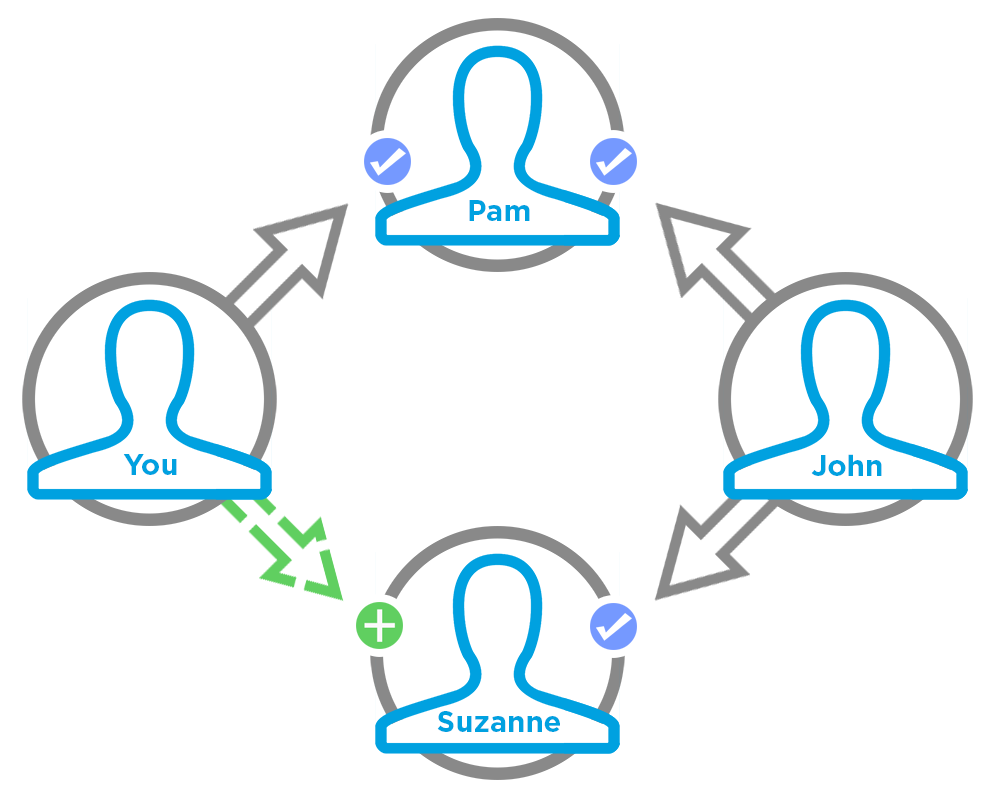
If you want to get recommendations based on a recent action performed, such as following a user, use contextAction and contextObjectId together. For example, if you just followed Pam, you specify follow for contextAction and Pam’s user ID for contextObjectId.
This method only recommends users who are followed by people who follow Pam. In this example, John follows Pam so the method returns a recommendation for you to follow Suzanne since John also follows Suzanne.
To test code that uses this method, use the matching set test method (prefix the method name with setTest). Use the set test method with the same parameters or the code throws an exception.
getRecommendationsForUser(communityId, userId, action, contextAction, contextObjectId, channel, maxResults)
API Version
36.0
Available to Guest Users
38.0
Requires Chatter
Yes
Signature
public static ConnectApi.RecommendationCollection getRecommendationsForUser(String communityId, String userId, ConnectApi.RecommendationActionType action, ConnectApi.RecommendationActionType contextAction, String contextObjectId, ConnectApi.RecommendationChannel channel, Integer maxResults)
Parameters
communityId
Type: String
ID for an Experience Cloud site, internal, or null.
userId
Type: String
ID for the context user or the keyword me.
action
Type: ConnectApi.RecommendationActionType
Specifies the action to take on a recommendation.
- follow—Follow a file, record, topic, or user.
- join—Join a group.
- view—View a file, group, article, record, user, custom, or static recommendation.
contextAction
Type: ConnectApi.RecommendationActionType
Action that the context user just performed. Supported values are:
- follow
- view
Use contextAction and contextObjectId together to get new recommendations based on the action just performed. If you don’t want recommendations based on a recent action, specify null.
contextObjectId
Type: String
ID of the object that the context user just performed an action on.
- If contextAction is follow, contextObjectId is a user ID, file ID, record ID, or topic ID.
- If contextAction is view, contextObjectId is a user ID, file ID, group ID, record ID, or article ID (version 37.0 and later).
Use contextAction and contextObjectId together to get new recommendations based on the action just performed. If you don’t want recommendations based on a recent action, specify null.
channel
Type: ConnectApi.RecommendationChannel
A way to tie custom recommendations together. For example, display recommendations in specific places in the UI or show recommendations based on time of day or geographic locations. Values are:
- CustomChannel1—Custom recommendation channel. Not used by default. Work with your community manager to define custom channels. For example, community managers can use Experience Builder to determine where recommendations appear.
- CustomChannel2—Custom recommendation channel. Not used by default. Work with your community manager to define custom channels.
- CustomChannel3—Custom recommendation channel. Not used by default. Work with your community manager to define custom channels.
- CustomChannel4—Custom recommendation channel. Not used by default. Work with your community manager to define custom channels.
- CustomChannel5—Custom recommendation channel. Not used by default. Work with your community manager to define custom channels.
- DefaultChannel—Default recommendation channel. Recommendations appear by default on the Home and Question Detail pages of Customer Service and Partner Central Experience Builder templates. They also appear in the feed in the Salesforce mobile web and anywhere community managers add recommendations using Experience Builder.
maxResults
Type: Integer
Maximum number of recommendation results; default is 10. Values must be from 1 to 99.
Return Value
Usage
If you want to get recommendations based on a recent action performed, such as following a user, use contextAction and contextObjectId together. For example, if you just followed Pam, you specify follow for contextAction and Pam’s user ID for contextObjectId.
This method only recommends users who are followed by people who follow Pam. In this example, John follows Pam so the method returns a recommendation for you to follow Suzanne since John also follows Suzanne.
To test code that uses this method, use the matching set test method (prefix the method name with setTest). Use the set test method with the same parameters or the code throws an exception.
getRecommendationsForUser(communityId, userId, action, objectCategory, contextAction, contextObjectId, channel, maxResults)
API Version
36.0
Available to Guest Users
38.0
Requires Chatter
Yes
Signature
public static ConnectApi.RecommendationCollection getRecommendationsForUser(String communityId, String userId, ConnectApi.RecommendationActionType action, String objectCategory, ConnectApi.RecommendationActionType contextAction, String contextObjectId, ConnectApi.RecommendationChannel channel, Integer maxResults)
Parameters
communityId
Type: String
ID for an Experience Cloud site, internal, or null.
userId
Type: String
ID for the context user or the keyword me.
action
Type: ConnectApi.RecommendationActionType
Specifies the action to take on a recommendation.
- follow—Follow a file, record, topic, or user.
- join—Join a group.
- view—View a file, group, article, record, user, custom, or static recommendation.
objectCategory
Type: String
- If action is follow, objectCategory is users, files, topics, or records.
- If action is join, objectCategory is groups.
- If action is view, objectCategory is users, files, groups, records, custom, apps, or articles (version 37.0 and later).
You can also specify a key prefix, the first three characters of the object ID, as the objectCategory. Valid values are:
- If action is follow, objectCategory is 005 (users), 069 (files), 0TO (topics), or 001 (accounts), for example.
- If action is join, objectCategory is 0F9 (groups).
- If action is view, objectCategory is 005 (users), 069 (files), 0F9 (groups), 0RD (custom recommendations), T (static recommendations), 001 (accounts), or kA0 (articles), for example, (version 370 and later).
contextAction
Type: ConnectApi.RecommendationActionType
Action that the context user just performed. Supported values are:
- follow
- view
Use contextAction and contextObjectId together to get new recommendations based on the action just performed. If you don’t want recommendations based on a recent action, specify null.
contextObjectId
Type: String
ID of the object that the context user just performed an action on.
- If contextAction is follow, contextObjectId is a user ID, file ID, record ID, or topic ID.
- If contextAction is view, contextObjectId is a user ID, file ID, group ID, record ID, or article ID (version 37.0 and later).
Use contextAction and contextObjectId together to get new recommendations based on the action just performed. If you don’t want recommendations based on a recent action, specify null.
channel
Type: ConnectApi.RecommendationChannel
A way to tie custom recommendations together. For example, display recommendations in specific places in the UI or show recommendations based on time of day or geographic locations. Values are:
- CustomChannel1—Custom recommendation channel. Not used by default. Work with your community manager to define custom channels. For example, community managers can use Experience Builder to determine where recommendations appear.
- CustomChannel2—Custom recommendation channel. Not used by default. Work with your community manager to define custom channels.
- CustomChannel3—Custom recommendation channel. Not used by default. Work with your community manager to define custom channels.
- CustomChannel4—Custom recommendation channel. Not used by default. Work with your community manager to define custom channels.
- CustomChannel5—Custom recommendation channel. Not used by default. Work with your community manager to define custom channels.
- DefaultChannel—Default recommendation channel. Recommendations appear by default on the Home and Question Detail pages of Customer Service and Partner Central Experience Builder templates. They also appear in the feed in the Salesforce mobile web and anywhere community managers add recommendations using Experience Builder.
maxResults
Type: Integer
Maximum number of recommendation results; default is 10. Values must be from 1 to 99.
Return Value
Usage
If you want to get recommendations based on a recent action performed, such as following a user, use contextAction and contextObjectId together. For example, if you just followed Pam, you specify follow for contextAction and Pam’s user ID for contextObjectId.
This method only recommends users who are followed by people who follow Pam. In this example, John follows Pam so the method returns a recommendation for you to follow Suzanne since John also follows Suzanne.
To test code that uses this method, use the matching set test method (prefix the method name with setTest). Use the set test method with the same parameters or the code throws an exception.
getScheduledRecommendation(communityId, scheduledRecommendationId)
API Version
35.0
Requires Chatter
Yes
Signature
public static ConnectApi.ScheduledRecommendation getScheduledRecommendation(String communityId, String scheduledRecommendationId)
Parameters
- communityId
- Type: String
- ID for an Experience Cloud site, internal, or null.
- scheduledRecommendationId
- Type: String
- ID of the scheduled custom recommendation.
Return Value
Usage
Community managers can access, create, and delete audiences, definitions, and schedules for custom recommendations. (Community managers are users with the Create and Set Up Experiences or Manage Experiences permission.) Users with the Modify All Data permission can also access, create, and delete custom recommendation audiences, custom recommendation definitions, and scheduled custom recommendations.
getScheduledRecommendations(communityId, channel)
API Version
36.0
Requires Chatter
Yes
Signature
public static ConnectApi.ScheduledRecommendationPage getScheduledRecommendations(String communityId, ConnectApi.RecommendationChannel channel)
Parameters
communityId
Type: String
ID for an Experience Cloud site, internal, or null.
channel
Type: ConnectApi.RecommendationChannel
A way to tie custom recommendations together. For example, display recommendations in specific places in the UI or show recommendations based on time of day or geographic locations. Values are:
- CustomChannel1—Custom recommendation channel. Not used by default. Work with your community manager to define custom channels. For example, community managers can use Experience Builder to determine where recommendations appear.
- CustomChannel2—Custom recommendation channel. Not used by default. Work with your community manager to define custom channels.
- CustomChannel3—Custom recommendation channel. Not used by default. Work with your community manager to define custom channels.
- CustomChannel4—Custom recommendation channel. Not used by default. Work with your community manager to define custom channels.
- CustomChannel5—Custom recommendation channel. Not used by default. Work with your community manager to define custom channels.
- DefaultChannel—Default recommendation channel. Recommendations appear by default on the Home and Question Detail pages of Customer Service and Partner Central Experience Builder templates. They also appear in the feed in the Salesforce mobile web and anywhere community managers add recommendations using Experience Builder.
Return Value
Usage
Community managers can access, create, and delete audiences, definitions, and schedules for custom recommendations. (Community managers are users with the Create and Set Up Experiences or Manage Experiences permission.) Users with the Modify All Data permission can also access, create, and delete custom recommendation audiences, custom recommendation definitions, and scheduled custom recommendations.
rejectRecommendationForUser(communityId, userId, action, objectId)
API Version
33.0
Requires Chatter
Yes
Signature
public static rejectRecommendationForUser(String communityId, String userId, ConnectApi.RecommendationActionType action, String objectId)
Parameters
communityId
Type: String
ID for an Experience Cloud site, internal, or null.
userId
Type: String
ID for the context user or the keyword me.
action
Type: ConnectApi.RecommendationActionType
Specifies the action to take on a recommendation. Supported values are:
- follow—Follow a file, record, topic, or user.
- join—Join a group.
- view—View a file, group, article, record, user, custom, or static recommendation.
objectId
Type: String
Specifies the object to take action on.
- If action is follow, objectId is a user ID, file ID, record ID, or topic ID (version 36.0 and later).
- If action is join, objectId is a group ID.
- If action is view, objectId is a custom recommendation ID, the enum Today for static recommendations, or an article ID (version 37.0 and later).
Return Value
Type: Void
rejectRecommendationForUser(communityId, userId, action, objectEnum)
API Version
34.0
Requires Chatter
Yes
Signature
public static rejectRecommendationForUser(String communityId, String userId, ConnectApi.RecommendationActionType action, ConnectApi.RecommendedObjectType objectEnum)
Parameters
communityId
Type: String
ID for an Experience Cloud site, internal, or null.
userId
Type: String
ID for the context user or the keyword me.
action
Type: ConnectApi.RecommendationActionType
Specifies the action to take on a recommendation. Supported values are:
- view—View a static recommendation.
objectEnum
Type: ConnectApi.RecommendedObjectType
Specifies the object type to take action on.
- Today—Static recommendations that don’t have an ID, for example, the Today app recommendation.
Return Value
Type: Void
updateRecommendationAudience(communityId, recommendationAudienceId, recommendationAudience)
API Version
35.0
Requires Chatter
Yes
Signature
public static ConnectApi.RecommendationAudience updateRecommendationAudience(String communityId, String recommendationAudienceId, ConnectApi.RecommendationAudienceInput recommendationAudience)
Parameters
- communityId
- Type: String
- ID for an Experience Cloud site, internal, or null.
- recommendationAudienceId
- Type: String
- ID of the custom recommendation audience.
- recommendationAudience
- Type: ConnectApi.RecommendationAudienceInput
- A ConnectApi.RecommendationAudienceInput object.
Return Value
Usage
Community managers can access, create, and delete audiences, definitions, and schedules for custom recommendations. (Community managers are users with the Create and Set Up Experiences or Manage Experiences permission.) Users with the Modify All Data permission can also access, create, and delete custom recommendation audiences, custom recommendation definitions, and scheduled custom recommendations.
updateRecommendationDefinition(communityId, recommendationDefinitionId, name, title, actionUrl, actionUrlName, explanation)
API Version
35.0
Requires Chatter
Yes
Signature
public static ConnectApi.RecommendationDefinition updateRecommendationDefinition(String communityId, String recommendationDefinitionId, String name, String title, String actionUrl, String actionUrlName, String explanation recommendationDefinition)
Parameters
- communityId
- Type: String
- ID for an Experience Cloud site, internal, or null.
- recommendationDefinitionId
- Type: String
- ID of the custom recommendation definition.
- name
- Type: String
- Name of the custom recommendation definition. The name is displayed in Setup.
- title
- Type: String
- Title of the custom recommendation definition.
- actionUrl
- Type: String
- URL for acting on the custom recommendation, for example, the URL to join a group.
- actionUrlName
- Type: String
- Text label for the action URL in the user interface, for example, “Launch.”
- explanation
- Type: String
- Explanation, or body, of the custom recommendation.
Return Value
Usage
Community managers can access, create, and delete audiences, definitions, and schedules for custom recommendations. (Community managers are users with the Create and Set Up Experiences or Manage Experiences permission.) Users with the Modify All Data permission can also access, create, and delete custom recommendation audiences, custom recommendation definitions, and scheduled custom recommendations.
updateRecommendationDefinition(communityId, recommendationDefinitionId, recommendationDefinition)
API Version
35.0
Requires Chatter
Yes
Signature
public static ConnectApi.RecommendationDefinition updateRecommendationDefinition(String communityId, String recommendationDefinitionId, ConnectApi.RecommendationDefinitionInput recommendationDefinition)
Parameters
- communityId
- Type: String
- ID for an Experience Cloud site, internal, or null.
- recommendationDefinitionId
- Type: String
- ID of the custom recommendation definition.
- recommendationDefinition
- Type: ConnectApi.RecommendationDefinitionInput
- A ConnectApi.RecommendationDefinitionInput object containing the properties to update.
Return Value
Usage
Community managers can access, create, and delete audiences, definitions, and schedules for custom recommendations. (Community managers are users with the Create and Set Up Experiences or Manage Experiences permission.) Users with the Modify All Data permission can also access, create, and delete custom recommendation audiences, custom recommendation definitions, and scheduled custom recommendations.
updateRecommendationDefinitionPhoto(communityId, recommendationDefinitionId, fileUpload)
API Version
35.0
Requires Chatter
Yes
Signature
public static ConnectApi.Photo updateRecommendationDefinitionPhoto(String communityId, String recommendationDefinitionId, ConnectApi.BinaryInput fileUpload)
Parameters
- communityId
- Type: String
- ID for an Experience Cloud site, internal, or null.
- recommendationDefinitionId
- Type: String
- ID of the custom recommendation definition.
- fileUpload
- Type: ConnectApi.BinaryInput
- File to use as the photo. The content type must be usable as an image.
Return Value
Type: ConnectApi.Photo
Usage
Community managers can access, create, and delete audiences, definitions, and schedules for custom recommendations. (Community managers are users with the Create and Set Up Experiences or Manage Experiences permission.) Users with the Modify All Data permission can also access, create, and delete custom recommendation audiences, custom recommendation definitions, and scheduled custom recommendations.
updateRecommendationDefinitionPhoto(communityId, recommendationDefinitionId, fileId, versionNumber)
API Version
35.0
Requires Chatter
Yes
Signature
public static ConnectApi.Photo updateRecommendationDefinitionPhoto(String communityId, String recommendationDefinitionId, String fileId, Integer versionNumber)
Parameters
- communityId
- Type: String
- ID for an Experience Cloud site, internal, or null.
- recommendationDefinitionId
- Type: String
- ID of the custom recommendation definition.
- fileId
- Type: String
- ID of a file already uploaded. The file must be an image, and be smaller than 2 GB.
- versionNumber
- Type: Integer
- Version number of the existing file. Specify either an existing version number, or null to get the latest version.
Return Value
Type: ConnectApi.Photo
Usage
Community managers can access, create, and delete audiences, definitions, and schedules for custom recommendations. (Community managers are users with the Create and Set Up Experiences or Manage Experiences permission.) Users with the Modify All Data permission can also access, create, and delete custom recommendation audiences, custom recommendation definitions, and scheduled custom recommendations.
updateRecommendationDefinitionPhotoWithAttributes(communityId, recommendationDefinitionId, photo)
API Version
35.0
Requires Chatter
Yes
Signature
public static ConnectApi.Photo updateRecommendationDefinitionPhotoWithAttributes(String communityId, String recommendationDefinitionId, ConnectApi.PhotoInput photo)
Parameters
- communityId
- Type: String
- ID for an Experience Cloud site, internal, or null.
- recommendationDefinitionId
- Type: String
- ID of the custom recommendation definition.
- photo
- Type: ConnectApi.PhotoInput
- A ConnectApi.PhotoInput object specifying the file ID, version number, and cropping parameters.
Return Value
Type: ConnectApi.Photo
Usage
Community managers can access, create, and delete audiences, definitions, and schedules for custom recommendations. (Community managers are users with the Create and Set Up Experiences or Manage Experiences permission.) Users with the Modify All Data permission can also access, create, and delete custom recommendation audiences, custom recommendation definitions, and scheduled custom recommendations.
updateRecommendationDefinitionPhotoWithAttributes(communityId, recommendationDefinitionId, photo, fileUpload)
API Version
35.0
Requires Chatter
Yes
Signature
public static ConnectApi.Photo updateRecommendationDefinitionPhotoWithAttributes(String communityId, String recommendationDefinitionId, ConnectApi.PhotoInput photo, ConnectApi.BinaryInput fileUpload)
Parameters
- communityId
- Type: String
- ID for an Experience Cloud site, internal, or null.
- recommendationDefinitionId
- Type: String
- ID of the custom recommendation definition.
- photo
- Type: ConnectApi.PhotoInput
- A ConnectApi.PhotoInput object specifying the cropping parameters.
- fileUpload
- Type: ConnectApi.BinaryInput
- File to use as the photo. The content type must be usable as an image.
Return Value
Type: ConnectApi.Photo
Usage
Community managers can access, create, and delete audiences, definitions, and schedules for custom recommendations. (Community managers are users with the Create and Set Up Experiences or Manage Experiences permission.) Users with the Modify All Data permission can also access, create, and delete custom recommendation audiences, custom recommendation definitions, and scheduled custom recommendations.
updateScheduledRecommendation(communityId, scheduledRecommendationId, scheduledRecommendation)
API Version
35.0
Requires Chatter
Yes
Signature
public static ConnectApi.ScheduledRecommendation updateScheduledRecommendation(String communityId, String scheduledRecommendationId, ConnectApi.ScheduledRecommendationInput scheduledRecommendation)
Parameters
- communityId
- Type: String
- ID for an Experience Cloud site, internal, or null.
- scheduledRecommendationId
- Type: String
- ID of the scheduled custom recommendation.
- scheduledRecommendation
- Type: ConnectApi.ScheduledRecommendationInput
- A ConnectApi.ScheduledRecommendationInput object containing the properties to update.
Return Value
Usage
Community managers can access, create, and delete audiences, definitions, and schedules for custom recommendations. (Community managers are users with the Create and Set Up Experiences or Manage Experiences permission.) Users with the Modify All Data permission can also access, create, and delete custom recommendation audiences, custom recommendation definitions, and scheduled custom recommendations.
Ranking scheduled custom recommendations example
If you have these scheduled custom recommendations:
| Scheduled Recommendations | Rank |
|---|---|
| ScheduledRecommendationA | 1 |
| ScheduledRecommendationB | 2 |
| ScheduledRecommendationC | 3 |
And you include this information in the Scheduled Custom Recommendation Input:
| Scheduled Recommendation | Rank |
|---|---|
| ScheduledRecommendationD | 2 |
The result is:
| Scheduled Recommendation | Rank |
|---|---|
| ScheduledRecommendationA | 1 |
| ScheduledRecommendationD | 2 |
| ScheduledRecommendationB | 3 |
| ScheduledRecommendationC | 4 |
updateScheduledRecommendation(communityId, scheduledRecommendationId, rank, enabled, recommendationAudienceId)
API Version
35.0
Requires Chatter
Yes
Signature
public static ConnectApi.ScheduledRecommendation updateScheduledRecommendation(String communityId, String scheduledRecommendationId, Integer rank, Boolean enabled, String recommendationAudienceId)
Parameters
- communityId
- Type: String
- ID for an Experience Cloud site, internal, or null.
- scheduledRecommendationId
- Type: String
- ID of the scheduled custom recommendation.
- rank
- Type: Integer
- Relative rank of the scheduled custom recommendation indicated by ascending whole
numbers starting with 1.
Setting the rank is comparable to an insertion into an ordered list. The scheduled custom recommendation is inserted into the position specified by the rank. The rank of all the scheduled custom recommendations after it is pushed down. See Ranking scheduled custom recommendations example.
If the specified rank is larger than the size of the list, the scheduled custom recommendation is put at the end of the list. The rank of the scheduled custom recommendation is the size of the list, instead of the one specified.
If a rank is not specified, the scheduled custom recommendation is put at the end of the list.
- enabled
- Type: Boolean
- Indicates whether scheduling is enabled. If true, the custom recommendation is enabled and appears in Experience Cloud sites. If false, custom recommendations in feeds in Salesforce mobile web aren’t removed, but no new custom recommendations appear. In Customer Service and Partner Central sites, disabled custom recommendations no longer appear.
- recommendationAudienceId
- Type: String
- ID of the custom recommendation definition that this scheduled recommendation schedules.
Return Value
Usage
Community managers can access, create, and delete audiences, definitions, and schedules for custom recommendations. (Community managers are users with the Create and Set Up Experiences or Manage Experiences permission.) Users with the Modify All Data permission can also access, create, and delete custom recommendation audiences, custom recommendation definitions, and scheduled custom recommendations.
Ranking scheduled custom recommendations example
If you have these scheduled custom recommendations:
| Scheduled Recommendations | Rank |
|---|---|
| ScheduledRecommendationA | 1 |
| ScheduledRecommendationB | 2 |
| ScheduledRecommendationC | 3 |
And you include this information in the Scheduled Custom Recommendation Input:
| Scheduled Recommendation | Rank |
|---|---|
| ScheduledRecommendationD | 2 |
The result is:
| Scheduled Recommendation | Rank |
|---|---|
| ScheduledRecommendationA | 1 |
| ScheduledRecommendationD | 2 |
| ScheduledRecommendationB | 3 |
| ScheduledRecommendationC | 4 |
Recommendations Test Methods
For information about using these methods to test your ConnectApi code, see Testing ConnectApi Code.
setTestGetRecommendationForUser(communityId, userId, action, objectId, result)
API Version
33.0
Requires Chatter
Yes
Signature
public static Void setTestGetRecommendationForUser(String communityId, String userId, ConnectApi.RecommendationActionType action, String objectId, ConnectApi.RecommendationCollection result)
Parameters
communityId
Type: String
ID for an Experience Cloud site, internal, or null.
userId
Type: String
ID for the context user or the keyword me.
action
Type: ConnectApi.RecommendationActionType
Specifies the action to take on a recommendation.
- follow—Follow a file, record, topic, or user.
- join—Join a group.
- view—View a file, group, article, record, user, custom, or static recommendation.
objectId
Type: String
Specifies the object to take action on.
- If action is follow, objectId is a user ID, file ID, record ID, or topic ID (version 36.0 and later).
- If action is join, objectId is a group ID.
- If action is view, objectId is a user ID, file ID, group ID, record ID, custom recommendation ID, the enum Today for static recommendations, or an article ID (version 37.0 and later).
result
Type: ConnectApi.RecommendationCollection
Object containing test data.
Return Value
Type: Void
setTestGetRecommendationsForUser(communityId, userId, contextAction, contextObjectId, channel, maxResults, result)
API Version
36.0
Requires Chatter
Yes
Signature
public static Void setTestGetRecommendationsForUser(String communityId, String userId, ConnectApi.RecommendationActionType contextAction, String contextObjectId, ConnectApi.RecommendationChannel channel, Integer maxResults, ConnectApi.RecommendationCollection result)
Parameters
communityId
Type: String
ID for an Experience Cloud site, internal, or null.
userId
Type: String
ID for the context user or the keyword me.
contextAction
Type: ConnectApi.RecommendationActionType
Action that the context user just performed. Supported values are:
- follow
- view
Use contextAction and contextObjectId together to get new recommendations based on the action just performed. If you don’t want recommendations based on a recent action, specify null.
contextObjectId
Type: String
ID of the object that the context user just performed an action on.
- If contextAction is follow, contextObjectId is a user ID, file ID, record ID, or topic ID.
- If contextAction is view, contextObjectId is a user ID, file ID, group ID, record ID, or article ID (version 37.0 and later).
Use contextAction and contextObjectId together to get new recommendations based on the action just performed. If you don’t want recommendations based on a recent action, specify null.
channel
Type: ConnectApi.RecommendationChannel
A way to tie custom recommendations together. For example, display recommendations in specific places in the UI or show recommendations based on time of day or geographic locations. Values are:
- CustomChannel1—Custom recommendation channel. Not used by default. Work with your community manager to define custom channels. For example, community managers can use Experience Builder to determine where recommendations appear.
- CustomChannel2—Custom recommendation channel. Not used by default. Work with your community manager to define custom channels.
- CustomChannel3—Custom recommendation channel. Not used by default. Work with your community manager to define custom channels.
- CustomChannel4—Custom recommendation channel. Not used by default. Work with your community manager to define custom channels.
- CustomChannel5—Custom recommendation channel. Not used by default. Work with your community manager to define custom channels.
- DefaultChannel—Default recommendation channel. Recommendations appear by default on the Home and Question Detail pages of Customer Service and Partner Central Experience Builder templates. They also appear in the feed in the Salesforce mobile web and anywhere community managers add recommendations using Experience Builder.
maxResults
Type: Integer
Maximum number of recommendation results; default is 10. Values must be from 1 to 99.
result
Type: ConnectApi.RecommendationCollection
Object containing test data.
Return Value
Type: Void
setTestGetRecommendationsForUser(communityId, userId, action, contextAction, contextObjectId, channel, maxResults, result)
API Version
36.0
Requires Chatter
Yes
Signature
public static Void setTestGetRecommendationsForUser(String communityId, String userId, ConnectApi.RecommendationActionType action, ConnectApi.RecommendationActionType contextAction, String contextObjectId, ConnectApi.RecommendationChannel channel, Integer maxResults, ConnectApi.RecommendationCollection result)
Parameters
communityId
Type: String
ID for an Experience Cloud site, internal, or null.
userId
Type: String
ID for the context user or the keyword me.
action
Type: ConnectApi.RecommendationActionType
Specifies the action to take on a recommendation.
- follow—Follow a file, record, topic, or user.
- join—Join a group.
- view—View a file, group, article, record, user, custom, or static recommendation.
contextAction
Type: ConnectApi.RecommendationActionType
Action that the context user just performed. Supported values are:
- follow
- view
Use contextAction and contextObjectId together to get new recommendations based on the action just performed. If you don’t want recommendations based on a recent action, specify null.
contextObjectId
Type: String
ID of the object that the context user just performed an action on.
- If contextAction is follow, contextObjectId is a user ID, file ID, record ID, or topic ID.
- If contextAction is view, contextObjectId is a user ID, file ID, group ID, record ID, or article ID (version 37.0 and later).
Use contextAction and contextObjectId together to get new recommendations based on the action just performed. If you don’t want recommendations based on a recent action, specify null.
channel
Type: ConnectApi.RecommendationChannel
A way to tie custom recommendations together. For example, display recommendations in specific places in the UI or show recommendations based on time of day or geographic locations. Values are:
- CustomChannel1—Custom recommendation channel. Not used by default. Work with your community manager to define custom channels. For example, community managers can use Experience Builder to determine where recommendations appear.
- CustomChannel2—Custom recommendation channel. Not used by default. Work with your community manager to define custom channels.
- CustomChannel3—Custom recommendation channel. Not used by default. Work with your community manager to define custom channels.
- CustomChannel4—Custom recommendation channel. Not used by default. Work with your community manager to define custom channels.
- CustomChannel5—Custom recommendation channel. Not used by default. Work with your community manager to define custom channels.
- DefaultChannel—Default recommendation channel. Recommendations appear by default on the Home and Question Detail pages of Customer Service and Partner Central Experience Builder templates. They also appear in the feed in the Salesforce mobile web and anywhere community managers add recommendations using Experience Builder.
maxResults
Type: Integer
Maximum number of recommendation results; default is 10. Values must be from 1 to 99.
result
Type: ConnectApi.RecommendationCollection
Object containing test data.
Return Value
Type: Void
setTestGetRecommendationsForUser(communityId, userId, action, objectCategory, contextAction, contextObjectId, channel, maxResults, result)
API Version
36.0
Requires Chatter
Yes
Signature
public static Void setTestGetRecommendationsForUser(String communityId, String userId, ConnectApi.RecommendationActionType action, String objectCategory, ConnectApi.RecommendationActionType contextAction, String contextObjectId, ConnectApi.RecommendationChannel channel, Integer maxResults, ConnectApi.RecommendationCollection result)
Parameters
communityId
Type: String
ID for an Experience Cloud site, internal, or null.
userId
Type: String
ID for the context user or the keyword me.
action
Type: ConnectApi.RecommendationActionType
Specifies the action to take on a recommendation.
- follow—Follow a file, record, topic, or user.
- join—Join a group.
- view—View a file, group, article, record, user, custom, or static recommendation.
objectCategory
Type: String
- If action is follow, objectCategory is users, files, records, or topics.
- If action is join, objectCategory is groups.
- If action is view, objectCategory is users, files, groups, records,custom, apps, or articles (version 37.0 and later).
You can also specify a key prefix, the first three characters of the object ID, as the objectCategory. Valid values are:
- If action is follow, objectCategory is 005 (users), 069 (files), 0TO (topics), or 001 (accounts), for example.
- If action is join, objectCategory is 0F9 (groups).
- If action is view, objectCategory is 005 (users), 069 (files), 0F9 (groups), 0RD (custom recommendations), T (static recommendations), 001 (accounts), or kA0 (articles), for example, (version 370 and later).
contextAction
Type: ConnectApi.RecommendationActionType
Action that the context user just performed. Supported values are:
- follow
- view
Use contextAction and contextObjectId together to get new recommendations based on the action just performed. If you don’t want recommendations based on a recent action, specify null.
contextObjectId
Type: String
ID of the object that the context user just performed an action on.
- If contextAction is follow, contextObjectId is a user ID, file ID, record ID, or topic ID.
- If contextAction is view, contextObjectId is a user ID, file ID, group ID, record ID, or article ID (version 37.0 and later).
Use contextAction and contextObjectId together to get new recommendations based on the action just performed. If you don’t want recommendations based on a recent action, specify null.
channel
Type: ConnectApi.RecommendationChannel
A way to tie custom recommendations together. For example, display recommendations in specific places in the UI or show recommendations based on time of day or geographic locations. Values are:
- CustomChannel1—Custom recommendation channel. Not used by default. Work with your community manager to define custom channels. For example, community managers can use Experience Builder to determine where recommendations appear.
- CustomChannel2—Custom recommendation channel. Not used by default. Work with your community manager to define custom channels.
- CustomChannel3—Custom recommendation channel. Not used by default. Work with your community manager to define custom channels.
- CustomChannel4—Custom recommendation channel. Not used by default. Work with your community manager to define custom channels.
- CustomChannel5—Custom recommendation channel. Not used by default. Work with your community manager to define custom channels.
- DefaultChannel—Default recommendation channel. Recommendations appear by default on the Home and Question Detail pages of Customer Service and Partner Central Experience Builder templates. They also appear in the feed in the Salesforce mobile web and anywhere community managers add recommendations using Experience Builder.
maxResults
Type: Integer
Maximum number of recommendation results; default is 10. Values must be from 1 to 99.
result
Type: ConnectApi.RecommendationCollection
Object containing test data.
Return Value
Type: Void
Retired Recommendations Methods
createScheduledRecommendation(communityId, recommendationDefinitionId, rank, enabled, recommendationAudienceId)
API Version
35.0 only
Requires Chatter
Yes
Signature
public static ConnectApi.ScheduledRecommendation createScheduledRecommendation(String communityId, String recommendationDefinitionId, Integer rank, Boolean enabled, String recommendationAudienceId)
Parameters
- communityId
- Type: String
- ID for an Experience Cloud site, internal, or null.
- recommendationDefinitionId
- Type: String
- ID of the custom recommendation definition.
- rank
- Type: Integer
- Relative rank of the scheduled custom recommendation indicated by ascending whole
numbers starting with 1.
Setting the rank is comparable to an insertion into an ordered list. The scheduled custom recommendation is inserted into the position specified by the rank. The rank of all the scheduled custom recommendations after it is pushed down. See Ranking scheduled custom recommendations example.
If the specified rank is larger than the size of the list, the scheduled custom recommendation is put at the end of the list. The rank of the scheduled custom recommendation is the size of the list, instead of the one specified.
If a rank is not specified, the scheduled custom recommendation is put at the end of the list.
- enabled
- Type: Boolean
- Indicates whether scheduling is enabled. If true, the custom recommendation is enabled and appears in Experience Cloud sites. If false, custom recommendations in feeds in Salesforce mobile web aren’t removed, but no new custom recommendations appear. In Customer Service and Partner Central sites, disabled custom recommendations no longer appear.
- recommendationAudienceId
- Type: String
- ID of the custom recommendation definition that this scheduled recommendation schedules.
Return Value
Usage
Community managers can access, create, and delete audiences, definitions, and schedules for custom recommendations. (Community managers are users with the Create and Set Up Experiences or Manage Experiences permission.) Users with the Modify All Data permission can also access, create, and delete custom recommendation audiences, custom recommendation definitions, and scheduled custom recommendations.
Ranking scheduled custom recommendations example
If you have these scheduled custom recommendations:
| Scheduled Recommendations | Rank |
|---|---|
| ScheduledRecommendationA | 1 |
| ScheduledRecommendationB | 2 |
| ScheduledRecommendationC | 3 |
And you include this information in the Scheduled Custom Recommendation Input:
| Scheduled Recommendation | Rank |
|---|---|
| ScheduledRecommendationD | 2 |
The result is:
| Scheduled Recommendation | Rank |
|---|---|
| ScheduledRecommendationA | 1 |
| ScheduledRecommendationD | 2 |
| ScheduledRecommendationB | 3 |
| ScheduledRecommendationC | 4 |
getRecommendationsForUser(communityId, userId, contextAction, contextObjectId, maxResults)
API Version
33.0–35.0
Requires Chatter
Yes
Signature
public static ConnectApi.RecommendationCollection getRecommendationsForUser(String communityId, String userId, ConnectApi.RecommendationActionType contextAction, String contextObjectId, Integer maxResults)
Parameters
- communityId
- Type: String
- ID for an Experience Cloud site, internal, or null.
- userId
- Type: String
- ID for the context user or the keyword me.
- contextAction
- Type: ConnectApi.RecommendationActionType
- Action that the context user just performed. Supported values are:
- follow
- view
- contextObjectId
- Type: String
- ID of the object that the context user just performed an action on.
- If contextAction is follow, contextObjectId is a user ID, file ID, or record ID.
- If contextAction is view, contextObjectId is a user ID, file ID, group ID, or record ID.
- maxResults
- Type: Integer
- Maximum number of recommendation results; default is 10. Values must be from 1 to 99.
Return Value
Usage
If you want to get recommendations based on a recent action performed, such as following a user, use contextAction and contextObjectId together. For example, if you just followed Pam, you specify follow for contextAction and Pam’s user ID for contextObjectId.
This method only recommends users who are followed by people who follow Pam. In this example, John follows Pam so the method returns a recommendation for you to follow Suzanne since John also follows Suzanne.
To test code that uses this method, use the matching set test method (prefix the method name with setTest). Use the set test method with the same parameters or the code throws an exception.
getRecommendationsForUser(communityId, userId, action, contextAction, contextObjectId, maxResults)
API Version
33.0–35.0
Requires Chatter
Yes
Signature
public static ConnectApi.RecommendationCollection getRecommendationsForUser(String communityId, String userId, ConnectApi.RecommendationActionType action, ConnectApi.RecommendationActionType contextAction, String contextObjectId, Integer maxResults)
Parameters
communityId
Type: String
ID for an Experience Cloud site, internal, or null.
userId
Type: String
ID for the context user or the keyword me.
action
Type: ConnectApi.RecommendationActionType
Specifies the action to take on a recommendation.
- follow—Follow a file, record, topic, or user.
- join—Join a group.
- view—View a file, group, article, record, user, custom, or static recommendation.
contextAction
Type: ConnectApi.RecommendationActionType
Action that the context user just performed. Supported values are:
- follow
- view
Use contextAction and contextObjectId together to get new recommendations based on the action just performed. If you don’t want recommendations based on a recent action, specify null.
contextObjectId
Type: String
ID of the object that the context user just performed an action on.
- If contextAction is follow, contextObjectId is a user ID, file ID, or record ID.
- If contextAction is view, contextObjectId is a user ID, file ID, group ID, or record ID.
Use contextAction and contextObjectId together to get new recommendations based on the action just performed. If you don’t want recommendations based on a recent action, specify null.
maxResults
Type: Integer
Maximum number of recommendation results; default is 10. Values must be from 1 to 99.
Return Value
Usage
If you want to get recommendations based on a recent action performed, such as following a user, use contextAction and contextObjectId together. For example, if you just followed Pam, you specify follow for contextAction and Pam’s user ID for contextObjectId.
This method only recommends users who are followed by people who follow Pam. In this example, John follows Pam so the method returns a recommendation for you to follow Suzanne since John also follows Suzanne.
To test code that uses this method, use the matching set test method (prefix the method name with setTest). Use the set test method with the same parameters or the code throws an exception.
getRecommendationsForUser(communityId, userId, action, objectCategory, contextAction, contextObjectId, maxResults)
API Version
33.0–35.0
Requires Chatter
Yes
Signature
public static ConnectApi.RecommendationCollection getRecommendationsForUser(String communityId, String userId, ConnectApi.RecommendationActionType action, String objectCategory, ConnectApi.RecommendationActionType contextAction, String contextObjectId, Integer maxResults)
Parameters
communityId
Type: String
ID for an Experience Cloud site, internal, or null.
userId
Type: String
ID for the context user or the keyword me.
action
Type: ConnectApi.RecommendationActionType
Specifies the action to take on a recommendation.
- follow—Follow a file, record, topic, or user.
- join—Join a group.
- view—View a file, group, article, record, user, custom, or static recommendation.
objectCategory
Type: String
- If action is follow, objectCategory is users, files, or records.
- If action is join, objectCategory is groups.
- If action is view, objectCategory is users, files, groups, records, custom, or apps.
You can also specify a key prefix, the first three characters of the object ID, as the objectCategory. Valid values are:
- If action is follow, objectCategory is 005 (users), 069 (files), or 001 (accounts), for example.
- If action is join, objectCategory is 0F9 (groups).
- If action is view, objectCategory is 005 (users), 069 (files), 0F9 (groups), 0RD (custom recommendations), T (static recommendations), or 001 (accounts), for example.
contextAction
Type: ConnectApi.RecommendationActionType
Action that the context user just performed. Supported values are:
- follow
- view
Use contextAction and contextObjectId together to get new recommendations based on the action just performed. If you don’t want recommendations based on a recent action, specify null.
contextObjectId
Type: String
ID of the object that the context user just performed an action on.
- If contextAction is follow, contextObjectId is a user ID, file ID, or record ID.
- If contextAction is view, contextObjectId is a user ID, file ID, group ID, or record ID.
Use contextAction and contextObjectId together to get new recommendations based on the action just performed. If you don’t want recommendations based on a recent action, specify null.
maxResults
Type: Integer
Maximum number of recommendation results; default is 10. Values must be from 1 to 99.
Return Value
Usage
If you want to get recommendations based on a recent action performed, such as following a user, use contextAction and contextObjectId together. For example, if you just followed Pam, you specify follow for contextAction and Pam’s user ID for contextObjectId.
This method only recommends users who are followed by people who follow Pam. In this example, John follows Pam so the method returns a recommendation for you to follow Suzanne since John also follows Suzanne.
To test code that uses this method, use the matching set test method (prefix the method name with setTest). Use the set test method with the same parameters or the code throws an exception.
getScheduledRecommendations(communityId)
API Version
35.0 only
Requires Chatter
Yes
Signature
public static ConnectApi.ScheduledRecommendationPage getScheduledRecommendations(String communityId)
Parameters
- communityId
- Type: String
- ID for an Experience Cloud site, internal, or null.
Return Value
Usage
Community managers can access, create, and delete audiences, definitions, and schedules for custom recommendations. (Community managers are users with the Create and Set Up Experiences or Manage Experiences permission.) Users with the Modify All Data permission can also access, create, and delete custom recommendation audiences, custom recommendation definitions, and scheduled custom recommendations.
setTestGetRecommendationsForUser(communityId, userId, contextAction, contextObjectId, maxResults, result)
API Version
33.0–35.0
Requires Chatter
Yes
Signature
public static Void setTestGetRecommendationsForUser(String communityId, String userId, ConnectApi.RecommendationActionType contextAction, String contextObjectId, Integer maxResults, ConnectApi.RecommendationCollection result)
Parameters
- communityId
- Type: String
- ID for an Experience Cloud site, internal, or null.
- userId
- Type: String
- ID for the context user or the keyword me.
- contextAction
- Type: ConnectApi.RecommendationActionType
- Action that the context user just performed. Supported values are:
- follow
- view
- contextObjectId
- Type: String
- ID of the object that the context user just performed an action on.
- If contextAction is follow, contextObjectId is a user ID, file ID, or record ID.
- If contextAction is view, contextObjectId is a user ID, file ID, group ID, or record ID.
- maxResults
- Type: Integer
- Maximum number of recommendation results; default is 10. Values must be from 1 to 99.
- result
- Type: ConnectApi.RecommendationCollection
- Object containing test data.
Return Value
Type: Void
setTestGetRecommendationsForUser(communityId, userId, action, contextAction, contextObjectId, maxResults, result)
API Version
33.0–35.0
Requires Chatter
Yes
Signature
public static Void setTestGetRecommendationsForUser(String communityId, String userId, ConnectApi.RecommendationActionType action, ConnectApi.RecommendationActionType contextAction, String contextObjectId, Integer maxResults, ConnectApi.RecommendationCollection result)
Parameters
communityId
Type: String
ID for an Experience Cloud site, internal, or null.
userId
Type: String
ID for the context user or the keyword me.
action
Type: ConnectApi.RecommendationActionType
Specifies the action to take on a recommendation.
- follow—Follow a file, record, topic, or user.
- join—Join a group.
- view—View a file, group, article, record, user, custom, or static recommendation.
contextAction
Type: ConnectApi.RecommendationActionType
Action that the context user just performed. Supported values are:
- follow
- view
Use contextAction and contextObjectId together to get new recommendations based on the action just performed. If you don’t want recommendations based on a recent action, specify null.
contextObjectId
Type: String
ID of the object that the context user just performed an action on.
- If contextAction is follow, contextObjectId is a user ID, file ID, or record ID.
- If contextAction is view, contextObjectId is a user ID, file ID, group ID, or record ID.
Use contextAction and contextObjectId together to get new recommendations based on the action just performed. If you don’t want recommendations based on a recent action, specify null.
maxResults
Type: Integer
Maximum number of recommendation results; default is 10. Values must be from 1 to 99.
result
Type: ConnectApi.RecommendationCollection
Object containing test data.
Return Value
Type: Void
setTestGetRecommendationsForUser(communityId, userId, action, objectCategory, contextAction, contextObjectId, maxResults, result)
API Version
33.0–35.0
Requires Chatter
Yes
Signature
public static Void setTestGetRecommendationsForUser(String communityId, String userId, ConnectApi.RecommendationActionType action, String objectCategory, ConnectApi.RecommendationActionType contextAction, String contextObjectId, Integer maxResults, ConnectApi.RecommendationCollection result)
Parameters
communityId
Type: String
ID for an Experience Cloud site, internal, or null.
userId
Type: String
ID for the context user or the keyword me.
action
Type: ConnectApi.RecommendationActionType
Specifies the action to take on a recommendation.
- follow—Follow a file, record, topic, or user.
- join—Join a group.
- view—View a file, group, article, record, user, custom, or static recommendation.
objectCategory
Type: String
- If action is follow, objectCategory is users, files, or records.
- If action is join, objectCategory is groups.
- If action is view, objectCategory is users, files, groups, records,custom, or apps.
You can also specify a key prefix, the first three characters of the object ID, as the objectCategory. Valid values are:
- If action is follow, objectCategory is 005 (users), 069 (files), or 001 (accounts), for example.
- If action is join, objectCategory is 0F9 (groups).
- If action is view, objectCategory is 005 (users), 069 (files), 0F9 (groups), 0RD (custom recommendations), T (static recommendations), or 001 (accounts), for example.
contextAction
Type: ConnectApi.RecommendationActionType
Action that the context user just performed. Supported values are:
- follow
- view
Use contextAction and contextObjectId together to get new recommendations based on the action just performed. If you don’t want recommendations based on a recent action, specify null.
contextObjectId
Type: String
ID of the object that the context user just performed an action on.
- If contextAction is follow, contextObjectId is a user ID, file ID, or record ID.
- If contextAction is view, contextObjectId is a user ID, file ID, group ID, or record ID.
Use contextAction and contextObjectId together to get new recommendations based on the action just performed. If you don’t want recommendations based on a recent action, specify null.
maxResults
Type: Integer
Maximum number of recommendation results; default is 10. Values must be from 1 to 99.
result
Type: ConnectApi.RecommendationCollection
Object containing test data.
Return Value
Type: Void