


Service Cloud Chat Developer Guide
 j
jDeployment API Code Sample
Chat Window
This code sample creates a chat window that uses the following Deployment API methods:
- startChat
- showWhenOnline
- showWhenOffline
- addCustomDetail
- setName
- map
- setChatWindowWidth
- setChatWindowHeight
- doKnowledgeSearch
1<apex:page showHeader="false">
2<style> body { margin: 25px 0 0 25px; } </style>
3
4<h1>Welcome to Support</h1>
5<br />
6Thank you for your interest.
7<br /><br />
8
9<!-- START Button code, Replace this section with your Chat button code snippet -->
10<a id="liveagent_button_online_573B0000000033Y" href="javascript://Chat" style="display: none;" onclick="liveagent.startChat('573B0000000033Y')">Chat Now</a>
11<div id="liveagent_button_offline_573B0000000033Y" style="display: none;">Chat is currently unavailable</div>
12<script type="text/javascript">
13    if (!window._laq) { window._laq = []; }
14    window._laq.push(function(){
15        liveagent.showWhenOnline('573B0000000033Y', document.getElementById('liveagent_button_online_573B0000000033Y'));
16        liveagent.showWhenOffline('573B0000000033Y', document.getElementById('liveagent_button_offline_573B0000000033Y'));
17});</script>
18
19<!-- END Button code -->
20
21<!-- Chat Deployment Code, replace with your org's values -->
22<script type='text/javascript' src='https://c.la.gus.salesforce.com/content/g/js/36.0/deployment.js'></script>
23
24<!-- Deployment Code API examples -->
25<script type='text/javascript'>
26/* Adds a custom detail called Contact Email and sets it value to jane@doe.com */
27liveagent.addCustomDetail('Contact E-mail', 'jane@doe.com');
28
29/* Creates a custom detail called First Name and sets the value to Jane */
30liveagent.addCustomDetail('First Name', 'Jane');
31
32/* Creates a custom detail called Last Name and sets the value to Doe */
33liveagent.addCustomDetail('Last Name', 'Doe');
34
35/* Creates a custom detail called Phone Number and sets the value to 415-555-1212 */
36liveagent.addCustomDetail('Phone Number', '415-555-1212');
37
38/* An auto-query that searches Contacts whose Email field exactly matches 'jane@doe.com'. If no result is found, it will create a Contact record with the email, first name, last name, and phone number fields set to the custom detail values. */
39liveagent.findOrCreate('Contact').map('Email','Contact E-mail',true,true,true).map('FirstName','First Name',false,false,true).map('LastName','Last Name',false,false,true).map('Phone','Phone Number',false,false,true);
40
41/* The contact that's found or created will be saved or associated to the chat transcript. The contact will be opened for the agent in the Console and the case is linked to the contact record */
42liveagent.findOrCreate('Contact').saveToTranscript('ContactId').showOnCreate().linkToEntity('Case','ContactId');
43
44/* Creates a custom detail called Case Subject and sets the value to 'Refund policy for products' and will perform a knowledge search when the chat is accepted for the agent */
45liveagent.addCustomDetail('Case Subject','Refund policy for products').doKnowledgeSearch();
46
47/* Creates a custom detail called Case Status and sets the value to 'New' */
48liveagent.addCustomDetail('Case Status','New');
49
50/* This does a non-exact search on cases by the value of the 'Case Subject' custom detail If no results are found, it will create a case and set the case's subject and status.
51The case that's found or created will be associated to the chat and the case will open in the Console for the agent when the chat is accepted */
52liveagent.findOrCreate('Case').map('Subject','Case Subject',true,false,true).map('Status','Case Status',false,false,true).saveToTranscript('CaseId').showOnCreate();
53
54/* Saves the custom detail to a custom field on LiveChatTranscript at the end of a chat.  Assumes a custom field called Company__c was added to the Live Chat Transcript object */
55liveagent.addCustomDetail('Company', 'Acme').saveToTranscript('Company__c');
56
57/* For internal or technical details that don't concern the agent, set showToAgent to false to hide them from the display. */
58liveagent.addCustomDetail('VisitorHash', 'c6f440178d478e4326a1', false);
59
60/* Sets the display name of the visitor in the agent console when engaged in a chat */
61liveagent.setName('Jane Doe');
62
63/* Sets the width of the chat window to 500px */
64liveagent.setChatWindowWidth(500);
65
66/* Sets the height of the chat window to 500px */
67liveagent.setChatWindowHeight(500);
68
69<!-- Chat Deployment Code to initialize, replace with your org's values -->
70liveagent.init('https://d.la.gus.salesforce.com/chat', '572B000000003KL', '00DB00000000Rr8');
71</script>
72</apex:page>
This code results in the following view for agents using the Console.
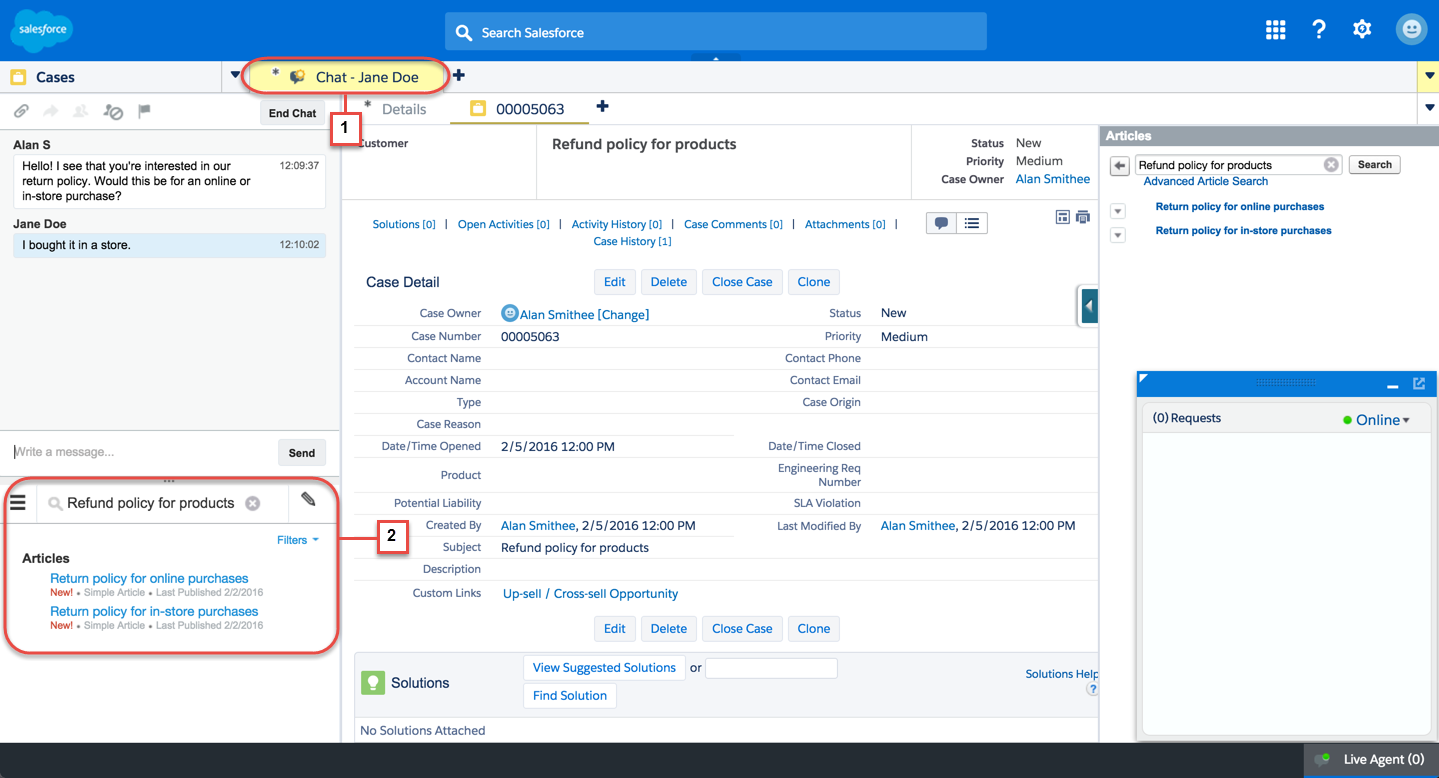
The name of the customer (Jane Doe for this example) appears in the Console from setName (1). When you call addCustomDetail.doKnowledgeSearch, the search automatically appears in the Knowledge widget (2).
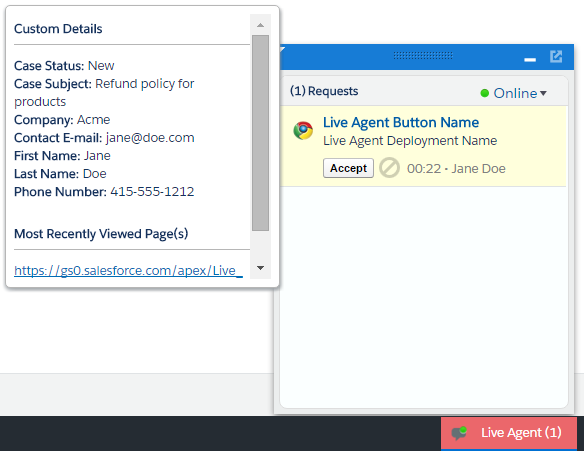
When the agent receives a chat, the set Custom Details appear in a hover window.
Optional Cookies
You can use your consent manager to provide users the ability to opt in or opt out of optional cookies. If they choose to opt in you can pass true to the fourth parameter in liveagent.init() to enable tracking optional cookies. Otherwise, if they choose to opt out, pass false. Omitting the fourth parameter is the same as passing true.
1/* Enable optional cookies*/
2liveagent.init('https://d.la.gus.salesforce.com/chat', '572B000000003KL', '00DB00000000Rr8', true);
3liveagent.init('https://d.la.gus.salesforce.com/chat', '572B000000003KL', '00DB00000000Rr8');
4
5/* Disable optional cookies */
6liveagent.init('https://d.la.gus.salesforce.com/chat', '572B000000003KL', '00DB00000000Rr8', false);
If the user opts out, you can also call liveagent.disableOptionalCookies(). This deletes and stops tracking the optional cookies. This is the same as passing false to liveagent.init() except that it takes higher order of precedence than liveagent.init() with the value true. For example, if you call liveagent.disableOptionalCookies() first and then pass true to liveagent.init(), optional cookies are still disabled. Unlike liveagent.init(), liveagent.disableOptionalCookies() can also be called anytime after the page is loaded.
1/* Disable optional cookies.*/
2liveagent.disableOptionalCookies()
If the user opts back in to optional cookies after opting out, pass true to liveagent.init() on the next page load.
1<apex:page showHeader="false">
2<style> body { margin: 25px 0 0 25px; } </style>
3
4...
5
6<!-- Chat Deployment Code to initialize, replace with your org's values -->
7/* To enable tracking optional cookies, pass `true` to the fourth parameter. To disable
8them, pass `false` to the fourth parameter or call liveagent.disableOptionalCookies().*/
9liveagent.init('https://d.la.gus.salesforce.com/chat', '572B000000003KL', '00DB00000000Rr8',true);
10</script>
11</apex:page>