


Service Cloud Voice for Partner Telephony 開発者ガイド
 j
jパートナーテレフォニーのユーザおよびグループとキューとの関連付け
パートナーテレフォニーのユーザとグループを Service Cloud Voice キューに関連付けるようにキュー管理を設定します。
概要
キュー管理の動作を改良し、パートナーとその顧客が簡単にユーザとグループを関連する音声キューに関連付けることが可能にな���ました。
この機能を使用するには、service_cloud_voice 名前空間から次の Apex インターフェースを実装します。
-
QueueManager。このクラスには、Service Cloud Voice がキュー管理をサポートするかどうかを記述します。次のメソッドが含まれます。
- supportsQueueUserGrouping。キューユーザのグループ化機能が実装でサポートされるかどうかを示します。
-
QueueSetup。このクラスは、パートナーテレフォニー実装と Salesforce との同期を維持するためにすべての作業を実行します。次のメソッドが含まれます。
- listQueues。既存のキューをすべてリストします。
- createQueue。キューを作成します。
- removeQueue。既存のキューを削除します。
- associateUsersAndGroupsWithQueue。パートナーテレフォニーのユーザとグループを Service Cloud Voice キューに関連付けます。
-
GroupSetup。このクラスは、ご使用の実装と Salesforce との同期を維持するためにすべての作業を実行します。次のメソッドが含まれます。
- listGroups。既存のグループをすべてリストします。
- createGroup。グループを作成します。
- associateUsersWithGroup。ユーザをグループに関連付けます。
これらのメソッドの実装方法は、サンプルコードに示されています。
パートナーテレフォニーのキュー管理の設定
BYOT キュー管理機能を有効にするには、次の手順に従います。
- Salesforce 担当者に連絡し、この機能にオプトインして、組織権限を有効にします。
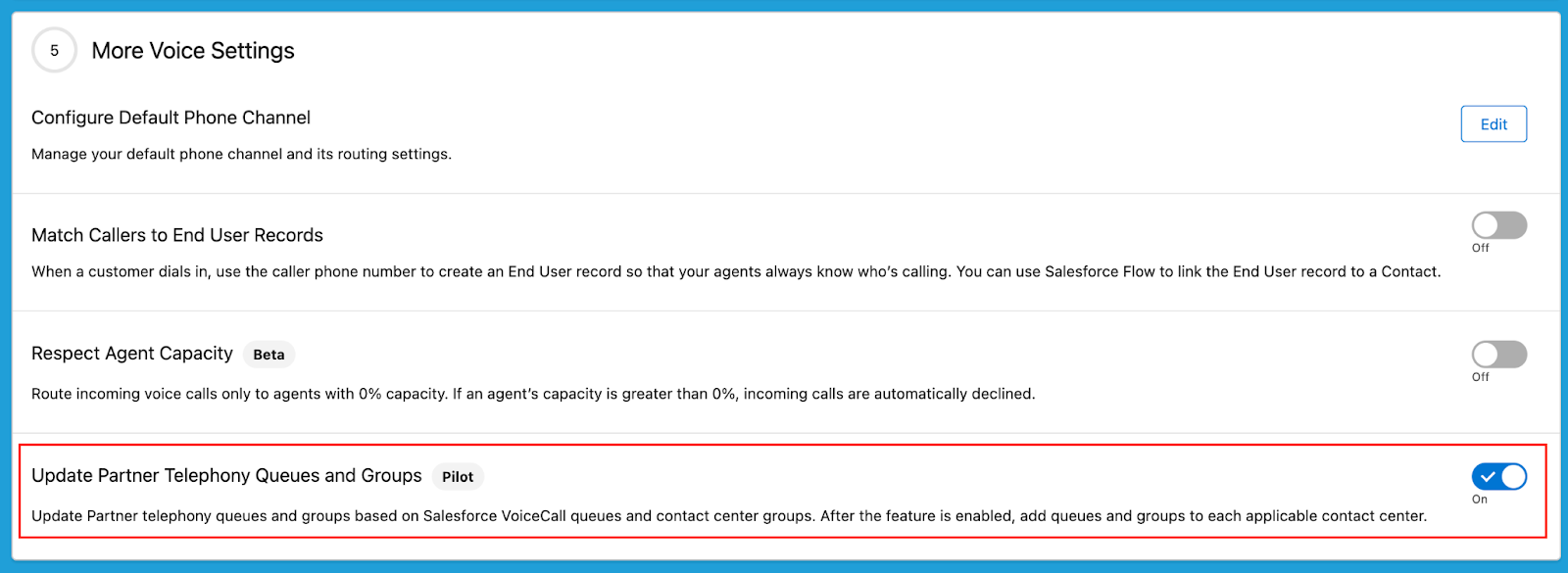
- 組織権限を有効にするときは、[設定] の [パートナーテレフォニー] に移動して、[パートナーテレフォニーのキューおよびグループを更新] をオンにします。
-
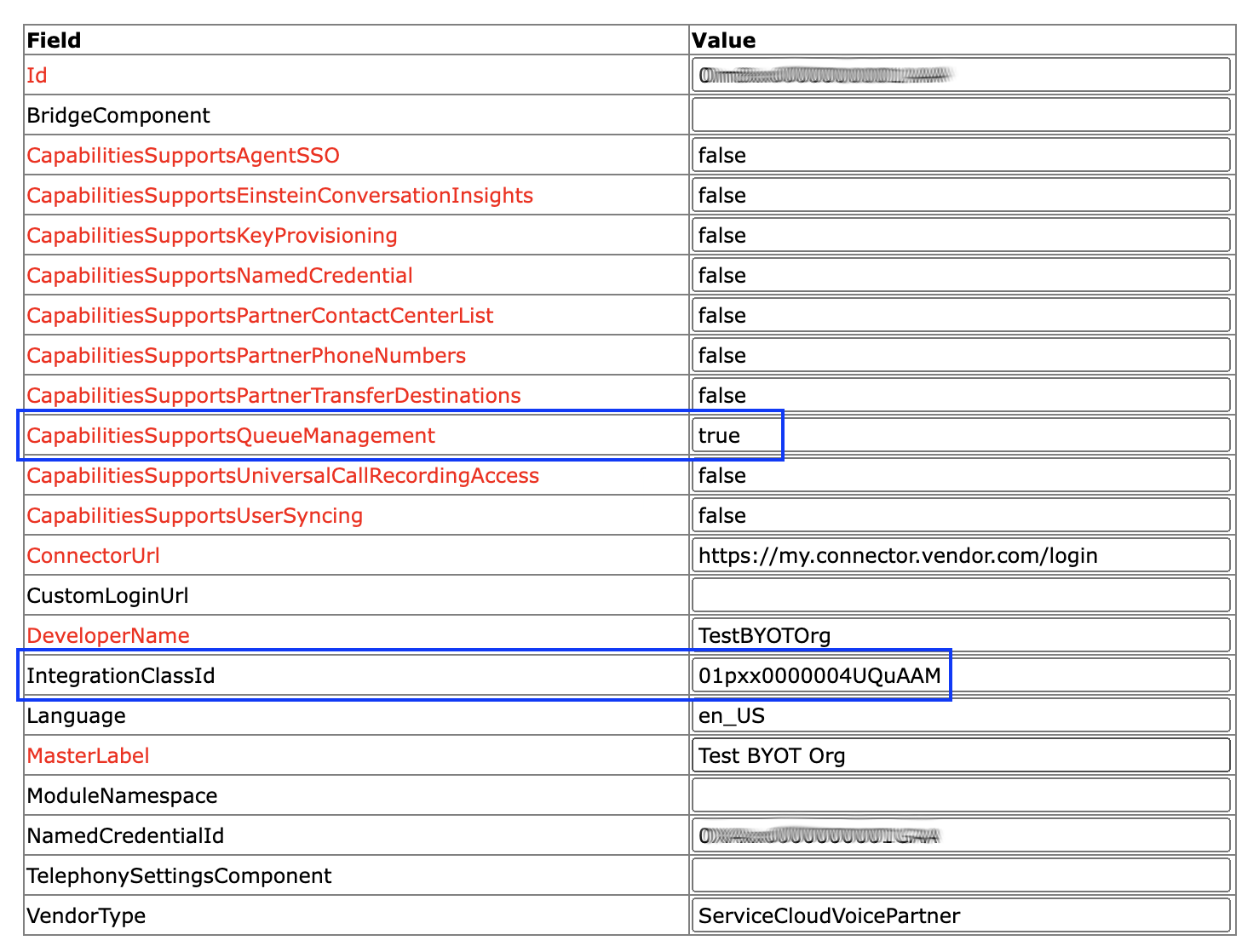
ConversationVendorInfo レコードをインポートする場合、ベンダーは次の項目を設定する必要があります。
- CapabilitiesSupportsQueueManagement。この値を true に設定します。
- IntegrationClassId。この値には Apex 実装クラスの ID が含まれます。たとえば、01pxx000000wxyzABC などです。
次のすべての手順に従う必要があります。そうしないと、新しい機能が使用可能にならず、Salesforce の動作は同期なしに戻ります。
これらの手順のほかに、顧客は次のセクションのサンプルコードを使用して Apex クラスを実装する必要があります。顧客はスクリーンショットに示されている ConversationVendorInfo レコードの IntegrationClassId 項目を指定する必要があります。この値を設定しないと、キューの対応付けを設定しようとしたときにエラーメッセージが表示されます。
Apex クラスの実装
サンプルコードを使って Apex クラスを実装します。ConversationVendorInfo レコードの IntegrationClassId 項目にクラス ID を指定します。この値を設定しないと、キューの対応付けを設定しようとしたときにエラーメッセージが表示されます。
次のコードブロックには、すべてのインターフェースメソッドの実装サンプルが含まれています。キューを操作するには、「TO DO」のコメントを自分の実装で更新します。
1/**
2* Sample code that implements QueueManager, QueueSetup, and GroupSetup in order to handle
3* queue and group management requests.
4*/
5public class PartnerQueueManagementSampleClass implements service_cloud_voice.QueueManager,
6                        service_cloud_voice.QueueSetup, service_cloud_voice.GroupSetup {
7
8
9   /** ========== Sample code for methods defined in interface QueueManager ========== */
10
11
12   /**
13    * @description Returns whether the contact center supports user grouping.
14    *              (Implementation for QueueManager.)
15    * @param contactCenterInfo Info about the contact center.
16    * @return QueueUserGroupingResponse Response containing whether the queue
17    *                                   supports user grouping.
18    */
19   public service_cloud_voice.QueueUserGroupingResponse supportsQueueUserGrouping(service_cloud_voice.ContactCenterInfo contactCenterInfo) {
20       // Grab information from the request
21       String contactCenterId = contactCenterInfo.getContactCenterId();
22
23
24       // Returns whether contact center supports user grouping.
25       // * @param boolean Indicates whether the method execution was successful.
26       // * @param String Contains any error info that occurred during the
27       // *               method execution.
28       // * @param boolean Indicate if user grouping is supported.
29       return new service_cloud_voice.QueueUserGroupingResponse(true, null, false);
30   }
31
32   /** ========== Sample code for methods defined in interface QueueSetup ========== */
33
34
35   /**
36    * @description Gets the list of queues. (Implementation for QueueSetup.)
37    * @param queueListRequest Request containing information about retrieving queue list.
38    * @return ListQueuesResponse Response containing the desired queues.
39    */
40   public service_cloud_voice.ListQueuesResponse
41       listQueues(service_cloud_voice.ListQueuesRequest queueListRequest) {
42
43
44       // TO DO: Call vendor's list queue API to retrieve the vendor queue list.
45       //        The code below creates a dummy queue list.
46       Map<String, String> queues = new Map<String, String>
47         {'CustomerSupport' => 'External Customer Support',
48           'ITSupport' => 'External IT Support',
49           'FinancialSupport' => 'External Financial Support',
50           'TechSupport' => 'External Tech Support'};
51
52       // Returns the list of queues (for a successful response).
53       // * @param boolean Indicates whether the method execution was successful.
54       // * @param Map<String, String> Map of queues with queueKey <=> queue label pairs.
55       // * @param String Contains any customer error message that occurred during the
56       // *               method execution.
57       return new service_cloud_voice.ListQueuesResponse(true, queues, null);
58
59
60       // ERROR HANDLING
61       // If an error occurs, you can return the error by passing false
62       // in the response with an error message.
63       //
64       // Error Example (false response):
65       //     return new service_cloud_voice.ListQueuesResponse(false,
66       //            null, '<customized error message on expected error>');
67   }
68
69
70   /**
71    * @description Creates a queue. (Implementation for QueueSetup.)
72    * @param createQueueRequest Request containing information about creating a new queue.
73    * @return CreateQueueResponse Response containing the new queue (or an error).
74    */
75   public service_cloud_voice.CreateQueueResponse createQueue(service_cloud_voice.CreateQueueRequest createQueueRequest) {
76
77
78       // Grab information from the request
79       String contactCenterId = createQueueRequest.getContactCenterInfo().getContactCenterId();
80       String queueName = createQueueRequest.getQueueName();
81
82       // TO DO: Call vendor's create queue API to create a new vendor queue and return its id.
83       //        The code below creates a dummy new queue ID.
84       String queueId = 'TechSupport';
85
86       // Returns the new queue ID (for a successful response).
87       // * @param boolean Indicates whether the method execution was successful.
88       // * @param String ID of the new queue.
89       // * @param String Contains any error that occurred during the method execution.
90       return new service_cloud_voice.CreateQueueResponse(true, queueId, null);
91
92
93       // ERROR HANDLING
94       // If an error occurs, you can return the error by passing false
95       // in the response with an error message.
96       //
97       // Error Example (false response):
98       //     return new service_cloud_voice.CreateQueueRequest(false,
99       //            null, '<customized error message on expected error>');
100   }
101
102
103   /**
104    * @description Removes an existing queue. (Implementation for QueueSetup.)
105    * @param removeQueueRequest Request containing information about queue removal.
106    * @return RemoveQueueResponse Response containing the queue removal information.
107    */
108   public service_cloud_voice.RemoveQueueResponse removeQueue(service_cloud_voice.RemoveQueueRequest removeQueueRequest) {
109
110
111       // Grab information from the request
112       String contactCenterId = removeQueueRequest.getContactCenterInfo().getContactCenterId();
113       String queueId = removeQueueRequest.getQueueId();
114
115       // TO DO: Call vendor's remove queue API to remove the existing vendor queue.
116       // Returns the status of the removed queue (for a successful response).
117       // * @param boolean Indicates whether the method execution was successful.
118       // * @param String Contains any error info that occurred during the
119       // *               method execution.
120       return new service_cloud_voice.RemoveQueueResponse(true, null);
121
122
123       // ERROR HANDLING
124       // If an error occurs, you can return the error by passing false
125       // in the response with an error message.
126       //
127       // Error Example (false response):
128       //     return new service_cloud_voice.RemoveQueueResponse(false,
129       //            null, '<customized error message on expected error>');
130   }
131
132
133   /**
134    * @description Associates users and groups with a queue.
135    * @param associateUsersAndGroupsWithQueueRequest Request containing
136    *        information about the users and groups.
137    * @return SyncUsersAndGroupsWithQueueResponse Response containing the result.
138    */
139   public service_cloud_voice.SyncUsersAndGroupsWithQueueResponse associateUsersAndGroupsWithQueue(service_cloud_voice.SyncUsersAndGroupsWithQueueRequest associateUsersAndGroupsWithQueueRequest) {
140
141
142       // Grab information from the request
143       String contactCenterId =
144           associateUsersAndGroupsWithQueueRequest.getContactCenterInfo().getContactCenterId();
145       String queueId =
146           associateUsersAndGroupsWithQueueRequest.getQueueId();
147       List<service_cloud_voice.UserInfo> userInfoList =
148           associateUsersAndGroupsWithQueueRequest.getUserInfoList();
149       List<service_cloud_voice.GroupInfo> groupInfoList =
150           associateUsersAndGroupsWithQueueRequest.getGroupInfoList();
151
152       // TO DO: Call vendor's sync users and groups with queue API to add users and groups to
153       //        the existing vendor queue.
154
155       // Returns the status of the association (for a successful response).
156       // * @param boolean Indicates whether the method execution was successful.
157       // * @param String Contains any error info that occurred during the
158       // *               method execution.
159       return new service_cloud_voice.SyncUsersAndGroupsWithQueueResponse(true, null);
160
161
162       // ERROR HANDLING
163       // If an error occurs, you can return the error by passing false
164       // in the response with an error message.
165       //
166       // Error Example (false response):
167       //     return new service_cloud_voice.SyncUsersAndGroupsWithQueueResponse(false,
168       //            null, '<customized error message on expected error>');
169
170
171   }
172
173   /** ========== Sample code for methods defined in interface GroupSetup ========== */
174
175
176   /**
177    * @description Gets the list of groups. (Implementation for GroupSetup.)
178    * @param groupListRequest Request containing information about retrieving group list.
179    * @return ListGroupsResponse Response containing the desired groups.
180    */
181   public service_cloud_voice.ListGroupsResponse
182       listGroups(service_cloud_voice.ListGroupsRequest groupListRequest) {
183
184
185       // TO DO: Call vendor's list group API to retrieve the vendor group list.
186       //        The code below creates a dummy group list.
187       Map<String, String> groups = new Map<String, String>
188         {'CustomerSupportGroup' => 'External Customer Support Group',
189           'ITSupportGroup' => 'External IT Support Group',
190           'FinancialSupportGroup' => 'External Financial Support Group',
191           'TechSupportGroup' => 'External Tech Support Group'};
192
193       // Returns the list of groups (for a successful response).
194       // * @param boolean Indicates whether the method execution was successful.
195       // * @param Map<String, String> Map of groups with groupKey <=> group Label pairs
196       // * @param String Contains any customer error message that occurred during the
197       // *               method execution.
198       return new service_cloud_voice.ListGroupsResponse(true, groups, null);
199
200
201       // ERROR HANDLING
202       // If an error occurs, you can return the error by passing false
203       // in the response with an error message.
204       //
205       // Error Example (false response):
206       //     return new service_cloud_voice.ListGroupsResponse(false,
207       //            null, '<customized error message on expected error>');
208       //
209   }
210
211
212   /**
213    * @description Creates a group. (Implementation for GroupSetup.)
214    * @param createGroupRequest Request containing information about creating a new group.
215    * @return CreateGroupResponse Response containing the new group (or an error).
216    */
217   public service_cloud_voice.CreateGroupResponse createGroup(service_cloud_voice.CreateGroupRequest createGroupRequest) {
218
219
220       // Grab information from the request
221       String contactCenterId = createGroupRequest.getContactCenterInfo().getContactCenterId();
222       String groupName = createGroupRequest.getGroupName();
223
224       // TO DO: Call vendor's create group API to create a new vendor group and return its id.
225       //        The code below returns a dummy new group ID.
226       String groupId = 'TechSupportGroup';
227
228       // Returns the new group ID (for a successful response).
229       // * @param boolean Indicates whether the method execution was successful.
230       // * @param String ID of the new group.
231       // * @param String Contains any customer error message that occurred during the method execution.
232       return new service_cloud_voice.CreateGroupResponse(true, groupId, null);
233
234
235       // ERROR HANDLING
236       // If an error occurs, you can return the error by passing false
237       // in the response with an error message.
238       //
239       // Error Example (false response):
240       //     return new service_cloud_voice.CreateGroupResponse(false,
241       //            null, '<customized error message on expected error>');
242       //
243   }
244
245
246   /**
247    * @description Associates users with a group.
248    * @param associateUsersWithGroup Request containing information about the users.
249    * @return SyncUsersWithGroupResponse Response containing the result.
250    */
251   public service_cloud_voice.SyncUsersWithGroupResponse associateUsersWithGroup(service_cloud_voice.SyncUsersWithGroupRequest associateUsersWithGroupRequest) {
252
253
254       // Grab information from the request
255       String contactCenterId =
256           associateUsersWithGroupRequest.getContactCenterInfo().getContactCenterId();
257       String groupId =
258           associateUsersWithGroupRequest.getGroupId();
259       List<service_cloud_voice.UserInfo> addedUserInfoList =
260           associateUsersWithGroupRequest.getAddedUserInfoList();
261       List<service_cloud_voice.GroupInfo> removedUserInfoList =
262           associateUsersWithGroupRequest.getRemovedUserInfoList();
263
264       // TO DO: Call vendor's sync users with group API to add users to the
265       //        existing vendor group.
266
267       // Returns the status of the association (for a successful response).
268       // * @param boolean Indicates whether the method execution was successful.
269       // * @param String Contains any customer error message that occurred during the
270       // *               method execution.
271       return new service_cloud_voice.SyncUsersWithGroupResponse(true, null);
272
273
274       // ERROR HANDLING
275       // If an error occurs, you can return the error by passing false
276       // in the response with an error message.
277       //
278       // Error Example (false response):
279       //     return new service_cloud_voice.SyncUsersWithGroupResponse(false,
280       //            null, '<customized error message on expected error>');
281       //
282   }
283}