


 j
jAnnouncements
Frequently Asked Questions
SFRA Feature List
Learn More
Commerce Community Suite
SFRA Versions and Releases
Build SFRA
Configure SFRA
Customize SFRA
Troubleshoot SFRA
Contribute To SFRA
B2C Commerce Release Notes
Ask the Community
Choosing a specific SFRA version ensures that your base cartridge and plugin cartridges work well together. In GitHub, some versions are labeled as releases, and others are labeled as pre-releases. Releases are stable; pre-releases might be unstable.
Only existing customers can access some of the links on this page. Visit Salesforce Commerce Cloud GitHub Repositories and Access for information about how to get access to the repositories.
Tip
SFRA version numbers follow the semantic versioning pattern. Semantic versioning is used for all SFRA product repositories on GitHub. In semantic versioning, there are major versions, minor versions, and patch versions.
Each major version represents a version that is not backwards-compatible with previous versions. Each minor version represents new functionality and features that are backwards-compatible within the major version. Each patch version contains bug fixes or patches that are backwards-compatible within each minor version.
SFRA version numbers have the following format:
v*<major_version>*.<minor_version>.<patch_version>
For example: v3.3.0
This version number format applies to all SFRA GitHub product repositories, including the following:
SFRA versions have matching Git tags. For example, SFRA version v3.3.0 corresponds to the Git tag v3.3.0. All SFRA product repositories are tagged separately but follow the same pattern. After cloning the SFRA product repositories, fetch the tags for each repository, list the tags, and check out the same version tag for each repository to make sure you are using the same version everywhere.
For each SFRA product repository, fetch all the tags before listing them or checking them out. Fetch the tags using the following command:
1git fetch --tagsAfter fetching the tags, list them using the git tag command.
List the tags for an SFRA repository as follows:
1git tagFor example, issuing the git tag command against the plugin-applepay repository produces the following output (this output changes over time as tags are added):
1v1.0.0
2v2.0.0
3v2.1.0
4v3.0.0
5v3.1.0
6v3.2.0
7v3.3.0Check out a Git tag using the following command:
1git checkout {\<tag>}For example:
1git checkout v3.3.0When you check out a tag, Git displays a message similar to the following:
1Note: checking out 'v3.3.0'.
2
3You are in 'detached HEAD' state. You can look around, make experimental
4changes and commit them, and you can discard any commits you make in this
5state without impacting any branches by performing another checkout.
6
7If you want to create a new branch to retain commits you create, you may
8do so (now or later) by using -b with the checkout command again. Example:
9
10  git checkout -b <new-branch-name>
11
12HEAD is now at 274a5ee7... 3.3.0
Use the suggested command to create a branch from the tag. For example:
1git checkout -b my3_3_0Work in the branch you created, knowing that it matches the specified version (in this example, v3.3.0).
Repeat this process for all SFRA product repositories that you want to include in your project.
The SFRA base repository (storefront-reference-architecture) is continually updated regularly, and each incremental update corresponds to a new version, but only some correspond to releases.
Development occurs on the integration branch of the base repository, and code changes are merged from the integration branch onto the main branch. Once merged, these incremental changes are considered a new version (and are tagged using a corresponding Git tag). However, only some versions are fully tested against the full suite of SFRA plugin repositories and deemed stable. These fully tested, stable releases are labeled as releases in GitHub. Other versions are labeled as pre-releases. For all versions, once the base repository is tagged, all other SFRA product repositories are tagged with matching tags.
When you view the SFRA base repository in GitHub, you can click the releases tab to view releases. For example:
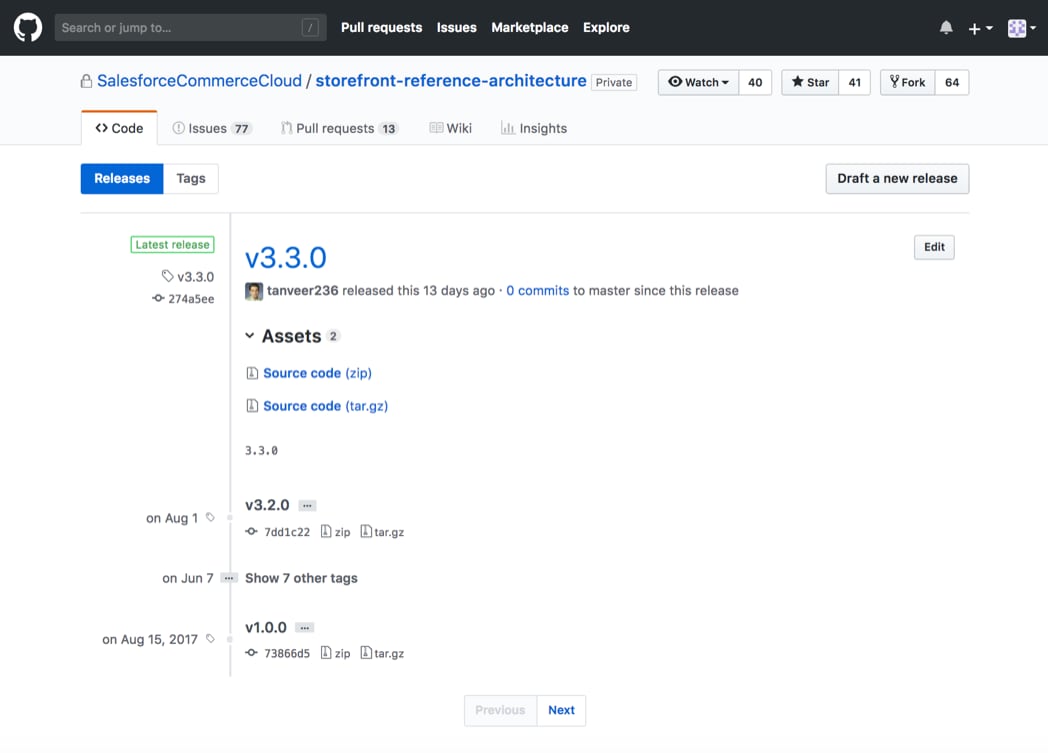
Here, the v3.3.0 tag is labeled as the ‘Latest Release.’ This label indicates that the v3.3.0 version is fully integration-tested with other product plugins and is considered stable. It further indicates that you can check out the v3.3.0 tag not only for the base storefront-reference-architecture repository, but also for other SFRA plugin repositories (for example, plugin-applepay, plugin_wishlist, plugin_ordermanagement, and so on).
If a storefront-reference-architecture tag is labeled as ‘Pre-release’ in GitHub, the version has not been integration-tested with other SFRA product plugins and might be unstable. A pre-release version is compatible within its major and minor versions, as is standard for semantic versioning, but it might be unstable.
Within SFRA repositories, branches can be updated and commits can be pushed without being tagged. Nothing prevents you from checking out the main branch of any SFRA repository. But unless you check out a tag, you cannot be sure if the changes in the branch are compatible with other SFRA repositories. By checking out only tags that are labeled as releases, you can be confident that you are starting with a stable code base. You can also be confident that all like-tagged SFRA plugin repositories have been integration-tested against the base repository.
j