Integrate Payment Gateways Using the Payment Gateway SPI
Point of Sale’s Payment Gateway SPI lets you integrate third-party payment gateway terminals (for example, Worldpay or Stripe Terminal) with POS through a store-local proxy server. Implement the SPI on a proxy that runs on the store’s local network and acts as an intermediary between the POS iOS client and the payment gateway terminals. The proxy handles terminal communication, gateway protocol translation, and real-time event streaming so that new gateway integrations can be added without modifying the POS iOS application.
For endpoint details, see Payment Gateway SPI in the Point of Sale reference documentation.
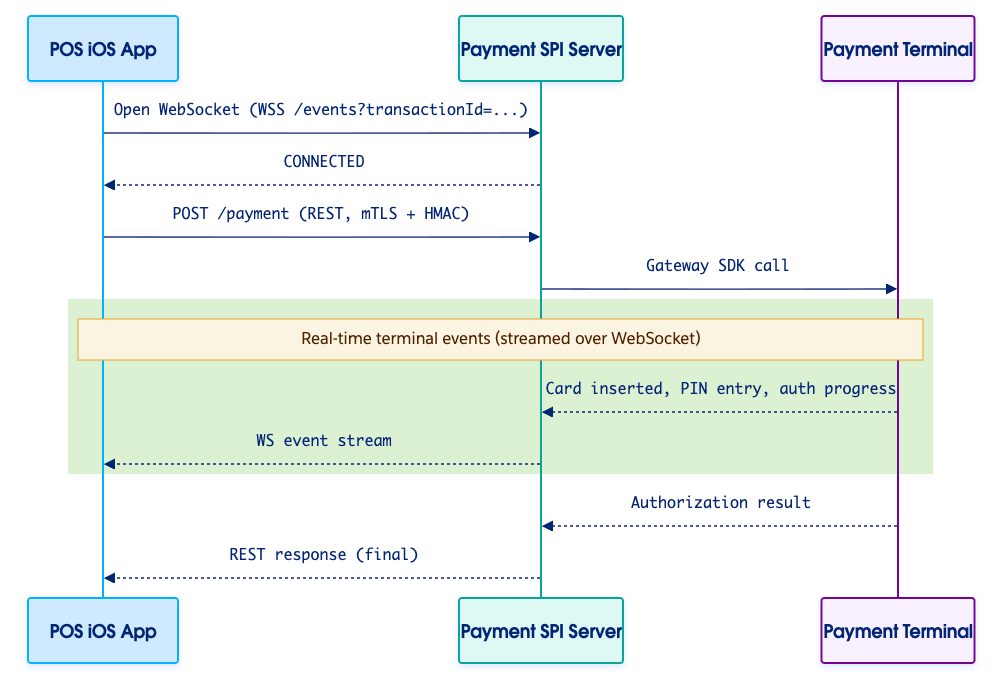
This diagram shows a payment for a client that uses the WebSocket channel.
The proxy exposes two channels that run side by side:
REST over mTLS + HMAC-SHA256 — the command channel. The POS iOS client uses this to start, cancel, and query transactions. The REST response is the source of truth for a transaction’s outcome.
WebSocket — the event channel. Long-lived and optional. The client uses events to render real-time UI updates as the cardholder interacts with the terminal (for example, CARD_INSERTED, PIN_ENTRY_STARTED, AUTHORIZATION_APPROVED).
The client generates a transactionId (UUID v4) per payment and uses it as the correlation ID across the WebSocket stream, the REST call, and any follow-up operations (cancel, void, capture, status query).
The payment flow, when the client uses the WebSocket channel:
The client opens a WebSocket to WSS /events?transactionId={transactionId} and waits for a CONNECTED event.
The client calls POST /payment with the same transactionId.
The proxy drives the terminal and streams events back over the WebSocket.
The proxy returns the final authorization result in the REST response.
The WebSocket channel is optional — support clients that skip it and rely on the REST response alone.
Security Modes
The proxy supports two security modes:
Secure mode (production): Requires mTLS transport and HMAC-SHA256 request signing.
Simple mode (testing only): No mTLS and no HMAC. Self-signed certificates are accepted.
All date and time fields use ISO 8601 format. The proxy server must accept both:
Standard format: 2026-03-12T14:04:06Z
Fractional seconds: 2026-03-12T14:04:06.206Z
The server should return dates with fractional seconds for maximum precision.
Client Timeouts
The POS iOS client enforces per-operation timeouts. If the proxy doesn’t respond within the window listed below, the client treats the request as failed.
Operation
Timeout
Initial connection
10s
Payment
120s
Payment + recovery
300s
Status query
30s
Health check
5s
Cancel / Void
30s
Refund
120s
Gift Card Balance
30s
Gift Card Operation
60s
Gift Card Payment
120s
Card Acquisition
120s
Terminal Display
10s
Terminal Input
120s
PBL Create
30s
PBL Expire
15s
PBL Status Query
15s
PBL Refund/Void
120s
SAF Query
15s
Offline Validation
30s
Terminal Offline Status
5s
Beta Feature
Payment Gateway SPI is a pilot or beta service that is subject to the Beta Services Terms at Agreements - Salesforce.com or a written Unified Pilot Agreement if executed by Customer, and applicable terms in the Product Terms Directory. Use of this pilot or beta service is at the Customer’s sole discretion.


 j
j