Configure Monitoring for SPIs and Webhooks in Point of Sale CMS
Enable Web Client Service to monitor SPI and webhook integrations configured in Point of Sale CMS. Set up a monitoring webhook to track performance and get alerts if an SPI or webhook fails. Define a latency threshold for the response time.
-
Go to Store Management | Store Settings | System.
-
Expand the Rollout section.
-
Turn on Enabled Web Client Service (supportWebClient).
-
Save your changes.
-
In CMS, go to Integrations | Custom Connectors.
-
Click Create.
-
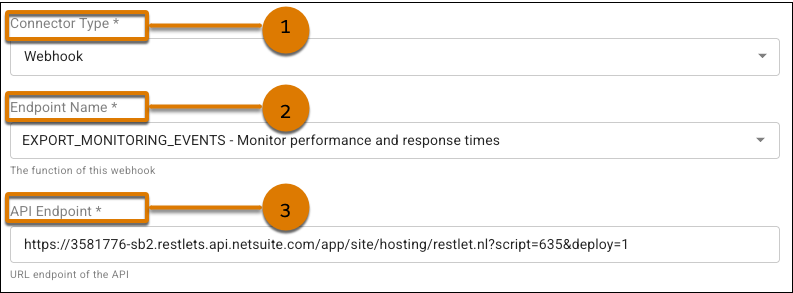
For Connector Type, select Webhook (1).
-
For Endpoint Name, select EXPORT_MONITORING_EVENTS (2).
-
For API Endpoint, provide the URL endpoint of the API (3).
-
For Integration Type, select HTTP_POST or HTTP_PUT.
-
Save your changes.
-
Go to Integrations | Custom Connectors.
-
Click the pencil icon to edit the webhook or SPI configuration you want to enable monitoring for.
-
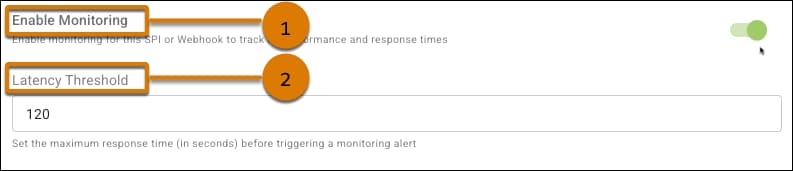
Turn on Enable Monitoring (1).
-
(Optional) If you want to be notified of a slow response time, enter a maximum time (in seconds) for Latency Threshold (2). For example, a Latency Threshold of 120 triggers a monitoring alert if a webhook or SPI takes 120 seconds or longer to respond.
-
Save your changes.