Start Checkout
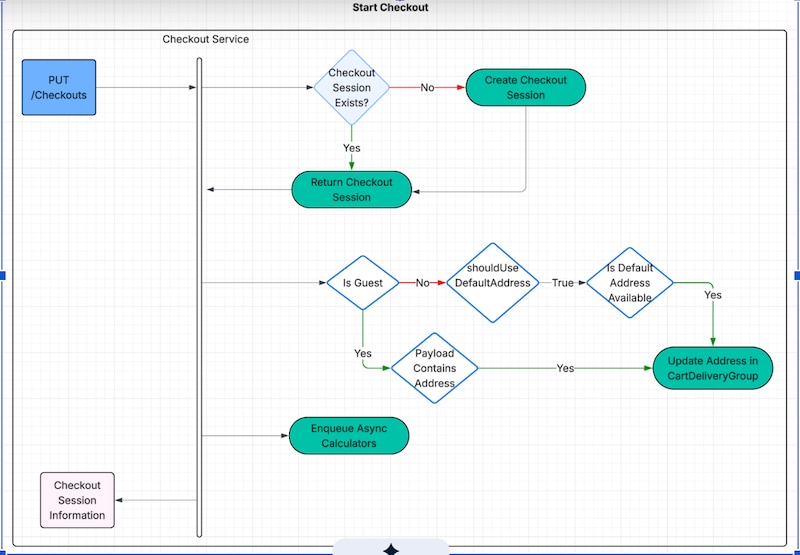
Create a checkout session and initialize background calculators.
Endpoint: PUT /commerce/webstores/{webstoreId}/checkouts
What happens:
- Checks for existing checkout session and returns it if found
- Creates new checkout session if none exists
- Runs pricing, promotions, and inventory calculators
- Runs shipping and tax calculators if address is available
Request parameters:
cartId (string) — Required. The ID of the shopping cart.deliveryAddressInput — Optional. Input for the delivery address.customFields — Optional. Custom fields to include.
Response includes:
checkoutIddeliveryGroupscontactInfoerrorsstatusCodecartSummaryorderReferenceNumbercustomFields
Processing and Validation Steps:
- The system validates access to the specified webstore.
- The system validates access to the shopping cart (
cartId).
- The system validates the cart status.
- If
deliveryAddressInput is provided, the system validates the delivery address.
- The system checks if an active Checkout Session already exists for the cart; if so, the system retrieves and returns it.
- If no existing Checkout Session is found, the system creates a new session and returns the
checkoutId in the response.
- If
shouldUseDefaultAddress is set to true, the system retrieves and validates the address associated with the Contact Point Address (CPA) or Profile. The system then applies this address to the CartDeliveryGroup object.
- For guest users, if the request includes
deliveryAddressInput, the system validates the provided address and applies it to the CartDeliveryGroup object.
Response codes:
- 200 OK – Checkout session ready, all calculations complete
- 202 Accepted – Processing in progress, poll GET endpoint until you receive 200


 j
j