Connect a Third-Party Order Management System (OMS)
The OMS domain is a backend-onlyCommerce App: you implement sfcc.app.oms.order.* extension points so a third-party Order Management System serves current order data through Shopper Orders, Shopper Customers, and UCP order lifecycle updates. Declare "domain": "oms" in commerce-app.json. For the framework this app builds on, see Architecture Overview and Building Your Commerce App.
Overview
B2C Commerce is a high-scale order-taking engine: it captures orders at peak traffic and is
the point of origin for every order placed on your digital storefronts and channels. After an order is
created, the work of post-purchase processing — fulfillment, shipping, cancellations, returns,
refunds — is typically handled by an Order Management System (OMS).
Salesforce offers a tightly integrated OMS (Salesforce Order Management) for exactly this. But you
aren’t limited to it: plug in a third-party OMS and have it serve order data
through the same integrated surfaces B2C Commerce already exposes — the Shopper Orders and
Shopper Customers SCAPIs, and the Universal Commerce Protocol (UCP) order lifecycle
updates. The shopper- and agent-facing experience is identical no matter which OMS is behind it.
Connect a third-party OMS so it serves current order data through the same shopper APIs. The standard GET endpoints return the order as
it was created in B2C Commerce, but carry no real-time data from the integrated OMS. That gap is
closed with the expand=oms parameter on certain shopper-facing APIs. That parameter loads the current
order data from the OMS. When Salesforce Order Management is integrated, that parameter works automatically.
When you want to integrate a third-party OMS instead, the rest of this document describes how.
Build a Commerce App whose backend (site) cartridge implements a small set
of server-side hooks. When your app registers the hooks and the integration is enabled, the
platform routes order operations to your hooks automatically. Your hooks are responsible for one
thing: talking to your OMS and mapping its data to the platform’s order shape. Everything else —
shopper authentication, the access decision, request/response validation, the public API surface —
stays with the platform.
Nothing changes for API consumers. Storefronts, the mobile app, and agentic-commerce channels
keep calling the same SCAPI Shopper Orders endpoints. The response shape is identical whether the
data came from the built-in store or your OMS.
How a Request Flows
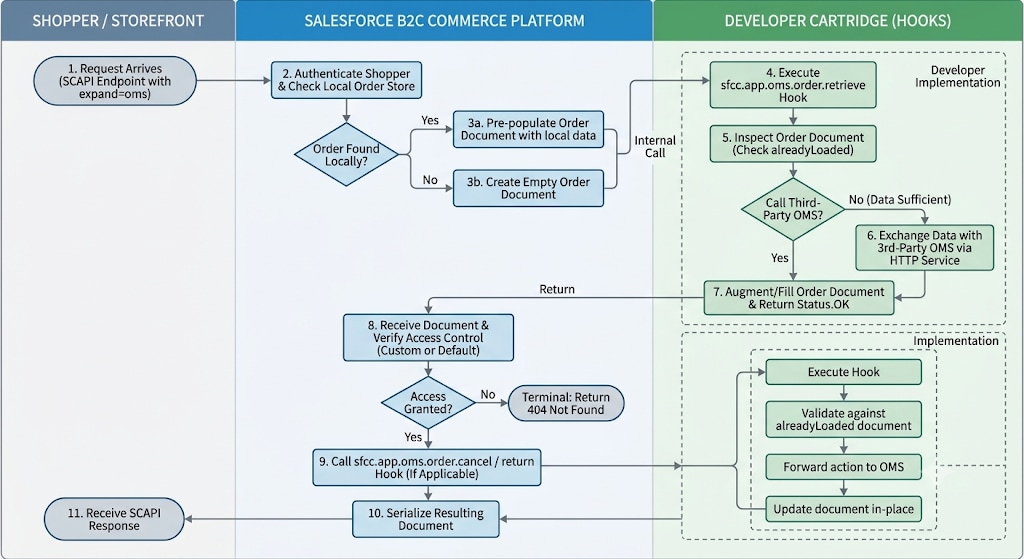
When a request arrives, the platform authenticates the shopper and loads the order from its own
store if it still holds it. It then hands your hook an order document — pre-populated with the
platform’s data when the order was found locally, or empty when it was not — for your hook to
augment. Your hook decides what it needs from the OMS: it can fill in a document the platform left
empty, or enrich a pre-populated one with fields the platform doesn’t have (live fulfillment status,
tracking, and so on), and it can skip the OMS call entirely when the platform’s data already
suffices. The platform then takes over again: it applies access control, and, for a cancel or
return, calls your cancel or return hook, which executes the operation against the OMS and
returns the updated order. Finally the platform serializes the resulting document as the SCAPI
response.
Your hooks own every interaction with the OMS — enriching order data on reads and executing the
actions on writes; everything around them — authentication, access control, validation, and the
response — is the platform’s. Access control, in particular, is only exercised for an order the
platform did not already load and access-check itself: an order the platform served from its own
store is already trusted, whereas an order that exists only in the OMS (or one your list hook adds)
is access-checked before it is returned. That check uses a sensible default (the shopper must own the
order), but when it doesn’t fit your needs a custom access-control hook can fully override it — at
which point the platform steps aside and you own and enforce the access decision yourself.
The Hooks
The integration is made up of two groups of hooks: four core hooks that form the integration
itself, and two optional hooks you use to refine specific behaviors.
Core Hooks (Required)
These four are the integration. The platform routes order operations to your OMS only when all
four are registered together and the feature toggle is on. If any one is missing, the platform
ignores the others and falls back to its default behavior. Register all four even if some start out
as temporary no-ops during development.
sfcc.app.oms.order.retrieve — provides a single order. The platform hands you the order
document — pre-populated when it still holds the order locally, empty when it doesn’t — and your
hook augments it from the OMS: enriching it with data the platform lacks (live fulfillment status,
tracking, …) or filling it entirely when the platform had nothing. This is the workhorse of the
integration: it runs when a shopper views an order, up front on every cancel, return, and
access-code request, and whenever the platform needs the current order internally — for example to
assemble an order snapshot for UCP webhook events.
sfcc.app.oms.order.list — provides orders belonging to a single customer for their order
history. The platform pre-populates the result with the orders it already holds for that customer,
and your hook augments the list — typically appending the customer’s OMS-only orders. This is the
only hook that is customer-scoped by nature, and it may need to return a specific subset of orders
(paging).
sfcc.app.oms.order.cancel — cancels a whole order in your OMS. The platform calls it after
it has loaded the order and confirmed the shopper is allowed to cancel it.
sfcc.app.oms.order.return — starts a return for specific order items, called under the same
post-access-check conditions as cancel.
Optional Hooks
Both of these are independent — register only the ones you need; they don’t affect whether the
integration is active.
sfcc.app.oms.order.accessControl — overrides the platform’s default ownership decision.
Register it only when “does this shopper own this order?” can’t be answered by matching the
platform customer ID (for example, when your OMS uses a different customer identifier and you
manage it via custom attributes on the customer profile). It runs after
a retrieve and fully replaces the default check.
sfcc.app.oms.order.reasonCodes — supplies the cancel and return reason codes your OMS
accepts. The platform uses them both to serve the oms-meta-data endpoint (so the storefront can
render a reason picker) and to validate a submitted reason.
Reference: The sfcc.app.oms.order.* extension points are documented with full contract details, parameter types, and return values in the B2C Commerce Script API documentation.
The app installed on the site. App-specific extension points (sfcc.app.*) run only through Commerce App install—you can’t invoke them from a cartridge that isn’t part of an installed app. See Building Your Commerce App — Extension Points.
Your OMS reachable from hook scripts—typically through an HTTP service you define in the same cartridge (dw.svc.LocalServiceRegistry).
Enabling the Integration
The integration is active for a site only when both of these are true:
The OMS App Hooks feature switch is on. This is a platform kill switch, not a
merchant-facing setting, and it is enabled by default — so you normally don’t need to touch
it. For reference, it lives in Business Manager under Administration > Feature Switches,
labeled “Enable OMS App Hooks (sfcc.app.order.*)” in the Commerce Apps group section
(internal name OmsAppHooksEnabled).
All four core hooks are registered:
sfcc.app.oms.order.retrieve, sfcc.app.oms.order.list,
sfcc.app.oms.order.cancel, and sfcc.app.oms.order.return.
This is all-or-nothing: if any of the four is missing, the platform doesn’t route order
operations to your app and falls back to its default behavior. Register all four even if some are
temporary no-ops during development.
Triggering the hook on reads. For getOrder and getCustomerOrders, the storefront request
must include the query parameter expand=oms to route to your retrieve hooks. Without it, the
platform serves the request from its own order store as usual.
Note
Step 1 — Register the Hooks
Register the four core sfcc.app.oms.order.* extension points in the site cartridge’s hooks.json, and point package.json at it. This is the same registration pattern as other backend-only domains (for example, Tax). The following JSON is what the app registers. Install still goes through the Commerce App package, not a standalone cartridge-path hook. See Building Your Commerce App — Extension Points.
Each hook takes two arguments — an input and an order document to work with — and returns a
dw.system.Status. For most hooks the input is a purpose-built context object (for example
OmsOrderContext, carrying siteId and orderNo). The one exception is accessControl, whose
first argument is the authenticated shopper as a standard dw.customer.Customer object rather than a
context.
The order document is not always empty. On the read hooks the platform pre-populates it with the
order it already holds locally, and hands you an empty document only when it has none. Your hook can
therefore either enrich the data already there or fill a blank document — inspect it and add only what
the OMS needs to contribute.
new Status(Status.OK) — success.
new Status(Status.ERROR, ...) — failure. On a single-order retrieve this surfaces as 404.
Always return a Status. A hook that returns nothing is treated as a failure, not a success.
Important
The order documents you populate are Script API work objects. Use snake_case property
names in your hook (order_no, customer_info, product_items, tracking_number). The platform
serializes them to the camelCase SCAPI response (orderNo, customerInfo, productItems,
trackingNumber) automatically.
retrieve — Provide One Order
Signature: retrieve(context, orderResponse).
The context identifies the order by the combined key context.siteId + context.orderNo. It does
not carry a customer id — a retrieve hook is a pure data provider and must not implement its own
ownership logic; the platform handles access control.
orderResponse arrives pre-populated when the platform still holds the order locally, and empty
when it doesn’t. Your hook typically does one of two things:
Enrich an order the platform already loaded — add the post-purchase data the platform doesn’t
have (live fulfillment status, tracking, carrier, delivery dates). Skip the OMS call
entirely when the platform’s data is already enough.
Fill an order the platform no longer holds (empty document) — populate it fully from the OMS.
To detect which case you’re in, check whether the document already carries an order number.
1"use strict";2var Status = require("dw/system/Status");34function retrieve(context, orderResponse){5 var alreadyLoaded = !!orderResponse.orderNo; // platform pre-populated it67 var omsOrder = MyOms.getByOrderNo(context.siteId, context.orderNo);89 // Order isn't in the platform AND isn't in the OMS → not found.10 if(!alreadyLoaded && !omsOrder){11 return new Status(Status.ERROR, "ORDER_NOT_FOUND", "Order not found");12}1314 if(!alreadyLoaded){15 // Empty document: fill the base order from the OMS.16 orderResponse.orderNo = omsOrder.number;17 orderResponse.status = "open"; // must map to an allowed status enum value18 orderResponse.orderTotal = omsOrder.total;19 orderResponse.currency = omsOrder.currency;20 orderResponse.guest = omsOrder.isGuest;2122 // customer_id must be the platform customer id — the default access check compares against it.23 orderResponse.customerInfo = {24 customer_id: omsOrder.platformCustomerId,25 customer_no: omsOrder.customerNo,26 email: omsOrder.email,27};28 orderResponse.productItems = omsOrder.lines.map(function(l){29 return{30 product_id: l.sku,31 product_name: l.name,32 quantity: l.qty,33 price: l.price,34 item_id: l.lineId, // stable line id — needed to return specific items35 shipment_id: l.shipmentId, // groups line items; NOT fulfillment/tracking data36};37});38 // A full order also carries payment instruments, promotions, gift certificates, taxes, etc.39 // Map whatever your storefront's order experiences need — omitted here for brevity.40}4142 // In both cases, enrich with the live post-purchase data the platform doesn't hold. Put43 // fulfillment/tracking under omsData.shipments — the shipment object that carries tracking44 // links, carrier, and delivery dates. (order.shipments is line-item grouping, not this.)45 if(omsOrder){46 orderResponse.omsData = {47 shipments: omsOrder.shipments.map(function(s){48 return{49 id: s.id,50 status: s.status, // e.g. 'shipped', 'delivered'51 tracking_number: s.tracking,52 tracking_url: s.trackingUrl,53 provider: s.carrier,54};55}),56};57}5859 return new Status(Status.OK);60}6162exports.retrieve = retrieve;
order.list — Provide a Customer's Orders
Signature: list(context, customerOrdersResponse).
This is the one hook that is customer-scoped by nature. The context carries the authenticated
shopper’s identifiers and paging/filter inputs:
Field
Notes
context.customerId
Platform customer id of the authenticated shopper.
context.start, context.count
Paging window. Your hook owns pagination against your OMS.
context.from, context.until
Optional date filters.
context.status
Optional status filter.
context.siteId
The site.
context.crossSites
Whether the request spans sites.
customerOrdersResponse arrives pre-populated with the orders the platform already holds for
this customer, in its data list. Your hook augments that list — typically appending the
customer’s OMS-only orders rather than replacing what’s there. Add only orders belonging to
context.customerId. The platform trusts the entries it put there and access-checks the ones you
add.
1"use strict";2var Status = require("dw/system/Status");34function listOrders(context, customerOrdersResponse){5 var page = MyOms.getOrdersForCustomer(6 context.customerId,7 context.start,8 context.count,9 context.siteId,10);1112 // Append the OMS orders to whatever the platform already loaded.13 var existing = customerOrdersResponse.data || [];14 var omsOrders = page.orders.map(function(o){15 return{16 order_no: o.number,17 status: "completed",18 creation_date: o.createdAt, // a java.util.Date19 order_total: o.total,20 currency: o.currency,21 customer_info:{customer_id: o.platformCustomerId, customer_no: o.customerNo},22 product_items: o.lines.map(function(l){23 return{24 product_id: l.sku,25 product_name: l.name,26 quantity: l.qty,27 price: l.price,28 item_id: l.lineId,29};30}),31};32});3334 customerOrdersResponse.data = existing.concat(omsOrders);35 customerOrdersResponse.count = customerOrdersResponse.data.length;3637 return new Status(Status.OK);38}3940exports.list = listOrders;
cancel — Cancel a Whole Order
Signature: cancel(context, orderResponse). Context carries orderNo, siteId, and reason
(already validated and defaulted by the platform).
Before the platform calls this hook, it has already loaded the order (via your retrieve hook) and
run it through access control, and it hands that populated order to you as orderResponse. Then
inspect it to perform your own eligibility checks (for example, refuse to cancel an order that has
already shipped). If the order is eligible, forward the cancellation to your OMS, then update the
same orderResponse in place to reflect the post-cancellation state — the platform returns it as
the response.
1"use strict";2var Status = require("dw/system/Status");34function cancel(context, orderResponse){5 // orderResponse is the already-loaded, access-checked order — use it for eligibility checks.6 var shipments = orderResponse.omsData ? orderResponse.omsData.shipments : null;7 if(shipments && shipments.length>0){8 return new Status(Status.ERROR, "NOT_CANCELABLE", "Order has already shipped");9}1011 var result = MyOms.cancelOrder(context.orderNo, context.reason);12 if(!result.ok){13 return new Status(Status.ERROR, "OMS_CANCEL_REJECTED", result.message);14}1516 // Update the loaded order to its post-cancellation state.17 orderResponse.status = "cancelled";18 return new Status(Status.OK);19}2021exports.cancel = cancel;
return — Start a Return
Signature: returnOrder(context, orderResponse). The context carries productItems — the items to
return, each with itemId, quantity, and a validated reason. As with cancel, orderResponse is
the already-loaded, access-checked order: inspect it for eligibility, forward the return to your OMS,
then update it in place to reflect the post-return state.
Because return is a reserved word in JavaScript, name the function anything else and export it
under the return key:
1"use strict";2var Status = require("dw/system/Status");34function startReturn(context, orderResponse){5 var result = MyOms.createReturn(context.productItems);6 if(!result.ok){7 return new Status(Status.ERROR, "OMS_RETURN_REJECTED", result.message);8}9 orderResponse.status = "completed";10 return new Status(Status.OK);11}1213exports["return"] = startReturn; // NOT exports.return
accessControl — Custom Ownership Decision
Signature: accessControl(customer, orderResponse), where customer is a dw.customer.Customer.
By default the platform grants access when the order’s customer_info.customer_id matches the
authenticated shopper. Register this hook only when your ownership rule is different — for example
when your OMS uses a different customer identifier and you manage it via custom attributes on the
customer profile. When registered, this hook fully replaces the default check. Return
Status.OK to grant, Status.ERROR to deny.
1"use strict";2var Status = require("dw/system/Status");34exports.accessControl = function(customer, orderResponse){5 // The OMS uses its own customer identifier, stored as a custom attribute on the profile.6 var externalCustomerId = customer.custom.externalOmsCustomerId;7 if(externalCustomerId && externalCustomerId === orderResponse.customerInfo.customer_id){8 return new Status(Status.OK);9}10 return new Status(Status.ERROR);11};
reasonCodes — Supply Cancel / Return Reasons
Signature: reasonCodes(context, omsMetaData). The context carries context.siteId (use it if
your OMS has per-site reason codes). Fill cancelReasonCodes and returnReasonCodes, each an array
of { reason, default }. Mark exactly one entry per list as default: true.
1"use strict";2var Status = require("dw/system/Status");34function reasonCodes(context, omsMetaData){5 // context.siteId identifies the site the codes are requested for.6 var codes = [7{reason: "Not specified", default: true},8{reason: "Defect", default: false},9{reason: "Wrong item", default: false},10];11 omsMetaData.cancelReasonCodes = codes;12 omsMetaData.returnReasonCodes = codes;13 return new Status(Status.OK);14}1516exports.reasonCodes = reasonCodes;
The platform serves these codes on the oms-meta-data endpoint and validates cancel/return reasons
against them.
The Order Response
Your hooks map your OMS’s data onto the platform’s order shape. The full set of available fields is
defined by the SCAPI Order schema in the Shopper Orders API reference; you decide which of them
your storefront’s order experiences need and populate those — unset fields are absent from the
response.
Two things always hold, regardless of which fields you populate:
Property names are snake_case in the hook, camelCase on the wire — for example set
order_no, customer_info, product_items; the platform serializes them as orderNo,
customerInfo, productItems.
customer_info.customer_id is load-bearing for the default access check. It must carry the
platform customer id of the shopper who owns the order, because the default access check
compares it against the authenticated shopper. This has an
upstream consequence: when an order is exported to your OMS, the OMS must persist the platform
customer id alongside the order, so that your retrieve and list hooks can map it back into
customer_info.customer_id on load. Storing it at creation time is what makes the default access
check work; if your OMS instead keys the shopper on a different identifier, map that identifier and
register a custom accessControl hook.
Watch for Constrained Fields
Some fields in the Order schema are enums — the OpenAPI Specification (OAS) restricts them to a fixed set of allowed
values. status is the most common example. Where a field is an enum, you must map your OMS’s native
value onto one of the allowed values; anything else is rejected. Check the Order schema in the
Shopper Orders API reference for the exact enum values on each field before you map to it.
Access Control
The platform — never your retrieve hook — decides whether the authenticated shopper may see an
order. It does so either with its built-in checks or, when you register one, by delegating to your
custom accessControl hook.
Access control runs only for orders the platform didn’t already load and check itself. When the
platform served the order from its own store, it was already access-checked during that load and is
trusted as-is — the OMS access decision below does not run again for it. The access decision
below applies to orders the platform did not hold: an order that exists only in the OMS (so your
retrieve hook filled an empty document), or an order your list hook appended. For those, after
your hook returns, the platform resolves access in this order:
Guest order access code. If the request carries a valid access code for a guest order, access
is granted (and the accessControl hook is not consulted).
Ownership check — your hook or the default, never both. If you registered an accessControl
hook, the platform calls it and uses its verdict; the default check doesn’t run. If you didn’t,
the platform applies the default check: the order’s customer_info.customer_id must match the
authenticated shopper’s platform customer id.
If none grants access, the platform returns 404 Not Found — order existence is never leaked to a
shopper who doesn’t own it.
Guest orders via OTP. Step 1 is an alternative access path evaluated up front, and it
applies only to guest orders — the platform requires the order to be flagged as a guest order
(your hook set guest = true with a non-null customer_info.customer_id). For such an order, a
valid access code (OTP) grants access there and then — neither your accessControl hook nor the
platform’s default ownership check is invoked. Orders owned by a registered customer can’t be
accessed via OTP; for them the access code is ignored and access falls to step 2.
Note
Because the platform owns this decision, your single-order hooks (retrieve, cancel, return)
receive no customer id and must not re-check ownership. The list hook does receive
context.customerId — it is customer-scoped by design and needs it to query your OMS for the right
customer’s orders. Even so, the platform doesn’t take the orders you add to the list on trust: it
runs the access decision individually for each order your hook appended — your accessControl
hook if registered, otherwise the default ownership check — and filters out any that doesn’t pass.
(The orders the platform pre-populated are already access-checked and are kept as-is.) So the
customerId on the list context is a query aid, not the access control itself.
For cancel and return, the platform first calls your retrieve hook, verifies ownership, and only
then calls your cancel / return hook — so a mutation is never forwarded to your OMS for an order
the shopper doesn’t own.
Reason Codes for Cancel and Return
When a shopper cancels an order or returns items, the request may carry a reason. If your OMS has
its own set of accepted reasons, register the optional reasonCodes hook to supply them. The
platform uses those codes two ways:
The GET .../orders/oms-meta-data endpoint returns them so the storefront can render a reason
picker.
Cancel and return requests are validated against them.
The reason-code list is never empty. If you don’t register the hook (or it supplies no codes),
the platform injects a single default reason, "Not specified" (default: true). With no hook
registered, "Not specified" is therefore the only accepted reason: an omitted reason resolves to
it, and any other supplied reason is rejected with 400 Bad Request. Register the hook to widen
the accepted set.
Rules:
Matching is case-sensitive and exact. A supplied reason that is not in the list → 400 Bad
Request.
A missing reason resolves to the default-flagged code.
The picker and the validator read from the same list, so what the storefront shows is exactly
what cancel / return accept.
Caching. Reason codes are near-static, so the platform does not call this hook on every
request. It caches the hook’s output per site for a short time (a 180-second TTL) and serves both
oms-meta-data and cancel/return validation from that snapshot. When you activate a new code
version, the cache is flushed so an edit to reasonCodes.js takes effect immediately; otherwise a
change is picked up within the TTL window.
Treat reasonCodes as a settings provider, not a per-request handler. The platform can reuse a
cached result instead of calling your hook, so it won’t necessarily run on every shopper request.
Return the list of codes. Don’t put logic in it that runs each time an order is
canceled or returned. Its only input is context.siteId.
Even with caching, avoid calling your OMS from inside this hook on every cache miss. Reason codes
change rarely, so a live callout per miss adds latency to the first request in each TTL window for
no real benefit. Prefer a synchronization approach: periodically pull the codes from your OMS
and store them on B2C Commerce (for example in site preferences or a custom object), and have the
hook return that locally-stored copy. That keeps even uncached responses fast and insulates the
shopper path from OMS availability.
Note
Guest Order Access Codes (OTP)
This is a separate, independent SCAPI-only feature. Guest order access codes are a
SCAPI-only flow whose purpose is to let a guest shopper regain access to their own orders
after the session they placed the order in is gone (guests have no login to prove ownership).
It’s not part of the OMS integration — it lives in its own sfcc.app.order.* namespace and works
with any order backend, not just a third-party OMS. This section covers only how the two features
interact — see Guest Order Access with an Access Code (OTP) for the full feature.
Note
Guests have no account, so after the session they checked out in is gone, they have no way to prove
ownership of their order. To bridge that, the platform issues a one-time, 6-digit access code for
guest order access, valid for a short window. A shopper requests one via
POST .../orders/{orderNo}/actions/request-access-code, and then supplies the code to prove
ownership on the guest read and write paths alike — the order lookup as well as the cancel and return
requests. Note that the field the code goes in differs by endpoint:
Order lookup (POST .../orders/{orderNo}/lookup) — put the code in orderViewCode. That
field accepts either the static OrderViewCode or the 6-digit access code; the server tells them
apart by format. There is no orderAccessCode field on the lookup request.
Cancel / return (.../actions/oms-cancel-order, .../actions/oms-return-order) — put the code
in orderAccessCode.
Where it intersects the OMS integration: a valid access code is checked before the OMS
accessControl hook, so it grants access regardless of other rules. For the platform to know which
guest order the code belongs to, your OMS retrieve hook must set guest = true and a non-null
customer_info.customer_id.
When the access-code request is made with expand=oms, the code-generation and email flow runs
against the order data from your OMS (loaded via the retrieve hook) rather than the platform’s
local order. This has a useful side effect: the flow keeps working even after B2C Commerce has
deleted its local copy of the order — for example after the order has been handed off to the OMS
and purged from the platform. As long as the OMS still has the order and your retrieve hook can
return it, a guest can still request an access code and receive the email.
Push Status Updates to the Platform
The retrieve hooks are pull-based: the platform calls your OMS when a shopper or channel requests
an order. To let your OMS proactively notify the platform when an order ships or is adjusted —
so the update propagates to agentic-commerce order webhooks — your OMS calls an inbound Admin API:
400 when the request body is invalid (see the request body rules in this section)
OMS not active
409 Conflict when the OMS integration is not active for the site — the OMS App Hooks toggle is off, or the required hooks are not all registered
The request body carries exactly one of a fulfillment event or an adjustment. The platform
assembles the full order (by calling your retrieve hook), merges the pushed change, and publishes
the downstream order webhook.
1{2 // exactly ONE of the following:34 "fulfillmentEvent": {5 "id": "ship-001", // required6 "occurredAt": "2026-06-03T10:15:00.000Z", // required (RFC 3339)7 "type": "shipped", // required — processing | shipped | in_transit |8 // delivered | failed_attempt | canceled |9 // undeliverable | returned_to_sender (open string)10 "lineItems": [11 // required, 1..20012 { "id": "pli-001", "quantity": 2 } // quantity >= 013 ],14 "trackingNumber": "1Z999AA10123456784", // required when type != "processing"15 "trackingUrl": "https://www.ups.com/track?num=1Z999AA10123456784", // required when type != "processing"16 "carrier": "UPS", // optional17 "description": "Handed to carrier" // optional18 },1920 "adjustment": {21 "id": "ret-7788", // required22 "type": "return", // required — open string: refund | return | credit | ...23 "occurredAt": "2026-06-03T10:15:00.000Z", // required (RFC 3339)24 "status": "completed", // required — pending | completed | failed25 "lineItems": [26 // optional; quantity may be negative — a negative27 { "id": "pli-001", "quantity": -1 } // value means units removed/returned28 ],29 "totals": [30 // optional; amount in minor units (cents) and may be31 { "type": "total", "amount": -1999, "displayText": "Refund" }, // negative — negative = money32 { "type": "tax", "amount": -160 } // back to the buyer33 ],34 "description": "Customer requested — defective item" // optional35 }36}
For how B2C Commerce turns these events into signed UCP order snapshots, see Order Post-Processing Events in the UCP Order Lifecycle. The inbound request uses camelCase (occurredAt, lineItems); the UCP snapshot uses snake_case (occurred_at, line_items).
The SCAPI Surface (for Reference)
These are the public Shopper endpoints your hooks power. Consumers call them exactly as they would
without an OMS integration.
Most of these endpoints belong to the Shopper Orders API, whose base is
/checkout/shopper-orders/v1/organizations/{organizationId}. The one exception is List customer
orders, which is a Shopper Customers API endpoint, with the base
/customer/shopper-customers/v1/organizations/{organizationId}. The API column below notes which
base each path is relative to. siteId is a required query parameter on every endpoint — both
the base and siteId are omitted from the paths for readability.
The provided input is not sufficient or valid for the requested action (for example, an unrecognized reason code, an unknown itemId, or a return quantity beyond what’s returnable).
404 Not Found
Order unknown, or the shopper is not authorized to see it (existence is not leaked).
409 Conflict
Order state doesn’t permit the action, your OMS rejected it, or the OMS integration is not active for the site.
Gotchas
Install the Commerce App.sfcc.app.oms.order.* hooks don’t run unless the app is installed on the site. Registering hooks.json on a cartridge that isn’t part of an installed Commerce App isn’t enough. See Building Your Commerce App — Extension Points.
Always return a Status. A missing return is treated as failure (surfaces as 404 on
single-order retrieve), not as success.
Register all four core hooks together — the integration is inactive unless all four are present
and the toggle is on.
Pass expand=oms on getOrder / getCustomerOrders, or your hook is not called at all and the
platform serves only its own data.
The order document may arrive pre-populated. On the read hooks, check what the platform already
put there and enrich it rather than blindly overwriting it.
retrieve gets no customer id. Don’t implement ownership there — the platform runs access
control for the orders it didn’t already load.
customer_info.customer_id is load-bearing. Set it to the platform customer id of the shopper
who owns the order, or the default access check can’t grant access.
The list hook appends, and returns only its customer’s orders — add to the pre-populated data
list rather than replacing it, and include only context.customerId’s orders.
reasonCodes takes (context, omsMetaData) and its output is cached per site. Return a
static or per-site list; don’t rely on per-request side effects.


 j
j