


テンプレートおよびレイアウト内のコンテンツ領域
ガイドテンプレート言語では、テンプレートおよびレイアウト内のコンテンツ領域のコンテナーとしてスロットとブロックを使用します。この情報を確認して、マークアップ内でこれらのコンテナーを使用してください。
サンプルテンプレート
次のサンプルは、HTML メール内にテンプレートを含める方法を示しています。
1<html>
2     <body>
3          <style type="text/css">
4           .tftable {font-size:12px;color:#333333;width:100%;border-width: 1px;border-color: #ebab3a;border-collapse: collapse;}
5           .tftable th {font-size:12px;background-color:#e6983b;border-width: 1px;padding: 8px;border-style: solid;border-color: #ebab3a;text-align:left;}
6           .tftable tr {background-color:#ffffff;}
7           .tftable td {font-size:12px;border-width: 1px;padding: 8px;border-style: solid;border-color: #ebab3a;}
8          </style>
9
10      <table class="tftable" border="1">
11           <tr>
12                <th colspan="2">TITLE OF MESSAGE</th>
13           </tr>
14           <tr>
15                <td rowspan="3">
16                     {{.slot slot1}}
17                          {{.block mytext+imageblock textimage}}Block Goes Here
18                               <br />
19                               {{.default}}I am a Text and Image Block - Hello World!{{/default}}
20                          {{/block}}
21                     {{/slot}}
22                </td>
23                <td>
24                     {{.slot slot2}}
25                          {{.default}}This slot is available for anything{{/default}}
26                     {{/slot}}
27                </td>
28           </tr>
29           <tr>
30                <td>
31                     {{.slot slot3}}
32                          {{.block mytextblock text}}Block Goes Here
33                               <br />
34                               {{.default}}I am a Text only Block - Hello World!{{/default}}
35                          {{/block}}
36                     {{/slot}}
37                </td>
38           </tr>
39           <tr>
40                <td>
41                     {{.slot slot4}}
42                          {{.block myimageblock image}}Block Goes Here
43                               <br />
44                               {{.default}}I am an Image only Block - Hello World!{{/default}}
45                          {{/block}}
46                     {{/slot}}
47               </td>
48           </tr>
49      </table>
50   </body>
51</html>
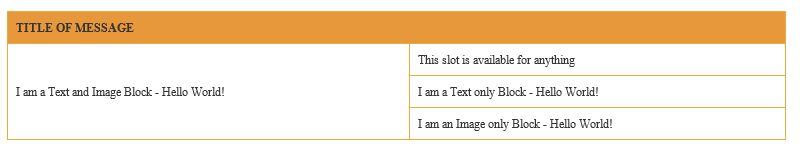
次のようにメールが表示されます。
 j
j